Google Ads conversion lag: why recent CPA can look worse than it is
Conversion lag is the time between an ad interaction and the conversion it produces. Recent CPA can look high because the spend is already recorded while some conversions have not happened or appeared yet. Compare cohorts at the same age, separate observed outcomes from estimates, and investigate tracking failures rather than assuming every shortfall will catch up.
On this page12 sections
Why does recent CPA look worse than it is?
There is no universal number of days that makes a Google Ads report final. The relevant delay depends on the action you count, the buying process, the measurement setup and the data source.
Google’s conversion-lag explanation describes why lag can inflate apparent CPA and depress apparent ROAS. The practical task is to establish how much of your own recent period is still unresolved.
Four different delays are often confused
| Term | What it means | Example |
|---|---|---|
| Customer conversion lag | Time from the relevant ad interaction to the chosen outcome | Click on 1 October; payment on 10 October |
| Reporting or import delay | Time from the outcome to its arrival in the report | Payment on 10 October; import on 12 October |
| Lead-cohort maturity | How much opportunity a group of enquiries has had to reach a later business stage | October leads still being assessed or sold to |
| Conversion window | The configured period in which an interaction can receive credit for an outcome | An outcome beyond that eligibility period may not be attributed |
In the example, the payment happens nine days after the click, then takes two more days to reach the reporting system. Changing the report’s date picker does not make the customer buy earlier or complete a missing import.
Also separate measurement maturity from a bidding strategy’s Learning status. One is about outcomes still arriving; the other describes the bidding system. Neither label verifies that the form, import or sales process works.
A complete old week and an incomplete new week are not comparable
Imagine a fictional campaign with $2,400 of spend for each acquisition week:
| Cohort and observation age | Spend | Conversions observed | Observed CPA |
|---|---|---|---|
| Older week, observed at day 7 | $2,400 | 24 | $100 |
| Same older week, observed at day 28 | $2,400 | 40 | $60 |
| Newer week, observed at day 7 | $2,400 | 24 | $100 |
Comparing the new week with the old week’s day-28 result makes CPA appear about 67% worse: $100 ÷ $60 − 1.
Comparing both weeks at day 7 shows the same observed CPA. That does not prove the newer week will finish with forty conversions. It establishes that the original comparison mixed observation ages.
If you never saved the older week’s day-7 report, you may be unable to reconstruct that exact historical snapshot from today’s aggregate table. Start saving consistent snapshots now rather than inventing the missing one.
Download the worked conversion-lag snapshots.
Where to find conversion lag in Google Ads
Google’s current instructions for finding lag data identify three useful places. Choose a recent period in the date picker: Google shows an annotation when the selected data is affected by lag.
- In the Campaigns table, inspect the conversion-column hover information when available.
- Open the bid strategy report through the campaign’s bid-strategy-type column.
- Use Segment → Conversions → Days to conversion to inspect the delay distribution.
The available views and annotations depend on the campaign and report. A missing estimate does not mean the campaign has zero lag.
For a historical delay distribution, use a period old enough for the selected outcome to have substantially developed. Recent incomplete periods can make long delays appear rarer simply because the late outcomes have not arrived yet.
Record the conversion action, the date range, extraction date and reporting settings alongside the distribution. A fast form submission does not provide the delay curve for a paid sale.
The distribution is also limited by measurement eligibility. Google’s conversion-window documentation explains that outcomes beyond the selected window are not recorded for that interaction. For Search and Display click conversions the default window is 30 days, and a change applies only to conversions going forward, not to outcomes already excluded. Waiting longer does not recover an outcome the measurement rules exclude; inspect longer-term business outcomes in the appropriate CRM or sales view.
Build a maturity curve for the outcome you actually care about
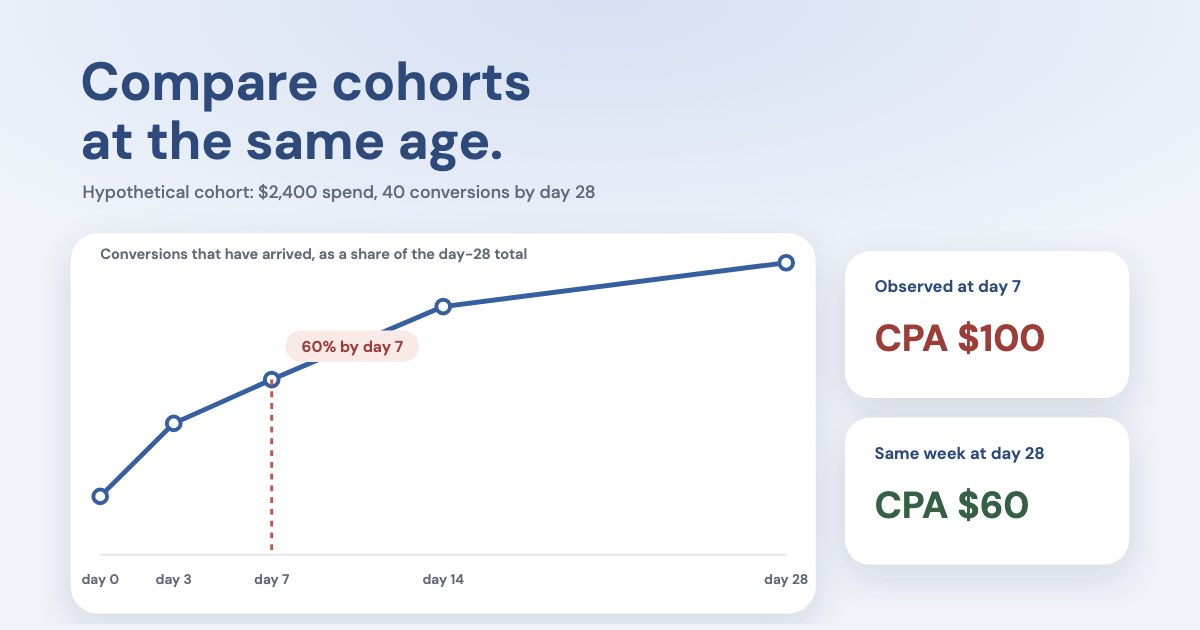
For illustration, suppose an older, sufficiently observed cohort eventually produces 100 attributed outcomes:
| Age since interaction | Cumulative outcomes observed | Share of the observed day-28 total |
|---|---|---|
| Day 0 | 20 | 20% |
| Day 3 | 45 | 45% |
| Day 7 | 60 | 60% |
| Day 14 | 85 | 85% |
| Day 28 | 100 | 100% |
This is an invented distribution, not a Google benchmark. “100% of the day-28 total” does not establish that no outcomes can appear later.
A useful review age is an operating choice. For example, you might agree to make preliminary assessments when a historically large share has arrived and confirm them later. Keep the remaining tail visible, especially when a few large sales determine most of the revenue.
For lead businesses, build separate curves where needed: enquiry to qualification, enquiry to sale and enquiry to payment. A quick qualification stage can support an earlier quality review without turning it into a final revenue assessment.
Can you estimate the conversions still to come?
You can create a planning estimate, but it must remain distinct from an observed total.
If a comparable historical curve suggests 60% of outcomes have appeared by day 7, and the new cohort has 24 observed outcomes:
Estimated later total = 24 ÷ 0.60 = 40
With $2,400 of spend, the corresponding estimated CPA is $60. The observed CPA is still $100.
The estimate assumes the newer cohort develops like the historical one. A changed offer, sales capacity, conversion window, tracking setup or customer mix can break that assumption. Do not write forty completed conversions into a business ledger because the projection says forty.
Google may also provide lag-adjusted information in eligible reports; its help page lists App, Search and Performance Max campaigns as eligible. Treat the platform’s forecast and your own maturity-curve estimate as different estimates with different inputs, not as extra conversions to add together.
Why “by conversion time” does not remove the delay
By default Google Ads shows a conversion against the date of the ad that led to it, not the date the conversion happened; its help pages word that date as query or impression date. Google provides conversion-time columns to help align date-based comparisons. Moving an outcome to the date it occurred can be useful when reconciling a calendar sales report.
It does not make pending outcomes happen immediately. Nor does dividing this month’s spend by this month’s conversion-time outcomes necessarily describe acquisition efficiency: some of those outcomes can come from advertising in earlier months.
Use the date basis that matches the question:
- Acquisition performance: interaction or lead-created cohorts with a stated observation cutoff.
- Sales operations: outcomes reached during the calendar period.
- Cash management: payments actually received during that period.
Keep those views separate rather than using a column change to make their totals appear consistent.
When to wait and when to investigate now
| What you see | First response |
|---|---|
| Recent results are low, but mature comparable cohorts have a consistent delay pattern | Compare matched ages and set a later checkpoint |
| A form fails or the test event does not arrive | Investigate the implementation immediately |
| The CRM import has stopped | Repair the pipeline; waiting does not import the missing records |
| Raw leads arrive, but many remain unassessed | Inspect the sales backlog and source freshness |
| The counted conversion action changed | Separate before/after definitions before comparing performance |
| Equally mature cohorts deteriorate | Investigate performance; lag alone does not explain the difference |
| A report contains forecasts | Keep forecast and observed columns separate |
Google’s data-freshness documentation distinguishes metrics with different processing schedules and notes that reports can be revised. Avoid assuming a single fixed waiting time covers every metric or import type.
An evident broken form, unusable enquiries or exhausted spending authorization can require intervention before the usual maturity checkpoint. A lag explanation is not permission to keep spending through a known failure.
A reporting template that prevents premature decisions
For every review, include:
| Field | Example entry |
|---|---|
| Outcome | Received payment from an acquired lead |
| Cohort | Leads created during the selected acquisition week |
| Observation cutoff | The stated extraction date and time |
| Spend | Media expense associated with that cohort’s acquisition period |
| Observed outcomes | Outcomes already recorded, not projected |
| Observed CPA or revenue | Calculated from those recorded outcomes |
| Maturity context | Historical share observed at a comparable age |
| Estimate, if used | Separate projection with explicit assumptions |
| Data health | Last successful import and known missing records |
| Decision | Observe, repair, investigate or approve a defined action |
Use the snapshot template to retain repeatable observations. Do not put estimates in the observed-outcomes column.
Ask Variafy for a fair comparison
Variafy can bring supported Google Ads readings into your assistant. Combine those with the cohort snapshots and business-stage data you actually have. It should not invent an unavailable historical snapshot or assume that a missing platform estimate is zero.
Try:
Compare these acquisition periods while accounting for conversion lag. State each outcome, cohort, observation cutoff and data source. Separate observed conversions from estimates. Compare the periods at matching ages where snapshots exist; otherwise explain the limitation. Check for tracking or import failures before suggesting that I wait.
Google Ads access in Variafy is read-only. Use the connection guide, or troubleshoot an actual measurement failure with the conversion-tracking guide.
How we checked
Questions
How long is Google Ads conversion lag?
There is no single correct duration. Measure the distribution for the specific conversion action and use mature historical periods. Payment and qualification outcomes can have different delays from an initial enquiry.
Is conversion lag the same as reporting delay?
No. Lag concerns the time until the business action occurs; reporting or import delay concerns when that completed action reaches the report. Both can make recent reporting incomplete.
Can I ignore the last seven days?
Only if that is a defensible operating rule for the outcome and account. Some outcomes develop faster and others much later. A blanket exclusion can hide a current tracking problem or still leave a period immature.
Will widening the conversion window improve sales?
It changes measurement eligibility, not the underlying customer outcome, and it applies only to conversions going forward. Investigate the business’s actual delay and the current tracking setup before making a settings change.
Should I use Google’s estimated conversions as completed customers?
No. Keep estimates separate from recorded conversions and from verified unique customers. A projection does not create a completed sale.