How to read a Google Ads report: what each column means and what to check first
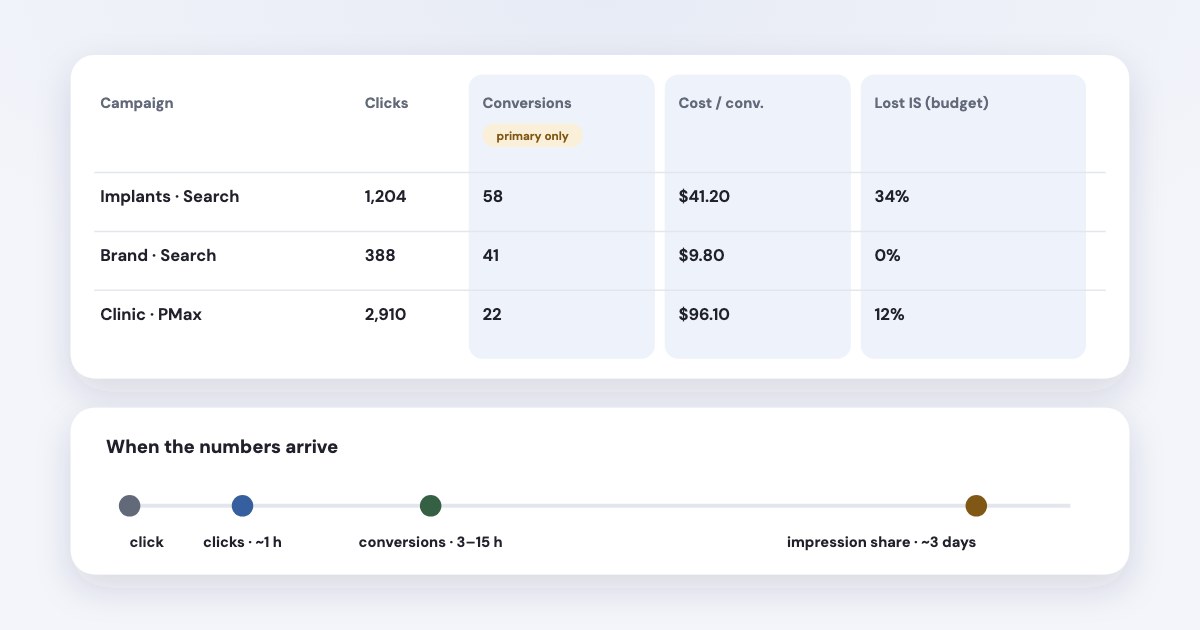
For a lead business, read Conversions and Cost / conv. first, then Search impression share lost to budget and rank, then the search terms. Know three traps before you judge anything: the Conversions column counts only your primary conversion actions; conversions are recorded on the day of the click, so the last few days always look worse; and data arrives at different speeds — clicks within an hour, conversions within 3 to 15 hours, impression share about three days later. Google has its own AI Report Generator and a free Data Studio connector; neither combines Google Ads with your other ad platforms or your CRM.
On this page9 sections
The columns to read first
| What Google means | What it tells a lead business | |
|---|---|---|
| Conversions | the number of conversions that you've received across your primary conversion actions.(source) | Your leads — if only real leads are primary |
| Cost / conv. | how much, on average, each of your conversions cost. | Your cost per lead |
| Conv. rate | Conversions per ad interaction, as a percentage | How well the page and offer turn clicks into leads |
| Search lost IS (budget) | weren't shown on the Search Network due to insufficient budget.(source) | Leads you’re leaving on the table for budget |
| Search lost IS (rank) | Not shown because of Ad Rank | Ad quality or bids, not money |
| Avg. CPC | The average amount that you've been charged for a click on your ad.(source) | Price of traffic; explains a CPL change |
| CTR | Clicks ÷ impressions (source) | Whether the ad matches the search |
A click counts even if the person doesn't reach your website
(source) — one reason Google Ads shows more
clicks than Google Analytics shows visits. An impression is counted each time the ad is shown (source). If a campaign has no impressions or very little spend, see how to diagnose zero and low impressions. To see how competing advertisers appear in the auctions you entered, see Google Ads Auction Insights.
Conversions vs All conversions
Primary actions are reported in the "Conversions" column in your reports and used for bidding
; secondary ones are
used for reporting in the "All conversions" column in your reports, but not for bidding
(source).
View-through conversions are not included in the "Conversions" column
(source). The old
“Include in Conversions” checkbox is now this primary/secondary choice.
So before trusting cost per lead, open Goals → Conversions and check what is primary. A button click or a page view set as primary inflates Conversions and makes leads look cheap (more on cost per lead). If a lead you know happened never appears as a conversion, the guide on conversion tracking not working covers that case.
Why the last few days look worse
To date, Google Ads has always reported conversions by the date your ad was clicked.
A lead who clicks on Monday and fills in the form on Thursday is counted on Monday. Until Thursday, Monday looks weaker. Google says recent
performance might not look as strong, because some of the people who clicked your ad haven't converted yet.
and suggests looking at
periods that ended at least 30 days ago
for a full picture (source). The default click-through
conversion window is 30 days, adjustable from 1 to 90 (source). To line up a change in results with edits made in the account, see what changed in Google Ads change history.
Two remedies: the Days to conversion segment shows how long your leads usually take, and the columns labelled (by conv. time) count conversions on the day they happened (source). To compare these numbers with GA4, use the Google Ads vs GA4 reconciliation worksheet.
How fresh is the data?
From Google’s data freshness page (source): clicks and impressions refresh hourly; Google Ads conversions take about 3 hours with last-click attribution and 15 hours with other models; impression share for a Sunday is ready on Wednesday afternoon (Pacific time). Google removes invalid traffic it finds before the end of the billing cycle, so recent numbers can still change. Once the month closes, campaign metrics are frozen: later findings arrive as an “Invalid activity” credit on the invoice and don’t adjust the campaign data (source). The invalid clicks guide covers the billing-cycle boundary with a filled check.
Attribution and Quality Score
- Attribution.
The "Data-driven" model is the default attribution model for most conversion actions.
The other rule-based models were retired in 2023, so in 2026 the choice is data-driven or last click (source). - Quality Score is
a diagnostic tool meant to give you a sense of how well your ad quality compares to other advertisers.
, scored 1–10 per keyword from expected CTR, ad relevance and landing page experience — andQuality Score is not an input in the ad auction.
(source) Use it to find which part to improve, not as a target. The Quality Score guide shows how to pick a component and the first check. - Search terms show what people actually typed; rare searches are left out for privacy (source). For a lead business this is the report that saves the most money.
Performance Max and the invoice
Performance Max now has a channel performance report — Search, Display, YouTube, Discover, Maps, Gmail and search
partners — but You can view any date range after June 6, 2025
(source). An empty channel isn’t a
fault: Google says PMax may simply be bidding where returns are higher at that moment. To judge whether the enquiries are acceptable, see Performance Max for lead generation.
Cost vs billing. The cost in reports doesn’t match your invoice exactly because of invalid click credits, overdelivery credits, and credit adjustments
(source). For what you actually paid, use the Billing pages.
Export, schedule, Report Generator and Data Studio
- Export and schedule. Reports download as CSV, TSV, PDF, XLSX, XML or Google Sheets, and scheduled reports go by e-mail to people with access. Google’s pages differ on the run time for individual accounts: one says 1 A.M. in the account’s time zone (source), another says 3 AM (source) — so check the time in your own schedule. For a monthly client report, see the filled monthly report template.
- Report Generator
uses Google AI to build detailed reports about your campaigns' performances
. Limits:The Report Generator is only available in English.
, itprovides limited support for Manager Accounts (MCC)
, and it declines questions about data outside Google Ads (source). To read your account through ChatGPT or Claude, see connecting Google Ads and checking the first report. - Data Studio (formerly Looker Studio) has Google’s own free Google Ads connector — unlike Meta. One data source connects to one account, or up to 50 sub-accounts through a manager account, and objects with no impressions don’t appear (source).
For the Meta side of the same report, see how to read a Facebook ads report.
One report across Google, Meta and your CRM: Variafy
Variafy offers read-only Google Ads access after your beta invitation. An assistant connected through Variafy can read Google Ads campaigns, conversions and search terms next to Meta — the one thing Google’s Report Generator and Data Studio connector don’t do — and explain in plain words why cost per lead moved.
How we checked
Checked on 17 October 2026 against Google Ads Help (impressions, clicks, CTR, average CPC, conversion tracking data, all conversions, primary and secondary actions, conversions by conversion time, days to conversion, conversion windows, data freshness, attribution models, impression share, Quality Score, search terms, downloading and scheduling reports, Report Generator, Performance Max channel reporting, cost and billing, invalid traffic) and Google Cloud’s Data Studio documentation for the Google Ads connector. Google’s help pages show no update dates. The invalid-traffic wording was re-checked on 20 October 2026. We also read the pages that rank for these searches.
Variafy is our product. Google and Google Ads are trademarks of Google LLC; we are not a Google product, partner or representative.
Questions
How do I read a Google Ads report?
Start with Conversions and Cost / conv. (your leads and cost per lead, if only real leads are primary), then Search lost impression share to budget and rank, then the search terms report. Remember that recent days fill in later and that Cost isn’t your invoice.
What is the difference between Conversions and All conversions in Google Ads?
Conversions counts only primary conversion actions and is used for bidding. All conversions adds secondary actions, view-through conversions and some cross-device calls, and is for reporting only.
Why do my Google Ads conversions change after a few days?
Google reports conversions on the date of the ad click, and a lead can convert up to the end of the conversion window — 30 days by default. Data also arrives with delays of hours. Google removes invalid clicks it finds before the end of the billing cycle; later findings come as credits on the invoice, not as changes to closed campaign metrics.
How often is Google Ads data updated?
Clicks and impressions hourly; Google Ads conversions within about 3 hours for last click and 15 hours for other attribution models; impression share for a given Sunday by Wednesday afternoon Pacific time.
Can I connect Google Ads to Looker Studio for free?
Yes. Data Studio (formerly Looker Studio) has a free Google Ads connector from Google. One data source covers one account, or up to 50 sub-accounts through a manager account; objects without impressions don’t appear.