Google Ads enhanced conversions for leads (2026 setup)
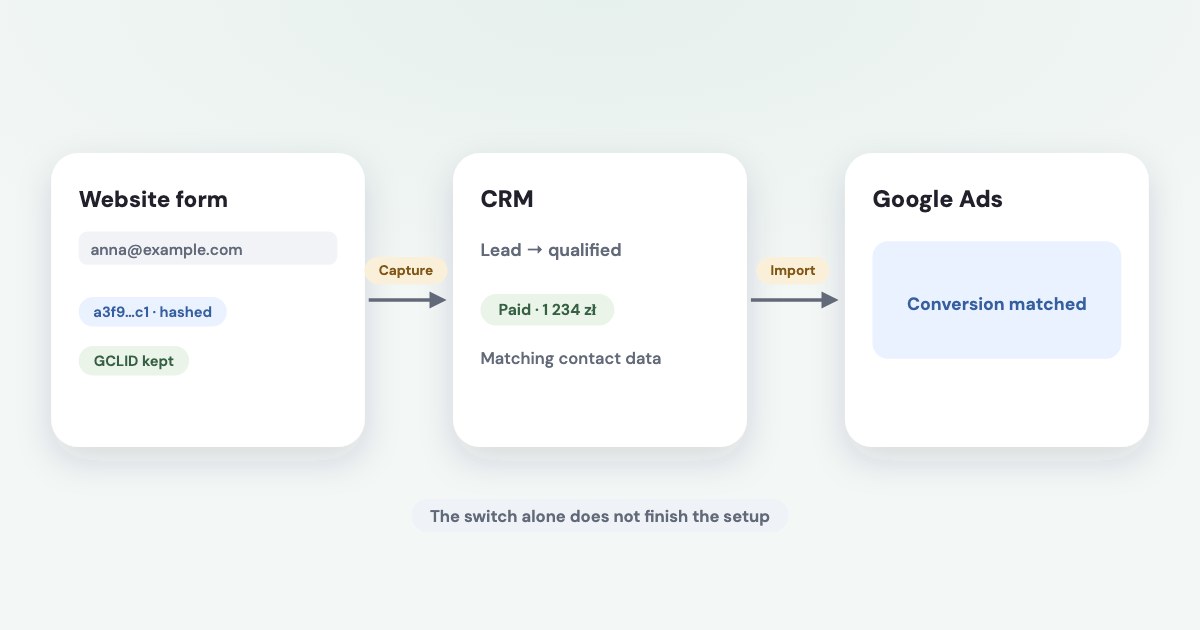
Enhanced conversions for leads adds first-party customer data, such as a hashed email or phone number, to offline outcome measurement. You collect permitted lead data through the website tag and import the later outcome with matching customer information; turning on the setting alone does not complete that chain. As of November 2026, Google’s settings update describes a unified enhanced conversions switch, and new API builds should use Data Manager API rather than assume legacy Google Ads API upload access. [1] [2]
On this page10 sections
Confirm that your data can complete the match
Start with a lead form whose customer information can be captured through your permitted tag setup and retained with the lead in your CRM. Then identify the later business outcome you want to measure, such as qualification or a completed sale, and the matching identifier the import will contain. [1] [3]
Enhanced conversions for leads is an upgraded matching approach for offline conversions, not a competing name for Data Manager. A GCLID-only import relies on click identification; enhanced matching adds user-provided data, while Data Manager or its API is a delivery route. [1] [4]
Use the offline conversions and CRM guide for the wider choice of outcomes and import routes. This article focuses on the form-to-outcome identity chain and the checks needed before you trust it.
Google’s setup guidance calls for first-party lead data, auto-tagging and compliance with its customer-data policies. Its policy requires appropriate disclosure and consent where legally required, and prohibits enhanced-conversion measurement involving specified sensitive categories. [3] [7]
Assign one website owner and one CRM/import owner before setup. Both should agree which successful form action creates the lead, which field survives into the CRM and which later change becomes the imported outcome.
Turn on the current enhanced conversions setting
Google’s detailed settings update dates simultaneous acceptance from tags, Data Manager and API connections to April 2026, and the combined web/leads switch to June 2026. Other current setup pages still describe separate method selectors, so use the settings-update page for the account-level control. [2] [3]
The labels below were read November 4, 2026, and describe the documented interface as of November 2026. They are not a claim that we opened or changed your Google Ads account. [2]
STEPS: 1. In Google Ads, open Settings within Goals. [2] 2. Expand Customer data use. [2] 3. Select Turn on enhanced conversions. [2] 4. Review the separate Turn on conversion-based customer lists option for its own intended use. [2] 5. Select Agree and save. [2] 6. Review the data terms and select Agree and continue if you can accept them for the business. [2]
The customer-list option concerns another use of customer data; do not describe it as the measurement match itself. Review the choices and applicable terms rather than checking every box just because it appears in the same panel. [2] [7]
If a manager account owns conversion tracking, confirm who controls the conversion action and accepts the terms. Google’s tag setup notes that terms may need acceptance from the manager account when cross-account conversion tracking is used. [3]
Configure website collection in Google Tag Manager
Use the tagging route your website already supports rather than installing a second system without an owner. Google documents Google tag and Google Tag Manager options; the sequence below uses Tag Manager’s manual user-provided-data setup. [1] [3]
STEPS: 1. Open the intended Google Tag Manager container. [3] 2. In Workspace, select Tags → New. [3] 3. In Tag Configuration, select Google Ads User-Provided Data Event. [3] 4. Enter the Conversion ID required for the intended Google Ads setup. [3] 5. Under User-provided data, select New Variable. [3] 6. Create a User-Provided Data variable and set Type to Manual. [3] 7. Map the relevant email or phone field to a reliable existing or new variable. [3] 8. Select Save for the variable. [3] 9. In Triggering, select the trigger for the completed lead-form action. [3] 10. Save the tag and verify the configured collection before publishing the container. [3] [9]
Google also documents a Conversion Linker tag and where it should run. Check whether it is already present before adding another; automatic user-data collection is a separate option and its documented limitations include not collecting phone numbers. [3]
Verify the field value at the successful action, not merely while someone types. If the form is embedded or clears its fields after submission, have the website implementer choose a supported capture method and confirm consent behavior before publishing.
Prepare the outcome and hash through the right route
The imported outcome needs its conversion action and time as well as the customer information used for matching. Keep available click identifiers, actual outcome values and currency where relevant, and a stable order or transaction identifier when the selected route supports it. [3] [4]
Google Ads Data Manager says it can normalize, SHA-256 hash and encode relevant private customer fields automatically. A custom Data Manager API implementation has its own field-specific normalization, hashing and encoding rules; do not apply an old upload recipe to every route. [5] [6]
| Data component | Preparation check |
|---|---|
| Email and phone | Follow the selected route’s normalization and hashing rules. [5] [6] |
| Customer name or address | Use only permitted fields and the route’s component-specific rules. [6] [7] |
| Click identifiers | Preserve available identifiers and map the correct field. [3] |
| Outcome time | Use the required format and correct time zone for the selected destination. [3] [5] |
| Value and currency | Send the real defined outcome value with its appropriate currency field. [3] |
| Consent | Carry applicable consent information and respect the permitted use. [3] [7] |
Do not hash every column of a sheet or hash an existing hash again. Write down which component performs normalization and hashing, and test its input and output format using the instructions for that specific connector or API.
Hashing does not make prohibited data permissible. Keep sensitive notes out of the upload and check the conversion itself against Google’s customer-data policy; changing a revealing event name does not settle whether the underlying outcome is eligible. [7]
Connect the offline action to its data source
Google’s updated settings page documents creating an offline action through Goals → Summary → + Create conversion action → Conversions offline. Its Data Manager setup page still shows an Import route, so the exact source-connection sequence depends on the documented flow and connector you follow. [2] [4]
For an existing connection, the Data Manager page gives Tools → Data manager, the connection under Connected products, and + Add conversion action under Usage. Attach the intended action rather than leaving a newly created conversion action without an outcome source. [4]
For a Google Sheets connection, that page documents selecting the source file, mapping source fields to destination fields, reviewing transformations, naming the connection and selecting Finish. Use the current connector’s instructions for authorization and scheduling; a sheet containing leads is not automatically a working outcome import. [4]
Begin with a small permitted set of genuine outcome records and compare them with the source. Check the action, outcome time, identifier mapping and actual imported results before scaling the scheduled transfer.
For a new custom integration, use the current Data Manager API event guide. Google’s migration notice starts June 15, 2026, and ties legacy Google Ads API access to developer-token upload history; it does not justify telling every existing integration that it stopped working on that date. [2] [10]
Diagnose the tag and import separately
An enabled setting proves neither that the tag captured customer information nor that the CRM import sent a usable outcome. Google’s diagnostics distinguishes missing website collection, missing imports and customer-data matching problems, which gives you a better starting point than reinstalling everything. [8]
STEPS: 1. In Google Ads, open Summary within Goals. [8] 2. Select Diagnostics. [8] 3. Select View Diagnostics for the enhanced conversions information when available. [8] 4. Read the issue for the affected conversion action. [8] 5. Compare that issue with the website tag evidence and the source import result. [8] [9]
Use a permitted form submission to check that the expected tag receives the correct field at the intended action. Then trace a genuine later outcome through the import and distinguish an accepted row from a matched and attributed conversion; the business record is your reconciliation anchor.
Google’s implementation checklist recommends starting a new enhanced-leads action as secondary for an initial observation period. Before changing optimization, check whether another action already measures the same business outcome, so parallel validation does not become two primary signals for one sale. [9]
If the tag or action does not work at all, use the Google Ads tracking troubleshooting guide. For a reporting disagreement with Analytics, use Google Ads versus GA4 conversions rather than treating different attribution totals as an automatic upload failure.
What to do next
Choose one eligible outcome and identify the customer field that must survive from the form into its CRM record. Confirm the current setting, verify website capture and connect the outcome source to the intended conversion action.
Review both import results and enhanced conversions diagnostics before using the action for bidding. Keep one person responsible for the field mapping and another for the business definition, so a later CRM change does not silently break the match.
Where Variafy fits
Variafy connects Google Ads and Google Analytics to ChatGPT or Claude and can bring CRM deals and payments into reports. This article does not claim that it implements Google’s enhanced conversions for leads or uploads those outcomes for you; complete that setup through Google’s supported route. It is in a free beta by invitation. Join the waitlist.
How we checked
Checked on 4 November 2026 against the pages below, read in English; Meta’s pages were read in a browser. We checked the documentation only: we did not run these steps in a live ad account.
- support.google.com/google-ads/answer/15713840?hl=en — Matching mechanism, website plus offline workflow and retaining GCLIDs
- support.google.com/google-ads/answer/16884284?hl=en — April/June settings changes, current account and action labels, migration notice and legacy-access qualification
- support.google.com/google-ads/answer/11347292?hl=en — Requirements, GTM manual setup, variable and tag labels, Conversion Linker, collection limitations and upload fields
- support.google.com/google-ads/answer/15707550?hl=en — Data Manager connection, existing action attachment, Google Sheets field mapping and alternate Import labels
- support.google.com/google-ads-data-manager/answer/14184381?hl=en — Data Manager automatic normalization, hashing, encoding and input preparation
- developers.google.com/data-manager/api/devguides/concepts/formatting — Route-specific API field normalization, SHA-256 hashing and encoding
- support.google.com/adspolicy/answer/7475709?hl=en — First-party data, disclosure, consent and sensitive-category restrictions
- support.google.com/google-ads/answer/15249267?hl=en — Exact diagnostics labels and distinct collection/import/matching issues
- support.google.com/google-ads/answer/16782203?hl=en — Implementation validation and initial secondary-action recommendation
- developers.google.com/data-manager/api/devguides/events/google-ads/offline/send-events — Current custom API delivery route and event destination design
What we could not confirm
- A guaranteed match or conversion lift
- That turning on the switch completes setup
- One hashing recipe for every import route
- That all historical Google Ads API uploads stopped on June 15
- A universal connector price
- A connector-specific retrieval window or upload deadline not established here
- Live tagging, CRM or upload testing. Google’s current help pages retain conflicting method-selection and Import labels, disclosed above
Variafy is our product.
Questions
What are enhanced conversions for leads?
They add first-party customer data, such as a hashed email or phone number, to offline outcome measurement. You collect permitted lead data through the website tag and import the later outcome with matching customer information.
Does turning on the setting finish the setup?
No. Website capture and the CRM import both have to work. Retain GCLIDs when available, and check tag activity, imports and diagnostics before changing bidding.
Do I have to hash the data myself?
It depends on the delivery route. Google’s Data Manager can normalize and hash for you, while some API routes need you to prepare SHA-256 hashes. Customer-data policies and consent requirements still apply to hashed data.