How to connect Google Analytics 4 (GA4) to ChatGPT or Claude
To connect Google Analytics 4 to ChatGPT or Claude, use an MCP server that reads the GA4 Data API with a Google account that has at least the Viewer role on the property. Google’s own server is read-only by default but runs on your computer, so it works in Claude Desktop, Claude Code and Cursor, not in ChatGPT out of the box. A hosted connector works in both.
On this page12 sections
Can ChatGPT or Claude read GA4 without setup?
No. Neither ChatGPT nor Claude ships a first-party Google Analytics connector; you add one yourself. Google’s own assistant, Ask Advisor, works inside the GA4 interface and only for properties set to English.
| Google’s official server | A hosted connector | |
|---|---|---|
| Where it runs | On your computer, started by Claude Desktop, Claude Code or another local client. | On the operator’s server; you add its URL as a custom connector. |
| What you set up | Python, two Google APIs in a Cloud project, and Application Default Credentials. | A Google sign-in to the connector and the connector in your assistant. |
| Works in | Claude Desktop, Claude Code and Cursor. Not ChatGPT or claude.ai without extra bridging. | Claude on the web and desktop, and ChatGPT where your plan allows custom servers. |
Our suggestion: if one analyst works in Claude Desktop, Google’s server is a good free start. If a team uses ChatGPT or the Claude web app, you need a hosted route.
What is Google’s official Google Analytics MCP server?
An open-source server from Google that exposes GA4 reads through the Admin API and Data API. Its repository calls it experimental.
The MCP server is available for read requests only. It can’t create, modify, or delete your Google Analytics configuration or settings.
- Reads: account and property discovery, property details, Google Ads links, custom dimensions and metrics, standard, realtime and funnel reports.
- Access: at least the Viewer role on the property, and credentials with the read-only scope
analytics.readonly. - Runs with: Python 3.10 or newer, the Google Analytics Admin API and Data API enabled in your Cloud project.
The repository also has one write tool, for property annotations, that runs only with the --allow-write flag and the analytics.edit scope; without them the server only reads.
The exact tool list differs a little between Google’s guide and the repository, so check the version you install.
Which GA4 connectors exist?
Google’s own server is listed first. It runs on your computer, so ChatGPT and Claude on the web cannot reach it without a tunnel; the hosted options below exist mostly for that reason.
| Where it runs | What its own page says it can do | |
|---|---|---|
| Google Analytics MCP server (Google, experimental) | Open source, runs on your computer (Python) | Reads through the Admin and Data APIs; one optional tool writes annotations. |
| Composio | Hosted MCP server | 67 Google Analytics tools, including changes such as creating custom dimensions and updating properties. |
| Coupler.io | Hosted, syncs a dataset | No-code connection of GA4 data to ChatGPT. |
| Markifact | Hosted, public ChatGPT app | Read-only; the Google Analytics connection stays inside Markifact. |
| Supermetrics | Hosted MCP server, in ChatGPT’s directory | Handles the API connection; 14-day trial. |
| Variafy | Hosted remote MCP server | Read-only for Google Analytics. |
| Windsor.ai | Hosted, through Windsor MCP | No-code connection; advertises a free plan. |
Listed alphabetically, from each project’s own page on 23 October 2026; we did not test the others, and what they can do may change. Variafy is ours.
How do you set it up in Claude Desktop?
Local servers are added in Claude Desktop’s configuration file, not through the connector menu.
- Enable the APIs. In a Google Cloud project, enable the Google Analytics Admin API and Data API.
- Create credentials. Install the gcloud CLI, give your Google account (or a service account) the Viewer role on the property, and sign in with the read-only scope. Copy the credentials path the command prints.
gcloud auth application-default login \
  --scopes="https://www.googleapis.com/auth/analytics.readonly,https://www.googleapis.com/auth/cloud-platform"
- Install the runner. Install Python 3.10+ and
pipx; the server runs aspipx run analytics-mcp. - Edit the config. In Claude Desktop, open Settings → Developer → Edit Config and add the server with your credentials path and Cloud project ID:
{ "mcpServers": { "analytics-mcp": { "command": "pipx", "args": ["run", "analytics-mcp"], "env": { "GOOGLE_APPLICATION_CREDENTIALS": "PATH_TO_CREDENTIALS_JSON", "GOOGLE_CLOUD_PROJECT": "YOUR_PROJECT_ID" } } } } - Restart Claude Desktop completely and ask: “What GA4 properties can you see?”
Claude Code registers the same server with one command:
claude mcp add analytics-mcp \
  --scope user \
  -e GOOGLE_APPLICATION_CREDENTIALS="PATH_TO_CREDENTIALS_JSON" \
  -e GOOGLE_CLOUD_PROJECT="YOUR_PROJECT_ID" \
  -- pipx run analytics-mcp
Commands and config are from Google’s guide, checked 23 Oct 2026; Cursor takes the same block in .cursor/mcp.json.
The general steps for local servers are in the MCP documentation. Keep the credentials file out of shared folders: it opens every property that identity can read.
How do you add a hosted GA4 connector in Claude or ChatGPT?
Claude. Anthropic’s connector guide, checked 23 Oct 2026, lists custom connectors on Free, Pro, Max, Team and Enterprise; Free allows one.
- Open Customize → Connectors, click + Add, then Add custom connector.
- Enter a name and the connector URL, Continue, then Add and Connect with your Google sign-in.
- Turn it on in a chat with + → Connectors.
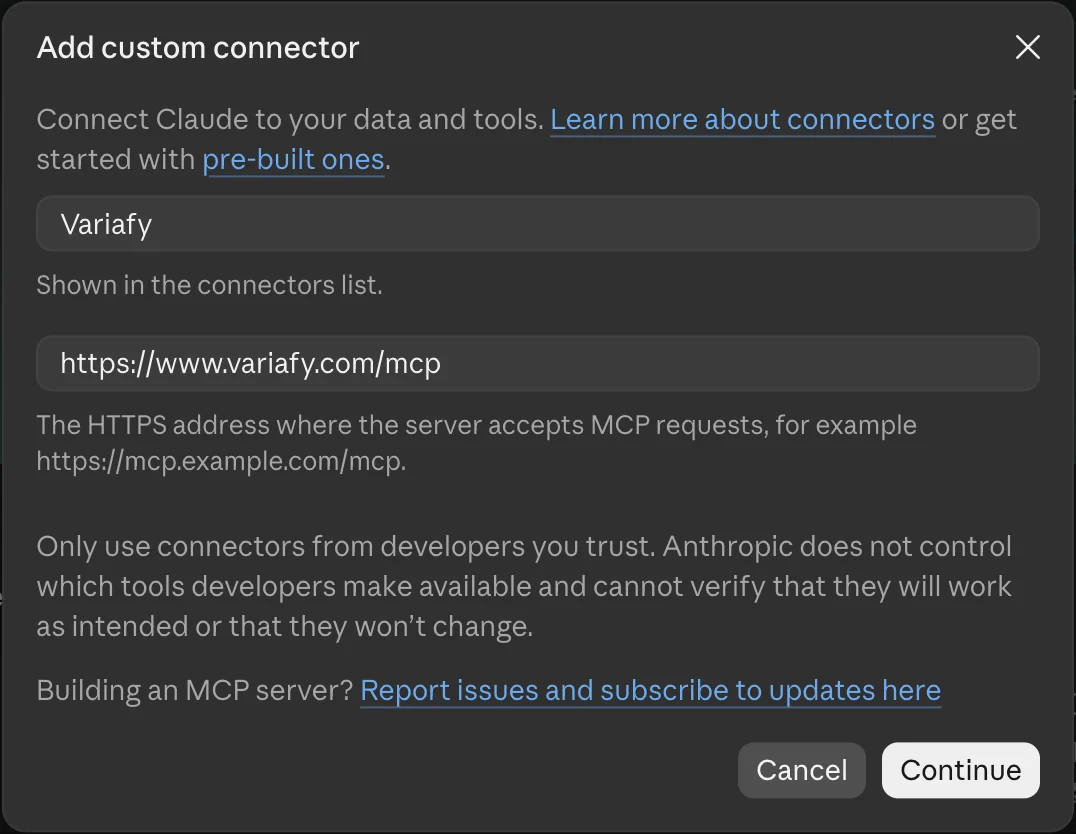
On Team and Enterprise, an Owner adds it in Organization settings → Connectors, and members connect their own Google sign-in.
Claude Code. Run claude mcp add --transport http NAME URL with the connector’s address, then /mcp to sign in.
ChatGPT. Per OpenAI’s plugin guide: open Plugins, select the plus button, Add custom MCP server, paste the URL, set up the sign-in, create it as a plugin, then type @ in a chat to use it. Plan rules change often; check OpenAI’s help page for yours on the day you connect.
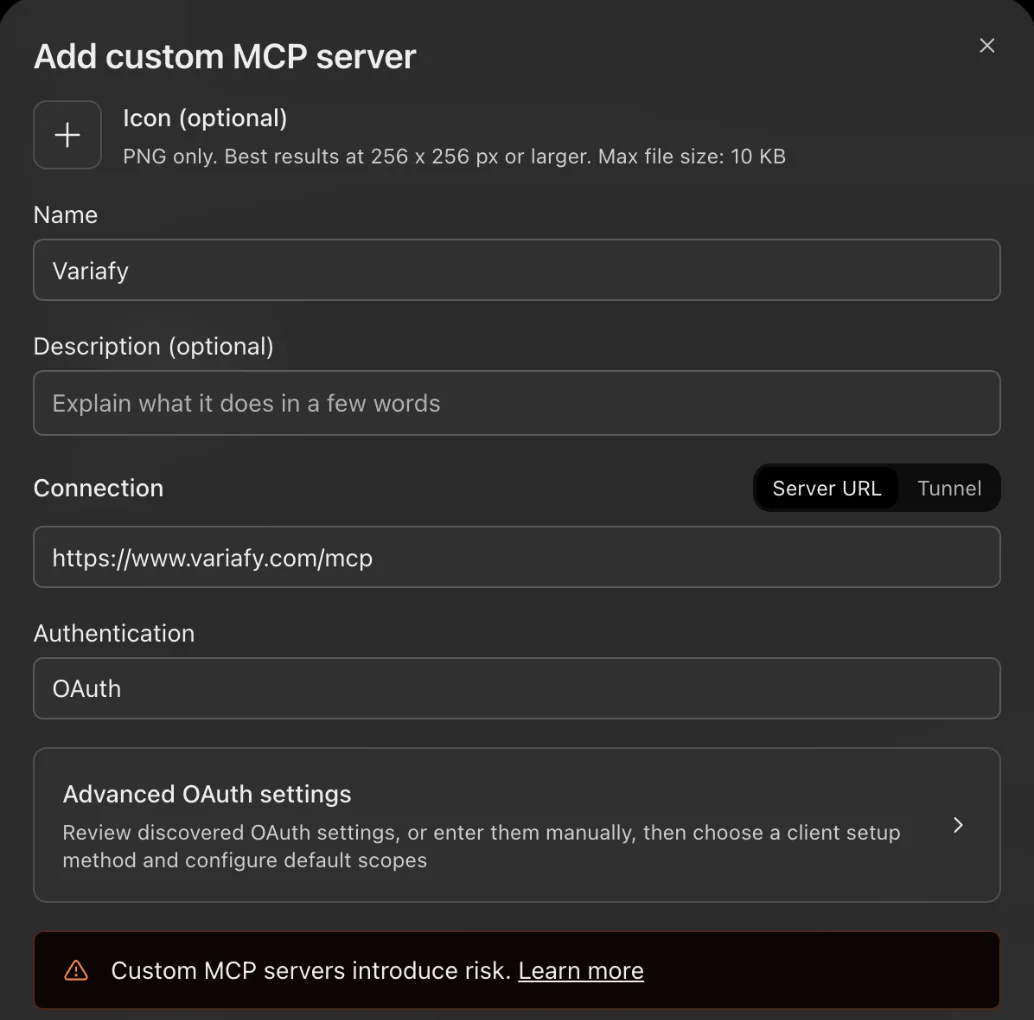
We also saw Add custom MCP server in the Add menu of a ChatGPT Plus account on 23 October 2026, although OpenAI’s help page names only Business, Enterprise, Edu and Pro.
What access does the connector need in GA4?
The Viewer role on the property is the stated minimum, and it is enough for reporting. GA4’s roles page describes Viewer as able to see settings and data.
| What to check | Why | |
|---|---|---|
| Role | Viewer for reading. Editor and Administrator can change settings and are not needed. | Give a reporting connection the least role. |
| Data restrictions | GA4 can hide cost metrics or revenue metrics from a user. | If revenue is missing from every answer, check the restriction before blaming the connector. |
| Property | An account can hold several properties, each with its own time zone and currency. | Name the property ID in your first prompt. |
Why do AI answers differ from the GA4 interface?
Usually because the data is still processing or was trimmed for privacy or size. GA4 reports these conditions in each API response, so a careful connector can say them out loud.
Data processing can take 24-48 hours. During that time, data in your reports may change.
| What Google documents | What to ask for | |
|---|---|---|
| Freshness | Data can take 24–48 hours to settle. | Compare periods that ended at least two days ago. |
| Thresholds | System-defined thresholds withhold small numbers; “You can’t adjust them.” | Ask whether the report was subject to thresholding. |
| Sampling | Large requests can be sampled when events exceed the quota limit. | Ask what share of events was used. |
| (not set) | A placeholder when GA4 received no value, often from missing auto-tagging or broken UTM tags. | Ask for the share of sessions with (not set) source before reading channel totals. |
| Attribution | Changing the reporting attribution model applies to historical and future data. | Note the model and date of any change when comparing months. |
Sources: thresholds, sampling, (not set) and attribution settings. The Data API also has quotas: a standard property gets 200,000 tokens a day and 40,000 an hour, shared by every tool that reads it.
What this looked like on a real site
We compared Search Console and GA4 for one lead-generation site we can read, anonymised with its owner’s permission, July–September 2026. Google had indexed one of its main landing pages under an address tagged utm_source=instagram. Search Console counted Google clicks on it, but GA4 credited under a quarter as many sessions on that page to google / organic: visits that arrive through a tagged address are filed under the source the tag names.
Two more findings from the same read: Direct had 8% of sessions but 34% of key events, and a card-payment page appeared as a referral source credited with key events. Both point to lost sources, not to strong direct traffic.
Conversions are now key events
In GA4, important events are now called key events, and “conversion” refers to ad-campaign measurement. Marking an event as a key event does not change past data, so a new key event has no history.
What should the first answer prove?
The property, the closed period and whether the data was complete.
First prompt
“Use only the connected Google Analytics tools. Name the property, its time zone and currency. For the last 7 days ending two days ago, show sessions and key events by session source and medium, and say whether the report was thresholded or sampled and how many sessions have (not set). Do not change anything.”
Then check the same dates in GA4’s Traffic acquisition report. If paid traffic looks wrong, compare it with the ad platform: see Google Ads vs GA4 conversions and when the Meta pixel is not firing.
Which GA4 prompts should you copy?
They name the property and a closed period and ask about data quality, so you can repeat them in GA4’s reports. Replace the parts in brackets.
For property [ID], what are the time zone and currency, and which events are marked as key events? How many of each were recorded in the last 28 days?
Show the top 10 landing pages by sessions for the 28 days ending two days ago, with engagement rate and key events per session against the site average.
What share of sessions in the last 28 days has (not set) as source or medium, and which landing pages have the most of them?
For the last 14 days ending two days ago, compare Google Ads clicks with GA4 sessions from google / cpc by campaign, and name the campaigns with the biggest gap.
The last prompt needs a connector that reads both Google Ads and GA4.
How does Variafy read Google Analytics?
Variafy is a hosted connector. You connect GA4 with the same Google sign-in as Google Ads and Search Console in the Variafy console, then add one connector to ChatGPT or Claude.
It reads GA4 reports with your choice of dimensions and metrics, the property’s setup (time zone, currency, data streams and key events), landing pages against the site average, and where GA4 loses the source of traffic. It also compares GA4 with Google Ads and Meta campaign by campaign, and a daily check flags a key event that never fires or attribution that goes missing.
It is read-only: Variafy does not change GA4. Google Analytics works right after your beta invitation.
Join the free beta to read GA4 next to your ad accounts in one assistant.
How we checked
Checked on 23 Oct 2026 against Google’s Analytics MCP guide and repository, Google Analytics Help (freshness, thresholds, sampling, (not set), key events, attribution, roles, Ask Advisor), the Data API quotas and response metadata, the MCP local-server guide, OpenAI’s plugin guide and Anthropic’s custom connector guide.
We also ran the reads ourselves through Variafy: a channel and attribution check and a landing-page report for one lead-generation site we can read, anonymised with its owner’s permission, July–September 2026, compared with its Search Console data, with relative numbers only. The screenshots come from our own accounts on 23 October 2026. The connector table lists what each project says about itself; we did not test the others.
Questions
Is there an official Google Analytics MCP server?
Yes. Google publishes an experimental, open-source Google Analytics MCP server that runs locally and reads through the Admin API and Data API. It is read-only unless you enable its annotation write tool.
Can I use Google’s GA4 MCP server in ChatGPT?
Not out of the box: ChatGPT reaches remote MCP servers, and Google’s server runs on your computer, so it needs an HTTP bridge and OpenAI’s Secure MCP Tunnel. It works directly in Claude Desktop, Claude Code and Cursor; a hosted connector works in ChatGPT.
Which GA4 role does the connection need?
At least the Viewer role on the property. Cost and revenue data restrictions on that user still hide those metrics.
Why doesn’t yesterday’s data match GA4?
GA4 data processing can take 24 to 48 hours, and thresholds or sampling can trim a report. Compare a period that ended at least two days ago.
Are conversions and key events the same in GA4?
Not any more: important events are now called key events, and “conversion” refers to measuring ad campaigns.
Can I use a GA4 connector on Claude’s free plan?
Yes, as one custom connector: Anthropic limits Free to one. Google’s local server runs in Claude Desktop through its configuration file instead.