Meta pixel not firing or not tracking leads: causes and how to check each
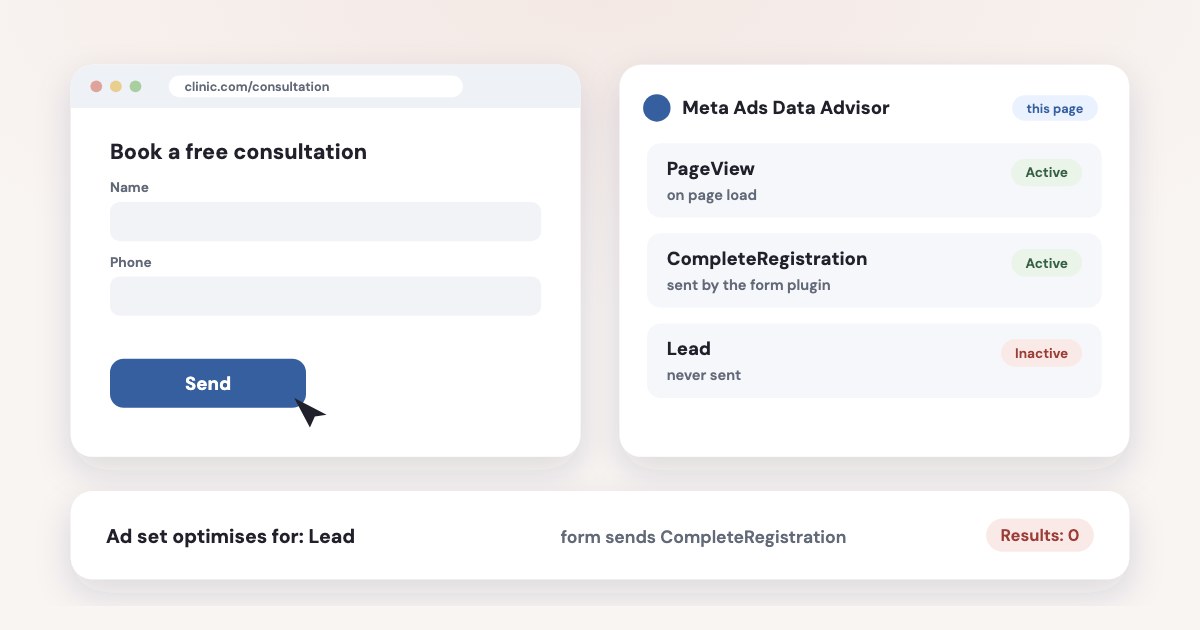
First check where your leads come from. If they fill in a Facebook or Instagram lead form (Instant Form), there is no pixel involved at all — “not tracking” means leads don’t reach your CRM. If they fill in a form on your site, open the thank-you page with Meta’s Chrome extension (now called Meta Ads Data Advisor, formerly Pixel Helper) and send a test lead while Events Manager → Test Events is open. The usual causes are the event firing on the button click instead of a successful submission, a form in an iframe that sends its own event, the wrong event name (CompleteRegistration where the ad set waits for Lead), a duplicate pixel, or a cookie banner. Ranking 8 events is no longer needed.
On this page10 sections
First: is it a lead form or your website?
A Meta lead form (Instant Form) is filled in on Facebook or Instagram. The pixel lives on your website, so it never sees these leads — Meta counts them itself, and they appear under Results in Ads Manager. If those leads don’t show up in your CRM or inbox, the problem is the export: Leads Center, a Zapier or n8n flow, or a webhook (how to fix that).
Everything below is for forms on your own site or landing page.
The 5-minute check
- Install Meta Ads Data Advisor in Chrome —
Meta Ads Data Advisor (formerly Meta Pixel Helper) is a free Google Chrome extension
(source). Open the page with the form.If the icon does not have a badge on it, no Meta Pixels are installed on the webpage.
- Open Events Manager → your dataset → Test Events, enter your site address and send a real test lead. Watch which event arrives, when, and whether it arrives once or twice. Before creating another dataset, check the intended portfolio in the separate guide to Meta business portfolio setup.
- Send the form with an error — an empty required field. If a Lead still arrives, the event is tied to the button, not to a successful submission.
- Compare the event name with the conversion event of your ad set (ad set → Conversion → Performance goal / Conversion event). They must be the same event.
- Check Diagnostics in Events Manager. Issues from the last 24 hours show as active; after 3 days without a fix they move to “previously detected” (source).
Testing leaves real data
Server events sent with a test code are not thrown away: Meta says they
flow into Events Manager and are used for targeting and ads measurement purposes.
(source) A handful of test leads won’t hurt, but
don’t run hundreds.
Causes and how to check each
| What happens | How to check | |
|---|---|---|
| No pixel on the form page | The landing page is on another builder or subdomain, or a redesign dropped the code | Data Advisor shows no badge; in DevTools → Network, filter for facebook.com/tr |
| Pixel installed twice | Theme plus plugin, GTM plus hand-written code, HubSpot plus manual code — each lead counts twice | Data Advisor flags duplicates; two identical events seconds apart in Test Events |
| Fires on the click, not the success | Failed submissions and double clicks count as leads | Submit with an error; in GTM, turn on “Check Validation” for the form trigger |
| Thank-you page problem | A redirect cuts the request, the event isn’t on that template, or the URL changed and an old custom conversion rule no longer matches | Open the thank-you page directly with Data Advisor; check the URL rule of the custom conversion |
| Form without a page reload | AJAX, React or pop-up forms don’t load a new URL or trigger a standard submit | PageView arrives but Lead doesn’t; GTM Preview shows no Form Submit |
| Form in an iframe | Calendly, Typeform, JotForm run on another domain and send their own event names | Data Advisor lists events like invitee_meeting_scheduled; make a custom conversion from them |
| Wrong event name | The form sends CompleteRegistration, Contact or SubmitApplication; the ad set waits for Lead | Test Events vs the ad set’s conversion event |
| Cookie banner | The pixel waits for consent — that’s correct; the bug is when it stays silent after “Accept” | Private window, before and after accepting |
| Caching or script-delay plugin | JavaScript is deferred and the pixel isn’t defined when the form sends | Browser console on a cold load: “fbq is not defined” |
| Domain not allowed | A traffic permissions allow list blocks the new landing domain | Events Manager → Settings → allow/block list |
| Wrong pixel ID | Events go to another dataset | Compare the ID in the page source with the dataset in Events Manager |
| Server events without event_id | Pixel and Conversions API both send the lead, and it counts twice | Event Details → Event Deduplication |
For a sudden drop in events, Meta lists base code issues, event code problems, website downtime and Domain allow/block list misconfiguration
as causes, and suggests the Test Events tool to see whether events fire (source). Its alert only covers events
used in campaigns or audiences
.
Lead, CompleteRegistration or SubmitApplication?
Meta defines its standard events precisely (source):
- Lead —
When a sign up is completed.
- CompleteRegistration —
When a registration form is completed.
- SubmitApplication —
When a person applies for a product, service, or program you offer.
- Schedule —
When a person books an appointment to visit one of your locations.
- Contact — a call, SMS, email or chat started with your business.
Pick one for your main form and use the same one in the ad set. A plugin that sends CompleteRegistration while the campaign
optimises for Lead is one of the most common reasons for “the pixel works but the ad set shows no results”. Write the standard event name
exactly as Meta does: Lead.
Meta also lets an event fire either when the page loads, or when a visitor completes an action, such as clicking a button.
(source) For leads, prefer the moment the form is accepted: Google Tag Manager’s form trigger can
fire only if the form is successfully sent (source). On single-page sites, Meta says
Hooking it into the routing system of the framework or application is required.
(source)
Forms on common site builders
- Tilda sends Lead through its own Conversions API integration: Site Settings → Forms → Facebook Conversion API, with a tick on each form (source).
- Calendly has a Meta-built integration that sends events such as
invitee_meeting_scheduled(source). Typeform sends its own submit event too. Build a custom conversion from that event, or optimise for the event your page sends. - HubSpot forms:
only install the Meta pixel via HubSpot
and remove manual code, or you get duplicates (source). - WordPress: duplicates usually come from two plugins both installing the pixel. Keep one.
- Webflow and Wix: Webflow has no built-in Lead, so it is added with code on successful submission; Wix has a Meta Pixel & CAPI integration under Marketing Integrations — don’t add the pixel again with custom code.
What changed in 2025–2026
Many guides still give advice that no longer applies.
- No more 8-event ranking.
You no longer need to prioritize 8 conversion events per domain for web conversion optimization
and you don’t select a conversion domain when you create a campaign (source). Domain verification is still useful for other reasons, but not for events. - Automatic Events on by default. According to Jon Loomer, quoting Meta’s documentation,
any new pixel created on or after August 3, 2026, will have Automatic Events enabled by default
(source). Meta’s AI then adds standard events to your site. If you also send Lead from code, check Events Manager → dataset → Settings and turn one of them off, or you may count a button click as a lead. - Health and finance businesses. Meta sorts datasets into data source categories (help page). For
some categories it trims URLs and parameters, and vendors report it can block events like Lead entirely — with the Conversions API under the
same rules (Stape, 2026). Custom conversions that suggest health conditions or financial status are flagged, and
You won’t be able to use flagged custom conversions when creating new campaigns.
(source) Check the dataset’s settings in Events Manager. Don’t rename events to get around it: Meta’s Business Tools Terms forbid sending health and financial information (source).
Cookie consent and the Conversions API
In the EU, a pixel that waits for consent is doing its job. Meta’s code uses fbq('consent', 'revoke') to pause
and fbq('consent', 'grant') to resume, and notes You need to call revoke on every page.
(source)
Some visitors will never accept, and some browsers block the pixel. That loss is permanent on the browser side.
Use the Conversions API in addition to the Meta Pixel.
A server event doesn’t depend on the visitor’s browser. If you send the same lead from both, give both the same event name and ID:
The eventID from the Meta Pixel must match the event_id in the corresponding event coming from the Conversions API.
Meta merges
them only if they arrive within 48 hours
(source). Event Match Quality, scored up to 10, should be
6 or higher (source). Sending CRM stages and sales back to Meta is a separate step — see
Conversions API for CRM.
Check it from your assistant: Variafy
Variafy connects ChatGPT, Claude and other assistants to your Meta ad accounts. Ask “Is my tracking working?” and the conversion tracking audit checks, for every active ad set:
- which event it optimises for, and whether that event arrived in the last 7 days — the “ad set waits for Lead, site sends something else” case;
- whether the pixel fired in the last 24 hours, and whether any events come from the server;
- Event Match Quality, and custom conversions that are archived or unusable.
It reads Meta’s side only: it can’t see your site’s code, cookie banner or data category, so the checks above stay with you. Its watchdog also emails you when conversion tracking stops sending events.
How we checked
Checked on 17 October 2026 against Meta’s developer documentation (Meta Ads Data Advisor, standard events reference, conversion tracking, single-page apps, GDPR consent, deduplication, verifying setup and best practices for the Conversions API), the Business Help Center (Aggregated Event Measurement, event diagnostics, event drops, flagged custom conversions, data source categories), Meta’s Business Tools Terms, Google Tag Manager’s form trigger help, and the help pages of Tilda, Calendly and HubSpot. Automatic Events and the health and finance restrictions are partly from Jon Loomer and Stape, as marked. We also read the pages that rank for these searches.
Variafy is our product.
Questions
Why is my Meta pixel not firing?
Check with Meta Ads Data Advisor (formerly Pixel Helper) whether the pixel is on the page at all. If it is, the usual causes are a duplicate install, an event tied to the button click instead of a successful submission, a form without a page reload or in an iframe, a cookie banner, a caching plugin or a wrong pixel ID.
Why is my Facebook pixel not tracking leads?
If the leads come from an Instant Form, the pixel isn’t involved — check your CRM connection. For website forms, compare the event your form sends with the event your ad set optimises for: CompleteRegistration or a Typeform event won’t count as Lead.
What replaced the Facebook Pixel Helper?
Meta Ads Data Advisor, a free Chrome extension; existing Pixel Helper installs update to it automatically. No badge on its icon means no Meta pixel on the page.
Do I still need to rank 8 events in Aggregated Event Measurement?
No. Meta says you no longer need to prioritise 8 conversion events per domain or pick a conversion domain when creating a campaign; it processes events through Aggregated Event Measurement automatically.
Why is Test Events not showing my events?
Make sure you opened Test Events for the same dataset whose ID is on the page, entered the exact site address, and accepted the cookie banner if there is one. Ad blockers and privacy settings can also stop the pixel in your own browser.
Why are my leads counted twice?
Usually the pixel is installed twice, Automatic Events adds a second Lead, or the pixel and the Conversions API send the same lead without matching event_id. Check Data Advisor for duplicates and Event Deduplication in Events Manager.