Facebook and Instagram ad sizes 2026: 14 Meta placements, safe zones and a free crop preview
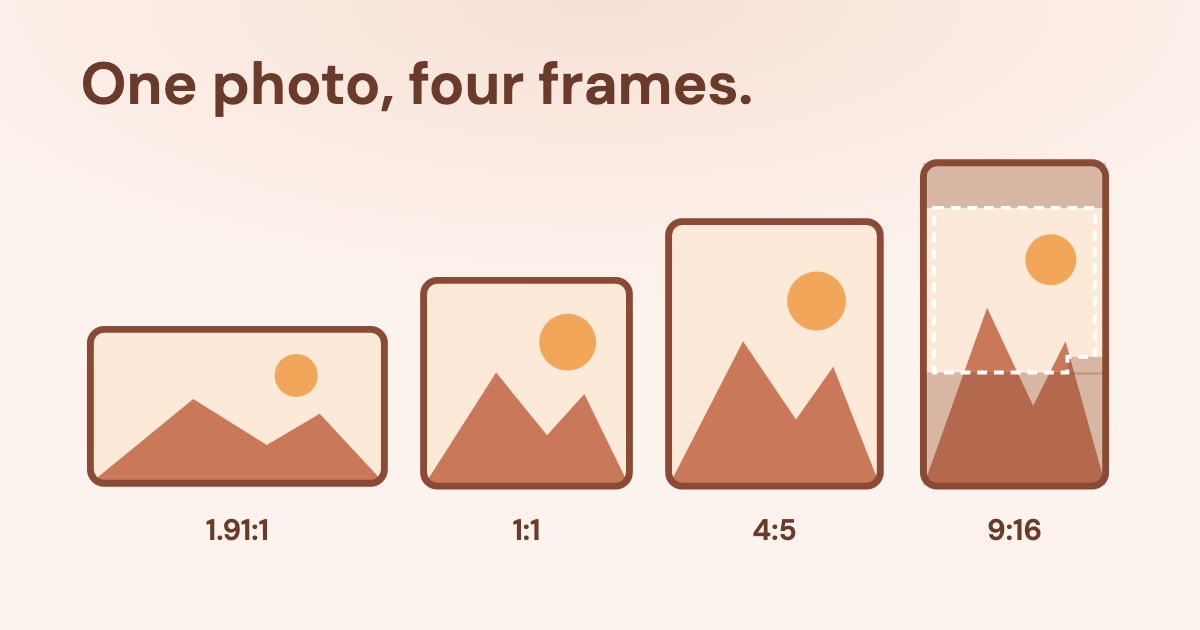
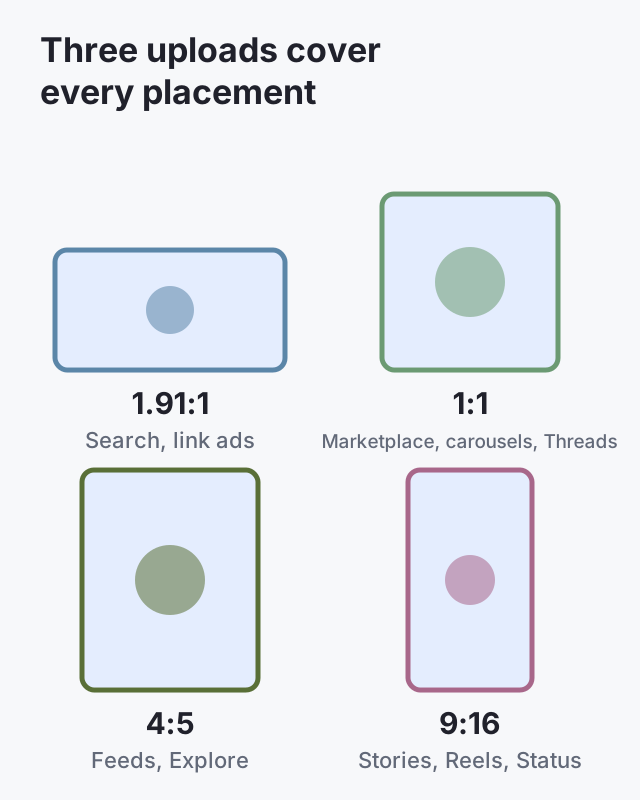
For Facebook and Instagram ads in 2026, upload three versions: 4:5 at 1440×1800 for feeds, 9:16 at 1440×2560 for Stories and Reels, and 1:1 at 1440×1440 for Marketplace, Facebook carousels and Threads images (Instagram image carousels use 4:5). In 9:16, keep text and logos out of the top 14%, the bottom 35% and 6% on each side. Drop your own image into the preview below to see how it crops in each of 14 placements.
Open the free meta ad crop and safe zone preview ↓
On this page10 sections
Preview your ad in every Meta placement
Meta ad crop and safe zone preview
Red: covered by the profile, caption or buttons. Brown: an estimate where Meta publishes no numbers. Meta calls its own previews “only examples”; so is this one.
Check text length
| Placement | Primary text, characters | Headline |
|---|
The preview uses the frames and safe zones from Meta’s Ads Guide and help pages. For a mockup you can share, Meta’s own Creative Hub still works (Meta), and Ads Manager shows placement previews side by side before you publish (Meta).
Facebook and Instagram ad sizes in 2026: the cheat sheet
| Upload | Minimum | Text that shows | |
|---|---|---|---|
| Facebook Feed | 4:5 at 1440×1800 (the aspect ratio page also accepts 1.91:1 to 1:1) | 600 px wide; 1080×1080 for 1:1 | Primary 50–150, headline 27 |
| Instagram Feed | 4:5 at 1440×1800; video 9:16 at 1080×1920 | 500 px wide | Primary 125, headline 40 |
| Instagram Explore home | 1.91:1 to 4:5 image, 4:5 recommended; 9:16 video | 500 px wide | Primary 125, headline 40 |
| Facebook Marketplace | 1:1, at least 1080×1080 | 1200×1200 in the Help Center | Primary 125, headline 40, description 30 |
| Facebook search results | 1.91:1 to 1:1, at least 1080×1080 | 600×600 | Primary 125, headline 40, description 30 |
| Facebook right column (desktop) | 1:1 in the Ads Guide; 1.91:1 in the Help Center | 254×133 | Headline 40; no text on the image |
| Facebook and Instagram Stories | 9:16 at 1440×2560 | 500 px wide (image) | Primary 125, headline 40 (Facebook) |
| Instagram Reels | 9:16 at 1440×2560 | 500 px wide | Primary 44 |
| Facebook Reels | 9:16 at 1440×2560 | 600×600 (image) | Primary 40, headline 55 |
| Threads | 1:1 at 1440×1440 image; 1440×1800 video | none | Primary 80–160, headline 40 |
| WhatsApp Status | 9:16 recommended | 500×320 | Not published |
| Carousel cards | Facebook 1:1; Instagram 4:5 (image-only) | 1080×1080 | Facebook: primary 80, headline 20, description 18 |
Files: images JPG or PNG up to 30 MB; video MP4 or MOV up to 4 GB, H.264 with AAC audio. Character counts are what shows before “…more”, from each placement’s Ads Guide page.
What are the safe zones for Stories and Reels?
Keep text, logos and faces out of the top 14%, the bottom 35% and 6% on each side of a 9:16 frame. In Reels, also keep the bottom-right corner clear: the like, comment and share buttons sit there.
Consider leaving roughly 14% of the top, 35% of the bottom, and 6% on each side
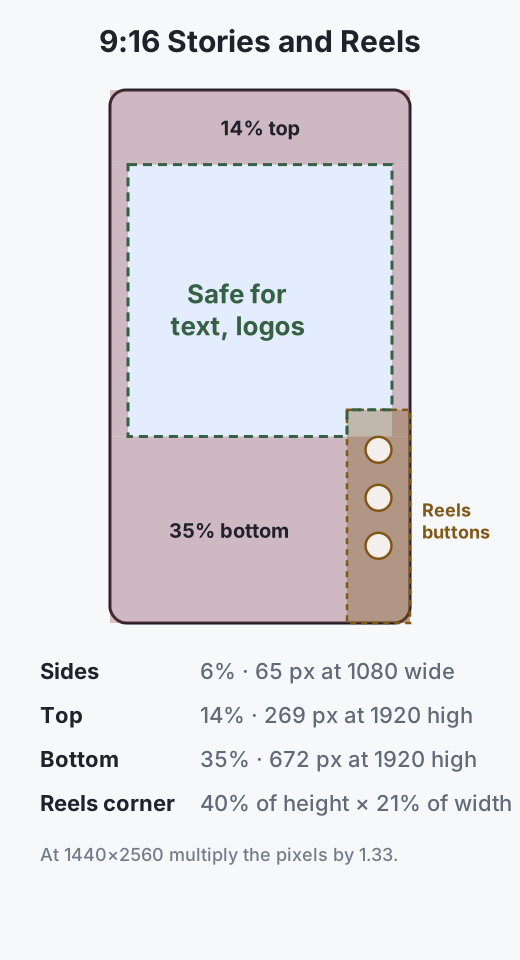
The cut-out is our measurement of the diagram on Meta’s safe zone help page (Meta), which applies the same zone to Stories, Reels and 9:16 video in the Instagram feed. If your Reels ad carries a disclaimer, Meta suggests keeping the bottom 40% free. On phones taller than 9:16, Meta either zooms the creative, cropping everything outside the safe zone, or shows it with a black background.
The 250 px and 340 px numbers are Messenger’s
Many size guides say Stories need 250 px free at the top and 340 px at the bottom. Those figures come from Meta’s Messenger Stories page — a placement Meta retired in 2026 — not from Instagram or Facebook Stories, where the bottom margin is 35%.
Should you use 1080 or 1440 pixels?
Use 1440. The Ads Guide recommends 1440×1800 for 4:5 feeds and 1440×2560 for 9:16; Meta’s minimum-pixels page lists 1080×1080 as the minimum for 1:1 (Meta). A 1080 file still runs; it just has less detail on large screens.
The exception is Instagram feed video: the Ads Guide page recommends 9:16 at 1080×1920. Meta does not say why; we follow the page.
What does Meta do with an image that doesn’t fit?
It adapts it. If you upload one size, Ads Manager fills the other placements with “padding, media expansion, cropping and additional AI-enabled features” (Meta). You can review and replace each crop in the aspect ratio view, and Meta warns that cropping alone does not stop delivery to a placement.
- Feeds accept 1.91:1 to 4:5; a taller image is cropped to 4:5.
- Threads accepts 1.91:1 to 9:16 but shows anything taller than 4:5 cropped to 4:5 around the centre (Meta).
- Facebook desktop feed shows video as 1:1, with black bars if needed.
- 9:16 is not on Meta’s list for Facebook Feed (aspect ratios by placement), so a vertical video there is cut down.
That is why three uploads beat one: you choose the crop instead of Meta.
Where Meta’s own pages disagree
| Ads Guide says | Help Center says | |
|---|---|---|
| Stories resolution | 1440×2560 | 1080×1920 recommended, 600×1067 minimum (Instagram Stories design) |
| Facebook Stories video length | 1 second to 3 minutes | 1–120 seconds (video length); 1–15 seconds on the asset customisation page |
| Right column | 1:1 | 1.91:1 recommended (aspect ratio table) |
| Instagram Feed image | 4:5 | 1:1 (best practices for aspect ratios) |
| Marketplace minimum | At least 1080×1080 | 1200×1200 |
When pages conflict we follow the Ads Guide for sizes, because it is per placement and is where Ads Manager links, and the shorter limit for video length. Preview before launch either way.
Which placements changed in 2025–2026?
- Retired: Facebook video feeds (Marketing API v24, October 2025), Instagram Explore Feed and Messenger Stories (v26, July 2026; for Messenger Stories Meta says the change applies to all API versions from late August 2026 — changelog). Messenger Inbox is no longer on Meta’s list of placements.
- Added or expanded: WhatsApp Status, with 9:16 recommended and a 500×320 minimum; Threads, which since September 2026 can run ads from a native Threads profile; Facebook Feed now includes the Friends tab (since March 2026, placements).
- Still running: the Facebook right column, desktop only.
How does Variafy use placements?
Variafy connects Meta ad accounts to ChatGPT or Claude. It reports where your budget goes by placement — Feed, Stories, Reels, Audience Network — what each brings, and where a result costs more than across the account, so you can tell whether a Reels crop is worth fixing before you redesign it.
How we checked
Checked on 23 Oct 2026 against Meta’s Ads Guide (each placement’s image, video and carousel page), Meta Business Help (aspect ratios by placement, minimum pixels, safe zones, video length, best practices for aspect ratios, Instagram Stories design, Threads ads, ad placements, Creative Hub, previews) and the Marketing API v26.0 changelog. We read the ten pages that rank for these searches; none covered Threads, WhatsApp Status or the Reels cut-out.
The preview tool applies the same frames and percentages in your browser. WhatsApp Status safe zones are not published by Meta; the tool shows Stories values and labels them as an estimate.
Questions
What size should a Facebook ad image be in 2026?
4:5 at 1440×1800 pixels for the feed. Add 9:16 at 1440×2560 for Stories and Reels and 1:1 at 1440×1440 for Marketplace, Facebook carousels and Threads images. Instagram image carousels use 4:5.
What is the best Instagram ad size?
4:5 at 1440×1800 for feed images, 9:16 at 1440×2560 for Stories and Reels, and 9:16 at 1080×1920 for feed video, as the Ads Guide lists.
What are the safe zones for Instagram Reels ads?
Keep the top 14%, the bottom 35% and 6% on each side clear, plus the bottom-right corner — 40% of the height and 21% of the width — where the Reels buttons appear.
Is 1080×1080 still OK for Facebook ads?
Yes, it meets Meta’s minimum for 1:1, but Meta now recommends 1440-pixel files, and 1:1 shows smaller than 4:5 in mobile feeds.
Can I use one image for all placements?
You can; Meta will pad, expand or crop it for each placement. Uploading 4:5, 9:16 and 1:1 versions lets you control those crops.
What size are Threads ads?
Threads accepts 1.91:1 to 9:16, recommends 1440×1440 for images and 1440×1800 for video, and crops anything taller than 4:5 to 4:5 around the centre.
Are Messenger ads still available?
Messenger Stories was retired in 2026 and Messenger Inbox is no longer on Meta’s placement list. Messenger remains available as a destination for click-to-message ads.
How can I preview a Facebook ad before publishing?
Use the preview panel in Ads Manager, a mockup in Meta’s Creative Hub, or the free preview on this page, which shows the crop and safe zone for each placement without uploading your image.