Facebook link clicks vs GA4 sessions: why they differ
Facebook link clicks and Google Analytics sessions count different things, so they should not be expected to match. Compare outbound clicks and landing page views with GA4 session-scoped traffic for the same destination and dates, then check page loading, tags, redirects and consent in that order. A large gap is a diagnostic clue, not proof of click fraud. [1] [2] [3] [4] [5] [6] [7] [8]
On this page10 sections
Compare the right measurements
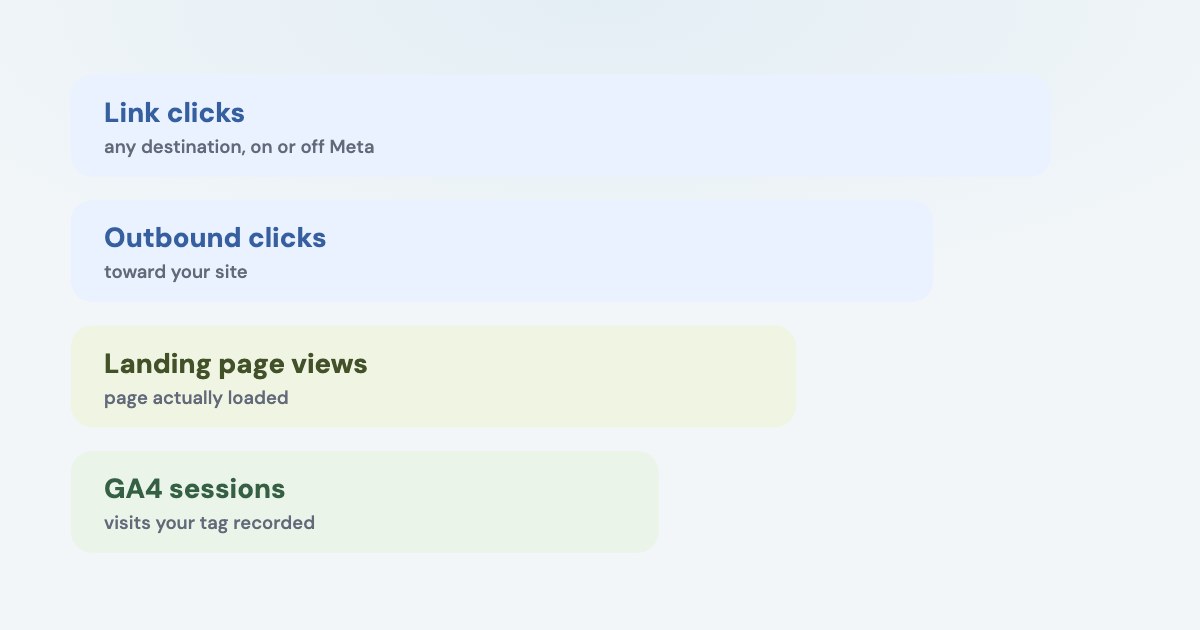
Meta’s Link clicks metric counts interactions with links to advertiser-specified destinations on or off its technologies. It is therefore too broad to treat as a count of people who loaded your website, especially when your ads include an on-platform experience. [1]
Outbound clicks measures links leading outside Meta technologies. Landing page views goes further by measuring a successful destination load after an ad click; Meta says it can use the Pixel or its in-app browser and may estimate events where data is incomplete. [2] [3]
| Metric | What it tells you |
|---|---|
| Link clicks | An interaction with an advertiser-specified link, including some Meta destinations. [1] |
| Outbound clicks | A click toward a destination outside Meta technologies. [2] |
| Landing page views | A post-click destination load observed or, in some cases, estimated by Meta. [3] |
| GA4 sessions | Periods of interaction on your website or app, rather than ad taps. [4] |
GA4 starts a session when a page or screen is viewed and no session is active; its default timeout is 30 minutes of inactivity. Repeated clicks during an active session can therefore produce more clicks than sessions without a broken tag. [4]
For lead businesses, first exclude instant-form-only activity from a website comparison. Label each destination type in the report so a click opening a lead form cannot be mistaken for a lost website visit.
Make the reports comparable first
Choose one website destination and a completed date range, and record the reporting time zones. Use a stable comparison window and the same campaign scope, rather than changing dates and filters until the totals happen to look close.
In GA4, use a session-scoped dimension such as Session source / medium or Session campaign. First user dimensions answer how someone was initially acquired, which is a different question from which source started the session you are comparing now. [5]
The documented GA4 report path as of November 2026 is below. Google notes that navigation can differ if the report was removed or is absent from the property’s default report collection. [5]
STEPS: 1. Sign in to the intended Google Analytics property. [5] 2. Select Reports. [5] 3. Select Acquisition → Traffic acquisition. [5] 4. Use Session source / medium or Session campaign for the comparison. [5] 5. Apply the intended dates and identify the traffic values actually used in your ad URLs.
Check UTMs rather than assuming every Facebook visit appears under one spelling. Google documents manual parameters for source, medium and campaign; your own inconsistent values can split one advertising source across several report rows. [9]
Use the Facebook UTM guide for naming and URL construction. Here, the question is whether the values survive into the session and whether your report includes them.
Check the page and tag before the audience
Open the exact destination from the ad on a phone, including its tracking parameters. Check the experience both in an ordinary browser and through the relevant app, because your desktop shortcut may skip the path real visitors take.
Watch for an error, a long delay or a page the visitor can leave before measurement runs. Google’s discrepancy troubleshooting documents missing or obstructed tracking code and server delays as reasons a click can occur without the expected Analytics session; that page concerns Google Ads, but the page-loading mechanism is relevant to this website diagnosis. [6]
Check every landing-page variant used by the affected ads. A tag working on the home page is not evidence that it works on a separate booking page, translated page or campaign-specific landing page; ask your implementer to confirm the actual destination’s measurement request.
Use the Meta Pixel troubleshooting guide if the Meta event is missing. Remember that Meta’s current landing-page-view definition includes in-app-browser observation, so “no Pixel means no landing page views” is not a safe explanation. [3]
Two collection systems
A working Meta event and a working GA4 event are separate checks. Our diagnostic recommendation is to verify each collection path before drawing conclusions from the difference between their dashboards.
Follow redirects and preserve campaign information
Test the full ad URL through every redirect to its final page. Google’s official discrepancy guide explains that redirects and URL rewrites can remove campaign parameters or interfere with tracking; it recommends testing whether appended parameters survive. [6]
Look for shortened links, tracking domains, language redirects and booking handoffs. These are investigation points, not claims that any one service necessarily drops your parameters; record the final URL and the actual measurement request instead of diagnosing from the presence of a redirect alone.
Distinguish a missing visit from a misclassified visit. If a session exists but the campaign parameters were lost, the issue can be attribution to another source rather than total failure to collect the session.
Give your developer an example with the starting URL, final URL and observed source in GA4. That is a concrete task: preserve permitted campaign parameters and confirm measurement on the intended page, rather than “make Analytics match Facebook.”
If a booking site runs on another domain, include that handoff in the test. Do not add a second tag or invent a replacement source value before your implementer establishes where the original visit information is lost.
Test consent behavior deliberately
A consent banner changes what the visitor permits and when tags can run. Google distinguishes basic consent mode, where tags are blocked before the relevant consent interaction, from advanced mode, where tags can send consent-aware measurements without cookies while consent is denied. [8]
That means a banner’s appearance alone does not explain the size of your reporting gap. Ask which mode is implemented, which consent defaults apply and whether a choice updates the tag correctly; those are implementation questions, not assumptions you can settle from a screenshot.
Test the allowed paths separately: grant, deny and no interaction. Record which permitted requests occur in each state, so a broken consent update is distinguishable from an intentional collection limitation.
Do not remove or bypass the banner to make counts larger. Fix the consent implementation while preserving the visitor’s choice, and describe remaining measurement limitations in your report rather than presenting modeled and observed figures as identical logs. [8]
Investigate bots after the collection path
GA4 automatically excludes traffic from known bots and spiders. Google says you cannot disable that exclusion or see the quantity of known-bot traffic removed, so the Meta–GA4 gap cannot be converted into a measured bot count from those totals alone. [7]
If suspicious traffic remains, compare the affected destination, device and delivery period with server logs and actual inquiries where you have them. Look for consistent evidence of a problem after accounting for destination definitions, repeated clicks, redirects and consent behavior.
Keep a short diagnosis record: which comparison you made, which collection tests passed and what remains unexplained. A useful finding is “campaign parameters disappear at this redirect,” not an unsupported statement that a fixed share of Facebook traffic is fake.
Do not confuse this traffic comparison with conversion attribution. If your disagreement concerns reported leads or sales, use the cross-platform double-counting guide to reconcile business outcomes rather than forcing sessions to equal ad clicks.
What to do next
Build a same-period comparison for one website campaign using outbound clicks, landing page views and GA4 session-scoped traffic. Then test the real URL on a phone and identify the earliest point where the expected page load, parameters or permitted tag request is missing.
Assign that specific issue to the website or measurement owner. If the path works, document the expected definition and consent differences and use leads or payments to judge business value.
Where Variafy fits
Variafy connects Meta Ads and Google Analytics to an assistant such as ChatGPT or Claude, so you can read both sets of data together for free. It does not make their metrics equivalent or recover every unobserved session. It is in a free beta by invitation. Join the waitlist.
How we checked
Checked on 4 November 2026 against the pages below, read in English; Meta’s pages were read in a browser. We checked the documentation only: we did not run these steps in a live ad account.
- www.facebook.com/business/help/659185130844708 — Link-click definition
- www.facebook.com/business/help/186560398499760 — Outbound-click definition and external destinations
- www.facebook.com/business/help/646884317670110 — Landing page views, in-app-browser observation and estimation
- support.google.com/analytics/answer/9191807?hl=en — GA4 session definition and default inactivity timeout
- support.google.com/analytics/answer/12923437?hl=en — Traffic acquisition path and session-scoped dimensions
- support.google.com/analytics/answer/14452452?hl=en — Google’s Google Ads discrepancy diagnosis: tags, redirects, rewrites and server delays; applying these website mechanisms to Meta traffic is an explicit diagnostic inference
- support.google.com/analytics/answer/9888366?hl=en — Automatic known-bot exclusion and visibility limitations
- developers.google.com/tag-platform/security/concepts/consent-mode — Basic versus advanced consent behavior
- support.google.com/analytics/answer/11242870?hl=en — Manual tagging and traffic-source parameters
What we could not confirm
- A universal acceptable discrepancy
- A bot percentage
- That Meta landing page views always require a Pixel
- That denying consent always produces no measurement in every implementation
- That all redirects strip UTMs
- An exact one-to-one relationship between clicks, sessions and people
- A live traffic test
Variafy is our product.
Questions
Why do Facebook link clicks not match Google Analytics sessions?
They count different things. Link clicks include destinations on and off Meta, while GA4 counts sessions, and several ad clicks can belong to one session. Compare outbound clicks and landing page views with session-scoped traffic for the same destination and dates.
What should I check when GA4 shows far fewer visits than Meta?
Check in this order: page loading, tags, redirects and consent behavior. A large gap is a diagnostic clue, not proof of click fraud.
Does GA4 remove bot traffic?
GA4 excludes known bots, but it cannot show how much known-bot traffic it removed.