Facebook UTM parameters: free builder and link checker for Meta ads (2026)
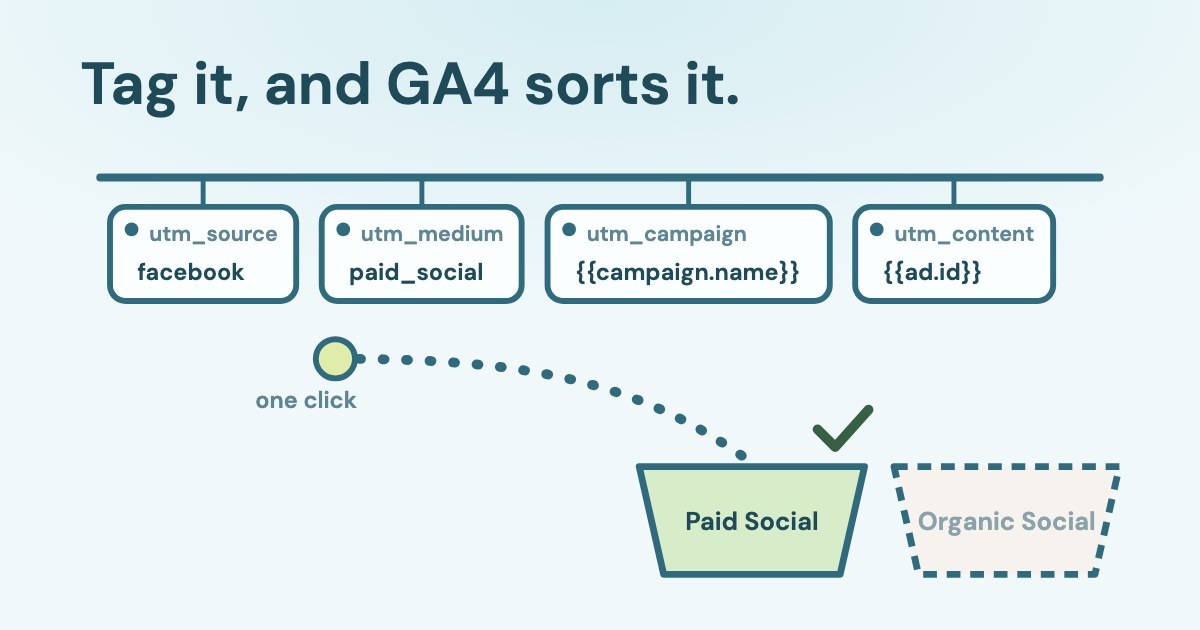
Facebook UTM parameters are tags in the URL parameters field of a Meta ad, such as utm_source=facebook&utm_medium=paid_social&utm_campaign={{campaign.name}}. Meta replaces the double-brace macros with real names and IDs on each click, and Google Analytics 4 uses the tags to file the visit under Paid Social.
Build and check yours with the free tool below; nothing you type leaves your browser.
Open the free UTM builder and checker for Meta ads ↓
On this page12 sections
Build and check UTM parameters for Meta ads
UTM builder and checker for Meta ads
Pick a preset or set each field. The string on the left goes into URL parameters in Ads Manager; the example shows what a real click will send.
Paste into Ads Manager → Ad → Tracking → URL parameters
What one click will look like (sample names and IDs)
Check a tagged link
Paste a landing page address from your browser, a CRM record or an ad preview. The check runs on your device.
This checks one link. Variafy checks every live ad at once: in ChatGPT or Claude ask “Which of my Meta ads have broken UTM tags, and how many Meta clicks reach GA4 without tags?” and it compares Meta clicks with GA4 sessions campaign by campaign.
The tool knows all nine Meta macros, keeps the double braces intact (Google’s own Campaign URL Builder encodes them into %7B%7B…%7D%7D, and Meta documents only the plain double-brace form), and shows the GA4 and HubSpot channel for the tags you choose.
Which UTM template should you use for Meta ads?
For most advertisers who report in GA4 and keep leads in a CRM, this template is the safe default:
utm_source=facebook&utm_medium=paid_social&utm_campaign={{campaign.name}}&utm_content={{ad.name}}&utm_term={{adset.name}}&utm_id={{campaign.id}}
Why each value: facebook is on Google’s list of social sites; paid_social matches GA4’s paid pattern; names keep reports readable; utm_id carries the campaign ID that GA4 uses to join imported cost data. Google’s own UTM guidance uses the same {{campaign.name}} syntax and paid_social as its medium example.
| Returns | Use it for | |
|---|---|---|
{{campaign.name}} | The campaign name when the ad was first published | utm_campaign, readable reports |
{{campaign.id}} | The campaign ID | utm_id; joining with spend |
{{adset.name}} | The ad set name | utm_term |
{{adset.id}} | The ad set ID | CRM joins |
{{ad.name}} | The ad name | utm_content |
{{ad.id}} | The ad ID | CRM joins; never changes |
{{placement}} | Where the ad showed, for example Facebook_Mobile_Feed | Splitting by placement |
{{site_source_name}} | fb, ig, msg, an or th | Splitting by app — see the GA4 caveat below |
{{media_type}} | The media type | Advantage+ catalog ads only |
Name-based parameters like ad.name are set to the campaign, ad set or ad name used when the ad was first published.
Meta’s own page lists placement values such as facebook_feed and threads_stream. In a live account we read, the values that actually arrived in GA4 looked different — Facebook_Mobile_Feed, Instagram_Reels, Threads_Feed, Others, an. Build reports on what arrives, not on the table.
Where do you add URL parameters in Ads Manager?
- Open the ad (not the campaign or ad set) and scroll to Tracking.
- Paste the string into URL parameters, or click Build a URL parameter to fill it field by field.
- Keep the website URL clean. If the same tag sits in both places, the URL parameters field wins.
- Preview the ad, click the link and check the address bar. In a preview the macros are not filled in yet; that is expected.
Parameters in the URL parameters field will override the duplicate parameters in the Website URL field.
Meta also adds a few parameters on its own for some advertisers since 1 January 2024 — a source of Facebook or Instagram, a medium of paid, and campaign, ad set and ad IDs — but does not publish the parameter names. Meta says your field overrides parameters set elsewhere; it does not say so for these automatic ones, so do not rely on them for reporting. Dynamic parameters are also not supported in Collection ads on Instagram placements. Changing URL parameters on a published ad can also send the ad set back into learning, so set them before launch.
Which utm_medium puts Meta ads into Paid Social in GA4?
GA4 files a tagged visit under Paid Social only if two things are true: the source is on Google’s list of social sites, and the medium matches ^(.*cp.*|ppc|retargeting|paid.*)$. If the source is social but the medium does not match, the visit becomes Organic Social — even though you paid for it.
Source matches a regex list of social sites AND Medium matches regex ^(.*cp.*|ppc|retargeting|paid.*)$
| GA4 channel | HubSpot source | |
|---|---|---|
| facebook / paid_social | Paid Social | Paid social |
| facebook / paid-social | Paid Social | Paid social |
| facebook / paid | Paid Social | Paid social |
| facebook / cpc | Paid Social | Paid social |
| facebook / cpa or cpm | Paid Social (both contain “cp”) | Other campaigns |
| facebook / social_paid | Organic Social | Paid social |
| facebook / ad, ads, facebook_ads | Organic Social | Other campaigns |
| facebook / social | Organic Social | Organic social |
| meta / paid_social | Paid Other (meta is not on Google’s social list) | Paid social |
| msg, an or th / paid_social | Paid Other | Other campaigns |
Google’s own example lands in Paid Other
Google’s UTM guidance suggests insta as a source for Instagram, but insta is not on Google’s own list of social sites. By GA4’s rules, paid clicks tagged insta go to Paid Other, not Paid Social. Use instagram or ig.
Two more traps follow from the rules. First, {{site_source_name}} returns msg for Messenger, an for Audience Network and th for Threads, and none of them is on Google’s list, so those paid clicks land in Paid Other. Use utm_source=facebook and split by app in utm_term, or create a custom channel group. Second, GA4 checks the campaign name before Paid Social: a campaign called “Black Friday shop” or anything with “cross-network” in its name can move into Paid Shopping or Cross-network once {{campaign.name}} fills it in. We could not test that rule on live data; keep such words out of campaign names, or tag that campaign by hand.
What we saw in a live account
In one lead-generation account we can read, anonymised with the owner’s permission, an Instagram medium of ad was filed as Organic Social, and visits with utm_medium=cpa were correctly Paid Social. Clicks from Ads Manager previews arrived as adsmanager.facebook.com / referral and counted as Organic Social too.
Capital letters do not change the channel — Google says channel rules are not case sensitive — but they do split the source report: GA4 treats Facebook and facebook as two values.
Should you put names or IDs in UTM parameters?
Use names where people read reports and IDs where machines join data. Names are frozen at first publish, can repeat across campaigns and change their encoding; an ad ID never changes.
- Frozen names. Renaming a campaign in Ads Manager does not change what its links send. To change the value you have to publish a new campaign, ad set or ad.
- Spaces. Meta documents spaces as
%20. In the account we read, the same ad name arrived with+from the Facebook right column and with a space from other placements, so one ad became two rows in GA4. Use-or_in names, or put{{ad.id}}inutm_content. - CRM joins. Add
ad_id={{ad.id}}&adset_id={{adset.id}}&campaign_id={{campaign.id}}and capture them in hidden form fields; HubSpot and most form tools can store URL parameters on the contact.
Unfilled macros are a signal too. About one in seven hundred tagged Meta sessions in that account still carried a literal {{campaign.name}} — clicks from previews, forwarded links or posts shared outside the ad.
Do UTM parameters work with lead forms and messages?
The URL parameters field is available for Instant forms and messaging ads, but a lead that never visits your site leaves nothing for GA4 to read. For those leads, use the form’s own tracking parameters and the IDs Meta already puts on every lead.
Tracking parameters show in the file you download from Meta Ads Manager or Meta Business Suite, and are passed directly to your integrated CRM system.
Every lead export already includes ad_id, adset_id, campaign_id and form_id (Meta’s field list), so you can join leads to spend by ID without any UTM at all. Meta lists Instant forms among the places where dynamic parameters are available, so a template like campaign={{campaign.name}} in the form’s tracking parameters is filled in; check one test lead in the export before you rely on it.
Can tagged links hurt your SEO?
They can if Google indexes them. A tagged landing page without a canonical tag is a separate address, and Google may pick it as the main one. Then organic search clicks arrive with utm_source=instagram and GA4 files them as Instagram, not Organic Search.
What we found in Search Console
On a site we can read, anonymised with the owner’s permission, addresses with utm_ tags collected almost half of all search impressions over 90 days. URL inspection showed a main course page indexed only under its ?utm_source=instagram address, chosen by Google as canonical; the page had no canonical tag.
if you don't specify a canonical URL, Google will identify which version of the URL is objectively the best version to show to users in Search.
The fix is on the site: add <link rel="canonical"> with the clean address to every landing page, keep tagged addresses out of the sitemap, and do not put tags on internal links. To check your own site, filter the Search Console Pages report by “utm_” and inspect the top addresses.
Do iOS and Safari strip UTM parameters?
Not as a rule. Apple’s Link Tracking Protection removes click-level identifiers from links in Mail, Messages and Safari private browsing, and WebKit says parameters used only for campaign attribution pass through.
Safari allows such parameters to pass through.
Apple does not publish the list of removed parameters (its announcement describes them only as information used “to track users across other websites”). Safari 26 extended fingerprinting protection to all browsing; that limits what known fingerprinting scripts can read, not your UTM tags. Most Meta ad clicks open in Meta’s in-app browser anyway. fbclid is a different matter: it is Meta’s click ID, it is case sensitive, and you should never edit it or paste it into an ad’s URL (Meta’s note).
Which UTM mistakes break Meta reporting?
- Single braces or another platform’s macros —
{campaign.name},{campaignid},__CAMPAIGN_NAME__. They arrive as literal text. - An organic medium on paid ads —
social,ad,social_paid. GA4 counts the clicks as Organic Social. - A source GA4 does not know —
meta,insta,msg,an,th. Paid clicks land in Paid Other. - Empty values like
utm_content=. Meta asks for a value on every key. - Tags in two places. The URL parameters field overrides the website URL; keep one.
- Tags after #. Browsers do not send the part after
#, so GA4 never sees it. - Redirects and shorteners that drop the query string (Google lists both).
- Very long URLs. GA4 accepts
page_locationup to 1,000 characters (limits); long names plusfbclidget close. - UTM tags on links inside your own site. They restart the session and overwrite the real source.
- gclid and UTM on the same click. With Google Ads auto-tagging, GA4 takes source and medium from gclid (Google).
The link checker in the tool above catches all of these except redirects.
How does Variafy use UTM tags?
Variafy connects Meta ad accounts and Google Analytics 4 to ChatGPT or Claude. Its GA4 checks compare Meta link clicks with GA4 sessions campaign by campaign and list Facebook or Instagram traffic that arrived without tags, so you can see where tagging breaks before it skews a report. It reads only; it does not change your site or your tags.
| This page’s checker | Variafy | |
|---|---|---|
| What it checks | One link you paste | Every live ad’s URL parameters |
| Clicks vs sessions | No | Meta link clicks vs GA4 sessions, by campaign |
| Untagged traffic | No | Facebook and Instagram sessions without utm_ tags |
| Where it runs | Your browser | ChatGPT or Claude, read-only |
How we checked
Checked on 23 Oct 2026 against Meta Business Help (URL parameters, dynamic URL parameters, Instant form tracking parameters, lead export fields), Meta’s Conversions API page on fbclid, Google Analytics Help (default channel group, URL builders, manual and auto-tagging, collection limits, lost campaign data), Google’s source category list, HubSpot’s traffic source rules, Google Search Central on duplicate URLs, and Apple and WebKit on link tracking protection. We also read the pages that rank for these searches and the source code of Google’s Campaign URL Builder.
The examples marked as live come from a lead-generation account and site we can read through Variafy, anonymised with the owner’s permission and shown as shares, not counts. The channel tables apply Google’s and HubSpot’s published rules; the tool runs the same rules in your browser.
Questions
What are the best UTM parameters for Facebook ads?
utm_source=facebook&utm_medium=paid_social&utm_campaign={{campaign.name}}&utm_content={{ad.name}}&utm_term={{adset.name}}&utm_id={{campaign.id}}. It lands in Paid Social in GA4 and HubSpot and keeps both names and the campaign ID.
How many dynamic URL parameters does Meta support?
Nine: ad.id, adset.id, campaign.id, ad.name, adset.name, campaign.name, placement, site_source_name and media_type. media_type works only in Advantage+ catalog ads.
Should utm_medium be cpc or paid_social for Meta ads?
Both put the visit in Paid Social in GA4. paid_social keeps Meta apart from search ads that also use cpc, and Google uses it in its own examples.
Why do my Facebook ads show as Organic Social in GA4?
Usually the medium does not match GA4’s paid pattern, for example ad, ads or social_paid. Change it to paid_social or cpc. Clicks without tags and clicks from Ads Manager previews also count as social referrals.
Does renaming a campaign change the UTM value?
No. Meta fills name-based parameters with the name used when the ad was first published. To send a new name you have to publish a new campaign, ad set or ad.
Why does {{campaign.name}} appear literally in my reports?
Meta fills macros only on ad clicks. Literal macros come from previews, forwarded links, organic shares or a misspelled macro. A small share is normal; a large share means the template is wrong.
Do UTM parameters work with Facebook lead forms?
A lead from an Instant form never visits your site, so GA4 cannot see it. Use the form’s tracking parameters — Meta lists Instant forms among the places where dynamic parameters work — and the ad_id, adset_id and campaign_id that Meta includes with every lead.
Is utm_source=insta OK for Instagram ads?
No. Google’s guidance uses insta as an example, but insta is not on GA4’s list of social sites, so paid clicks land in Paid Other. Use instagram or ig.
Can I use Google’s Campaign URL Builder for Meta ads?
Not for templates with macros: it encodes the curly braces into %7B%7B…%7D%7D, while Meta documents only plain double braces. Use a builder that keeps the braces, or type the string yourself.
Can UTM links be indexed by Google?
Yes, if tagged landing pages have no canonical tag. Add a canonical with the clean address and keep tagged addresses out of your sitemap.