Google Ads assets: sitelinks, callouts and calls
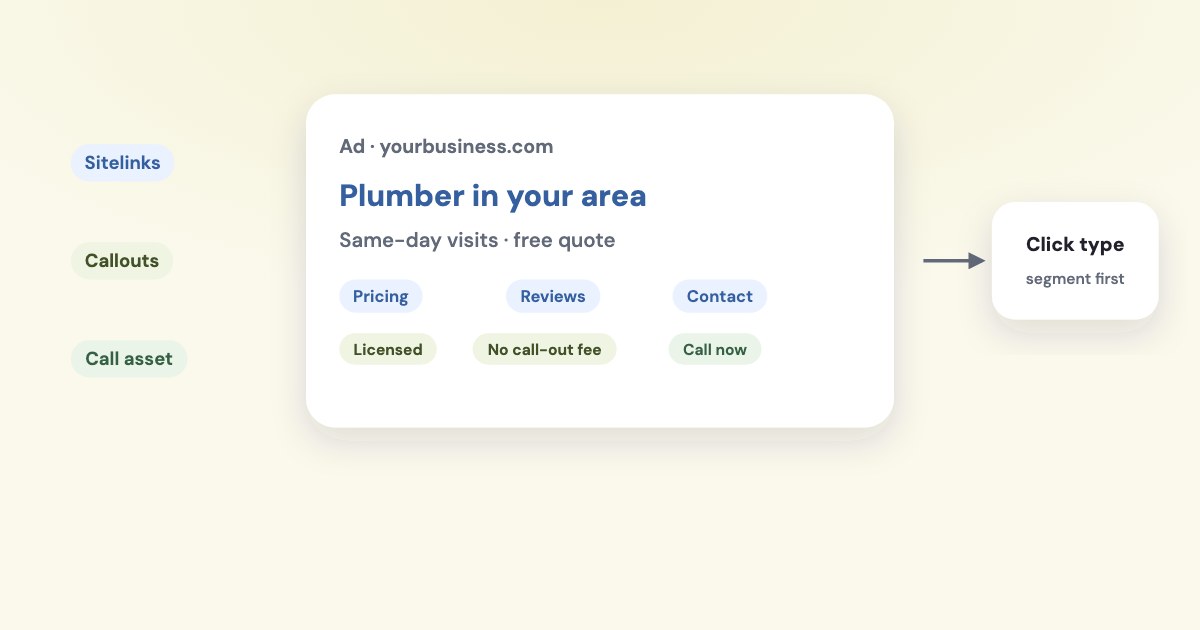
Use sitelinks to send people to useful pages, callouts to explain relevant service details, and call assets to offer a phone contact route. Add each at a level where its message is accurate, then check policy status and performance; adding an asset does not guarantee it appears with every ad. [1] [2] [3] [4]
On this page10 sections
Which asset does your lead business need?
Choose the asset by the decision it helps someone make. Google’s documentation describes these as different ways to provide useful information or a route to contact you. [1] [2] [3]
| Asset | Useful job for a lead business |
|---|---|
| Sitelink | Send someone directly to a relevant service, process, or contact page |
| Callout | Explain a short, accurate service distinction |
| Call | Offer the business phone contact route |
For a service business, a sitelink might lead to the specific work you handle or an explanation of the consultation process. Treat those as editorial examples, not a required Google template.
A callout might describe a genuine service condition, such as appointment availability or the type of customer you serve. Avoid writing a claim your reception or sales team cannot consistently honor.
Use a call asset when you want phone inquiries and can handle them. The value of the contact route depends on what happens after the call reaches your business, not simply whether the number is visible.
What should the message and destination contain?
Match each sitelink’s wording to the page it opens. Google prohibits repeated sitelink text and generally requires the destination domain to match the ad’s final URL, with limited documented exceptions. [5]
If the link promises a specific service, send the reader to that service rather than a general page that makes them search again. Review the mobile page and contact action before spending time polishing the link’s wording.
As of November 2026, Google’s sitelink and callout pages limit their text to 25 characters in most languages. The current documentation also describes shorter limits for double-width languages; this article’s examples are for US English. [1] [2]
Keep callouts factual and distinct from one another. A row of broad compliments about your business gives a reader less useful information than a concrete explanation of what you provide.
For calls, Google requires a verified, accurate, active phone number relevant to the advertised business and visible on the linked website. Confirm the correct destination with the team that answers it before creating the asset. [6]
How do you add the three asset types?
These desktop labels follow Google’s official help read November 4, 2026, as of November 2026. Start with the account or campaign you intend to change, then use the appropriate documented creation route. [1] [2] [3]
For a sitelink:
STEPS: 1. Open Assets within the Campaigns menu. 2. Click the plus button. 3. Click Sitelink. 4. Choose the level under Add to. 5. Select Create new under Asset. 6. Enter Sitelink text. 7. Enter the Description line fields. 8. Enter the URL. 9. Click Save. [1]
For a callout:
STEPS: 1. Open Assets within the Campaigns menu. 2. Select the plus button. 3. Select Callout. 4. Choose the level under Add to. 5. Enter Callout text. 6. Select Save. [2]
For a call asset:
STEPS: 1. Open Assets within the Campaigns menu. 2. Select the plus icon. 3. Select Call. 4. Choose Account, Campaign, or Ad group. 5. Select Create new. 6. Enter the business phone number. 7. Read the Call Ads Supplemental Terms notice before continuing. [3]
The call-asset article does not name a final creation button, so this procedure does not invent one. Review the confirmation displayed in your account, and keep any optional call-reporting or conversion settings aligned with your measurement plan. [3]
Where should you attach the assets?
Use account-level assets only for information that remains accurate across the eligible account. Put service-specific messages closer to the campaigns or ad groups where they apply.
Do not assume all asset types inherit in the same way. Google says sitelinks at different levels within the same branch can serve together, while more specific callouts and call assets override their higher-level equivalents. [1] [2] [3]
That difference matters when you add a narrowly relevant callout or phone number. Review the resulting eligible set rather than assuming your generic account-level information will also appear.
For a business with several services, maintain a short inventory linking each asset to its destination or responsible team. It helps you find the right update when a service ends, a page moves, or a phone route changes.
Google allows scheduling for supported assets, including showing call assets during selected days and hours. Use that option when it matches the hours your team can actually answer, then confirm that your campaign schedule also makes sense. [3] [4]
Accurate coverage
The best placement for an asset is the narrowest sensible level that keeps its message useful without creating unnecessary maintenance.
What controls review and whether an asset shows?
Assets remain subject to Google Ads policies and format requirements. A saved asset is therefore not the same thing as an approved asset that is eligible to serve with a particular ad. [5] [6] [7]
For an issue, inspect the policy detail before rewriting unrelated copy. Google’s current help documents this route for adding the relevant information to the Assets table. [7]
STEPS: 1. Open Assets within the Campaigns menu. 2. Select Columns above the statistics table. 3. Expand Attributes. 4. Select Policy details. 5. Select Apply. [7]
Google says it selects additional assets in response to the individual search, and call assets do not show with every impression. If an asset has little delivery, consider relevance, eligibility, association, and schedule before concluding that the system failed. [3] [4]
As of November 2026, Google’s transition page says new call-only ad creation was removed in February 2026 and existing call-only ads will stop receiving impressions in February 2027. Use current call-asset guidance when planning phone inquiries rather than starting from an old call-only tutorial. [10]
How should you read asset performance?
Start with the question the row answers. Google says clicks for additional asset types can combine headline clicks with clicks on the asset itself; the cost row similarly concerns the ad when it appeared with that asset. [8]
To isolate the available click interaction types, use the documented reporting control. Keep the same account, campaign scope, and date range while you compare. [8]
STEPS: 1. Open Assets within the Campaigns menu. 2. Select the asset type you want to review. 3. Click Segment above the reporting table. 4. Select Click type. [8]
Do not add all asset-row impressions, clicks, or costs and assume the sum is your campaign total. Google warns that assets can appear together and that asset-level ratios are directional rather than isolated causal performance. [8]
For calls, distinguish an interaction, a received call, and a call counted under your conversion definition. Google’s call-reporting page documents call details including whether calls were missed or received; use the call tracking guide for the measurement setup. [9]
Then connect the inquiries to your business outcomes. If the broader campaign needs diagnosis, use how to read a Google Ads report; if query relevance is the problem, use the search terms guide.
What to do next
Choose the pages, service facts, and phone route that help a prospective customer take a useful next step. Add them at the appropriate level and check the policy details and destination before evaluating results.
Review the interaction types and the campaign’s qualified inquiries together. Keep an asset because it helps the business outcome, and avoid declaring it responsible for every click or sale that happened while it was present.
Where Variafy fits
Variafy connects Google Ads data and your CRM deals and payments to an AI assistant, helping you review inquiries alongside money received. It does not replace Google’s asset review or your phone-handling process. Reading data is free in the free invitation beta; sign-up is closed. Join the waitlist.
How we checked
Checked on 4 November 2026 against the pages below, read in English. We checked the documentation only: we did not run these steps in a live ad account.
- support.google.com/google-ads/answer/2375416?hl=en — Sitelink purpose, text limit, creation fields, and associations
- support.google.com/google-ads/answer/6079510?hl=en — Callout purpose, text limit, creation labels, and hierarchy
- support.google.com/google-ads/answer/2453991?hl=en — Call asset creation, terms notice, hierarchy, schedules, and serving
- support.google.com/google-ads/answer/7331111?hl=en — Asset selection and supported schedules
- support.google.com/adspolicy/answer/1054210 — Sitelink repetition, relevance, and destination rules
- support.google.com/adspolicy/answer/1054212 — Call-number verification and requirements
- support.google.com/google-ads/answer/9338593?hl=en — Policy review and exact Policy details column procedure
- support.google.com/google-ads/answer/9781208?hl=en — Additional-asset click meanings, Click type, non-additive metrics, and directional ratios
- support.google.com/google-ads/answer/7180997 — Call details and calls versus conversions
- support.google.com/google-ads/answer/16619010?hl=en — Call-only ad retirement dates
What we could not confirm
- That an asset appears on every impression
- A guaranteed review duration or conversion lift
- That asset-row metrics measure causal impact
- A universal final confirmation button for call-asset creation, which the cited article does not name. No assets, policies, or call settings were changed or tested in a live account
Variafy is our product.
Questions
What do sitelinks, callouts and call assets do?
Sitelinks add links to useful pages, callouts add short business text, and call assets add a phone number or call interaction to eligible ads.
Where do I create them?
Google’s current route starts in Campaigns, then Assets. Check the confirmation Google actually displays for the final step, since the help page does not name one.
Does a clicked asset row mean the asset worked?
Not necessarily. Asset-row clicks can include clicks elsewhere in the ad, so use Segment, then Click type, before drawing conclusions.