What happens to Meta ad IDs in Excel and Google Sheets? A 36-ID round-trip study
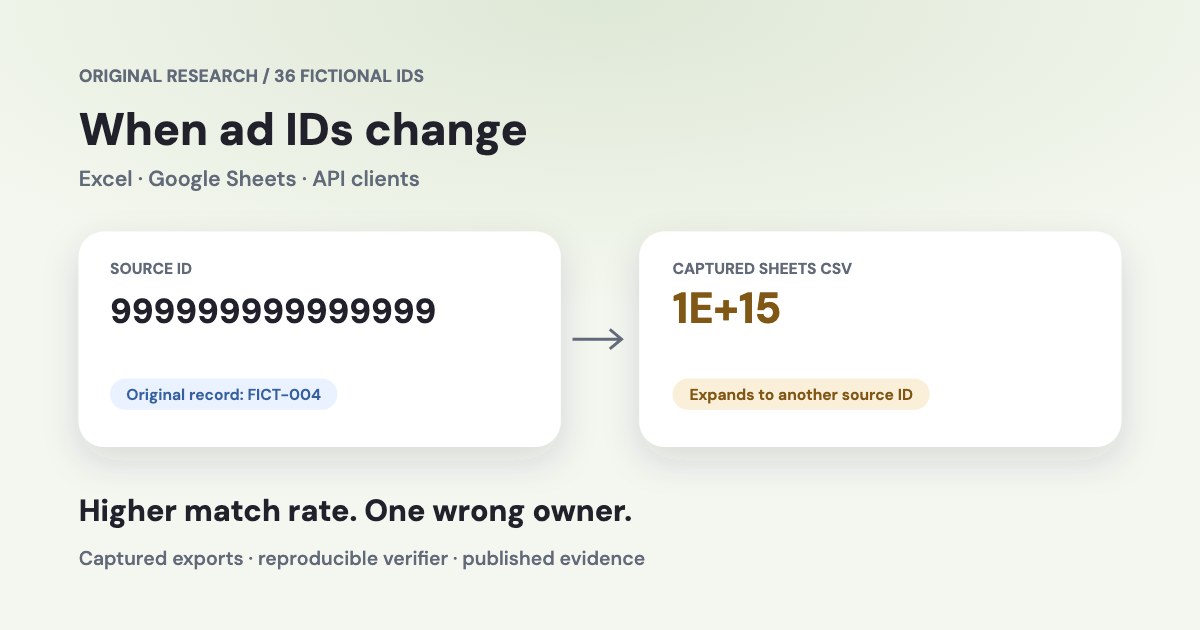
An ad ID can change when a spreadsheet parses it, when an API client turns it into a number, or when an export formats the stored value. We followed 36 fictional ID strings through named Excel, Google Sheets and JavaScript routes. In one captured Sheets export, expanding scientific notation raised apparent matches from 25 to 31 out of 32 decimal test records while introducing a wrong match. The files, settings and verifier are available below.
On this page12 sections
The observed results depend on the route
The corpus contains 32 unique positive decimal identifiers and four leading-zero controls. It deliberately exercises decimal length, the binary64 integer boundary and adjacent 18-digit strings. These fixed test cases isolate failure mechanisms. Their counts describe this corpus.
“Exact string” means every exported character matches the source. “Same numeric value” compares the exported decimal or exponent with the source using Python Decimal. The leading-zero controls have their own denominator because the zeros are part of their identity.
| Measured route | Exact strings / 32 | Same numeric value / 32 | Leading zeros / 4 |
|---|---|---|---|
| Excel 16.93 · General / Convert | 0/32 | 5/32 | 0/4 |
| Excel 16.93 · Convert, then format 0 | 10/32 | 10/32 | 0/4 |
| Excel 16.93 · Don't Convert | 28/32 | 28/32 | 4/4 |
| Sheets · connected CSV import | 25/32 | 30/32 | 1/4 |
| Sheets · imported copy, then format 0 | 31/32 | 31/32 | 1/4 |
| Sheets · typed strings | 32/32 | 32/32 | 4/4 |
| Sheets · client Number, typed numbers | 9/32 | 9/32 | 0/4 |
| Sheets · pasteData CSV | 25/32 | 30/32 | 1/4 |
| Sheets · connected quoted CSV import | 25/32 | 30/32 | 1/4 |
| Node.js · Number / JSON / String | 17/32 | 17/32 | 0/4 |
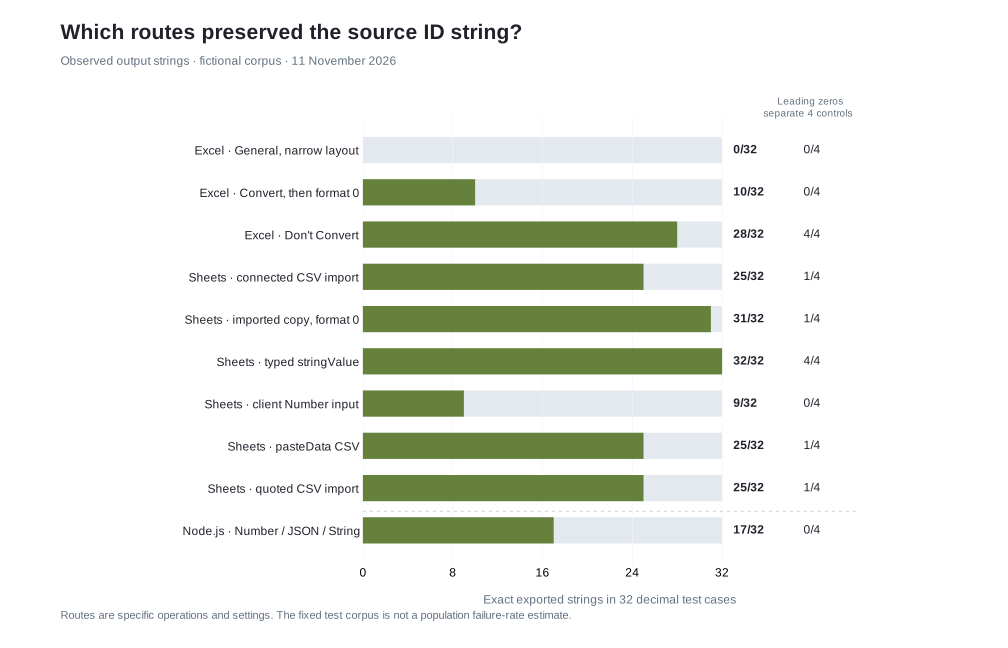
The Excel General row uses the original narrow worksheet layout. The Google Sheets rows identify connector or API operations. The JavaScript row measures a runtime conversion. Each is a separate experiment with its own settings.
Download the unchanged source CSV, row-level results and the complete research kit.
What we measured and how to reproduce it
Every source row has a stable record_id, the original ad_id, a cohort label and a control type. We aligned exports by record_id and compared the ID strings. Each captured export contains all 36 unique record keys.
| Environment | Route and settings | Evidence |
|---|---|---|
| Excel for Mac 16.93, build 16.93.25011212 | macOS 26.5.2. Russian interface, system locale ru_UA, decimal comma. Legacy Text Import used tabs, General columns and the Convert or Don’t Convert prompt. CSV UTF-8 exports used a BOM and semicolons. | Conversion settings screenshot and the three captured Excel exports. |
| Google Sheets cloud service | Connected CSV import, pasteData, updateCells and repeatCell routes. Locale ru_RU. Each selected tab was moved to index 0 for a native Drive CSV export. | CSV bytes and CellData with entered, effective and formatted values plus number formats. |
| Node.js v26.0.0 | Number conversion, numeric JSON round-trip and String serialization. Exact binary64 integer and a string JSON round-trip were recorded separately. | Executable runtime probe and recorded runtime output. |
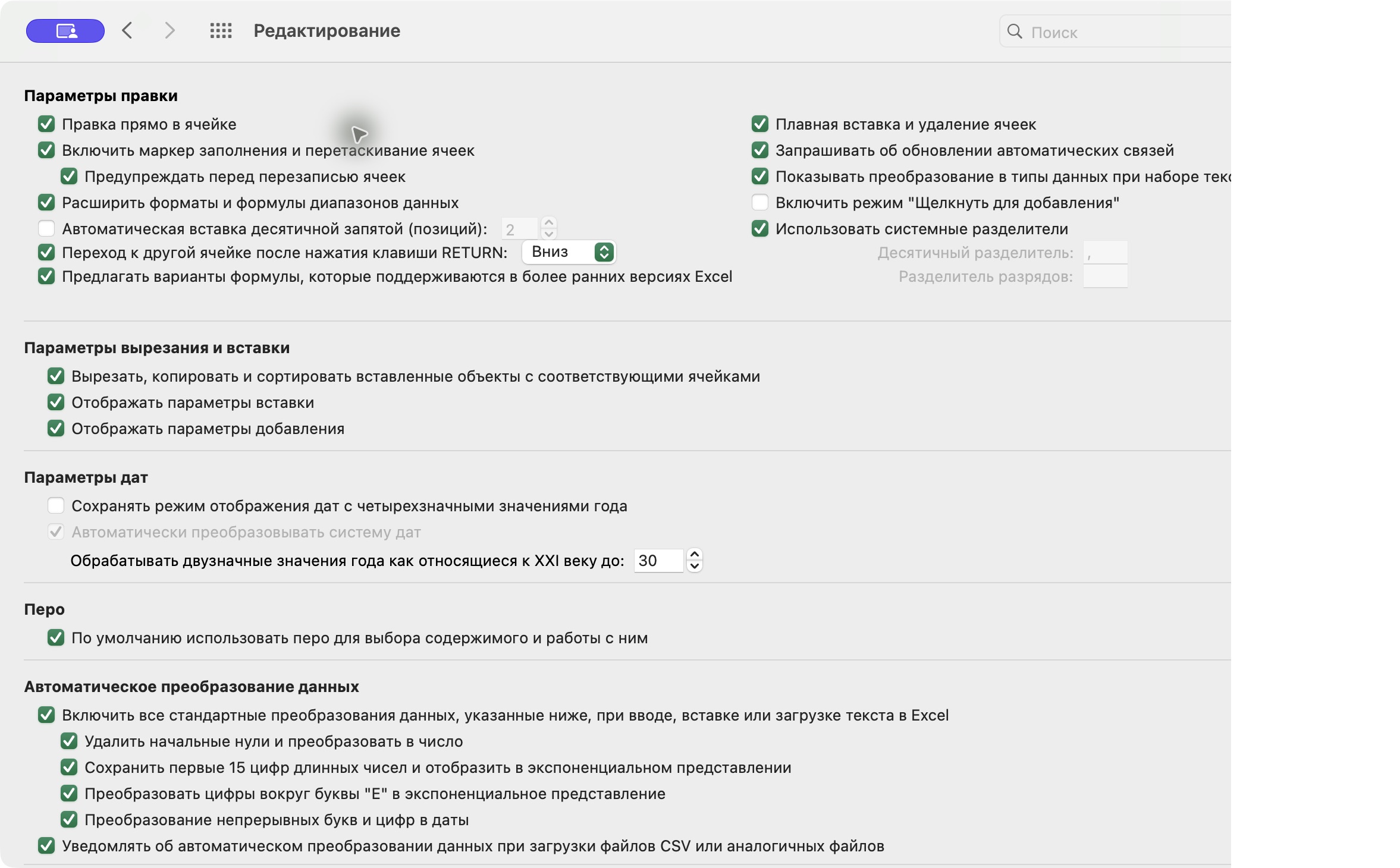
The Sheets import was performed with the connected import_spreadsheet operation and native_google_sheets, followed by Drive CSV export. The underlying connector implementation is not assumed to reproduce the browser’s File → Import workflow. We measured typed updateCells calls separately. RAW and USER_ENTERED are discussed later as documented API choices.
A second fresh connected import produced a byte-identical CSV export. Importing a fully quoted version of the same CSV also produced the same export. Excel Text-column import, AutoFit, Excel for Windows and Excel for the web were outside the completed runs. The Excel guidance below is identified as vendor documentation. HubSpot is covered through its property schema, as no live CRM portal was used.
To independently recompute the published counts, extract the kit and run python3 verify.py. To reproduce the runtime conversion in your own Node version, run node probe.mjs > local-javascript-results.json. For another spreadsheet run, use the original source, record the settings, export a new CSV and compare by record_id. The full protocol records exact operations and limits.
Separate the source, stored value and exported text
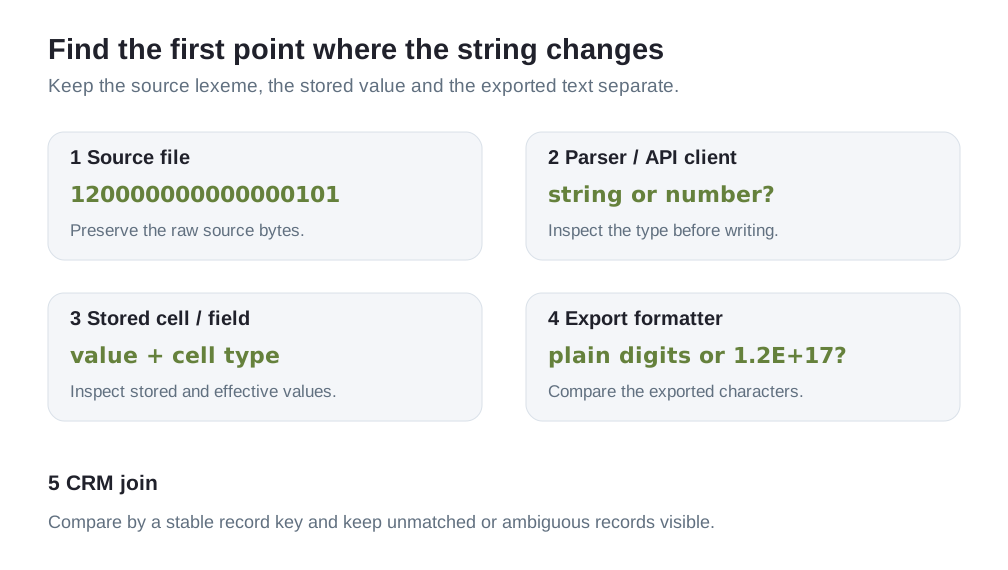
A CSV field is a character sequence. An importer may keep it as text or interpret it as a number. A spreadsheet then has both a stored value and a displayed representation. Its CSV exporter can write a formatted representation that differs from the source.
For example, the Sheets cell for FICT-004 reported numberValue 999999999999999 in the typed readback, while the captured CSV contained 1E+15. For FICT-009, the readback reported 9007199254740990 and the CSV contained the locale-formatted 9,0072E+15. Both examples lose source information during the observed formatting/export path.
The recorded Sheets import contained 13 numeric ID cells and 23 string ID cells. Several long values, including 120000000000000101, remained strings. Length alone therefore does not predict this connector’s import result. The typed readback and the export are both necessary to interpret it.
Google documents entered values, effective values and formatted values as separate fields. Download the original typed readback alongside the captured CSV to inspect the distinction. Google CellData documentation
What changed in the three Excel runs
In the captured General export, none of the 32 decimal ID strings survived exactly. Many were written in short exponent form. This observation includes the worksheet layout and export settings recorded in the protocol. It measures the exported text.
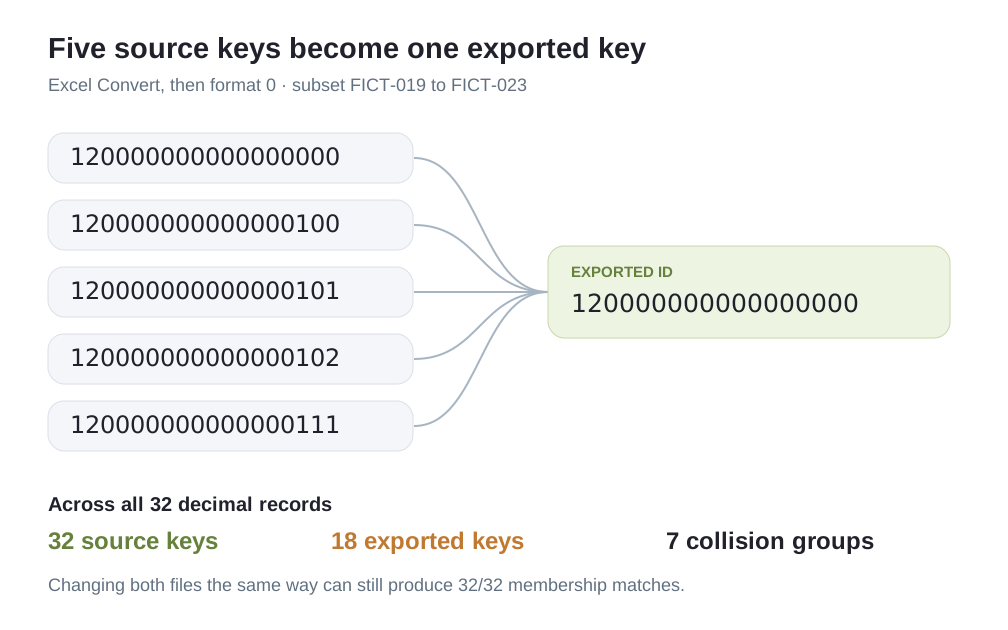
We then applied number format 0 to the ID cells in the same converted workbook and saved another CSV. Ten decimal strings were exact and 22 changed. The full-digit display exposed values such as 120000000000000101 → 120000000000000000. Formatting the converted cell did not restore that source ID.
In a fresh import, choosing Don’t Convert preserved 28 of the 32 decimal strings and all four leading-zero controls in the exported CSV. The remaining four decimal strings still appeared in exponent form. This prompt improved the measured outcome, while the final export still required inspection.
For a production workflow, Microsoft recommends importing identifiers as Text and documents automatic-conversion settings that can retain long numeric text. Apply the text choice before the values are interpreted. The exact menus depend on Excel version and platform. Our completed experiments cover the three named Mac routes. Microsoft’s guidance for large identifiers
Compare General export, the format 0 export and the Don’t Convert export with the tab-separated source in the kit.
What the Sheets typed and CSV routes preserved
The connected CSV import preserved 25 of 32 decimal strings and one of four leading-zero controls through CSV export. Five of the seven changed decimal strings still represented the same mathematical number when their exponent was expanded exactly. Two represented a different number.
Changing only the imported copy’s number format to 0 raised exact decimal strings to 31 of 32. The remaining changed value was 999999999999999 → 1000000000000000. Its captured typed readback still reported the original integer. We report this as observed formatter/export behaviour in this cloud route.
The explicit text route wrote the original characters through userEnteredValue.stringValue and assigned Text format before export. It preserved all 36 strings. The numeric-client route first applied Number(original), supplied numberValue, and used format 0. Only nine of 32 decimal strings and none of the leading-zero controls survived the exported text. Client conversion and the later formatter can each affect the result.
The pasteData CSV route returned the same exported characters as the connected CSV import. Fully quoting all CSV fields also left this measured outcome unchanged. Quotes delimit a CSV field, while the receiving operation decides its cell type.
For integrations, the measured typed-write route provides a reproducible example of preserving a string. Google also documents values.update with valueInputOption=RAW as a way to store string inputs without parsing them. Send a JSON string. RAW can also accept a numeric input, which retains any precision loss that already occurred in the caller. The RAW endpoint itself was outside our completed experiments. Google’s value types, RAW and USER_ENTERED semantics
{
  "userEnteredValue": {
    "stringValue": "120000000000000101"
  },
  "userEnteredFormat": {
    "numberFormat": { "type": "TEXT", "pattern": "@" }
  }
}
Why a higher match rate can hide a wrong attribution
We used the 32 unique source decimal IDs as fictional ground-truth ads and each exported ID as the corresponding payment’s key. A correct match retained its source owner. A wrong match equalled another source ID. An unmatched row found no source ID. This is a deterministic join exercise derived from the captured export.
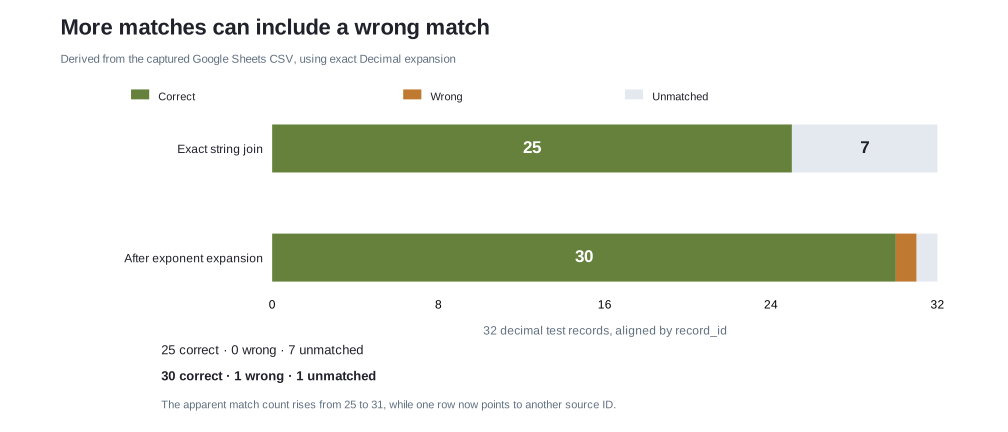
The unmodified Sheets CSV gave 25 correct matches and seven unmatched rows. We then expanded every recorded exponent using Python Decimal with the export’s decimal comma. This exact expansion gave 30 correct matches, one wrong match and one unmatched row.
The wrong match came from FICT-004. Its source ID was 999999999999999, but the export’s 1E+15 expands to 1000000000000000, the different source ID on FICT-005. Expansion accurately reads the exported exponent. It cannot reconstruct the discarded source digits.
| Derived Sheets CSV analysis | Correct owner | Wrong owner | Unmatched | Apparent matches |
|---|---|---|---|---|
| Exact string join | 25 | 0 | 7 | 25/32 |
| Exact exponent expansion, then join | 30 | 1 | 1 | 31/32 |
There is another failure mode when both files go through the same transformation. In the Excel format 0 capture, 32 original decimal keys became 18 distinct exported keys, with seven collision groups involving 21 source rows. If both sides use those same changed keys, every payment can still find a key. The resulting 32/32 membership count leaves the key collisions unresolved.
The Attribution Checker reports row membership in the selected ad export. Use that result alongside checks on the original keys and duplicate ownership when validating an attribution pipeline.
The JavaScript boundary differs from Excel’s decimal rule
Our runtime probe recorded 17 of the 32 decimal strings unchanged after Number → JSON number → String. Sixteen original integer values were not exactly representable in the resulting binary64 value. These are different counts because the shortest decimal serialization can resemble an input whose integer value was already changed.
| Original string | String after numeric round-trip | Exact integer represented by Number |
|---|---|---|
| 120000000000000100 | 120000000000000100 | 120000000000000096 |
| 120000000000000101 | 120000000000000100 | 120000000000000096 |
| 9007199254740992 | 9007199254740992 | 9007199254740992 |
| 9007199254740993 | 9007199254740992 | 9007199254740992 |
The exact value 2^53 and some larger even integers remain representable. The safe-integer range describes a range where every integer can be represented exactly. It does not classify every larger integer as changed. Similarly, some long decimal controls survive a particular conversion even though nearby IDs collapse.
JSON permits number tokens beyond that interoperable range. The conversion risk depends on how a client and receiving field interpret them. RFC 8259 identifies integers between −(2^53)+1 and (2^53)−1 as the range in which common binary64 implementations agree exactly. Our probe’s JSON string round-trip preserved all 36 source strings. RFC 8259, section 6
Validate the type before converting or forwarding it. Once a value arrives as a rounded number, String(value) can only stringify that value.
function requireAdId(value) {
  if (typeof value !== 'string' || !/^[0-9]+$/.test(value)) {
    throw new Error('Expected the original ad ID string');
  }
  return value;
}
This check rejects numeric JSON and exponent strings. An already-rounded all-digit string can still pass, so source comparison remains necessary.
Carry the same text contract into the CRM
This section applies documented HubSpot property types to an integration design. A live HubSpot import/export experiment was outside the agreed scope.
HubSpot’s property model distinguishes a string property with a text field from a numeric property. For the original ad identifier, use a dedicated string property. Keep payment amounts in numeric fields and carry the ad ID unchanged from the lead to the payment or reporting record. HubSpot properties API documentation
{
  "name": "meta_ad_id",
  "label": "Meta ad ID",
  "groupName": "contactinformation",
  "type": "string",
  "fieldType": "text"
}
The request above is a documented schema example for a Contact property. It was not submitted to a CRM account in this study. Configure and test the field in your own test portal before using it in a production intake path.
- Capture the source string. Save the resolved ad ID in its own field when the lead arrives.
- Preserve the type at each handoff. Keep it as text in spreadsheet, workflow and API payloads.
- Follow a test record. Read the lead, its payment linkage and the raw exported characters using stable business record keys.
- Retain exceptions. Keep missing IDs, unmatched keys and ambiguous ownership visible in the report.
The downloadable JSON Schema enforces a digit string. It validates the payload’s shape. Source comparison establishes whether its characters are still the original ID.
How to investigate an export that already contains changed IDs
- Keep the received file. Work on a copy and retain the original export bytes for comparison.
- Find a stable record key. Compare source and destination by a payment reference, CRM record key or another independent key.
- Inspect the stored type and value. If the original value is still present, change the export path and verify a new raw CSV. If digits were already discarded, return to the original source.
- Reimport original identifiers as text. Avoid passing them through a numeric conversion before the text field.
- Count correctness and collisions. Check exact character equality and distinct key ownership, then inspect unmatched rows and the relevant account/date scope.
A recovered display can look plausible while carrying the wrong identifier. The evidence to seek is an exact match to a source record with a known owner. If the original mapping is unavailable, retain the uncertainty in the attribution report.
Use the public attribution lab to reproduce missing, changed or unexpanded IDs. The HubSpot tracking guide follows the wider lead-to-payment path.
Download the evidence and inspect individual rows
The research kit contains the source corpus, all captured exports, sanitized typed readbacks, protocol, runtime probe, verifier and SHA-256 checksums. The reproduction notes explain delimiters, metrics and reuse. The checksum manifest identifies the frozen evidence files.
The expanded table scrolls sideways on larger screens to keep every ID on one line.
Inspect all 36 source strings against three captured routes
| Record | Original string | Excel Convert + 0 | Sheets CSV | Sheets typed string |
|---|---|---|---|---|
| FICT-001 | 123456789012 | 123456789012 | 123456789012 | 123456789012 |
| FICT-002 | 12345678901234 | 12345678901234 | 12345678901234 | 12345678901234 |
| FICT-003 | 123456789012345 | 123456789012345 | 123456789012345 | 123456789012345 |
| FICT-004 | 999999999999999 | 999999999999999 | 1E+15 | 999999999999999 |
| FICT-005 | 1000000000000000 | 1000000000000000 | 1E+15 | 1000000000000000 |
| FICT-006 | 1000000000000001 | 1000000000000000 | 1000000000000001 | 1000000000000001 |
| FICT-007 | 1234567890123456 | 1234567890123450 | 1234567890123456 | 1234567890123456 |
| FICT-008 | 1234567890123457 | 1234567890123450 | 1234567890123457 | 1234567890123457 |
| FICT-009 | 9007199254740990 | 9007199254740990 | 9,0072E+15 | 9007199254740990 |
| FICT-010 | 9007199254740991 | 9007199254740990 | 9007199254740991 | 9007199254740991 |
| FICT-011 | 9007199254740992 | 9007199254740990 | 9007199254740992 | 9007199254740992 |
| FICT-012 | 9007199254740993 | 9007199254740990 | 9007199254740993 | 9007199254740993 |
| FICT-013 | 9007199254740994 | 9007199254740990 | 9007199254740994 | 9007199254740994 |
| FICT-014 | 9007199254740995 | 9007199254740990 | 9007199254740995 | 9007199254740995 |
| FICT-015 | 10000000000000000 | 10000000000000000 | 1E+16 | 10000000000000000 |
| FICT-016 | 10000000000000001 | 10000000000000000 | 10000000000000001 | 10000000000000001 |
| FICT-017 | 12345678901234567 | 12345678901234500 | 12345678901234567 | 12345678901234567 |
| FICT-018 | 99999999999999999 | 99999999999999900 | 99999999999999999 | 99999999999999999 |
| FICT-019 | 120000000000000000 | 120000000000000000 | 1,2E+17 | 120000000000000000 |
| FICT-020 | 120000000000000100 | 120000000000000000 | 120000000000000100 | 120000000000000100 |
| FICT-021 | 120000000000000101 | 120000000000000000 | 120000000000000101 | 120000000000000101 |
| FICT-022 | 120000000000000102 | 120000000000000000 | 120000000000000102 | 120000000000000102 |
| FICT-023 | 120000000000000111 | 120000000000000000 | 120000000000000111 | 120000000000000111 |
| FICT-024 | 123456789012345678 | 123456789012345000 | 123456789012345678 | 123456789012345678 |
| FICT-025 | 1000000000000000000 | 1000000000000000000 | 1E+18 | 1000000000000000000 |
| FICT-026 | 1000000000000000001 | 1000000000000000000 | 1000000000000000001 | 1000000000000000001 |
| FICT-027 | 1234567890123456789 | 1234567890123450000 | 1234567890123456789 | 1234567890123456789 |
| FICT-028 | 9223372036854775807 | 9223372036854770000 | 9223372036854775807 | 9223372036854775807 |
| FICT-029 | 10000000000000000000 | 10000000000000000000 | 1E+19 | 10000000000000000000 |
| FICT-030 | 10000000000000000001 | 10000000000000000000 | 10000000000000000001 | 10000000000000000001 |
| FICT-031 | 12345678901234567890 | 12345678901234500000 | 12345678901234567890 | 12345678901234567890 |
| FICT-032 | 18446744073709551615 | 18446744073709500000 | 18446744073709551615 | 18446744073709551615 |
| FICT-033 | 000123 | 123 | 123 | 000123 |
| FICT-034 | 0123456789012345 | 123456789012345 | 123456789012345 | 0123456789012345 |
| FICT-035 | 0120000000000000101 | 120000000000000000 | 0120000000000000101 | 0120000000000000101 |
| FICT-036 | 000000000000000001 | 1 | 1 | 000000000000000001 |
All identifiers and records in this dataset are fictional. The corpus’s digit lengths and boundary values are diagnostic choices. They do not describe the distribution of IDs issued by Meta or the prevalence of corruption in customer accounts.
How we checked
The Variafy team performed the recorded operations on 11 November 2026. The raw CSVs were parsed with Python’s csv module, aligned by record_id and compared as strings. Decimal expansion was used only for the explicitly labelled derived analysis. JavaScript integer values were inspected with BigInt(Number(value)), while shortest string serialization was recorded separately. A separate AI review agent independently reran the Python and Node checks and recomputed the export counts, joins and collisions.
Google Sheets exposed no cloud build number. The observed outcomes are tied to the connector/API routes, locale, formats and service behaviour on the test date. Excel results apply to the recorded Mac version and layout. Completed real runs, derived calculations and documented recommendations are identified in their sections. The primary-source list and protocol accompany the data.
Questions
Does scientific notation prove that an ad ID is damaged?
Inspect the stored value and the exported characters separately. In this study, several exponent strings represented the original number, while two captured Sheets export values represented a different number. Exact source comparison distinguishes them.
Can I fix an ID by expanding the exponent?
Expansion reads the number that was exported. If the exporter discarded digits, it cannot recover the source ID. In the derived Sheets test, exact expansion introduced one wrong match while increasing apparent matches.
Are all IDs above 15 digits or 2^53 changed?
The outcome depends on the path and value. Our corpus includes long exact controls that survive particular numeric conversions and adjacent identifiers that collide. Carry identifiers as strings and verify the exported characters.
Was HubSpot tested with real CRM records?
The CRM section uses HubSpot’s published property schema. All measured spreadsheet records are fictional, and this study used no live HubSpot portal or customer data.