Meta Pixel and Conversions API: deduplication
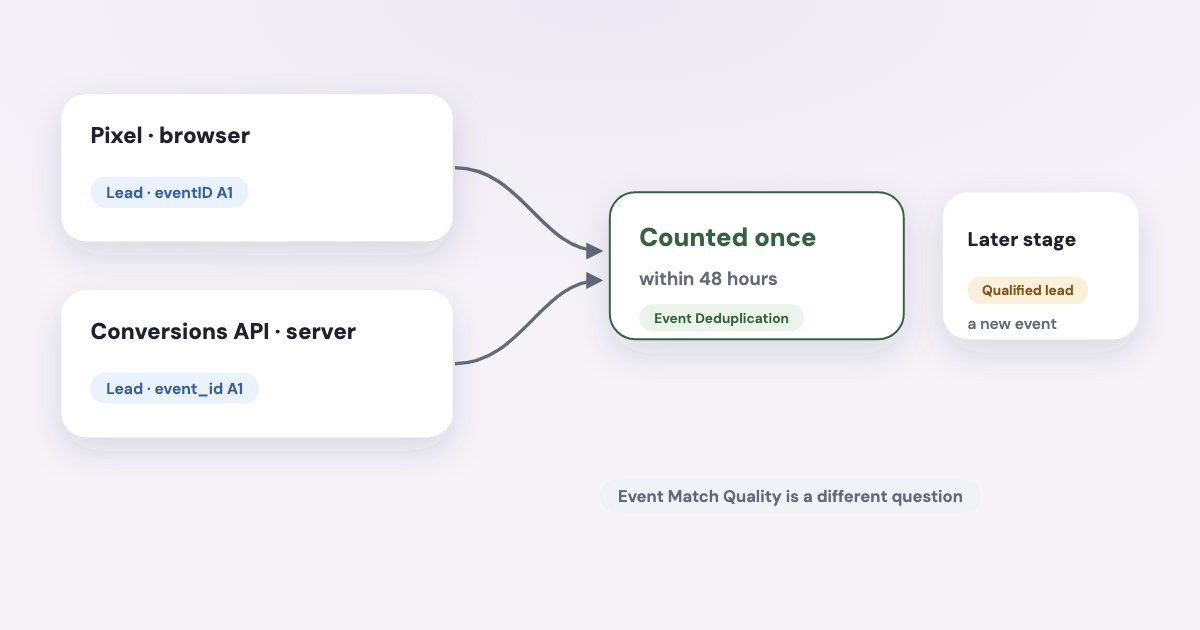
If the Pixel and Conversions API both report the same website action, send the same event name and the same event identifier to the same Pixel or dataset. The browser uses eventID and the server uses event_id; Meta documents a 48-hour receipt window for the matching event pair. Check Event Deduplication in Events Manager rather than assuming a high Event Match Quality score proves duplicate events are removed. [1] [2] [3]
On this page10 sections
Decide whether the two events describe one action
Start with a real business action: one successful website form submission or one completed order. The Pixel and the server can each report that action, but the measurement system needs enough information to recognize that they are overlapping reports rather than two results. [1]
Meta recommends using Conversions API alongside the Pixel and setting up deduplication for events sent through both. Its guidance also says you do not need this browser/server deduplication for an event you are not sending twice through those routes. [1]
Do not infer a duplicate merely because two events share a customer. Distinguish an initial inquiry, a later qualification and a later payment in your event plan before anyone chooses identifiers.
The CRM-focused Conversions API guide covers downstream lead stages. This article concerns the website action reported through both browser and server, so it does not reuse the original inquiry’s identity as a blanket instruction to discard later outcomes.
Write down which system creates the action record and which event represents it. That record gives your implementer a place to generate the shared identifier and a way to compare the measured event with something the business actually received.
Connect the browser and server identifiers
Meta’s recommended method compares event ID and event name. The browser Pixel’s eventID must match the corresponding server event_id, and the browser event name must match server event_name; equivalent-looking labels are not a substitute for matching values. [1]
| Part of the pair | What to compare |
|---|---|
| Browser event name | The actual event sent, such as Lead or Purchase. [1] |
| Server event_name | The matching name for the same business action. [1] |
| Browser eventID | The action identifier passed in the Pixel event options. [1] |
| Server event_id | The same action identifier in the server payload. [1] |
| Destination | The same intended Pixel ID for the corresponding reports. [1] |
| Business record | Your source submission or order that explains what happened. |
Meta’s server parameter reference says an order number or transaction ID can identify a purchase. For an event without an intrinsic identifier, it permits a unique generated value as long as the corresponding browser and server reports share it. [2]
Generate that value once at the accepted action and pass it through both routes. Two independently generated random values may both be unique, but they cannot identify each other as the same action.
Avoid using a person’s email, phone number or contact ID as a reusable event identifier. That is an engineering recommendation: a person can place several orders, so a person-level key does not by itself describe which order you mean.
Keep action identity stable through retries
Treat event identity and delivery attempts as separate records. Keep the same event_id when your server retries the same accepted action, while storing each attempt’s response and time for troubleshooting.
Give the next genuine action a new identity. Meta’s own purchase example uses different order numbers for different purchases and the corresponding shared IDs on each browser/server pair, illustrating why a constant event_id is unsuitable. [2]
Check refreshes and repeated button presses at the business-record level. If the visitor reloads a thank-you page, ask whether a new order or submission actually exists before firing another result; browser/server deduplication is not a complete form-submission or payment-processing design.
Meta’s recommended event-pair window is based on receipt within 48 hours of the first event with that identifier. Send events promptly and monitor delays rather than planning a server retry strategy around the end of the deduplication window. [1] [3]
Check deduplication in Events Manager
Meta’s verification guide describes Overview as showing received events before deduplication, consent controls and other processing. Seeing browser and server receipts is therefore not, by itself, proof that the final conversion total has doubled. [3]
Use the event’s deduplication detail rather than relying only on the top-level count. The following labels come from the developer documentation read November 4, 2026, as of November 2026; the guide still uses “Pixel” in parts of the interface description. [3]
STEPS: 1. Open Events Manager for the intended data source. [3] 2. Select the source corresponding to the Pixel ID your integration uses. [3] 3. Open Overview. [3] 4. Select Event Details for the event type you are checking. [3] 5. Open Event Deduplication. [3] 6. Review Rate of Events Deduplicated and Rate of Deduplication Key Usage. [3] 7. Open Event Freshness to investigate delivery delay. [3]
Ask the implementer to pair this interface check with the payload values for one authorized action. Retain the destination ID, event name, shared identifier, occurrence time and delivery responses without copying unnecessary customer details into a support ticket.
Do not expect every event type to have identical browser/server coverage. A server-only outcome and an event reported through both sources need different interpretation, so review each event type’s intended delivery design before judging a percentage.
Separate matching quality from event identity
Event Match Quality concerns how effectively server customer-information parameters can match events to people. Event Deduplication concerns whether overlapping reports of the same action are recognized; Meta presents them as separate verification checks. [3]
A well-identified person can still have an incorrectly paired action ID. Conversely, a correctly paired event does not establish that its customer information is sufficient for attribution; ask which problem a diagnostic actually measures before adding more data.
Meta also documents an alternative using event_name with fbp and/or external_id. Its limitations include browser-before-server behavior and limitations for repeated events from only one source, so it should not be summarized as “email matching removes all duplicates.” [1]
Our recommendation for a new implementation is to follow Meta’s recommended event-name-and-ID method and verify the resulting pair explicitly. Do not add several integrations to raise a quality score until you know which component is already sending each event.
If the browser route is blocked for a particular visit, the server receipt may be the only report. That is not the same situation as two reports with different IDs; interpret the expected source coverage before treating every unmatched server event as an error.
Fix the earliest identity mistake
When counts look high, compare the source action record with actual emitted events. Our recommended diagnosis is: confirm the destination, compare names, compare identifiers, inspect retries, and check whether more than one browser or server integration sends the action.
When counts look low, inspect whether separate actions reused the same name-and-ID combination. Meta’s deduplication rules can only work with the identities you provide, so an identifier collision needs a source-system fix rather than a larger reporting adjustment. [1] [2]
Do not assume whichever payload arrives last repairs the earlier one. The deduplication guide generally favors the first received event when content is not meaningfully different, while the parameter reference also documents browser/app preference for near-simultaneous arrivals; neither supports a universal “latest payload wins” rule. [1] [2]
Use the Pixel troubleshooting guide if one route never sends the event. If the dispute is instead that two advertising platforms claim one sale, use the Meta–Google double-counting guide; platform attribution overlap is a separate reconciliation problem.
What to do next
Choose one website action that both the Pixel and Conversions API should report. Ask your implementer to show the corresponding destination, name and identifier from each route, then check that event’s deduplication and freshness details.
Fix the source of a mismatched, regenerated or reused identifier and repeat the comparison with another authorized action. Keep later CRM stages distinct so the correction does not erase real business progress.
Where Variafy fits
Variafy can bring CRM deals and payments into reports and send payments and lead stages back to Meta. That does not replace correct website Pixel/CAPI event identity; have your implementer verify the paired events first. It is in a free beta by invitation. Join the waitlist.
How we checked
Checked on 4 November 2026 against the pages below, read in English; Meta’s pages were read in a browser. We checked the documentation only: we did not run these steps in a live ad account.
- developers.facebook.com/documentation/ads-commerce/conversions-api/deduplicate-pixel-and-server-events — Recommended matching keys, browser eventID, destination, 48-hour receipt window and alternative-method limitations
- developers.facebook.com/documentation/ads-commerce/conversions-api/parameters/server-event — Unique action IDs, order examples, event_time and documented event-preference nuance
- developers.facebook.com/documentation/ads-commerce/conversions-api/verifying-setup — Received versus processed counts, Event Details, Event Deduplication, key usage, freshness and separate Event Match Quality check
What we could not confirm
- That every two-source receipt is a double-counted conversion
- A universal target deduplication percentage
- Customer matching as proof of deduplication
- Guaranteed server-only retry deduplication through the alternative method
- A latest-payload-wins or value-merging rule
- That CAPI bypasses consent
- Live payload or Events Manager testing. Stable retry IDs and source logs are engineering recommendations
Variafy is our product.
Questions
How do I deduplicate Pixel and Conversions API events?
Send the same event name and the same event identifier from both routes to the same Pixel or dataset. The browser uses eventID and the server uses event_id. Meta documents that events are deduplicated only if received within 48 hours of the first event with that identifier.
Does a high Event Match Quality score mean duplicates are removed?
No. Event Match Quality and Event Deduplication answer different questions, so check Event Deduplication in Events Manager.
Is a later qualified-lead event a duplicate of the first lead event?
No. A later qualified-lead stage is a different event, not a duplicate of the initial inquiry. Give separate purchases or lead actions distinct identifiers.