Meta Conversions API for CRM: send lead stages and sales back to Meta
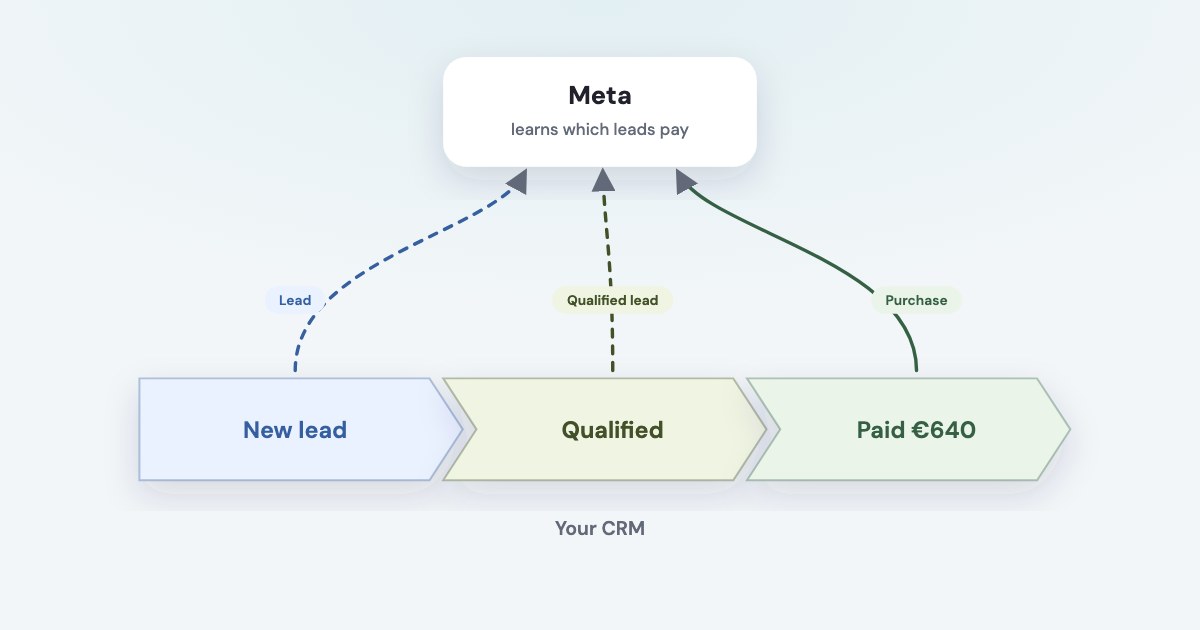
The Conversions API for CRM sends what happens after the lead — qualified, sold — from your CRM back to Meta, so ads find people who buy rather than people who fill in forms. For Meta lead forms it powers the qualified leads goal; for website leads you send standard events such as Purchase. The old Offline Conversions API was discontinued in May 2025.
On this page12 sections
What the Conversions API for CRM does
Meta optimises for whatever you tell it is a result. If that is a lead form submission, it finds people who
submit forms — not necessarily people who buy. The CRM integration closes the loop; its guide describes how to
send down-funnel event data from your CRM back to Meta
(source).
There are two uses:
- Meta lead forms → the qualified leads goal. You send each lead’s stages, and Meta optimises for leads that reach the stage you pick.
- Any lead → sales as standard events. A Purchase with its value tells Meta which clicks turned into money, for optimisation and reporting.
Ignore guides that say “offline event set”
The Offline Conversions API will be discontinued in May 2025.
(source) Offline sales now go through the same Conversions API. And since April 2026 the qualified
leads goal is no longer available for new campaigns without this integration; existing campaigns were affected from August 2026
(source).
Is it worth it for you
Meta’s guide lists who the qualified leads integration suits (source):
- you use Meta lead forms (Instant Forms) and already download the leads into a CRM;
- you generate at least 200 leads a month;
- you can upload data at least once a day;
- the stage you want to optimise for happens within 28 days of the lead, for 1% to 40% of leads.
Before Meta lets you configure the funnel, at least 60% of your leads need matching events — Meta calls this lead coverage (source). The goal isn’t available through personal ad accounts (source).
Below 200 leads a month, skip the goal and still send sales as Purchase events: they help optimisation and reporting at any volume.
Connect your CRM in Events Manager
- Open Events Manager → Data sources → Connect data sources.
- Select CRM and click Next.
- Create a new dataset. Meta recommends one just for CRM events, so they don’t mix with your pixel’s (source).
- Choose “Select a partner” or “Connect manually”.
If no plugin exists for your CRM, choose Connect manually.
(source)
Pick the dataset once: The integration is Pixel-based. Do not switch completed integrations to a different Pixel.
Partners differ by CRM. HubSpot sends stages to Meta from its own side (source). Pipedrive isn’t mentioned in Meta’s Conversion Leads documentation; Zapier publishes templates such as “Send funnel events to Facebook Conversions from Pipedrive” (source), and several connectors do the same.
What one CRM event contains
If you connect manually, each stage change is one event sent to
https://graph.facebook.com/API_VERSION/PIXEL_ID/events with an access token generated in Events Manager, up to 1,000
events per request (source):
{
  "data": [{
    "event_name": "Qualified lead",
    "event_time": 1760511600,
    "action_source": "system_generated",
    "user_data": { "lead_id": 1234567890123456 },
    "custom_data": { "event_source": "crm", "lead_event_source": "Pipedrive" }
  }]
}
| What it holds | |
|---|---|
event_name | Your stage name, free text: “Marketing Qualified Lead”, “Converted” |
event_time | When the stage changed, Unix seconds in GMT — no more than 7 days ago, and after the lead was created |
action_source | system_generated for every CRM stage event |
event_source | crm, inside custom_data |
lead_event_source | The tool the leads come from, such as your CRM’s name |
lead_id | The 15–17 digit Meta lead ID — or hashed contact details, see below |
Without event_source and lead_event_source, Meta says the event won’t register as a Conversion Leads
event (source). The full list is in Meta’s payload specification.
Test events are real events
Meta’s Test Events tool needs a test_event_code, but
Events sent with test_event_code are not dropped. They flow into Events Manager and are used for targeting and ads measurement purposes.
(source) Test with a real lead, not invented data.
Send every stage, not just the sale
Meta wants the whole path of each lead. Its example: for 100 leads, where 70 are contacted, 30 qualify and 15 buy,
Meta expects 215 events to be uploaded
— and make sure you capture the lead status change history rather than a snapshot
(source). Sending only sales isn’t enough; the FAQ asks for at least two stages, ideally three
(source).
Then you pick what to optimise for:
In the Optimization Target step, select the earliest lead stage to optimize for. The selected lead stage does not need to be the last stage of the funnel.
Meta adds that the system also optimises for the stages after it, and may switch to a different stage if that performs better.
Matching people: lead ID, hashes, click ID
Every event needs at least one way to find the person (source):
- Lead ID — for Meta lead forms, the
leadgen_idfrom the lead webhook. Store it on the CRM record when the lead arrives; not every integration does. - Email or phone, hashed with SHA-256. Normalise first: for email,
Trim any leading and trailing spaces. Convert all characters to lowercase.
; for phone, digits only with the country code, no “+” and no leading zeros (source). - Click ID — the
fbcvalue built from thefbclidyour landing page saved.
Don’t hash lead_id, fbc, fbp, the IP address or the user agent: Meta expects those as they
are. For leads from your own website there is no lead ID, so matching rests on hashed contact details and the click ID.
Sales from website leads
The CRM stage format is for Meta lead forms; Meta asks not to use it for other event types, such as website leads
(source). For a sale from a website lead, send a standard Purchase event instead:
valueandcurrency— the amount paid;action_source— where the sale actually closed:phone_call,email,physical_storeorother. Meta’s best practices say for such events itshould not be website
(source);event_id— your own payment ID, so the same purchase reported by the pixel isn’t counted twice;event_time— no more than 7 days ago (source).
These count for optimisation too: All action sources enable ad optimization capabilities.
(source)
Before any of this, the sale has to be tied to an ad in your CRM — see which Facebook ads bring paying customers.
The deadlines that decide it
| What Meta says | What it means for you | |
|---|---|---|
| 7 days | Meta accepts an event up to 7 days after it happened | Upload daily; a monthly export is too late |
| 28 days | The optimised stage should happen within 28 days of the lead | Pick an earlier stage if sales take longer |
| 60% coverage | Share of leads with matching events | Send events for every lead, not a sample |
| 2–4 weeks | Learning after setup (Meta’s FAQ says 1–2 months) | Don’t change the dataset while it learns |
Meta also says how much data to wait for: If it normally takes 14 days for a lead to convert, then you need at least that many days of good data uploaded.
(source)
Data and consent
Sending customer data to Meta puts obligations on you. Meta’s Business Tools Terms require you to
have all of the necessary rights and permissions and a lawful basis
for the data, to hash contact information before
sending it, and not to send sensitive categories such as health or financial information (source).
For matching and reporting, Meta Ireland acts as your processor under its Data Processing Terms.
For people in certain US states, Meta offers Limited Data Use, which you must proactively enable
(source). Work out your basis for sending CRM data with your own legal adviser before you switch it on.
How Variafy sends it
Variafy already holds your payments and lead stages for its revenue reports, from Pipedrive, a Google Sheet or an uploaded file. In the console you can switch on sending them back to Meta:
- Payments as Purchase events, purchases only and never refunds, each sent once with your payment ID as the deduplication key, with the action source you choose.
- Lead stages as “New lead” and “Qualified lead” — deliberately not the standard “Lead”, which your pixel already sends. You mark which CRM stages count as qualified.
- To the right dataset. Each payment and lead goes to the dataset of the ad account its lead came from, matched by the tags in the ad link. One from Google, from an untagged link or from a campaign name two accounts share stays out.
- Within Meta’s limits. Events go out every half hour, never older than 7 days, matched by a hash of the email or the Meta click ID; whatever can’t be sent is counted with the reason.
Ready for the qualified leads goal?
The console checks your own numbers against Meta’s requirements: leads in the last 30 days against the 200 Meta asks for, and the share of leads reaching qualified within 28 days against the 1–40% range.
Add https://www.variafy.com/mcp to your assistant. Variafy is in private beta:
join the waitlist.
How we checked
Checked on 15 October 2026 against Meta’s developer documentation for the Conversions API (the CRM integration guide and its steps, payload specification, FAQ, customer information and server event parameters, best practices, using the API), Meta’s Business Help Center (CRM partner setup, lead ad performance goals), the Graph API v20.0 changelog, Meta’s Business Tools Terms, the Limited Data Use documentation, and the HubSpot and Zapier pages on their Meta integrations.
Where Meta’s pages disagree — learning time, website forms — we say so. Variafy is our product.
Questions
What is the Meta Conversions API for CRM?
A way to send lead stages and sales from your CRM back to Meta through the Conversions API, so ads can optimise for leads that qualify or buy. For Meta lead forms it powers the qualified leads performance goal.
What replaced the Facebook Offline Conversions API?
The Conversions API. Meta discontinued the Offline Conversions API in May 2025; offline sales are now sent as standard Conversions API events with an action source such as phone_call, physical_store or other.
How many leads do I need for Meta’s qualified leads goal?
Meta’s guide asks for at least 200 leads a month, daily uploads, and a stage that 1% to 40% of leads reach within 28 days. Lead coverage — leads with matching events — should be at least 60%.
How old can a CRM event be when I send it to Meta?
Up to 7 days. Meta rejects events with an event_time more than 7 days in the past, so CRM events must be uploaded daily rather than as a monthly export.
Does Pipedrive integrate with Meta’s Conversions API?
Not natively in Meta’s documentation. Zapier offers templates that send Pipedrive deal stages and purchases to Meta, and other connectors do the same; or the events can be sent with your own code.