TikTok lead generation forms: send leads to a CRM
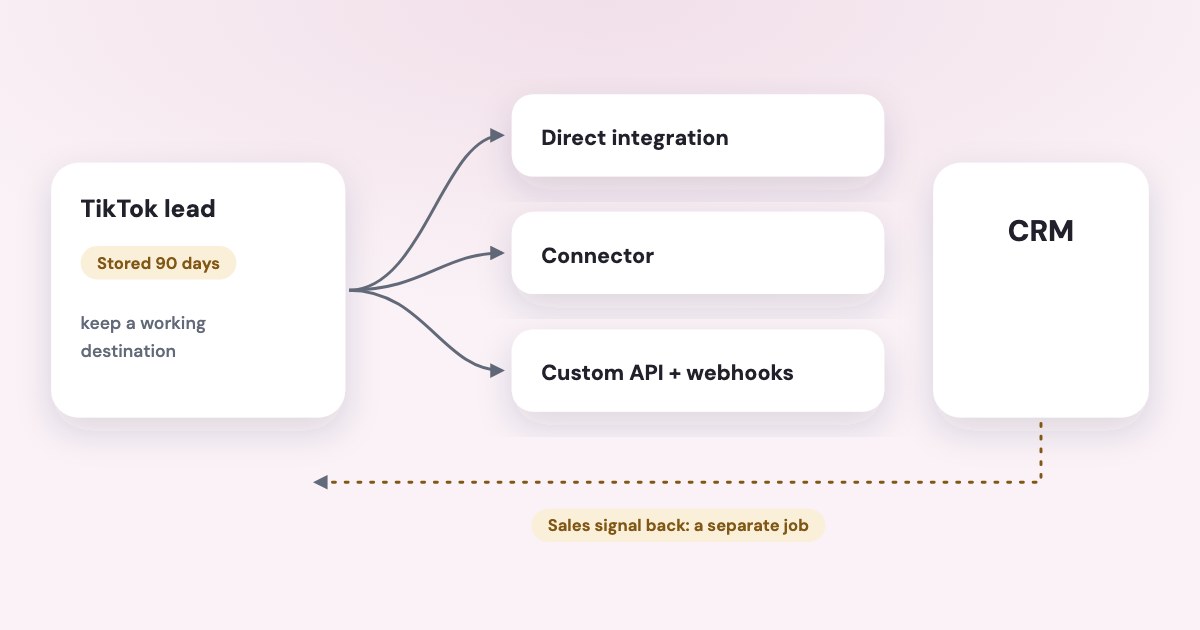
For TikTok Instant Form leads, choose a documented direct CRM integration, a supported connector, or TikTok Custom API with Webhooks. Confirm the source lead in Ads Manager or Leads Center first, then test the selected form and destination; exporting a lead and sending CRM stages back to TikTok are separate directions. [1] [2] [4]
On this page10 sections
Which documented delivery option should you choose?
Start with the system your team already uses to follow up. TikTok’s current integration directory, updated June 2026 and read November 4, 2026, lists direct integrations including Google Sheets, HubSpot, Salesforce Sales Cloud, and Salesforce Marketing Cloud. [1]
The same directory lists third-party routes including LeadsBridge, Zapier, Albato, and Make. These are documented options, not a claim that every workflow is included in your existing subscription. [1]
| Delivery route | When to investigate it |
|---|---|
| Direct CRM integration | Your existing destination is listed and the required fields are supported |
| Direct Google Sheets integration | Your team can work from a maintained spreadsheet |
| Third-party connector | You need a destination or routing workflow beyond the direct option |
| Custom API with Webhooks | Your technical team will own a custom delivery process |
TikTok also lists website-builder plugins, but describes functions such as account setup and Pixel installation in that category. Do not assume installing a website Pixel establishes delivery of native Instant Form submissions to your CRM. [1]
Are you collecting a native form lead or a website lead?
TikTok documents leads from Instant Forms and TikTok Direct Messages as automatically synced to Ads Manager and Leads Center. It says leads collected directly on your website are not synced to those workspaces. [4]
If your ad sends someone to your website, investigate the website form and its destination first. An empty Leads Center is not, by itself, evidence that a website inquiry failed.
For an Instant Form, locate the record in TikTok before changing the connector. That separates a missing source submission from a failure later in the delivery chain.
The following labels follow TikTok’s official access guide read November 4, 2026, as of November 2026. The guide says Admin permission is needed to download and manage leads. [4]
STEPS: 1. Open TikTok Ads Manager. 2. Click Campaigns. 3. Click Ad. 4. Select the relevant Lead Generation ad. 5. In Results, click Download Lead Data. [4]
Keep form and ad identifiers with the source record. They distinguish similar forms and older ads still collecting inquiries.
Where do you connect Google Sheets or your CRM?
TikTok’s newer Google Sheets guide uses Tools → Leads Center under Management → Connect CRM. Older instructions show other entry points, so the steps below follow the current guide read November 4, 2026. [3]
Before starting its Sheets setup, TikTok requires an Instant Form, admin access to the ad account, a Google account, and editor access to the destination sheet. Check those requirements with the person who will maintain the route. [3]
The traditional setup in that guide provides a delivery-focused path:
STEPS: 1. Open Tools. 2. Select Leads Center. 3. Click Connect CRM. 4. Select Google Sheets. 5. Click TikTok direct integration. 6. Click Apply for Permission. 7. Select Sign into Google Sheets. 8. Complete the displayed Google authorization. 9. Click Next. 10. Choose the intended TikTok Instant Form. 11. Click Choose a spreadsheet from your Google Drive. 12. Select the destination spreadsheet. 13. Select the worksheet tab. 14. Map the corresponding form fields to the sheet fields. 15. Click Next. 16. Click Yes, send test data. [3]
Read the resulting row rather than stopping at a successful authorization. Confirm the contact fields, any qualification answers you need, and the worksheet your team will actually use.
For another CRM, choose its documented option and follow that provider’s official setup. Do not reuse the Google Sheets button sequence as a supposed universal procedure for every destination.
How is delivery different from signal postback?
TikTok’s one-click CRM overview distinguishes lead export, signal postback, and a combined setup. Lead export sends the inquiry to your destination; signal postback returns CRM outcome information to TikTok. [2]
The newer Sheets guide includes a combined setup and a signal-postback-only option. If your problem is missing inquiries in the CRM, selecting only postback does not establish the outbound delivery you need. [2] [3]
Decide the direction before following a wizard. Your first task may simply be receiving new inquiries, with sales-stage feedback becoming a later implementation once your team records outcomes consistently.
Give the two directions separate acceptance checks. For delivery, look for a usable destination record; for feedback, define the sales-stage change and the permitted information your business intends to return.
Do not invent stage names or treat any spreadsheet edit as a completed sale. Agree on your business definitions first, then follow the current official documentation for the feedback integration you select.
What should you check when records stop arriving?
Trace one record from TikTok to the destination and identify the first missing stage. Check whether the source form is the one selected by the connection, then compare the fields the form sends with the fields the destination requires.
TikTok documents Edit CRM Settings under Connect to a CRM System after opening Download Leads from the ad or Instant Form page. That route allows changes to a form connection’s field mapping. [5]
Use the error information and the destination’s own record history before reconnecting everything. A lead may have been rejected, attached to an existing contact, filtered by a workflow, or written to a different worksheet; treat these as checks to investigate, not claims about what happened in your account.
TikTok says disconnecting the Instant Form connection stops leads for that form. Review the intended repair before deleting a connection, and keep the source records available for reconciliation. [5]
TikTok’s access guide says Ads Manager stores lead data for 90 days. Download the affected available records while you investigate, and do not assume connecting a new destination automatically backfills the interval you missed. [4]
If a provider advertises real-time syncing, check its actual delivery logs and documented expectations. A general description of speed is not proof that a particular inquiry reached the correct salesperson.
What should you check before paying for a connector or API build?
Ask whether a direct option already covers the destination and fields you need. Then compare the connector’s actual plan requirements with the workflow you intend to run, including lookups, updates, and retries.
On November 4, 2026, Zapier’s official USD pricing page showed Professional starting at US$19.99 per month with yearly billing selected. That is a published starting subscription price, not a verified total for your TikTok workflow or destination. [6]
Make’s pricing FAQ exposed a Free-plan allowance of 1,000 credits per month, but no readable paid-plan dollar price loaded in the page or browser. Do not quote a remembered paid price or translate credits into a promised number of leads without checking the workflow. [7]
TikTok documents Custom API with Webhooks as an option. Its linked API portal returned no readable documentation in this research, so this article does not supply endpoints, permission scopes, quotas, or retry timings. [1] [8]
If you choose custom work, assign ownership of delivery failures, duplicate handling, and recovery before the build. Compare the complete maintained process with the direct options.
What to do next
Confirm whether the inquiry comes from an Instant Form or your website, then locate a source record. Choose the simplest documented route that meets your field and destination requirements and test that exact form into the destination.
Assign an owner for failed deliveries and reconcile the available missing records. Use the lead response time guide for the follow-up handoff and cost per qualified lead when evaluating what the delivered inquiries become.
For reporting after the delivery route works, use the Variafy overview to understand the product’s role in connecting ad data and business outcomes.
Where Variafy fits
Variafy does not establish the TikTok form-to-CRM route described here; use the direct integration, connector, or technical implementation first. It can connect TikTok Ads and your business’s CRM deals and payments to an AI assistant for reporting. Reading data is free in the free invitation beta; sign-up is closed. Join the waitlist.
How we checked
Checked on 4 November 2026 against the pages below, read in English. We checked the documentation only: we did not run these steps in a live ad account.
- ads.tiktok.com/resources/help/article/available-crm-integrations-tiktok-lead-generation?lang=en — Direct integrations, connectors, Custom API with Webhooks, and website-plugin scope
- ads.tiktok.com/resources/help/article/about-one-click-crm-integration?lang=en — Lead export versus signal postback and combined setup
- ads.tiktok.com/resources/help/article/how-to-set-up-one-click-crm-integration-for-google-sheets?lang=en — May 2026 Sheets guide: prerequisites, current Leads Center route, traditional setup, mapping, and test-data button
- ads.tiktok.com/resources/help/article/access-leads-data-in-leads-center?lang=en — Native versus website leads, Admin access, export route, and 90-day storage
- ads.tiktok.com/resources/help/article/how-to-edit-your-crm-integration-settings?lang=en — Current mapping-edit route and effects of disconnecting a form
- zapier.com/pricing — USD Professional starting price with yearly billing selected in browser
- www.make.com/pricing — Free-plan credits; no readable paid-plan price
- business-api.tiktok.com/portal/docs?id=1694290110349313 — Official API destination attempted; returned no readable documentation; access checked November 4, 2026, not used as proof of API details.
What we could not confirm
- Universal availability of every integration
- Automatic historical backfill
- Guaranteed delivery speed
- A paid Make price
- A verified connector bill for your workflow
- API endpoints, scopes, quotas, authentication requirements, or retry timings. The linked API portal returned an empty document to the reader. No leads, permissions, connections, or CRM signals were submitted, tested, or changed
Variafy is our product.
Questions
How do TikTok leads get into a CRM?
TikTok documents direct integrations, third-party connectors and a Custom API with Webhooks. Google Sheets is among the direct integrations, set up under Tools, then Leads Center, then Connect CRM.
How long does TikTok keep my lead data?
TikTok says Ads Manager stores lead data for 90 days, so keep a working destination rather than treating Ads Manager as the archive.
Do website form leads appear in TikTok’s lead workspace?
Not automatically. Website form leads are not listed in TikTok’s native lead workspace, and sending sales outcomes back is a separate job from exporting leads.