UTM builder and generator for every ad platform: Google Ads, Microsoft, Meta, TikTok, LinkedIn (2026)
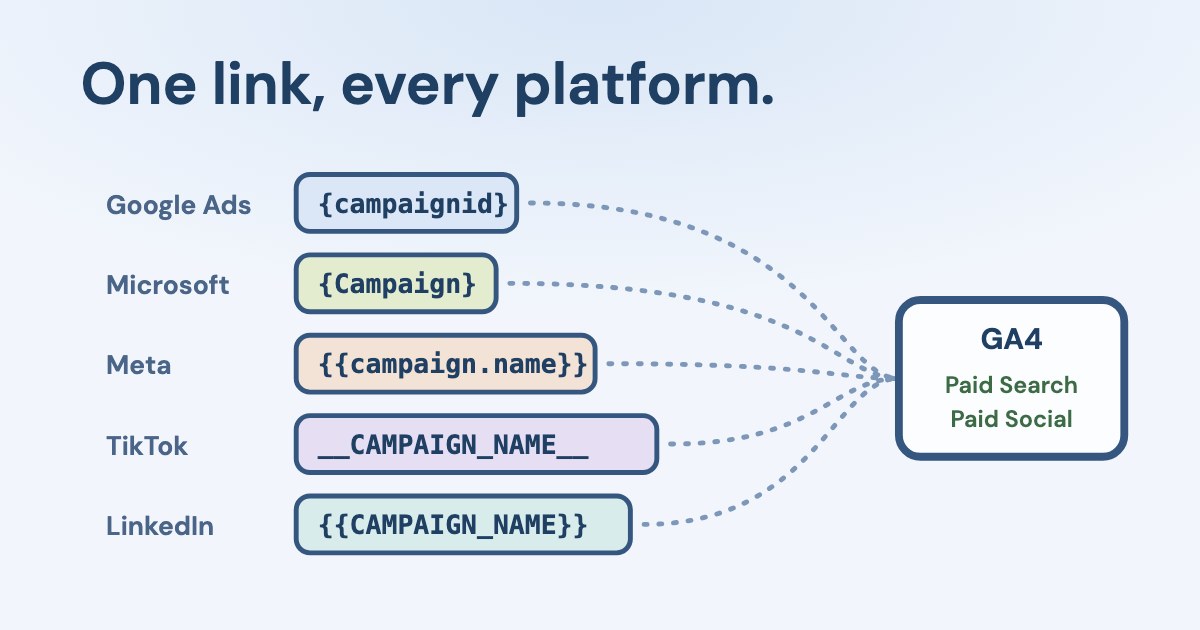
A UTM builder adds utm_source, utm_medium and utm_campaign to a link so Google Analytics knows where a visit came from. For ads, use each platform’s own macros, so campaign names and IDs fill in by themselves.
The free builder below writes the template for Google Ads, Microsoft, Meta, TikTok, LinkedIn and Pinterest, says which field to paste it into and which GA4 channel the visit lands in.
Open the free UTM builder for every ad platform ↓
On this page13 sections
Free UTM builder and generator for Google Ads, Microsoft, Meta, TikTok and LinkedIn
UTM builder for every ad platform
Click a field above, then a macro to insert it at the cursor
Paste into:
Full link
What one click will send (sample values)
Many links at once (CSV)
One link per line: url, source, medium, campaign, content, term, id. Put a URL that contains commas in quotes. Up to 500 lines; nothing leaves your browser.
Check a tagged link
This checks one link. Variafy compares Meta and Google Ads clicks with GA4 sessions campaign by campaign and lists Facebook and Instagram traffic that arrived without tags — ask for it in ChatGPT or Claude.
The builder keeps macros intact — Google’s own Campaign URL Builder encodes curly braces into %7B…%7D, which no platform fills in. For Meta in depth, with all nine dynamic parameters, see our Facebook UTM parameters guide.
What are UTM parameters?
UTM parameters are tags added to a link after “?” that tell analytics where a visit came from. The name stands for Urchin Tracking Module, after the analytics product Google bought in 2005. GA4 reads these (Google):
| What it says | Example | |
|---|---|---|
utm_source | Who sent the visit | google, facebook, newsletter |
utm_medium | What kind of traffic | cpc, paid_social, email |
utm_campaign | Which campaign | spring_sale |
utm_term | Paid keyword or ad group | crm for clinics |
utm_content | Which ad or link | video_03 |
utm_id | Campaign ID | 21034567890 |
Use a full set or none. Google says that if any UTM parameter is present, GA4 takes all traffic source values from the UTM tags only (Google) — so a link with a source but no medium overwrites better information with (not set).
What are the UTM macros for each ad platform?
| Syntax | Campaign | Ad group / ad set | Ad | Where to paste | |
|---|---|---|---|---|---|
| Google Ads | {lowercase} | ID only: {campaignid} | {adgroupid} | {creative} | Final URL suffix |
| Microsoft Advertising | {CamelCase} | {Campaign}, {CampaignId} | {AdGroup}, {AdGroupId} | {AdId} | Final URL suffix |
| Meta | {{lower.dot}} | {{campaign.name}}, {{campaign.id}} | {{adset.name}} | {{ad.name}} | Ad → Tracking → URL parameters |
| TikTok | __UPPER__ | __CAMPAIGN_NAME__, __CAMPAIGN_ID__ | __AID_NAME__, __AID__ | __CID_NAME__, __CID__ | Ad → Build URL parameters |
{{UPPER}} | {{CAMPAIGN_NAME}}, {{CAMPAIGN_ID}} | {{AD_SET_NAME}} | {{AD_NAME}} | URL tracking parameters (account or campaign) | |
{lowercase} | {campaign_name}, {campaignid} | {adgroupname} | {adid} | Destination URL |
Sources: Google ValueTrack, Microsoft Advertising, Meta, TikTok, LinkedIn, Pinterest. Two traps hide in the names: in TikTok, __AID__ is the ad group and __CID__ the creative; upgraded Smart+ campaigns use __ADID_V2__ for the ad. Google and Pinterest share {campaignid}, but Pinterest’s {campaign_name} arrives in Google Ads as literal text.
Campaign URL builder: which UTM template should you use for paid ads?
One pattern works everywhere; only the macros change:
utm_source = the platform (google, bing, facebook, tiktok, linkedin)
utm_medium = cpc for search, paid_social for social
utm_campaign = campaign name
utm_term = keyword or ad group
utm_content = ad
utm_id = campaign ID
Google says to always use source, medium and campaign; missing ones show as (not set). utm_id carries the campaign ID (Google). Values are case sensitive in reports — Google and google are two rows — so keep everything lowercase except the macros themselves.
Do you need UTM parameters in Google Ads if auto-tagging is on?
Not for GA4. With auto-tagging, Google adds a gclid to each click and GA4 uses it first:
in Google Analytics 4 (GA4), auto-tagging is prioritized over manual tagging
When both are present, source, medium and the other channel dimensions come from auto-tagging, while your utm_term and utm_content fill the Manual term and Manual ad content dimensions (Google). Blog posts that tell you to tick “manual tagging overrides auto-tagging” describe Universal Analytics; GA4 has no such switch.
Add UTMs anyway when a CRM, a form tool or another analytics product reads them. Put them in the Final URL suffix, not in the tracking template, which is meant for third-party click trackers (Google). Google has no macro for the campaign name, so type it or use {campaignid}. {keyword} is empty for Performance Max and Dynamic Search Ads.
Does Microsoft Advertising add UTM tags by itself?
Yes, if you switch it on. Under Account level options → Auto-tagging of UTM, Microsoft can either replace your tags or keep them and add the missing ones.
Using manually added UTMs in the final URL or final URL suffix fields combined with UTM auto-tagging can produce UTM duplication in some circumstances.
| utm_source | utm_medium | GA4 channel | |
|---|---|---|---|
| Search | bing | cpc | Paid Search |
| Audience ads | msads | cpm | Display |
| Shopping | msads | cpc, campaign suffix “shopping” | Paid Shopping |
| Video | bing_video | cpc | Depends on GA4’s source lists |
| Performance Max | msads | none; campaign suffix “cross-network” | Cross-network |
Microsoft says not every account has the format-specific tags yet. A final URL suffix cannot start with ?, & or #, and settings on an ad override those on a campaign (Microsoft).
How do TikTok and LinkedIn UTM parameters work?
TikTok takes parameters per ad: Destination URL → Build URL parameters. Its URL Auto-attach can add source, medium and campaign by itself; if it is on, do not add the same keys again. Even TikTok’s own help shows the trap — an example with utm_source twice (TikTok).
LinkedIn sets dynamic parameters at the account or campaign level only, in uppercase with double braces (LinkedIn). Since October 2025 LinkedIn calls its levels campaign → ad set → ad, and the macros follow: {{CAMPAIGN_NAME}}, {{AD_SET_NAME}}, {{AD_NAME}}. When you edit an ad set you must use the new names. LinkedIn’s own API example uses utm_medium=social (LinkedIn), which GA4 files as Organic Social — use paid_social.
Which UTM values put a visit into Paid Search or Paid Social in GA4?
GA4 checks the source against its lists of search, social and video sites and the medium against ^(.*cp.*|ppc|retargeting|paid.*)$ (Google). The rules run in order, and a few catch people out:
| GA4 channel | Why | |
|---|---|---|
| google / cpc, bing / cpc | Paid Search | Search engine with a paid medium |
| facebook, tiktok or linkedin / paid_social | Paid Social | Social site with a paid medium |
| linkedin / social | Organic Social | “social” is not a paid medium |
| facebook / cpm | Paid Social | “cpm” also matches the paid pattern, and Paid Social is checked before Display |
| msads / cpm | Display | “cpm” with a source that is on none of Google’s lists |
| meta / paid_social | Paid Other | “meta” is not on Google’s list of social sites |
| any / cpc, campaign “Black Friday shop” | Paid Shopping | Campaign names with “shop” or “shopping” win |
Campaign names can change the channel
With a dynamic campaign name, a campaign called “Shop the sale” or one with “cross-network” in its name moves to Paid Shopping or Cross-network. Keep those words out of campaign names, or tag such campaigns by hand.
Where do you see UTM tracking in GA4?
In GA4, open Reports → Acquisition → Traffic acquisition and switch the table to “Session source / medium” or “Session campaign”. Realtime shows a new link within minutes; standard reports take longer to fill in, so a tag that looks missing on the day may simply not be processed yet. Values appear exactly as the click sent them, which is why capitals and spaces turn one campaign into several rows.
Which UTM mistakes break campaign tracking?
- Another platform’s macro —
{campaignid}in Meta or{{campaign.name}}in Google arrives as text. - Encoded braces —
%7B%7Bcampaign.name%7D%7Dfrom a generic URL builder. - Tags in two places — final URL and suffix, or your tags plus the platform’s auto-tags: duplicate keys.
- An organic medium on paid ads —
socialsends them to Organic Social. - Missing source, medium or campaign — GA4 shows (not set).
- Spaces and capitals — one campaign becomes several report rows.
- Tags after # — browsers do not send them.
- Very long links — GA4 keeps page locations up to 1,000 characters (Google).
- Judging a preview — macros fill in only on real ad clicks, not in previews.
The link checker in the tool catches all of these except the last.
How does Variafy use UTM tags?
Variafy reads Meta and Google Ads accounts and Google Analytics 4 in ChatGPT or Claude. It compares ad clicks with GA4 sessions campaign by campaign and lists Facebook and Instagram traffic that arrived without tags, so you can see where tagging breaks before a report goes wrong. It only reads; it does not change your website or your links. For Microsoft Advertising and LinkedIn it reports results, without the GA4 comparison for now.
How we checked
Checked on 23 Oct 2026 against Google Ads Help (ValueTrack, final URL suffix, auto-tagging), Google Analytics Help (default channel group, URL builders, manual and auto-tagging, traffic source dimensions, collection limits), Microsoft Advertising Help (URL parameters and UTM auto-tagging, read in a browser) and its API documentation, TikTok Ads help (UTM macros and best practices), LinkedIn Campaign Manager help and its API documentation, Pinterest Business help and Meta Business Help. We tried the free UTM builders we found through web search; none used each platform’s macros, named the field to paste into and showed the GA4 channel together.
The GA4 channel in the tool follows Google’s published rules; Google’s full lists of search, social and video sites are longer than the common entries the tool knows.
Questions
What is the best UTM template for paid ads?
utm_source = platform (google, bing, facebook, tiktok, linkedin), utm_medium = cpc or paid_social, utm_campaign = campaign name, utm_term = keyword or ad group, utm_content = ad, utm_id = campaign ID — using each platform’s macros instead of typed names.
Do I need UTM parameters for Google Ads if auto-tagging is on?
Not for GA4, which uses gclid first. Add them in the final URL suffix only if a CRM or another tool needs them.
Where do I put UTM parameters in Google Ads?
In the Final URL suffix at the account, campaign, ad group or ad level. The tracking template is for third-party click trackers.
Why does my report show {{campaign.name}} or __CAMPAIGN_NAME__?
The macro was written in another platform’s syntax, or the click came from a preview or a shared link where macros do not fill in.
Which utm_medium should I use for paid social?
paid_social or cpc. Not social, which GA4 treats as organic.
What does UTM stand for?
Urchin Tracking Module, after Urchin, the web analytics company Google bought in 2005 that became Google Analytics.
Does Microsoft Advertising add UTM tags automatically?
If you turn on auto-tagging of UTM in Account level options. You choose whether it replaces your tags or only adds missing ones.
What are LinkedIn’s dynamic UTM parameters?
{{ACCOUNT_ID}}, {{ACCOUNT_NAME}}, {{CAMPAIGN_ID}}, {{CAMPAIGN_NAME}}, {{AD_SET_ID}}, {{AD_SET_NAME}}, {{AD_ID}} and {{AD_NAME}} — uppercase, double braces, set at the account or campaign level.
What are TikTok’s UTM macros?
__CAMPAIGN_NAME__, __CAMPAIGN_ID__, __AID_NAME__ and __AID__ for the ad group, __CID_NAME__ and __CID__ for the creative, __PLACEMENT__; upgraded Smart+ campaigns use __ADID_V2_NAME__ and __ADID_V2__.
Are UTM values case sensitive?
In GA4 reports, yes: Google and google are separate rows. The channel rules are not case sensitive. Use lowercase.
Is the builder safe to use with client links?
Yes. It runs in your browser and nothing you type is sent anywhere.