Can’t access your Facebook ad account? Fix permissions
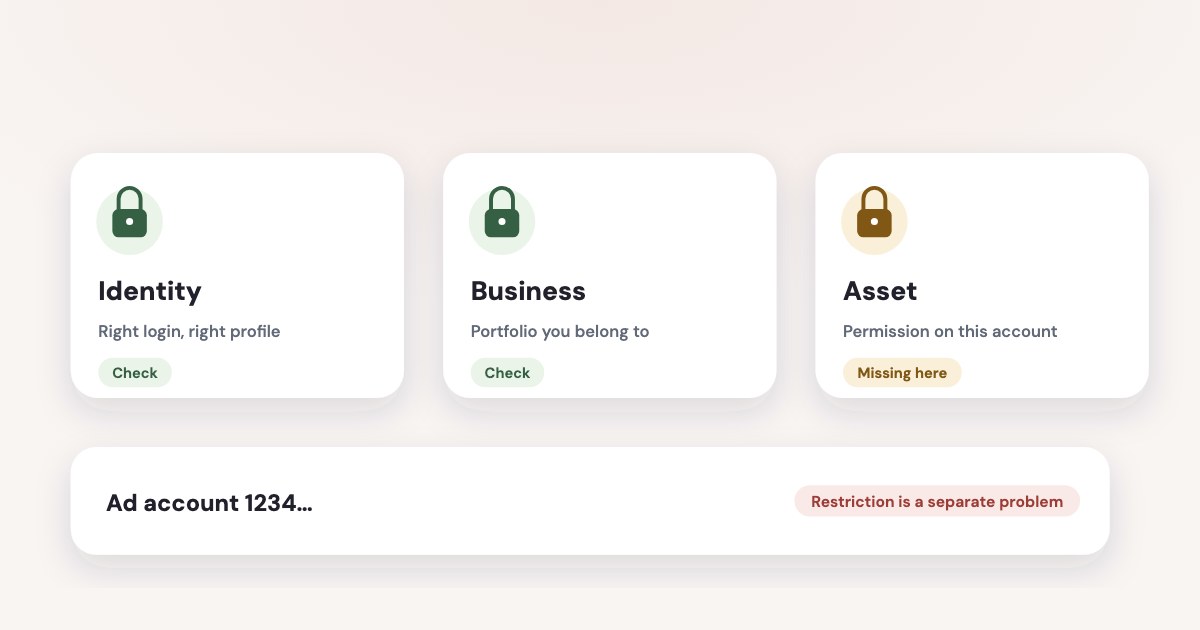
First check that you are signed in with the right identity and have selected the correct business portfolio and ad account. Then ask someone with portfolio access to check your asset permissions; complete any security requirement before using Meta’s ownership-request process if no authorized administrator remains. A restriction on your personal account needs its own review, even when the business still has access. [1] [2] [3] [4] [5] [6]
On this page10 sections
Try these fixes in order
Start with an account ID from a previous report, invoice or saved account record. Compare that ID with the account you are trying to open before anyone changes permissions: similar names can send your investigation toward the wrong business.
STEPS: 1. Sign in using the Facebook profile or managed Meta account that received your business invitation. 2. Select the intended business portfolio in Meta Business Suite. 3. Open Ads Manager and check the selected ad account against your recorded ID. 4. Complete any identity or two-factor authentication prompt shown by Meta. [4] [6] 5. Ask an authorized administrator to open Settings in the intended portfolio. [2] 6. Ask them to select People and your name. [2] 7. Ask them to select Manage beside the ad account, correct the assigned permissions, and select Save. [2]
Have the administrator check your business asset entry, rather than simply confirming that your name appears under People. Meta distinguishes access to the portfolio from access to individual assets, and a person can have asset access without portfolio-wide control. [1] [2]
Documentation date
Menu names are from Meta’s English documentation read November 4, 2026, and are described here as of November 2026. The permissions overview says “full access,” formerly “full control”; several procedure pages still use “full control.” Those are Meta’s differing labels, not two recovery products. [1] [2]
Find the permission that is missing
Ask what operation fails: viewing results, creating an ad, changing payment settings or adding another person. This is more useful than asking for “admin,” because Meta offers task-based access and reserves broader management powers for higher access levels. [1] [7]
| Access symptom | First place to investigate |
|---|---|
| Your portfolio opens but the ad account is missing | The ad account’s assignment to your person or partner business. [1] [2] [3] |
| Reports open but campaign work fails | The assigned ad account tasks, including Manage campaigns. [7] |
| You cannot change another person’s permissions | Your portfolio-level control, rather than control of one asset. [2] |
| Access disappeared after agency or staff changes | Both the owning business’s sharing and the receiving business’s assignments. [3] |
| Meta asks for a security code | The personal account’s two-factor setup and the portfolio requirement. [4] |
If someone removed your role, the appropriate fix is to restore the required permission in the owning business’s access structure. Creating another Facebook profile or another business portfolio does not prove your authority over the existing account; we suggest you preserve the account and repair the access relationship.
Keep Page, Instagram, dataset and lead access on your investigation list if only part of the advertising workflow fails. They are separate business assets or permissions, so opening the ad account alone is not a complete handover check. [1] [7]
Check the owning business and the agency
A “portfolio change” may actually be a change in which business shares an asset with you. Meta says a partner with partial access can pass on only the tasks the owner assigned, so the agency’s own administrator cannot grant a missing client permission from nothing. [3]
Have the client check the agency’s partner entry and the intended ad account. Then have the agency check which of its people received that asset; those are two different checks, and either side can explain why a colleague still works while you cannot. [1] [3]
For the full partner-sharing procedure, use agency access to a Facebook ad account. Keep the recovery conversation focused on the missing assignment instead of rebuilding an arrangement that already belongs to the client.
If a supplier suggests claiming the account into another portfolio, stop and clarify the ownership consequence first. Meta’s account-adding guidance distinguishes claiming an account from requesting access, and says an account created in a portfolio cannot be transferred out of it. [8]
Our practical handover record is simple: owning business, portfolio ID, ad account ID, authorized owner contact and agency portfolio ID if relevant. Put the recovery contact beside the asset record so a future employee does not have to infer ownership from a campaign name.
Resolve security and personal-account restrictions
When a portfolio requires two-factor authentication, the people covered by that requirement must enable it on their personal Facebook accounts before accessing the portfolio. Asking someone to re-add your ad account task will not complete that security requirement. [4]
If you can reach the portfolio’s settings, Meta documents Settings → Business portfolio info → Business options → Two-factor authentication for an authorized person to review the requirement. Satisfy the requirement on your own identity rather than asking the business to weaken it. [4]
Private browsing or automatic history clearing can make repeated verification prompts more likely because Meta needs to remember your device. That explains a repeated code request; it does not establish that your ad account role was removed. [4]
Check the restriction notice separately if Meta says your account cannot advertise. Meta documents restrictions at multiple levels, including a person, ad account and business, so another employee’s access does not settle whether your own identity is restricted. [6]
Follow the notice and the dedicated restricted ad account guide for review steps. Record the affected identity or asset and the exact wording before asking support for help; “my Facebook is blocked” leaves too much room for the wrong diagnosis.
Recover access when the administrator left
First try contacting the person who currently has full control and ask them to restore an authorized business representative. If that fails, Meta documents a request for full control for circumstances including a former employee or contractor, an ownership change, or no remaining person with full control. [5]
The published requirements include identification, evidence of business ownership and a signed attestation letter. The letter needs the portfolio ID, the requester’s identity and relationship to the business, and an explanation of why access is needed; use Meta’s complete requirements rather than a generic letter found online. [5]
STEPS: 1. Open Meta’s “Submit a request to get full control of a business portfolio” guidance. [5] 2. Prepare the required identification, ownership evidence and attestation letter in an accepted non-editable format. [5] 3. Go to Business Support Home while signed in with the associated Facebook profile. [5] 4. Start a chat if that support option is available to you. [5] 5. Choose Business Manager admin dispute when prompted to select the issue. [5] 6. Upload the required documentation through the official support flow. [5]
Do not use a verification-document checklist as a substitute for the ownership-request checklist. They serve different decisions, and Meta’s ownership page says existing people are not automatically removed if your request succeeds. [5]
Confirm recovery before closing the case
Ask the restored person to open the intended account, view a report and reach the task they actually need. Check with their own login: an administrator’s screenshot proves what the administrator can see, not what the restored person can do.
For a client, include the Page and dataset in this check if the assignment covers ad creation. If the account remains visible but an identity or event source is unavailable, return to that asset’s permissions instead of reopening the whole ownership dispute. [1] [7]
Record who now has portfolio management access and who is responsible for future departures. Keep another authorized business representative available, with appropriate security, so one person’s absence does not become your recovery plan.
Use the business portfolio ownership guide before creating or claiming replacement assets. A working replacement campaign is not evidence that the original account’s ownership and access problem has been resolved.
What to do next
Choose the first unresolved branch: wrong identity, missing task, partner sharing, security requirement or ownership dispute. Give the responsible person the account ID and the exact failed action, then ask them to complete that specific fix.
After access returns, save the owner and administrator record with your business documents. Recheck your own required task before you close the support case or end the handover.
Where Variafy fits
Variafy cannot restore Meta permissions or decide an ownership dispute; resolve those with the business administrator or Meta first. Once you have access, it connects ad accounts to ChatGPT or Claude, with free data reading and a preview and confirmation before any ad account change. It is in a free beta by invitation. Join the waitlist.
How we checked
Checked on 4 November 2026 against the pages below, read in English; Meta’s pages were read in a browser. We checked the documentation only: we did not run these steps in a live ad account.
- www.facebook.com/business/help/442345745885606 — Portfolio and asset permissions; full access versus former full control terminology
- www.facebook.com/business/help/299504287548592 — People, Manage and Save permission-editing procedure
- www.facebook.com/business/help/1717412048538897 — Partner sharing and limits on permissions an agency can assign
- www.facebook.com/business/help/280940009201586 — Two-factor requirement, settings and device recognition
- www.facebook.com/business/help/474856681929983 — Ownership-request eligibility, documents, support issue name and existing-user caveat
- www.facebook.com/business/help/975570072950669 — Advertising restrictions at different account and business levels
- www.facebook.com/business/help/1242256693745272 — Business assets and task-based access
- www.facebook.com/business/help/915885887059947 — Claiming versus requesting access and portfolio ownership consequences
What we could not confirm
- Guaranteed recovery
- A universal recovery time
- Support chat available to every person
- A way to bypass two-factor authentication
- A live-account test of these menus. Exact UI wording can differ from the checked documentation
Variafy is our product.
Questions
What should I check first when I can’t access my Facebook ad account?
Check that you are signed in with the right identity and that you selected the correct business portfolio and ad account, identified by its numeric ID. Then ask someone with portfolio access to check your asset permissions. A security requirement such as two-factor authentication can also block access until it is completed.
What if nobody with admin access is left?
Meta has an ownership-request process for business portfolios when no authorized administrator can restore access. Complete any security requirement first, then follow Meta’s current ownership-request steps.
Is a restricted ad account the same as missing permission?
No. A missing permission is fixed by someone with the right access assigning it. An advertising restriction on the account or on your personal profile is a separate problem with its own review, even when your business portfolio still works.