Facebook ad account restricted: what to do, step by step
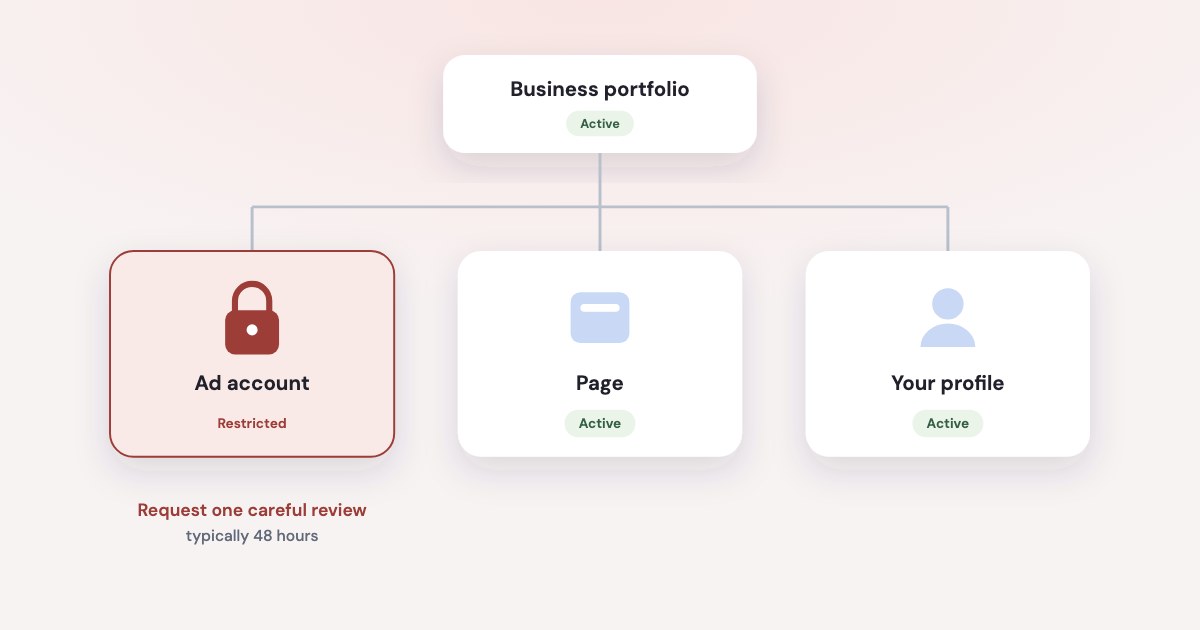
A restriction can sit on your ad account, your business portfolio, your Page or your own profile, and the fix depends on which. Open Business Support Home, do what it asks, then request one careful review: Meta limits how many you get, and its decision is final. Don’t open a new ad account in the meantime — Meta treats that as evading enforcement.
On this page11 sections
First, find what is restricted
“Restricted” isn’t one thing. Meta can restrict four kinds of assets, and each blocks something different (source):
| What it blocks | Who else is affected | |
|---|---|---|
| Business portfolio | The portfolio isn’t allowed to advertise | Its ad accounts and other assets |
| Ad account | Its ads and some of its advertising assets are disabled | Everyone who runs ads from it |
| Page | The Page isn’t allowed to advertise | Every ad that runs from the Page |
| Your profile | You can’t advertise or create ads | Ad accounts where you’re the only person; others may still advertise |
To see which one it is, open Business Support Home on a computer, go to Account status overview and look at the Outstanding tab under Recent account issues (source). Some Meta pages still call this tool Account Quality.
When it’s only your profile
Meta is explicit:
other members of the business portfolio, ad account or Page, may still be able to advertise.
(source) Ad accounts where you’re the only person may be disabled with you — one reason to keep a
second admin on every ad account.
If you work through the Marketing API, a restricted profile shows up as error 1404163:
You’re no longer allowed to use Facebook Products to advertise.
(source)
Warnings usually come first
For violations of the Advertising Standards, Meta uses a warning-based system
: rejected ads can
add warnings, and more warnings or one severe violation can restrict the account. The status sits at the top of Ads Manager
and in Business Support Home (source):
- Healthy — no warnings, but more rejections could lead to them.
- Needs attention — some ads broke the standards; keep going and the account may be restricted.
- Restricted —
You are unable to run ads until resolved.
At Needs attention you can still appeal the rejected ads behind the warning, and if Meta agrees it made a mistake,
your account status may improve.
That is the cheapest moment to act — before there is a restriction to appeal.
What to do, step by step
- Open the restricted asset. Business Support Home → Account status overview → select the restricted account → What you can do (source).
- Do what Meta asks.
Depending on the account restriction type and the stage you’re at in the process, you’ll have different steps to take
. The options are Confirm your identity, Complete verification, Secure your account and Request a review. - Fix the cause before you ask. Remove or edit the ads that were rejected, check the Page, settle any payment problem and turn on two-factor authentication. A review of an account that still breaks the rules is a wasted attempt.
- Request the review. An admin selects Request review and completes the on-screen steps (source). Meta doesn’t say what you can attach, so be specific about what you changed.
- Wait for the email.
Typically, our review is completed in 48 hours although it may take longer in some cases. You will be notified of our decision via email.
(source) - Turn your ads back on. After a restriction is lifted,
Any ads running before the restriction will not be automatically restarted.
(source)
You get a limited number of reviews
There is a limited number of times you can request an advertising restriction review. Once the review is completed, the decision is final.
(source) Meta doesn’t say how many. The same page adds that asking again
will not hurt your standing
— but plan for one good attempt, not several quick ones.
Restricted “for no reason”
Meta names what it looks at (source): severe or repeated policy violations,
evading review, inauthentic accounts, and assets connected to other abusive assets or displaying behavior similar to business assets we’ve already taken down.
That last one can catch an account that did nothing wrong itself. Other causes Meta lists (source):
- A hacked or compromised portfolio or account.
- Missing two-factor authentication:
If two-factor authentication isn't turned on, Meta may restrict or remove people's access to advertising
(source). - Unusual payment activity — failed or disputed payments. See payment failed or spending limit reached.
- Links to other assets — assets
Owned by the same person or entity as an account that has been disabled
(source).
Since 9 September 2026, repeat violations of Meta’s Prohibited Commercial Practices policy can also
extend penalties beyond a single ad account to associated users, Pages and business portfolios
(source). So check who else has access, which partners are connected and which Pages
your ad accounts use.
Our enforcement isn’t perfect, and both machines and people make mistakes.
Meta says its checks rely primarily on automated technology. If nothing above fits, a review is exactly what it’s for.
Worried that an AI tool caused it? See whether connecting AI can
get an ad account banned. One business on Meta’s forum had its portfolio restricted for automation that
mimics human activity
, and the appeal was denied the next day with no explanation (source).
Getting help from a person
There is no phone line: Phone numbers claiming to be for Meta customer support are potentially scams and should be avoided.
Advertisers contact Meta through Business Support Home (source), and every Business Help Center
page now offers a chat with Meta’s AI business assistant.
Meta Verified for businesses, a paid subscription, adds human agents by chat and email. But its list of support topics covers account access, security, Pages and the subscription — not advertising restrictions — and you need full control of the business portfolio to use it (source).
Restrictions attract scammers
Meta representatives will never ask you for your password, payment details, or other sensitive information over chat, text, email or phone.
(source) Check any message about your account against Business Support Home. Paid “unblocking” services
can’t promise anything either — the decision stays with Meta.
What not to do
- Don’t open a new ad account or portfolio to keep advertising. Several top guides suggest it. Meta lists creating
new ad accounts
with the intent to repeat violations
as evading enforcement (source), and can disable assetsCreated or repurposed to evade a previous account or entity removal
(source), along with assets owned by the same person as a disabled one. - Don’t fire off reviews. They are limited, and the decision is final.
- Don’t hand over your login to anyone who promises a fix.
- Don’t leave money sitting in a disabled account. If it stays ineligible for 6 months, unused prepaid funds may be
forfeited, and
Meta reserves the right to disable your account permanently prior to the 6 months.
(source)
How to avoid the next one
- Turn on two-factor authentication for everyone. Business Suite → Settings → Business portfolio info → Two-factor authentication. Some portfolios older than 90 days must have it and can’t turn it off (source).
- Audit access. Meta’s advice:
Regularly audit access to your business portfolio to ensure that only legitimate, active users and ad accounts are connected
(source). Remove people and partners you no longer work with. - Keep a second admin on every ad account, so one restricted profile doesn’t stop the business.
- Act on rejections early — fix or appeal them while the account still shows Needs attention.
- Keep payments clean — a backup card and no repeated declines.
The Advertising Standards also say a restricted asset can’t be used to advertise across our technologies
(source) — a restriction on a Page you share with other ad accounts reaches all of them.
How Variafy helps
Variafy can’t appeal for you — reviews only happen in Business Support Home. It helps you notice early and keeps its own access clean:
- Watchdog. Every 15 minutes it checks each connected ad account and emails the people who can approve changes when an account becomes disabled, unsettled or otherwise inactive — and when rejected ads leave an active ad set with nothing to run.
- Questions in the chat. “Which of my ads were rejected this week and why?” — answered from the account, so you can fix them before warnings add up.
- Meta’s own route. Facebook sign-in, never your password; the Marketing API; every change previewed and confirmed by you.
Add https://www.variafy.com/mcp to your assistant. Variafy is in private beta:
join the waitlist.
How we checked
Checked on 15 October 2026 against Meta’s Business Help Center (advertising restrictions, Business Support Home, ad account status, troubleshooting restricted accounts, requesting a review, enforcement, policy violation examples, two-factor authentication, Meta Verified support, scams), Meta’s Ads Review Policy and Protecting Businesses pages, the Transparency Center (Advertising Standards, Account Integrity, Prohibited Commercial Practices, updated 9 September 2026), Meta’s support phone page and the Marketing API error reference.
Meta doesn’t publish how long a restriction lasts, how many reviews you get or why the review button can be missing; we don’t claim any of it. “Keep a second admin” is our advice drawn from Meta’s note that other members may still advertise. Forum quotes are from Meta’s developer community. Variafy is our product.
Questions
How do I fix a restricted Facebook ad account?
Open Business Support Home on a computer, go to Account status overview and select the restricted account. Under What you can do, follow Meta’s steps — confirm your identity, complete verification or secure the account — fix the cause, then have an admin request a review.
How long does a Facebook ad account review take?
Meta says a review is typically completed in 48 hours, although it may take longer, and the decision comes by email. Meta doesn’t publish how long a restriction itself lasts.
Why is there no option to appeal my restricted ad account?
Only admins can request a review, and Meta may first ask you to confirm your identity, complete verification or secure the account. The restriction may also be on your profile rather than the ad account, or the limited number of reviews may be used up.
Can I create a new ad account if mine is restricted?
Not to keep running the same ads. Meta treats new ad accounts created to repeat violations as evading enforcement, and can disable assets created to get around a previous removal and the accounts linked to them.
Is there an appeal form for a restricted Facebook ad account?
Meta’s current help pages send every review request through Business Support Home: select the restricted account under Account status overview and choose Request review.