How to give an agency access to your Facebook ad account
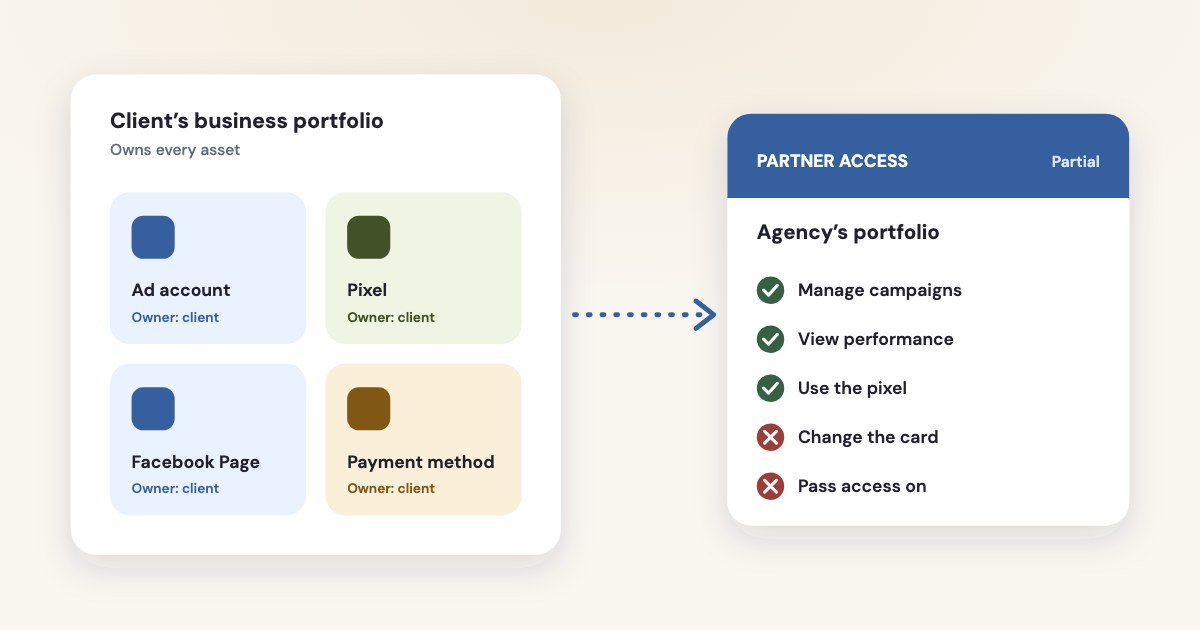
Add the agency as a partner in your business portfolio: Settings → Partners → Add → Give a partner access to your assets, enter the agency’s business portfolio ID, and give partial access — “Manage campaigns” on the ad account, plus the pixel and the Page if they need them. Keep the ad account, pixel, Page and card in your own portfolio: an ad account created in an agency’s portfolio stays there for good, while partner access can be removed in a few clicks.
On this page12 sections
First: keep everything in your own portfolio
The most expensive mistake happens before any access is given: the agency creates the ad account or the pixel in its own business portfolio. Meta can’t move either one later:
If you create a new ad account in a business portfolio, it will permanently be a part of that portfolio. This means the ad account can't be deleted or transferred from the portfolio.
The pixel is the same — you can’t delete a dataset or transfer it to another business portfolio
(source).
When the agency leaves, the ad history, the audiences built on the pixel and the account’s learning stay with the agency.
So the business creates its own portfolio, ad account, pixel and Page, and the agency works in them as a partner. Creating a portfolio
is free; one person can create up to two, and Business assets can only belong to 1 business portfolio.
(source)
| Who owns it | What the agency gets | |
|---|---|---|
| Ad account | Your business portfolio | Partial access: Manage campaigns |
| Pixel (dataset) | Your business portfolio | Use events dataset, or Manage events dataset if it builds audiences |
| Facebook Page | Your business portfolio | Partial access: Ads, plus Content or Messages if it posts or replies |
| Leads | Your Page | Leads access, assigned separately |
| Payment method | Your ad account | Nothing — changing it needs full access |
How to give an agency access, step by step
You need full access to your business portfolio and two-factor authentication turned on. Ask the agency for its business portfolio ID — it is under the portfolio name in its Settings → Business portfolio info (source). Then (source):
- Open Settings for your business portfolio in Meta Business Suite.
- Click Partners in the Users section. If you don’t see it, you don’t have full access to the portfolio.
- Click Add, then Give a partner access to your assets.
- Enter the agency’s business portfolio ID and click Next.
- Choose the assets — ad account, pixel, Page — and the level of access. For partial access, pick the tasks.
- Click Assign assets. Someone else with full access may need to approve it.
The agency then assigns the access to its own people. It can only pass on what you gave it:
you can only assign permissions for the specific tasks your business was assigned
(source).
Meta renames these menus from time to time, so if a label differs, look for the same step nearby.
If you are the agency: ask for access
You can start from your side instead (source):
- In your portfolio’s Settings → Partners, click Add and choose Ask a partner to assign you their assets.
- Enter the client’s email and business portfolio ID, choose your roles, the asset types and permissions you need.
- Click Send request. The client
can approve or deny your request, or change which asset types and permissions to share.
For a single ad account, use Settings → Accounts → Ad accounts → Add → Request access to an ad account in another business portfolio, with the ad account ID. The account’s owner or someone with full access to its portfolio approves it (source). Ask only for the tasks you need; a client who sees “full access” in a request has a reason to hesitate.
Access levels: full or partial
Meta has two levels: full access and partial access
— full access was called “full control” until recently
(source). For an ad account, partial access means picking tasks (source):
| What it allows | Give it to | |
|---|---|---|
| Manage campaigns | View ads, create and edit ads, access reports | An agency or freelancer running the ads |
| View performance | View ads and access reports | An auditor, a consultant, the business owner’s accountant |
| Manage Creative Hub mockups | Create and edit ad mockups | A designer |
| Full access | All of the above, plus ad account settings, finances and permissions | Only the business itself |
Don’t give a contractor full access to the whole portfolio. Business portfolio permissions override all others.
(source) Someone with full access to the portfolio can claim or remove assets and people.
A one-off audit by a freelancer
A person (not a partner business) can get temporary access: basic access for a minimum of 3 days and a maximum of 75 days
,
revoked automatically (source). Freelancers should also know the limit:
One person can manage up to 25 ad accounts.
A closed ad account still counts toward it (source).
Sharing the pixel
Ad account access doesn’t include the pixel. Share it separately: Settings → Data sources → Datasets → choose the dataset → Assign partners → the agency’s business portfolio ID → the level of access (source). The first time, Meta asks you to declare the business relationship and confirm its terms.
- Use events dataset (partial):
View data, view analytics and create conversion ads with this dataset.
- Manage events dataset (full): adds settings, events, user access
and create audiences
(source).
An agency that only runs conversion ads needs the first. One that builds website audiences or sets up the Conversions API needs the second — see Conversions API for CRM.
The Page and the leads
To run ads for a Page, the agency needs partial access with the Ads task on it; add Content, Messages or Insights only if it posts, replies or reports. Even with full access, a partner can’t delete the Page or remove it from your portfolio (source).
Leads from instant forms are separate. Until the business sets up leads access, all Page admins or people with messaging permissions can download leads
;
once it does, new people, CRM systems or partners need to be added manually.
(source)
- Go to Settings → Integrations → Leads access (the first time, click Customize access and confirm).
- Choose the Page and open Partners, then Assign partners.
- Pick the agency from the partners connected to the Page.
Only the business that owns the Page can assign leads access permissions to partner businesses or agencies.
(source) If the agency connects its CRM to your forms, this is the step that makes it work. Leads stay
downloadable for 90 days only, so decide who collects them — see lead quality.
Who pays
Keep your own card on your own ad account. If the ad account is in a business portfolio, then you need full control of the ad account to edit a payment method.
(source) An agency with partial access can spend the budget you set but can’t change the card — which is
the point. Set an account spending limit if you want a hard ceiling; our guide to
spending limits and failed payments explains it.
If the agency runs ads from its own portfolio on your behalf, Meta has an “advertise on behalf of another business” option. It shows your
business in “Why am I seeing this ad?”, but The business you advertise on behalf of can't see the ad account unless you grant it permission.
(source) Ask for that permission in writing.
Without a business portfolio
An ad account outside any portfolio can only be shared from Ads Manager, with three roles: admin, advertiser and analyst — and
You also need to be Facebook friends with the people you add to the account.
(source)
The same page reminds that sharing a Facebook login is against Meta’s terms. For working with an agency, create a portfolio first; it
takes a few minutes and the ad account can be claimed into it.
When the agency leaves
- Remove the partner: Settings → Partners → the agency → Options → Remove from business portfolio → Remove partner (source).
- Check leads access and the pixel’s partners for the agency, and remove what is left.
- Clean up people: Meta suggests you
Remove people who haven't logged into the portfolio within the past 90 days, especially those with full control of the portfolio.
- Review credit lines and the businesses they are shared with, and keep at least two of your own people with full access (source).
Removing a partner is a different step from removing a person: an agency employee you added directly under People needs removing there.
How Variafy works with agency access
Variafy uses the access you already have. When you connect, it lists the ad accounts your business portfolio owns and the client accounts shared with it, and reads which tasks you were given: with “View performance” it reads and reports, with “Manage campaigns” it can also prepare changes, each shown with its effect on spend before it runs. The client doesn’t need to add anyone new.
For a new client, start with our audit checklist, and use the weekly report to keep them informed.
Add https://www.variafy.com/mcp to your assistant. Variafy is in private beta:
join the waitlist.
How we checked
Checked on 16 October 2026 against Meta’s Business Help Center: giving and requesting partner access, removing partners, business portfolio and asset permissions, task-based access by asset type, adding and claiming ad accounts, ad account limits, ad account roles in Ads Manager, payment methods, datasets and their sharing permissions, Page access for partners, leads access, advertising on behalf of another business, and portfolio security. Meta doesn’t date these pages; menu names are as they appeared that day.
Variafy is our product.
Questions
How do I give an agency access to my Facebook ad account?
In Meta Business Suite, open your business portfolio’s Settings → Partners → Add → Give a partner access to your assets, enter the agency’s business portfolio ID, choose the ad account and give partial access with the Manage campaigns task. You need full access to the portfolio and two-factor authentication.
What is the difference between full access and partial access?
Full access (formerly full control) covers everything, including settings, finances and permissions. Partial access is limited to chosen tasks; for an ad account these are Manage campaigns, View performance and Manage Creative Hub mockups.
Can an ad account be moved from an agency’s business portfolio to mine?
No. An ad account created in a business portfolio stays there permanently and can’t be transferred; the same applies to a pixel (dataset). The agency can only share access with you, so create the ad account in your own portfolio from the start.
Does ad account access let the agency download leads?
Not by itself. Leads are tied to the Page: by default all Page admins can download them, and once leads access is set up, only the business that owns the Page can assign it to a partner in Settings → Integrations → Leads access.
Can the agency change my payment method?
Only with full access to the ad account. An agency with partial access (Manage campaigns) can create and edit ads within your budget but can’t change the card or the account’s permissions.
How do I remove an agency’s access?
Settings → Partners → select the agency → Options → Remove from business portfolio → Remove partner. Then check leads access and the pixel’s partners, and remove any agency employees you added directly as people.
How many ad accounts can one person manage?
Up to 25 ad accounts per person, and an ad account can be assigned to up to 25 people. Closed ad accounts still count toward the limit.