Claude Code for Meta Ads: MCP server or skill, setup and safety
Claude Code works with Meta Ads through an MCP server — Meta’s official one or a third-party server such as Variafy —
added with one claude mcp add command. A skill on its own only teaches Claude your process; it has no live access
to the ad account. Most teams use both: the server for data and changes, a skill for how they audit and report. Keep every
tool that changes ads on “ask” in Claude Code’s permission rules, and never let it drive Ads Manager in a browser.
MCP server or skill?
They solve different problems. An MCP server is a live connection: Claude Code calls its tools to read numbers
and make changes. A skill is a folder with a SKILL.md file of instructions, and optionally scripts, that Claude
loads when the task matches its description.
| MCP server | Skill | |
|---|---|---|
| What it gives Claude | Live data and actions in your ad account | Instructions: your audit checklist, report format, naming rules |
| Access to Meta | Through the server, with Facebook sign-in or a server token | None by itself; a script inside a skill needs your own access token on disk |
| Changes to ads | Whatever the server allows, with its own safeguards | Whatever the script does, with no safeguards unless you write them |
| Where it lives | ~/.claude.json or the project’s .mcp.json | ~/.claude/skills/<name>/ or the project’s .claude/skills/<name>/ |
| Best for | Questions about live numbers, changes, monitoring | Repeating the same review the same way every week |
A skill that calls the Meta Marketing API with a token stored in a file can work, but you then own everything a server would handle: keeping the token safe, retries, rate limits and the rule that nothing changes without a confirmation. That is why most setups pair a skill with an MCP server and let the skill call the server’s tools.
Connect Variafy to Claude Code
Issue a token
In the Variafy console open Assistant connection and issue a token.
Add the server
Put the token in place of
sk_live_YOUR_TOKENand run:claude mcp add --scope user --transport http variafy https://www.variafy.com/mcp --header "Authorization: Bearer sk_live_YOUR_TOKEN"
--scope usermakes Variafy available in all your projects. Leave it out to add it to the current project only.Check the connection
Run
/mcpinside Claude Code: Variafy should be listed as connected.Ask a first question
“Call start_here and show my ad accounts.” It answers with the connected ad accounts and your plan.
Already use Variafy in claude.ai? If Claude Code is signed in with the same claude.ai account, connectors you added
in claude.ai appear in Claude Code automatically and show up in /mcp. This does not work when Claude Code runs on an
API key. Details are in the Claude Code MCP documentation.
To connect the ad account itself, choose Connect an ad account in the console; Facebook asks which ad accounts and Pages to share. Step by step.
Meta’s official server in Claude Code
Meta lists Claude Code among the supported agents for its ads MCP server at https://mcp.facebook.com/ads, according to
its Business Help Center. Meta’s developer documentation
gives this command for people who use their own Meta developer app:
claude mcp add --transport http --client-id <META_APP_ID> meta-ads https://mcp.facebook.com/ads
Then run /mcp and sign in with Facebook. When we tried to register a client Meta does not list, its server
refused, so outside the supported assistants you need that developer app. What the official server can and cannot do is
compared in Meta Ads MCP servers in 2026.
Stop Claude Code from changing ads without asking
Claude Code has permission rules for MCP tools: mcp__<server>__<tool> names a single tool and
mcp__<server>__* names all of a server’s tools. Rules go into allow, ask and deny
lists in .claude/settings.json for a project or ~/.claude/settings.json for all projects. For Variafy,
a sensible start is to let reads run, ask before every change and block deletes:
{
  "permissions": {
    "allow": [
      "mcp__variafy__start_here",
      "mcp__variafy__meta_ads_read",
      "mcp__variafy__get_insights",
      "mcp__variafy__performance_overview",
      "mcp__variafy__audit_account"
    ],
    "ask": [
      "mcp__variafy__meta_ads_update",
      "mcp__variafy__meta_ads_create",
      "mcp__variafy__build_campaign"
    ],
    "deny": [
      "mcp__variafy__meta_ads_delete"
    ]
  }
}
You can review and edit the same rules with /permissions. The documentation is explicit that these rules are
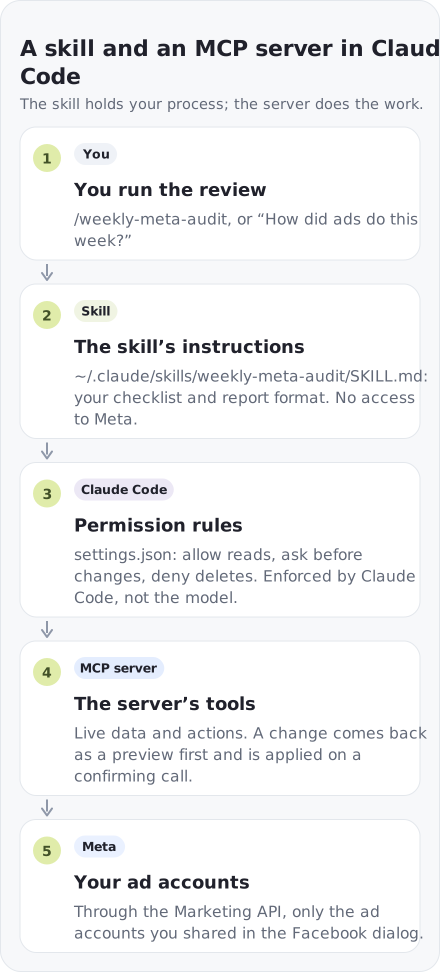
enforced by Claude Code itself, not by the model, so an instruction in a prompt can’t talk its way past them. Be careful with
modes that approve actions for you: for an ad account, keep tools that change spend on “ask” even when you let Claude Code
edit files freely. See Configure permissions.
Variafy adds its own layer underneath: a change first comes back as a preview with the ad account and the effect on spend and is applied only on a second, confirming call, and the owner can require that anything which increases spend waits for a person in the console.
A skill for your weekly review
Save this as ~/.claude/skills/weekly-meta-audit/SKILL.md. Claude loads it when you ask for a weekly
report, or you can run it directly with /weekly-meta-audit:
---
name: weekly-meta-audit
description: Weekly review of our Meta ad accounts. Use when asked for a weekly ads report, audit or "how did ads do this week".
---

1. Call start_here and list the connected ad accounts.
2. For each account, run the weekly account audit (audit_account).
3. Compare cost per result for each campaign with the previous four weeks (get_insights).
4. List ads that are rejected or not delivering.
5. Suggest at most three changes. Prepare them as previews only and never confirm a change without asking me.
6. Answer with one short table per account, then the three suggestions with their effect on spend.
The skill holds the process; the Variafy tools it names do the work. Put the same file in a project’s
.claude/skills/ folder and commit it, and everyone on the team runs the review the same way. How skills load and
what else they can contain is in Extend Claude with skills.
Can Claude Code get a Meta ad account banned?
Not by connecting through an API. Meta’s help page on its own ads MCP server says that using it does not, by itself, put an account at risk; restrictions come from breaking advertising policies. The same policies apply to every change, whichever tool makes it.
The setup that does carry risk is letting Claude Code drive Ads Manager in a browser — clicking through the interface with browser automation. Meta’s Terms of Service say you may not access or collect data from its products using automated means without Meta’s prior permission. An MCP server works through Meta’s API with the access you granted in the Facebook dialog, which is the route Meta provides for software.
Two habits lower the remaining risk: let Claude prepare changes but approve them yourself, and don’t ask it to create ads in bulk that nobody has read — an ad that breaks a policy is a problem whether a person or a model wrote it.
Run it every week without a terminal
You don’t need to keep Claude Code open for routine checks. Variafy’s watchdog looks at every connected ad account every 15 minutes for spend limits, rejected ads and delivery problems, and sends daily advice and a weekly account audit by email or Slack. Claude Code is then for the questions and changes those reports raise.
If you want your own report format on a schedule, run the skill non-interactively with claude -p from a
scheduled job. Nobody is there to answer a permission prompt in that mode, so allow the reading tools it needs and keep
changes out of scheduled runs.
How we checked
Checked on 12 October 2026 against the Claude Code documentation (MCP, skills, permissions), Meta’s Business Help Center and developer documentation, and Meta’s Terms of Service. The Variafy tool names come from our live server. Variafy is our product.
Questions
Can Claude Code manage Meta ads?
Yes, through an MCP server. Add Meta’s official server or a third-party one such as Variafy with “claude mcp add”, then ask in plain language; changes go through the server’s own safeguards and Claude Code’s permission rules.
Do I need an MCP server or a skill for Meta ads in Claude Code?
For live data and changes, an MCP server. A skill only adds instructions, such as your audit checklist or report format. Most teams use a skill that calls the server’s tools.
Can Claude Code get my Meta ad account banned?
Connecting through an API-based MCP server does not by itself put an account at risk, according to Meta. Driving Ads Manager in a browser with automation is different: Meta’s terms forbid automated access to its products without permission.
How do I stop Claude Code from changing my ads without asking?
Add the server’s tools that change ads to the “ask” list in settings.json, for example mcp__variafy__meta_ads_update, and put deletes on “deny”. Claude Code enforces these rules itself.
Does a connector added in claude.ai work in Claude Code?
Yes, if Claude Code is signed in with the same claude.ai account. Connectors added in claude.ai appear automatically and are listed in /mcp. They are not loaded when Claude Code runs on an API key.