How to connect Meta Ads to ChatGPT
ChatGPT cannot open your Meta ad account by itself. You connect the two in one of three ways: upload a report exported from Ads Manager, add Meta’s official ads connector, or add an MCP connector such as Variafy. The last two give ChatGPT live data and can change your ads. Both are added in ChatGPT under Plugins → Add → Add custom MCP server: on personal plans such as Plus you can do it yourself on the web; in Business, Enterprise and Edu workspaces an admin decides who can.
Three ways to connect
| Exported report | Meta’s official connector | Variafy | |
|---|---|---|---|
| Data | A snapshot from the moment you export | Live | Live |
| Changes to ads | No | Yes; new ads are created paused until you set them live | Yes; every change is previewed with its effect on spend and applied only after you confirm it |
| Who approves spend increases | — | Portfolio admins can allow or block agent actions in Meta’s settings | The account owner can require a signed-in person to approve anything that increases spend |
| Payments from your CRM | No | No | Yes: Pipedrive, a Google Sheet or an uploaded file, matched to the ads that brought them |
| Alerts without asking | No | No | Yes: spend limits, rejected ads, delivery problems, daily advice by email or Slack |
| Price | Free | Free | Free plan; paid plans from €29 per month; reading data is always free |
If you only need to look at last month’s numbers once, an export is enough. If you want ChatGPT to answer from today’s data and to act on it, use a connector.
Option 1: upload an exported report
- In Ads Manager, open the campaigns, ad sets or ads you want and choose Export → Export table data (.csv or .xlsx).
- In ChatGPT, attach the file and ask your question, for example “Which ad sets had the highest cost per result last month, and why?”
This works on any ChatGPT plan, but ChatGPT sees only the columns you exported and only as of that moment. It cannot check today’s numbers, look at a breakdown you did not export, or change anything in the account.
Option 2: Meta’s official ads connector
Since April 2026 Meta runs its own MCP server for AI assistants at https://mcp.facebook.com/ads.
It reads reporting, creates and edits campaigns, ad sets and ads, manages catalogs and audiences, and shows the account’s
activity log. New ads are paused until you set them live, and people with full control of a business portfolio can set
rules for what AI agents may change. Meta is still rolling access out, so not every account has every tool yet.
Meta publishes the setup for advertisers in its Business Help Center and for developers in the developer documentation. In ChatGPT it is added the same way as any custom MCP server — Plugins → Add → Add custom MCP server with the address above — and you sign in with Facebook.
It is free and official. What it does not do: it does not know which ads brought paying customers, because it has no access to your CRM, and it does not watch the account for you — it answers only when you ask.
Option 3: connect with Variafy
Open Plugins
On chatgpt.com, choose Plugins in the sidebar, then Add → Add custom MCP server.
Enter the address
Name it Variafy, add a short description and, under Connection, paste this address:
https://www.variafy.com/mcp
Create the plugin
Keep OAuth as the sign-in method, read the risk warning, choose I understand and want to continue, then Create as a plugin.
Sign in
ChatGPT opens the Variafy sign-in. There is no token to paste.
Connect your ad account
In the Variafy console choose Connect an ad account. Facebook asks which ad accounts and Pages to share; Variafy sees only those. Step by step.
Check that it works
Start a new chat, type @, pick Variafy and ask: “Call start_here and show my ad accounts.” It answers with the connected accounts and your plan.
If you don’t see “Add custom MCP server”: in a Business workspace only admins and owners can add one; in Enterprise and Edu an admin has to grant the Create plugins with MCPs permission; and the option is set up on the web, not in the mobile app. OpenAI says full MCP support, including actions that change data, is rolling out to Business, Enterprise and Edu, so what a custom server may do can depend on your plan. Menu names change from time to time; OpenAI keeps the current steps in its guide to connecting an MCP server.
Reading data is free and unlimited. A change — a paused ad, a new budget, a new campaign — first comes back as a preview with the ad account and the effect on spend, and is applied only on a second, confirming call. ChatGPT can also ask you to confirm an action before it runs, depending on the plugin’s permissions. All 3 plans and their limits are on the pricing page; every tool is listed in the tool directory.
Good first questions
- “Where am I wasting ad spend this week?”
- “Why did my cost per lead go up compared with last week?”
- “Which ads are showing creative fatigue?”
- “Are any of my ads rejected or not delivering?”
- “Which ads brought paying customers last month, not just leads?” — needs your payments connected.
Is it safe?
A connector acts only in the ad accounts you share in the Facebook dialog. With Variafy, nothing changes without a preview and a confirmation, the owner can require that a person approves anything that increases spend, and every executed change is written to the console’s journal with who approved it and when. Access tokens are stored encrypted.
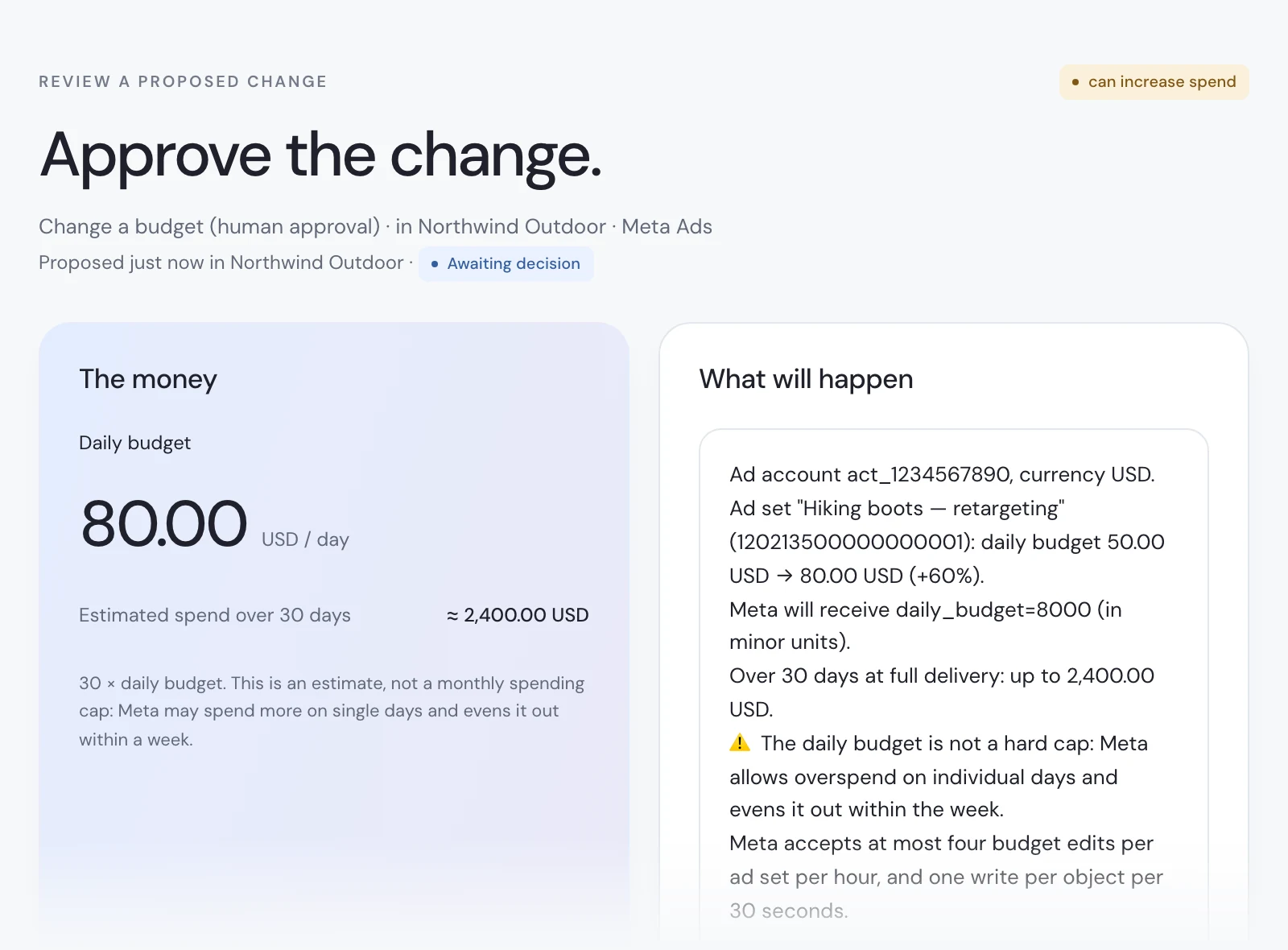
That approval happens on a Variafy page with its own link. It shows the new budget, what it can cost over 30 days and the exact value Meta will receive, and nothing changes in the ad account until someone signed in clicks Apply.
You can take access back at any time: remove the app in Facebook under Settings & privacy → Settings → Business integrations, or follow the data deletion instructions. What is stored and for how long is in the privacy policy.
How we checked
Rewritten on 11 October 2026 after OpenAI moved custom connectors into Plugins. The steps follow OpenAI’s developer guide and help center and were checked in a ChatGPT Plus account; Meta’s part follows Meta’s Business Help Center and developer documentation. Variafy is our product. Menu names in ChatGPT change from time to time, so the steps link to the current instructions.
Questions
Can ChatGPT connect to Meta Ads directly?
Not on its own. It needs a connector — Meta’s official ads connector or a third-party MCP connector — or a report you export from Ads Manager and upload.
Which ChatGPT plans can use a Meta Ads connector?
On personal plans such as Plus you add it yourself on the web under Plugins → Add → Add custom MCP server. In Business workspaces only admins and owners can add one; in Enterprise and Edu an admin grants the permission. OpenAI says full MCP support, including actions that change data, is rolling out to Business, Enterprise and Edu.
Where do I add a custom connector in ChatGPT now?
In Plugins: open Plugins in the sidebar, choose Add, then Add custom MCP server, and save it as a plugin. Older guides start from a developer mode switch in Settings; OpenAI’s current guide starts from Plugins. In Business, Enterprise and Edu, admins control who can add one.
Can ChatGPT change my ads?
Only through a connector with write access. With Variafy, every change is first shown as a preview with its effect on spend and is applied only after you confirm it; ChatGPT can also ask you to confirm an action before it runs.
Is connecting Meta Ads to ChatGPT free?
Exporting a report and Meta’s official connector cost nothing. Variafy has a free plan; reading data and pausing ads are free on every plan.