How to connect Meta Ads to Claude
Claude connects to Meta Ads through a connector: an MCP server that Claude calls to read your ad account and to make changes in it. Two kinds work today — Meta’s official ads connector and third-party connectors such as Variafy. In Claude on the web and in Claude Desktop you add either one as a custom connector, on every plan including Free, which allows one custom connector; in Claude Code you add it with a single command.

Meta’s connector or Variafy
| Meta’s official connector | Variafy | |
|---|---|---|
| Works in | Claude, Claude Desktop, Claude Code, ChatGPT and Perplexity | Claude, Claude Desktop, Claude Code, ChatGPT, Cursor and other MCP clients |
| Data | Live | Live |
| Changes to ads | Yes; new ads are created paused until you set them live | Yes; every change is previewed with its effect on spend and applied only after you confirm it |
| Limits on what the agent may do | Portfolio admins allow or block actions per ad account, including budgets above an amount you set | The account owner can require a signed-in person to approve anything that increases spend |
| Payments from your CRM | No | Yes: Pipedrive, a Google Sheet or an uploaded file, matched to the ads that brought them |
| Alerts without asking | No | Yes: spend limits, rejected ads, delivery problems, daily advice by email or Slack |
| Price | Free | Free plan; paid plans from €29 per month; reading data is always free |
Both are added the same way, so you can try one and switch later. If all you need is to look at a past month once, you can also skip connectors: export a table from Ads Manager and attach the file to a Claude chat. Claude then sees only the columns you exported and cannot change anything.
In Claude and Claude Desktop
Custom connectors are added once in your Claude settings and work in Claude on the web and in Claude Desktop.
Open the connector settings
Go to Customize → Connectors, choose + Add and then Add custom connector.
Enter the address
Name it Variafy and enter this address, then click Continue:
https://www.variafy.com/mcp
Keep the recommended sign-in
Claude detects the sign-in settings. Leave the recommended option, Use Claude’s published identity, and click Add.
Connect and sign in
Choose Connect next to Variafy and sign in. There is no token to paste.
Connect your ad account
In the Variafy console choose Connect an ad account. Facebook asks which ad accounts and Pages to share; Variafy sees only those. Step by step.
Check that it works
Start a chat and ask: “Call start_here and show my ad accounts.” It answers with the connected accounts and your plan.
On Team and Enterprise plans, an owner adds the connector for everyone in Organization settings → Connectors (Add → Custom → Web); each member then finds it under Customize → Connectors and chooses Connect. In any chat you can turn connectors on or off with the + button → Connectors.
Meta’s official connector is added with the same steps and the address https://mcp.facebook.com/ads; you sign in with
Facebook instead. Menu names change from time to time; Anthropic keeps the current steps in its
guide to custom connectors.
In Claude Code
Claude Code adds remote MCP servers from the terminal. For Variafy, issue a token in the console under
Assistant connection, put it in place of sk_live_YOUR_TOKEN and run:
claude mcp add --scope user --transport http variafy https://www.variafy.com/mcp --header "Authorization: Bearer sk_live_YOUR_TOKEN"
--scope user makes the connector available in all your projects, not only the current one. Then ask the same
check question: “Call start_here and show my ad accounts.”
Meta lists Claude Code among the supported agents for its connector. Its developer documentation gives this command for people who use their own Meta app (one with the Create & manage ads with ads MCP server use case):
claude mcp add --transport http --client-id <META_APP_ID> meta-ads https://mcp.facebook.com/ads
After adding a server that signs in through a browser, run /mcp in Claude Code and follow the sign-in. The
general setup is in the Claude Code MCP documentation.
What Meta’s official connector does
Meta’s ads MCP server, at https://mcp.facebook.com/ads, reads reporting; creates and edits campaigns, ad sets,
ads and creatives; manages custom audiences and catalogs; checks signal health; runs A/B tests and conversion lift studies;
searches the Business Help Center; and shows an ad account’s activity log. All new ads are paused until you set them live, and
Meta notes that not every account has every tool yet.
If you have full control of a business portfolio, you can limit what agents may do in each ad account: in Meta Business Suite go to Settings → Integrations → Ads MCP server and allow or block actions such as creating campaigns or editing budgets, or block budgets above an amount. Meta describes it in its Business Help Center.
It is free. It does not know which ads brought paying customers, because it has no access to your CRM, and it does not watch the account for you — it answers only when you ask.
How Claude asks before acting
Claude asks for permission before it uses a connector’s tool. Anthropic’s advice is to choose Allow always only for tools you trust; for an ad account, that means reading tools, not ones that change budgets or turn ads on. In Research, tools run without further approval, so Anthropic recommends switching off tools that can make changes before you start one.
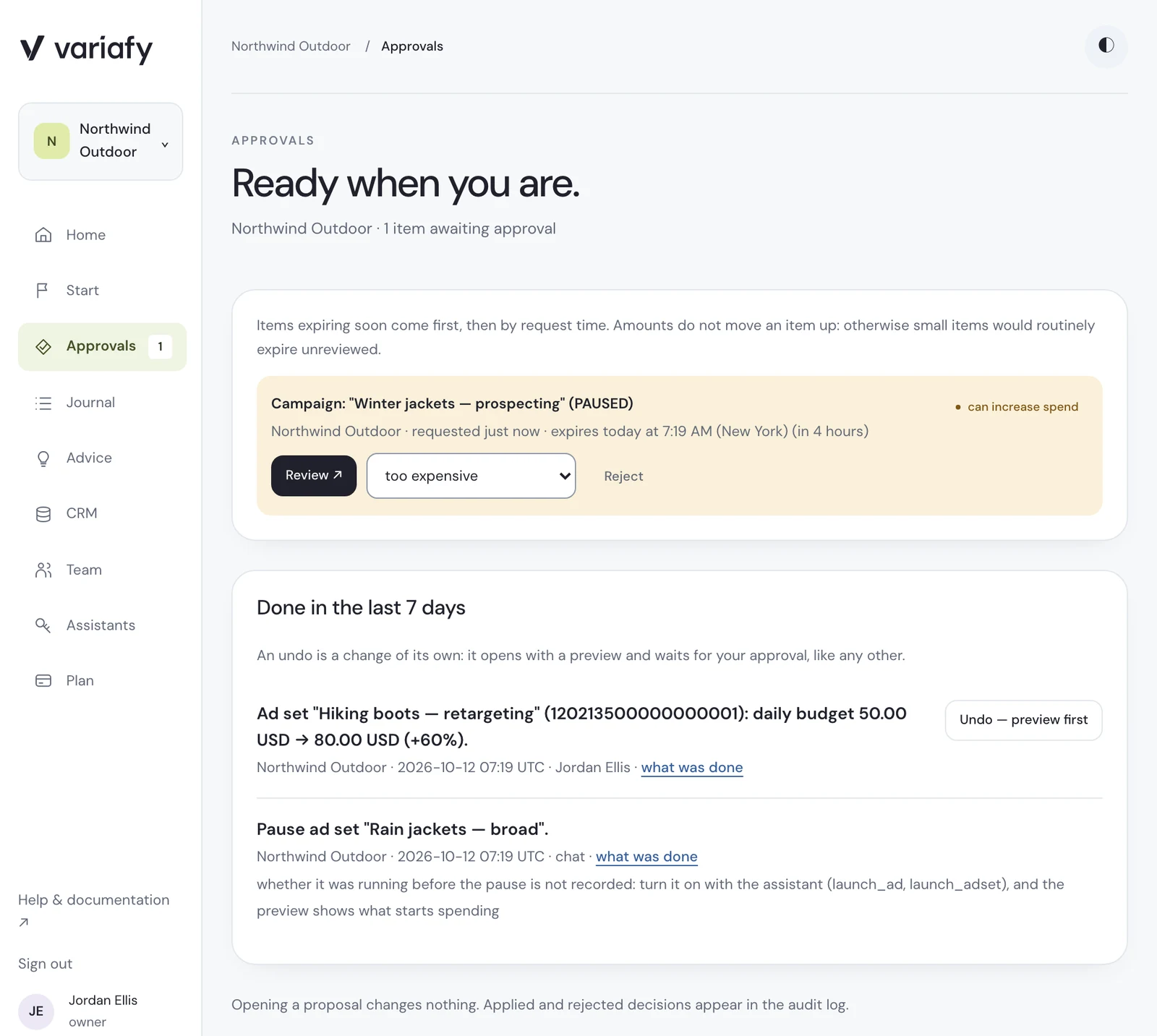
Variafy adds its own check on top. Reading data is free and changes nothing. A change — a paused ad, a new budget, a new campaign — first comes back as a preview with the ad account and the effect on spend, and is applied only on a second, confirming call. The owner can switch the account so that anything which increases spend waits for a person to approve it in the console, whatever Claude was allowed to do. Those changes wait under Approvals, next to the changes applied this week, who approved each one and an undo that opens as a new preview. All 3 plans and their limits are on the pricing page; every tool is listed in the tool directory.
What to ask first
- “Compare cost per result for each campaign this week with the previous four weeks.”
- “Which ad sets spent money yesterday and got no results?”
- “Are any ads rejected, and what does the rejection say?”
- “Prepare pausing the three ads with the highest cost per lead — show me the preview first.”
- “Which campaigns brought paying customers last month?” — needs your payments connected.
To take access back, remove the app in Facebook under Settings & privacy → Settings → Business integrations, or follow the data deletion instructions. What is stored and for how long is in the privacy policy.
How we checked
Checked on 10 October 2026 against Anthropic’s guide to custom connectors, the Claude Code MCP documentation, Meta’s Business Help Center and developer documentation, and a search of Claude’s connector directory for “Meta ads” and “Facebook”. Variafy is our product. Menu names in Claude change from time to time, so the steps link to the current instructions.
Questions
Is there an official Meta Ads connector for Claude?
Yes. Meta’s ads MCP server at https://mcp.facebook.com/ads lists Claude and Claude Code among its supported AI agents. In Claude you add it as a custom connector and sign in with Facebook.
Can I connect Meta Ads on the Claude Free plan?
Yes. Custom connectors are available on Free, Pro, Max, Team and Enterprise plans; the Free plan allows one custom connector.
Can Claude Code manage Meta ads?
Yes. Add a Meta Ads connector with “claude mcp add”, then ask in plain language. Variafy uses a token from its console; Meta’s developer documentation gives a command for people with their own Meta app.
Can Claude change my ads without asking?
Claude asks before it uses a tool unless you chose “Allow always”. Meta’s connector creates new ads paused and lets admins block actions. With Variafy, every change is first shown as a preview with its effect on spend and is applied only after you confirm it.