Meta Ads MCP servers in 2026: official vs third-party
An MCP server for Meta Ads is what lets an AI assistant such as ChatGPT or Claude read your ad account and change it.
Meta runs an official one at https://mcp.facebook.com/ads, and it is free. Third-party servers — Pipeboard, Adspirer,
Variafy and about ten others — are hosted services with paid plans that add what the official one does not: more ad platforms
in one connection, revenue from outside Meta, their own approval rules or monitoring. If you only need Meta and answers when
you ask, the official server is enough; pay for a third-party one only for an extra you will use.

What a Meta Ads MCP server is
MCP, the Model Context Protocol, is the standard way AI assistants call outside tools. A Meta Ads MCP server is a web address you add to your assistant as a connector. You sign in with Facebook once and choose which ad accounts to share; after that, when you ask “Which ad sets spent money yesterday and got nothing?”, the assistant calls the server’s tools, gets the numbers from your account and answers from them.
Third-party servers reach your data through Meta’s Marketing API, with only the access you grant in the Facebook dialog. Servers differ in three things: what they let the assistant change, how a change is checked before it reaches your account, and what they add on top of Meta’s own data.
Meta’s official ads MCP server
Meta’s server lives at https://mcp.facebook.com/ads and is free. According to Meta’s
Business Help Center, it can:
- pull reporting on campaign performance;
- create and edit campaigns, ad sets, ads and creatives, and upload images and videos;
- create, update and delete custom audiences;
- create and manage catalogs and troubleshoot product feeds;
- check signal health, run A/B tests and conversion lift studies;
- search the Business Help Center and show an ad account’s activity log.
All new ads are paused until you set them live. If you have full control of a business portfolio, you can allow or block actions for each ad account — creating campaigns, editing budgets, budgets above an amount you set — in Meta Business Suite under Settings → Integrations → Ads MCP server. Meta notes that not every account has every tool yet.
Which assistants can use it
Meta lists ChatGPT, Claude, Claude Code and Perplexity. When we tried to register a different client on 10 October 2026, the server refused: sign-in is open to supported assistants, and anything else needs its own Meta developer app, as Meta’s developer documentation describes. On the same day the server was not in Claude’s connector directory, so in Claude you add it as a custom connector with the address above. Step by step: in ChatGPT and in Claude and Claude Code.
What it does not do: it covers Meta only, it does not know which ads brought paying customers because it has no access to your CRM, and it does not watch the account for you — it answers when you ask.
What access a server asks for
When an assistant first connects, Meta’s server asks for these permissions (as it listed them to us on 10 October 2026):
ads_readandads_management— read and change ads in the ad accounts you share;business_management— see and manage assets in your business portfolio;pages_show_listandpages_manage_ads— list your Facebook Pages and run ads from them;instagram_basic— see the Instagram accounts linked to them;catalog_management— manage product catalogs;ads_mcp_management— Meta’s own permission for its MCP server.
Third-party servers ask for a similar set through their own Meta app; Variafy, for example, asks for ads_read,
ads_management, business_management, pages_show_list and pages_read_engagement.
The permission names are not where servers differ: anything that can pause an ad needs ads_management. What
differs is what the server does with that access — which actions it exposes and what has to happen before one is applied.
Third-party servers compared
Third-party Meta Ads MCP servers are run by independent companies. You connect them the same way, through Facebook sign-in, and they work with the same assistants. People choose them for one of four reasons:
- Several ad platforms in one connection — Meta, Google, TikTok, LinkedIn and others in one chat.
- Revenue from outside Meta — analytics, a shop or a CRM, so the assistant can see which ads brought sales, not only clicks and leads.
- Their own approval rules — a preview before a change, a person’s approval for spend increases, a log of who approved what.
- Monitoring — alerts and reports that arrive without anyone asking.
The trade-off is cost and one more company with access to your ad accounts. Here is how Meta’s server and three third-party ones describe themselves as of 10 October 2026:
| Meta (official) | Pipeboard | Adspirer | Variafy | |
|---|---|---|---|---|
| Ad platforms | Meta | Meta, Google, TikTok, Snap, Reddit, LinkedIn, Pinterest, Microsoft | Google, Meta, LinkedIn, TikTok, Amazon and others | Meta |
| Free plan | Free | 2 ad accounts, 30 AI commands a week | 15 tasks a month | Unlimited reading, 15 changes a month, 1 ad account |
| Paid plans | — | Priced per connected ad account, unlimited AI commands | From $49 a month ($40 billed annually) | Solo €29 a month, Studio €99 a month |
| New ads and campaigns | Created paused | New campaigns start paused; explicit confirmation on every write | Campaigns created paused; budget changes need explicit confirmation | Created paused; every change is previewed with its effect on spend and applied only after you confirm it |
| Owner controls | Allow or block actions per ad account in Meta Business Suite | Per-tool permissions, scoped tokens and team access controls on higher plans | Autonomous agents put proposed changes in an approval queue | The owner can require a signed-in person to approve anything that increases spend |
| Data beyond Meta | — | Google Analytics 4, Merchant Center, Search Console | Google Analytics 4, Klaviyo | Payments from Pipedrive, a Google Sheet or an uploaded file, matched to ads |
Prices and features change; check Pipeboard’s and Adspirer’s pricing pages for current terms. Pipeboard also publishes its Meta server’s code on GitHub under a source-available licence.
Other Meta Ads MCP servers
Eight more, each as its maker describes it on 10 October 2026:
- GoMarble — an open-source Meta server under the MIT licence that runs on your own computer; its tools fetch data. GoMarble’s hosted service covers Meta, Google and more; plans start at $139 a month, and write actions, proposed for your approval, come with the $399 Operator plan.
- Ryze — hosted; Meta, Google Ads, TikTok, GA4, Search Console and Shopify. Writes need approval. No free plan; from $89 a month.
- Markifact — hosted in the EU; 14 ad platforms plus analytics and CRM tools. It can create campaigns and change budgets, and says write operations always stop for your approval. 200 one-time credits, then from $79 a month.
- PaidSync — hosted; 14 platforms. Creates default to a dry-run preview, with an undo and a change log; over MCP, the assistant’s own confirmation is the human check. Free for 15 tasks a month; its site shows Pro at both $75 and $99 a month.
- Windsor.ai — hosted; 350+ data sources and listed in Claude’s connector directory. It can create, edit and pause campaigns and set budgets from Claude, ChatGPT and Copilot. Free for one data source; from $19 a month billed annually.
- Madgicx — hosted; Meta only. Its tools start and pause ads and change budgets and bids; creating campaigns is not available yet. The price is shown inside its app.
- AdAdvisor — hosted; Meta only for now. “Draft-first”: every change is staged for your approval, with an audit log. Free for 20 tool calls a month; from $19.99 a month.
- Zapier MCP — not an ad manager: it covers Facebook Lead Ads, creating a lead ad in an existing ad set and custom audiences, but not campaigns, budgets or pausing. Free for 100 tasks a month.
If you want to run a server yourself, GoMarble’s Meta server is MIT-licensed and Pipeboard’s is source-available; Pipeboard’s own setup guide says its local version needs your own Meta developer app.
Read-only or write access
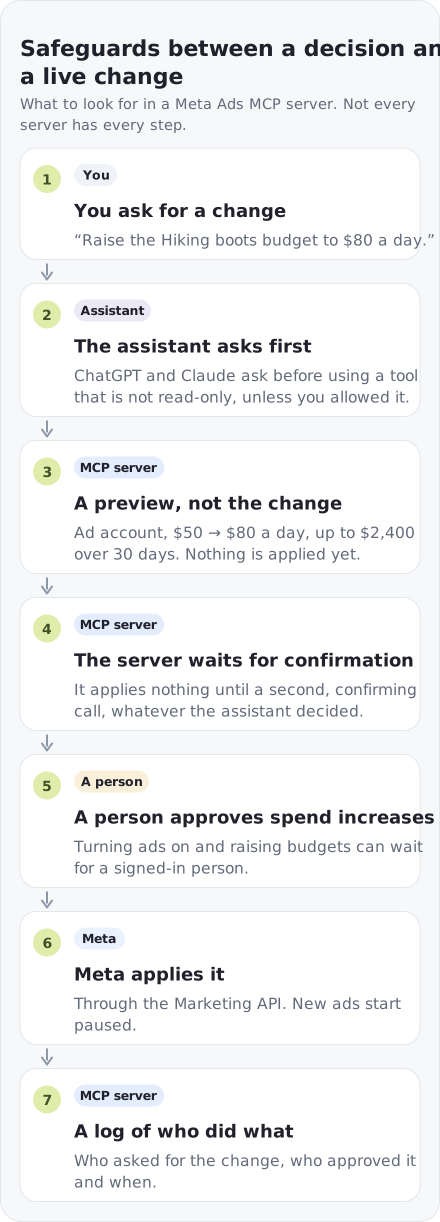
A read-only server can answer every reporting question and cannot break anything. It also cannot pause the ad set that is burning money while you read the answer. Write access is what makes an assistant useful during the working day, and it is where servers differ most. Look for these safeguards:
- New ads start paused — Meta’s server, Pipeboard, Adspirer and Variafy all do this.
- A preview before the change — what will change, in which ad account and how it affects spend.
- Confirmation outside the assistant — the assistant asking “shall I?” is not the same as the server refusing to apply a change until it is confirmed.
- Human approval for spend increases — turning ads on, raising budgets and bids are the actions that cost money.
- A log — who asked for each change, who approved it and when.
Your assistant adds its own layer: Claude and ChatGPT both ask before using a tool that is not read-only, unless you tell them not to.
How to choose
- Only Meta, and you ask when you need something? Start with Meta’s official server. It is free and you lose nothing by trying it first.
- Several ad platforms? A multi-platform server saves you a connector per platform.
- Sales happen in a CRM, not on your site? Lead generation, courses and services lose the link between an ad and a payment. Look for a server that matches payments from your CRM to the ads that brought them.
- Several people or a client’s money? Check whether every change is shown as a preview before it is applied, and whether a person — not the assistant — can be required to approve spend increases.
- Want to hear about problems before you ask? Look for alerts on spend limits, rejected ads and delivery problems.
For agencies
Agencies run into three questions that a single advertiser does not:
- How many ad accounts fit in a plan. Pipeboard’s plans are priced per connected ad account; Adspirer’s largest self-serve plan allows 5 active accounts per platform; Variafy’s Studio plan connects 15.
- Who in the team may change what. Meta lets a partner with access to a client’s ad account set its own MCP rules for that account, and those rules apply only to the partner’s people. Third-party servers add their own roles and approvals.
- How the client sees changes. A log of every change with who approved it is easier to show a client than a chat history.
Common mistakes
- Sharing every ad account in the Facebook dialog. Share only the ones the assistant needs; you can add more later.
- Choosing “Allow always” for tools that change budgets or turn ads on. Keep it for reading tools.
- Judging a server by its number of tools. What matters is what happens before a change reaches your account.
- Expecting the assistant to know revenue that lives in your CRM. No server sees it unless you connect it.
- Leaving a trial connected. Remove servers you no longer use under Settings & privacy → Settings → Business integrations in Facebook.
Can using an MCP server get an ad account banned?
Meta’s help page on its own server says that connecting through it does not, by itself, put an account at risk: bans come from breaking advertising policies, such as non-compliant ads or creating new accounts to get around enforcement. The same policies apply whichever server makes the change, so the real risk is what the assistant is allowed to do. That is why previews, paused new ads and human approval for spend increases matter more than which server you use.
What Variafy adds
Variafy works with Meta ad accounts and is built for businesses that sell through a CRM:
- Reading is free and unlimited. Only changes count towards a plan.
- Two calls per change. The first returns a preview with the ad account and the effect on spend; nothing changes until a second, confirming call.
- Human approval on request. The owner can require that anything which increases spend waits for a signed-in person in the console.
- Revenue from your CRM. Payments from Pipedrive, a Google Sheet or an uploaded file are matched to the ads that brought them.
- A watchdog. Every 15 minutes it checks spend limits, rejected ads and delivery problems, and sends daily advice and a weekly account audit by email or Slack.
When Variafy is not the right choice: you need to change Google, TikTok or LinkedIn campaigns from the same chat; you want an autopilot that changes ads with nobody confirming; you manage product catalogs; or you only need to read Meta numbers now and then — Meta’s free server does that.
The address to add to your assistant is https://www.variafy.com/mcp. Setup for each assistant is in the
help page, every tool is in the tool directory, and plans are on
the pricing page.
How we checked
Checked on 10 October 2026. Facts about Meta’s server come from Meta’s Business Help Center and developer documentation; the permission list comes from the server itself, which names them when an unauthenticated request arrives. We also tried to register an unlisted client with it and searched Claude’s connector directory for “Meta ads” and “Facebook”. Facts about other servers come only from their own websites, pricing pages and code repositories; we did not sign up for paid plans, and where a site shows two prices we say so. Variafy is our product, so read its rows with that in mind.
Questions
Does Meta have an official MCP server for ads?
Yes. Meta’s ads MCP server is at https://mcp.facebook.com/ads. It is free and can read reporting and create and edit campaigns, ad sets and ads; new ads are created paused.
Which AI assistants work with Meta’s official MCP server?
Meta lists ChatGPT, Claude, Claude Code and Perplexity. Other assistants and your own tools need a Meta developer app of your own.
Is Meta’s MCP server in Claude’s connector directory?
Not as of 10 October 2026. In Claude you add it as a custom connector with the address https://mcp.facebook.com/ads and sign in with Facebook.
What permissions does a Meta Ads MCP server ask for?
Meta’s server asks for ads_management, ads_read, business_management, pages_show_list, pages_manage_ads, instagram_basic, catalog_management and ads_mcp_management. Any server that can pause or change ads needs ads_management.
Is there an open-source Meta Ads MCP server?
Yes. GoMarble publishes a Meta server under the MIT licence that runs on your own computer, and Pipeboard publishes its Meta server’s code under a source-available licence.
Is the official Meta Ads MCP server free?
Yes. Meta does not charge for it. Third-party servers charge for extras such as more ad platforms, revenue from a CRM, approval rules or monitoring; many have a free plan.
Why use a third-party Meta Ads MCP server?
For something the official server does not do: several ad platforms in one connection, revenue from outside Meta, previews and human approval for changes, or alerts that arrive without asking.
Can using an MCP server get my ad account banned?
Meta says that using its ads MCP server does not by itself put an account at risk; bans come from breaking advertising policies. Those policies apply to every change, whichever server makes it.