How to connect Google Search Console to ChatGPT or Claude (MCP)
To connect Google Search Console to ChatGPT or Claude, add an MCP connector that reads the Search Console API and sign in with a Google account that has access to the property. Google does not list an official Search Console MCP server as of 23 October 2026. Ask for read-only access, and expect totals that differ from the chart for documented reasons.
On this page11 sections
Is there an official Search Console connector for ChatGPT or Claude?
No. Google’s list of supported MCP servers, updated 22 Oct 2026, has no Search Console entry, and neither ChatGPT nor Claude ships a built-in one. Connectors that exist are third-party and use the public Search Console API.
Inside Search Console, Google announced in December 2025 an AI-powered configuration of the Performance report, rolling out gradually: you describe a view in words and it sets the filters. It does not connect your data to an outside assistant.
| Local server | Hosted connector | |
|---|---|---|
| How it runs | On your computer, started by Claude Desktop or a developer tool, with your own Google Cloud credentials. | On the operator’s server; you add its URL as a custom connector and sign in to Google. |
| Works in | Claude Desktop and coding tools. ChatGPT reaches remote servers, so a local one needs a bridge and OpenAI’s Secure MCP Tunnel. | Claude on the web and desktop, and ChatGPT where your plan allows custom servers. |
Which Search Console connectors exist?
Google does not list one of its own, so every option below is a third party on the Search Console API. Two are open source and run on your computer; the rest are hosted.
| Where it runs | What its own page says it can do | |
|---|---|---|
| Coupler.io | Hosted, syncs a dataset into ChatGPT | Reads performance data. |
| Markifact | Hosted, listed in Claude’s directory | Read-only reporting. |
| mcp-gsc | Open source, runs on your computer | 20 tools: reads, inspects up to 10 URLs at once and submits sitemaps; deleting sites and sitemaps is off by default. |
| mcp-server-gsc | Open source, runs on your computer, uses a service account | Reads up to 25,000 rows of performance data. |
| Variafy | Hosted remote MCP server | Read-only for Search Console. |
| Windsor.ai | Hosted | Read-only, without URL inspection; free plan for one source. |
Listed alphabetically, from each project’s own page on 23 October 2026; we did not test the others, and what they can do may change. Variafy is ours.
What access does the connection need?
A Google account with a role on the property, and a connector that asks for read-only access. Google’s authorization guide lists two scopes; the read-only one covers both search data and URL inspection.
https://www.googleapis.com/auth/webmasters.readonly Read-only access.
| What to check | Why | |
|---|---|---|
| Your permission | Owner, Full user or Restricted user. Google describes a Restricted user as having “simple view rights on most data”, with a fetch-only URL inspection. | Owner or Full user gets the full URL inspection; check your level in Settings → Users and permissions. |
| Property type | A Domain property (sc-domain:example.com) covers every subdomain and protocol; a URL-prefix property covers one prefix. | Name the property in your first prompt; the two can show different totals. |
| Scope requested | The read-only scope is enough for reporting. | If a tool asks for full access, ask why: it can also add sites and delete sitemaps. |
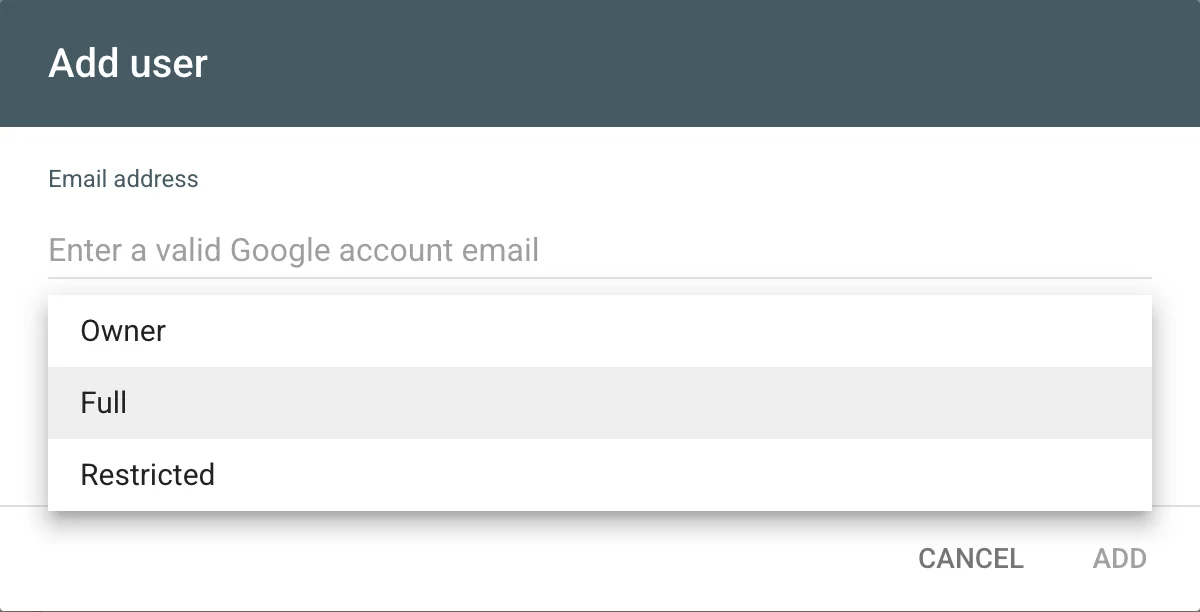
Permission levels are from Google’s users and permissions page.
How do you add Search Console in Claude?
For a hosted connector, use Claude’s custom connector flow. Anthropic’s connector guide, checked 23 Oct 2026, lists it on Free, Pro, Max, Team and Enterprise; Free allows one custom connector.
- Open Customize → Connectors. Click + Add, then Add custom connector.
- Enter a name and the connector URL, then Continue.
- Add, then Connect. Sign in to Google and check that the consent screen asks for the access you expect.
- Turn it on in a chat with + → Connectors.
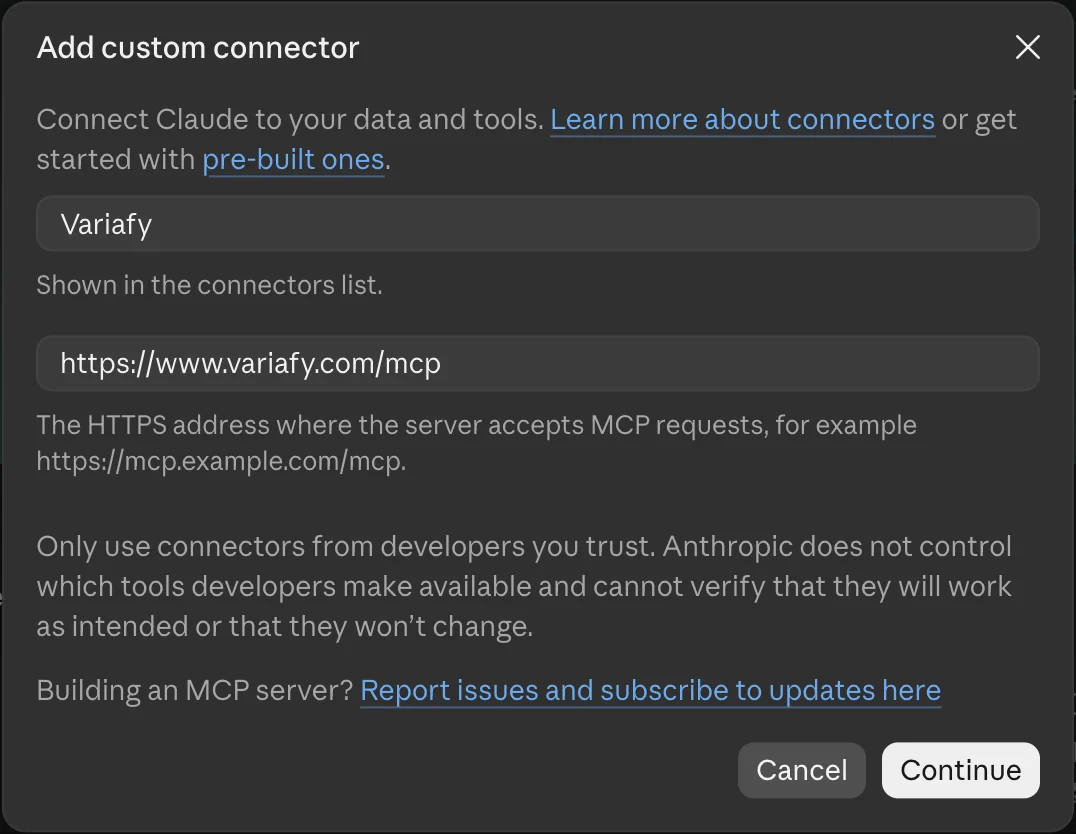
Claude reaches custom connectors from Anthropic’s cloud, so the server must be reachable on the public internet. A local server is set up in Claude Desktop’s configuration instead. On Team and Enterprise, an Owner adds the connector in Organization settings → Connectors, and members connect their own Google account.
Claude Code. Run claude mcp add --transport http NAME URL with the connector’s address, then /mcp to sign in.
How do you add Search Console in ChatGPT?
ChatGPT adds remote MCP servers as plugins on the web, per OpenAI’s plugin guide, checked 23 Oct 2026. It does not start local servers; a self-hosted one is reached through a public HTTPS address or OpenAI’s Secure MCP Tunnel.
- Open ChatGPT Plugins, select the plus button, then Add custom MCP server.
- Name it and paste the connector URL under Connection.
- Set up the sign-in and accept the risk warning only for a server you trust.
- Create it as a plugin, install it, and type @ in a new chat to use it.
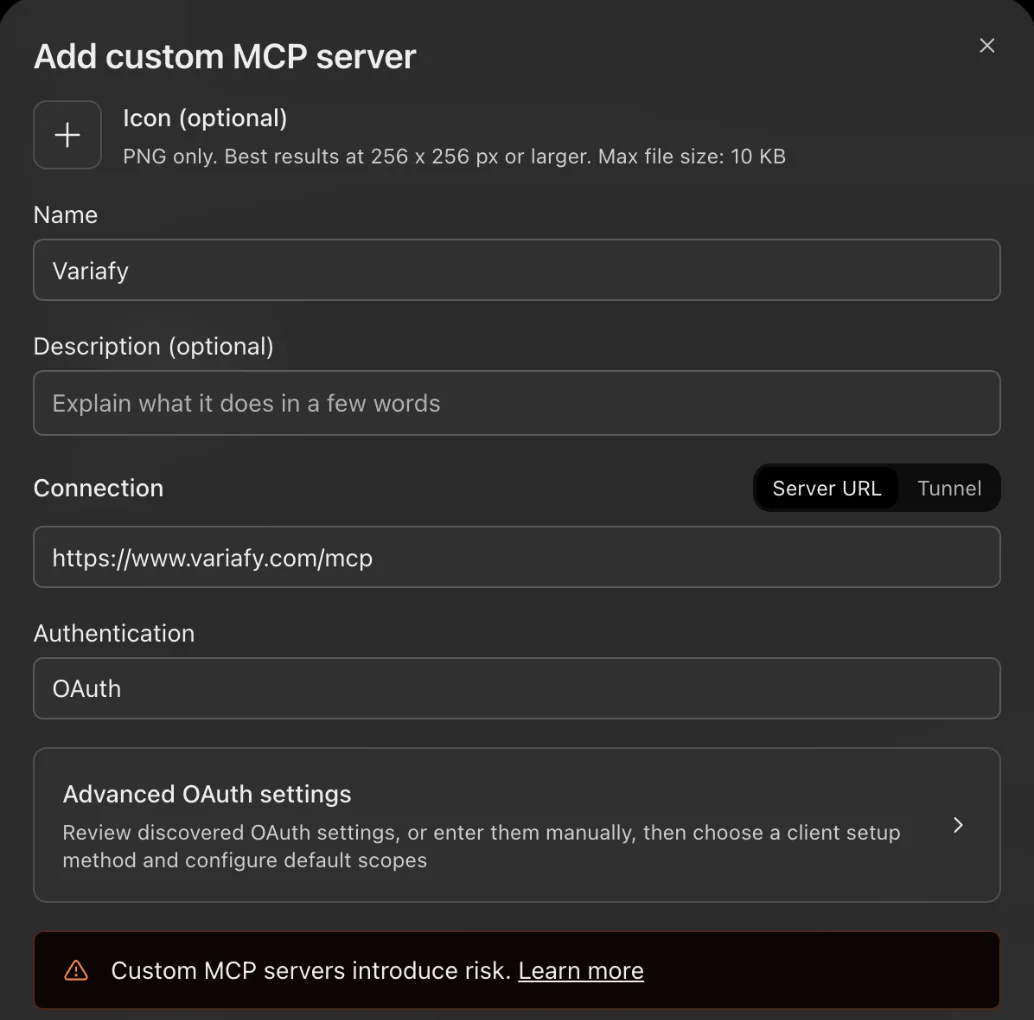
We also saw Add custom MCP server in the Add menu of a ChatGPT Plus account on 23 October 2026, although OpenAI’s help page names only Business, Enterprise, Edu and Pro.
Which plans can add custom servers, and whether they get full or read-only tools, changes often. Check OpenAI’s help page for your plan on the day you connect. Many older guides still describe a Developer Mode switch that is no longer the main path.
Why don’t the AI’s numbers match the Search Console chart?
Because the API and the chart count different things in documented ways. The biggest gap is anonymized queries.
the actual anonymized queries are always omitted from the tables, they are included in chart totals, unless you filter by query
| What Google documents | What to ask for | |
|---|---|---|
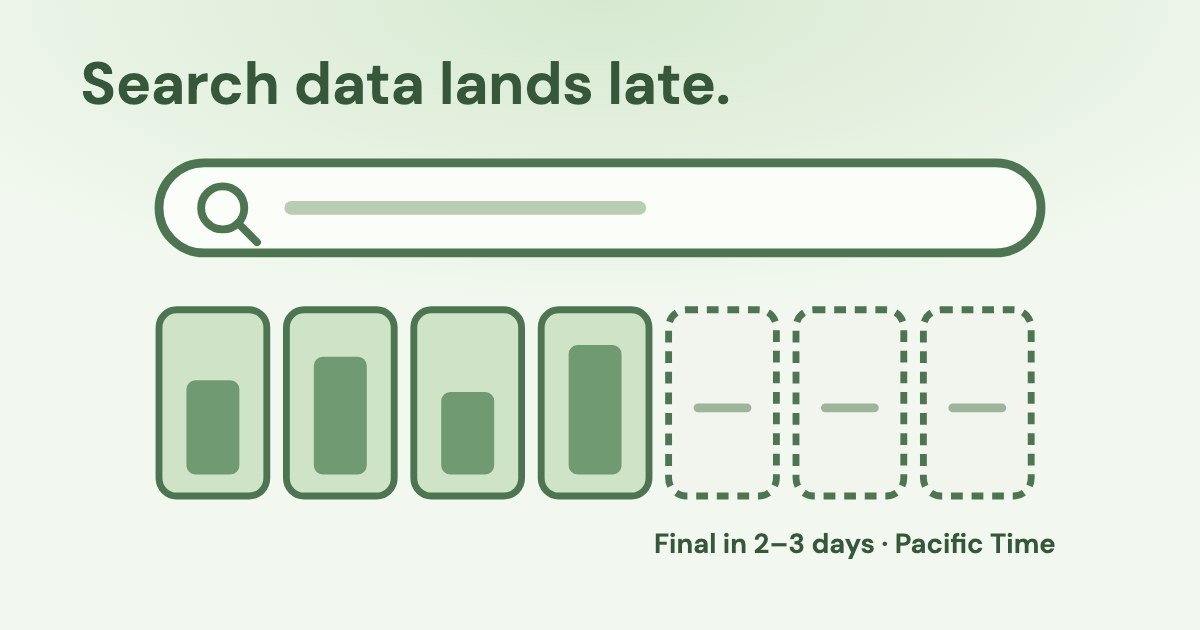
| Delay | “Data is typically available after 2-3 days.” The API returns final data unless fresh data is requested. | Ask which last date the answer includes, and leave out the last three days for comparisons. |
| Time zone | Dates are in Pacific Time (UTC−7/−8). | Expect a day boundary that differs from GA4 or your ad accounts. |
| By page vs by property | Tables grouped by page aggregate per URL; chart totals count per property. | Ask for site totals without the query and page dimensions when you need the headline number. |
| Average position | The topmost position of your link, averaged over queries where it had an impression. | Read it as a trend, not a rank tracker reading. |
Sources: Google’s getting all your data, the query reference and metrics definitions. Search Console and GA4 also disagree on clicks and sessions; Google explains why in comparing the two.
What this looked like on a real site
We read July–September 2026 for one lead-generation site we can read, anonymised with its owner’s permission. A filter that matches every query cut the site’s clicks by 45% and its impressions by 28%: that is how much came from anonymized queries, which leave the totals as soon as any query filter is applied. Rows grouped by page added up to 4% more clicks than the site total.
So when an assistant answers “your top queries bring most of your clicks”, ask whether it compared them with the unfiltered total.
Can the assistant check whether a page is indexed?
Yes, through URL inspection, with two limits. It reports the version already in Google’s index, and each site gets a daily allowance.
Presently only the status of the version in the Google index is available; you cannot test the indexability of a live URL.
Google’s usage limits allow 2,000 inspections per site per day and 600 per minute. The answer can show the verdict, the canonical Google chose, robots.txt and fetch state, and the last crawl time. The API has no “Request indexing” button: after a fix, you still request indexing in Search Console yourself.
What inspection found on a real site
On the same site, addresses carrying ad tags such as utm_source=instagram or fbclid were indexed and took almost half of the impressions and a tenth of the clicks for the quarter. Inspecting one of its main landing pages showed it “Submitted and indexed” only under its tagged address, which Google had chosen as canonical, while the clean address was “URL is unknown to Google”.
The fix is on the site: a canonical tag that points to the clean address and a sitemap with clean addresses only. The assistant’s part is to find it: ask for pages whose address contains utm_ or fbclid, then inspect the top ones.
Which questions should you ask first?
Questions that the API answers directly, so you can check them in the Performance report with the same filter.
First prompt
“Use only the connected Search Console tools. Name the property. For the last 28 days that are final, in Pacific Time, show clicks, impressions, CTR and average position for the site, then the 10 queries with the most impressions at an average position between 11 and 20. Say the last date included. Do not change anything.”
Then, one at a time:
Which pages lost the most clicks in the last 28 final days against the 28 before? Show clicks, impressions and average position for both periods.
Which pages have more than 1,000 impressions and a CTR under 1% in the last 28 final days? List the top queries for each.
Is [URL] indexed? Show the verdict, the canonical Google chose, the last crawl time and whether robots.txt or noindex blocks it.
If you also run Google Ads, the next step is comparing paid and organic search terms; see reading the search terms report and connecting Google Ads.
How does Variafy read Search Console?
Variafy is a hosted connector. You connect Search Console with the same Google sign-in as Google Ads and Google Analytics in the Variafy console, then add one connector to ChatGPT or Claude.
It reads search performance by query, page, country, device, date or search appearance with site totals; the indexing state of pages; queries and pages just off the first page or losing position; and, with a Google Ads account connected, the search terms you pay for where the site already ranks. Every answer states the period in Pacific Time and warns that the last 2–3 days may be incomplete.
It is read-only: Variafy does not change Search Console or your site. Search Console works right after your beta invitation.
Join the free beta to read search, analytics and ad accounts in one assistant.
How we checked
Checked on 23 Oct 2026 against the Search Console API reference, usage limits, authorization guide and URL inspection reference; Search Console Help on metrics and permissions; the Search Central blog on performance data; Google Cloud’s list of supported MCP servers; OpenAI’s plugin guide and Anthropic’s custom connector guide.
We also ran the reads ourselves through Variafy: performance and URL inspection for one lead-generation site we can read, anonymised with its owner’s permission, July–September 2026, with relative numbers only. The screenshots come from our own accounts on 23 October 2026. The connector table lists what each project says about itself; we did not test the others.
Questions
Is there an official Google Search Console MCP server?
Not as of 23 October 2026: Google’s list of supported MCP servers does not include Search Console. Connectors that exist are third-party and use the Search Console API.
Can the AI change my site or Search Console settings?
Not with the webmasters.readonly scope, which Google documents as read-only access. URL inspection reports the indexed version and cannot request indexing.
Why is the AI’s query total lower than the chart?
Anonymized queries are always omitted from tables but included in chart totals, and tables grouped by page aggregate differently from property totals. Ask for site totals without query and page dimensions.
How fresh is Search Console data through the API?
Data is typically available after 2–3 days, and dates are in Pacific Time. The API returns only final data unless fresh data is requested.
How many pages can the assistant inspect?
Google allows 2,000 URL inspections per site per day and 600 per minute.
Can I use it on Claude’s free plan?
Yes, with one custom connector: Anthropic lists custom connectors on Free, Pro, Max, Team and Enterprise, and limits Free to one.