Duplicate a Facebook campaign or ad set
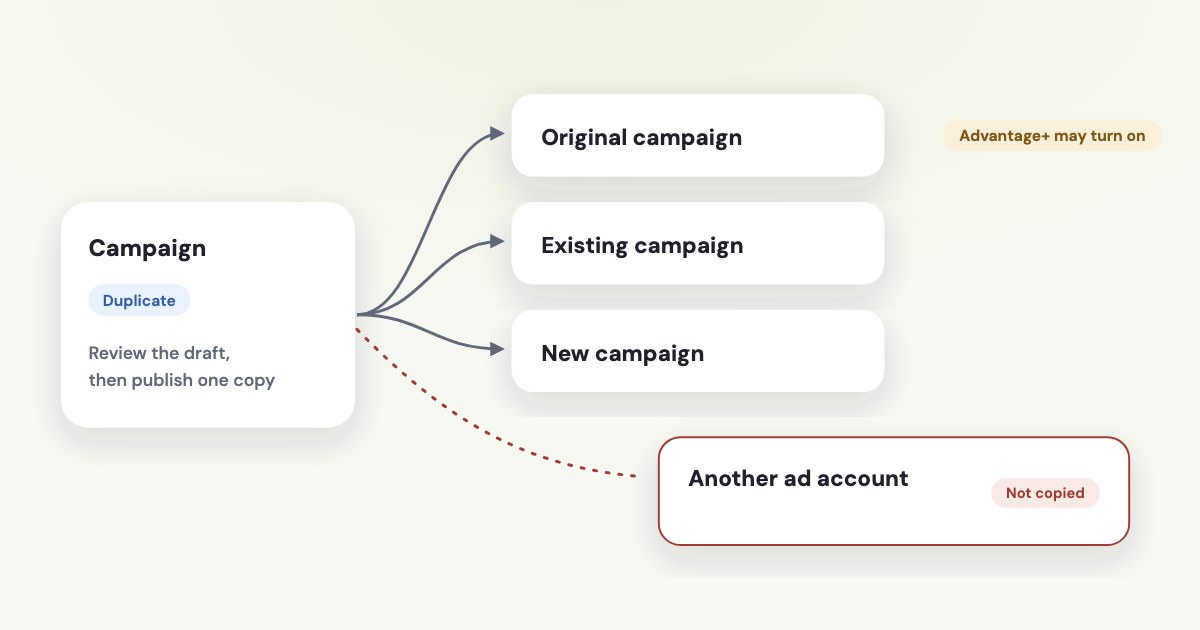
In Ads Manager, select the campaign, ad set or ad, choose Duplicate, review the destination and settings, then publish only the intended copy. Meta’s current guidance says duplicated campaigns can have Advantage+ settings turned on, including copies of campaigns previously created with manual settings. Its clipboard cannot copy ads across ad accounts, so a client-account handoff needs a destination-account rebuild or another separately verified method. [1]
On this page10 sections
Duplicate at the level you intend
Choose the smallest object that matches the job. If you need another creative inside an existing setup, select an ad; if you need a separate audience or schedule, decide whether an ad set is the right unit before copying a whole campaign.
This is our structure recommendation, not a rule that one level is always better. Copying more structure than you need makes it harder to see which budget, audience and creative are actually being tested.
The following desktop labels are from Meta’s English duplication documentation read November 4, 2026, as of November 2026. Meta describes conditional recommendation screens, so a button shown only for eligible objects is not guaranteed to appear for every copy. [1]
STEPS: 1. Open Meta Ads Manager and select Campaigns. [1] 2. Select the Campaigns, Ad sets or Ads tab for the object you need. [1] 3. Select its checkbox. [1] 4. Select Duplicate. [1] 5. If a recommendations screen appears, review the offered recommendations or current-setup option before continuing. [1] 6. For an ad set or ad, select Original campaign, Existing campaign or New campaign. [1] 7. Set Number of copies. [1] 8. Review Show existing reactions, comments and shares on new ads if offered. [1] 9. Select Duplicate. [1] 10. Review the draft and select Publish when it is ready to run. [1]
Before starting, record the source ad account and intended destination in your work notes. Use IDs as well as names when similar client accounts are open.
Know what a copy does and does not preserve
Meta describes duplication as a way to reuse campaign settings. It also documents settings that can change, so “same as the original” is a starting assumption to check, not a finished quality review. [1]
| Item | What to check in the copy |
|---|---|
| Campaign structure and settings | Start from the selected object, then compare the resulting draft. [1] |
| Advantage+ configuration | Meta says duplicated campaigns use Advantage+ settings, including formerly manual campaigns. [1] |
| Placements | Newly available placements can become available in duplicated ads. [1] |
| Reactions, comments and shares | Review the engagement checkbox and creative compatibility. [1] |
| Reporting history | Treat the copy as a separate reporting object; compare its own delivery after publication. |
| Asset permissions | Confirm the target account can use the Page, Instagram identity and dataset. [4] [5] |
Do not report the original ad’s past results as results earned by the copy. That is an editorial reporting rule: keep the source history for context and label the copy’s own delivery period clearly in any client comparison.
Give the duplicate a name that describes its purpose, such as “Service leads — new offer test — Nov 2026.” This is an example naming convention, not Meta’s generated naming behavior; we did not verify a universal automatic “Copy” suffix.
Use the campaign structure guide if you are deciding which level needs separation. Renaming a copy cannot correct an unsuitable structure or an accidental second budget.
Review automation and creative compatibility
Check Advantage+ settings even if the source used a manual setup. Meta’s current duplication page explicitly says previously manual campaigns are duplicated with Advantage+ settings on; selecting an existing campaign is not a promise to preserve every old delivery choice. [1]
Compare the campaign budget arrangement, audience controls, placements and creative options against your intended business constraints. Record intentional differences so the person approving the copy knows what changed.
Existing engagement is also conditional. Meta says customized creative for specific placements limits carrying over engagement more than once, so a duplicate is not a universal way to move every reaction and comment into every variation. [1]
If your actual goal is reusing a post, Meta separately documents Use existing post under Ad setup and Select post in Ad creative. Use that supported workflow when suitable, then check the selected Page, post and placement preview rather than assuming identical media means identical post engagement. [3]
Compatibility is a limit
Dynamic creative, placement-specific assets, the objective and the destination setup can affect what is available. Meta’s duplication guidance lists these caveats; it does not promise every historical ad format remains editable in every new copy. [1]
Account for learning and review
Duplication is not documented as a way to transplant a winning ad set’s learning state. Assess a new setup on its own delivery and to avoid promising a client that past stability will follow the copied creative.
If you add the duplicated ad to an existing ad set, Meta lists adding a new ad as a significant edit that causes that ad set to reenter learning. It also lists targeting, creative, optimization-event and bid-strategy changes as significant edits. [2]
Not every budget change has the same learning effect. Meta says significance can depend on the size of a budget or control change, so do not apply an invented universal percentage rule to every duplicate-and-budget adjustment. [2]
Use the learning-limited guide for the separate question of whether your structure receives enough useful optimization events. Duplicating an ad set repeatedly is not an evidence-based substitute for diagnosing that structure.
Meta also says ads are reviewed before they run and shows review status in the Delivery column. A source ad’s previous approval is not a guarantee of the duplicate’s approval or a fixed review duration. [1]
Handle another ad account as a separate destination
Meta’s copy-and-paste clipboard is limited to one ad account in one browser window at a time. It is cleared when you refresh the Ads Manager tab, change accounts or copy another selection, and the documented procedure says you cannot copy ads across ad accounts. [1]
Within that scope, the documented Duplicate dropdown includes Copy, Paste and See copied items. Those commands are useful inside the supported account context; keeping two browser tabs open does not extend the documented clipboard into a cross-account migration tool. [1]
For a client account, our recommended fallback is to rebuild the necessary campaign, ad set and ad in the client’s intended account. Start with a written settings record and approved creative files, then select assets available to that account rather than carrying over IDs blindly.
Arrange client permissions first using the agency access guide. Meta’s partner guidance limits an agency to the tasks and assets the owner shared, and an ad account created in a portfolio has ownership consequences that copying creative does not undo. [4] [5]
If a third-party tool offers cross-account copying, verify its current supported objects and destination mapping separately. This article makes no claim about an untested tool, and no source here establishes that an audience, payment method or dataset transfers just because an ad was recreated.
Check the draft before spending
Use a short approval record covering account, Page identity, objective, conversion location, performance goal, budget, dates, audience exclusions, placements and destination URL. This is our recommended review list, designed to make the intended spend and conversion path explicit.
Pay special attention to schedules copied from an older promotion. Confirm the destination’s current time zone and intended start and end dates, and remove expired offer language before asking anyone to approve the new setup.
Check account-specific creation or delivery limits from the warnings in your account. We have not verified a single numeric “maximum copies” allowance that applies to every objective and account, so use the actual limit message rather than a blog’s universal number.
After publication, confirm which objects exist and which are delivering. Make a source-versus-copy report with the publication date, because an unnoticed original campaign can continue spending while the duplicate starts its own delivery.
What to do next
Choose one source object and write down the intended account, purpose and budget for its copy. Create the draft, compare automation, assets and dates, and publish only after the differences are understood.
For a different client account, confirm permissions and rebuild the approved setup there. Check its Delivery status and its own results after publication instead of treating the source’s history as proof of success.
Where Variafy fits
Variafy connects ad accounts to an AI assistant and shows ad account changes as previews before confirmation. This article does not claim a cross-account copying feature; use the verified Meta workflow and review the destination first. It is in a free beta by invitation. Join the waitlist.
How we checked
Checked on 4 November 2026 against the pages below, read in English; Meta’s pages were read in a browser. We checked the documentation only: we did not run these steps in a live ad account.
- www.facebook.com/business/help/209669919072999 — Exact duplication and clipboard labels, destination choices, Advantage+ defaults, engagement and compatibility caveats, review
- www.facebook.com/business/help/316478108955072 — Significant edits and learning effects
- www.facebook.com/business/help/374756690038600 — Use existing post workflow
- www.facebook.com/business/help/1717412048538897 — Client-to-partner asset sharing and permission limits
- www.facebook.com/business/help/915885887059947 — Ad account ownership and shared-access distinction
What we could not confirm
- Cross-account clipboard copying
- Automatic transfer of audiences, datasets or billing
- A universal numeric copy limit
- A universal automatic name suffix
- Preservation of learning state
- Guaranteed engagement transfer or approval
- Live duplication testing. A destination-account rebuild is an editorial fallback, not a claim that Meta offers a transfer button
Variafy is our product.
Questions
How do I duplicate a Facebook campaign, ad set or ad?
In Ads Manager, select the campaign, ad set or ad and choose Duplicate. Review the destination and settings, then publish only the intended copy. Ad sets and ads can go into an Original campaign, an Existing campaign or a New campaign.
Can I copy ads to another ad account?
Not with the clipboard. Meta documents that switching accounts clears it, so a client-account handoff needs a rebuild in the destination account or another separately verified method.
Does duplicating a campaign keep my manual settings?
Not necessarily. Meta’s current guidance says duplicated campaigns can have Advantage+ settings turned on, including copies of campaigns that were created with manual settings, so check the draft before publishing.