Exclude existing customers from Facebook ads
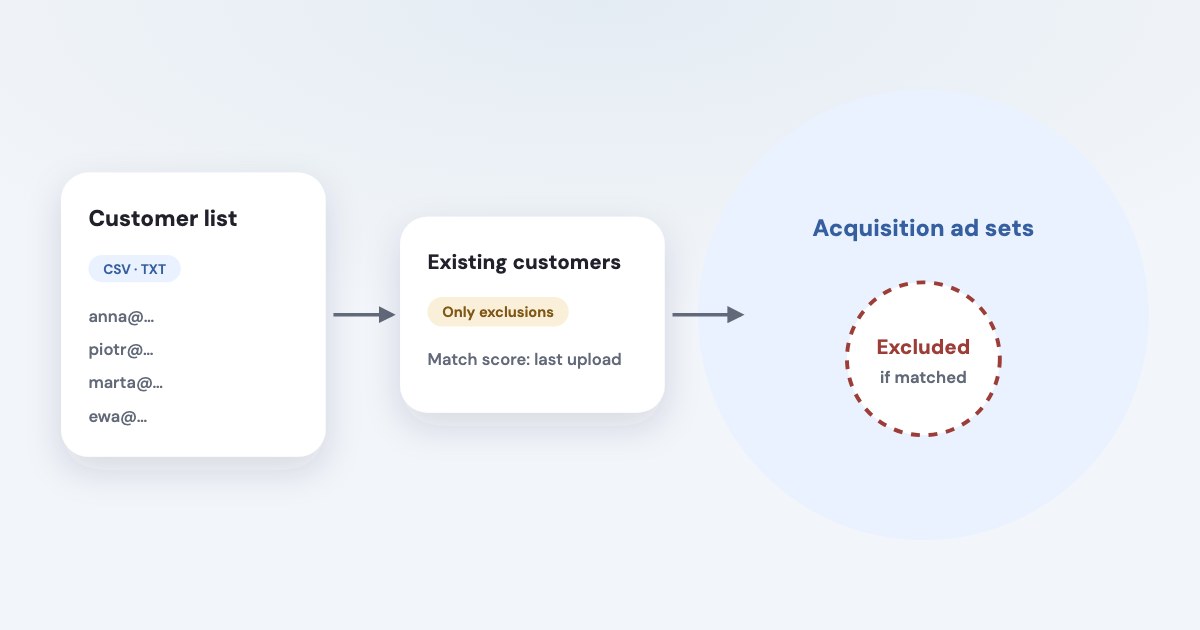
Export eligible customer contact details, create a customer list custom audience, then add it to your ad set’s customer-audience exclusions. Keep the same audience updated as customers change. The exclusion applies to people Meta can match, so uploading every CRM row does not guarantee that every customer will stop seeing your ads. [1] [2] [3] [4] [8]
On this page10 sections
Decide who belongs in the exclusion
Write a business definition first: for example, customers with a completed purchase who should not receive your first-purchase offer. That is an illustrative rule, not a Meta requirement; a renewal campaign may need those same people included instead.
Keep inquiries and customers distinct if your offer treats them differently. Give the acquisition owner a short inclusion rule and a separate reason for removing someone from the list, rather than relying on whichever CRM view an employee exported last month.
The existing custom audiences and lookalikes guide explains the broader audience system. This article concerns the operational chain from your customer record to the exclusion attached to a specific ad set.
Check data eligibility before exporting. Meta says a customer audience cannot be named, include or be based on prohibited sensitive information, and its preparation guidance covers the list’s name and selection criteria as well as the columns you upload. [1] [5]
An ordinary-looking filename does not make a sensitive underlying segment acceptable. If your business cannot lawfully and permissibly share a customer group, choose another acquisition approach instead of renaming the group and uploading it.
Prepare a useful CSV or TXT file
Meta’s formatting guidance accepts CSV or TXT files with at least one main identifier and says customer lists should include at least 1,000 customers. That wording is list-preparation guidance; we are not turning it into a verified universal hard minimum for every exclusion. [2]
Use the customer details you actually hold and are permitted to share. More usable identifiers can improve matching, but guessing an email address or collecting unnecessary personal data just to fill every column is not a sensible correction. [2] [5]
| Field | Formatting to check |
|---|---|
| Use email; one address in each cell. [2] | |
| Phone | Use phone; include the country code even for one-country lists. [2] |
| First and last name | Use separate fn and ln columns. [2] [5] |
| Country | Use country with an ISO two-letter country code. [2] |
| Postal code | Preserve the correct code in zip, including leading zeros. [2] |
Format identifiers as text in the working sheet before export so spreadsheet conversions do not remove a plus sign or leading zero. Check the exported file itself; a neat-looking sheet does not establish that the CSV contains the intended values.
Remove CRM notes, purchase descriptions and unrelated columns from the upload file. Keep a private record of the export rule, source row count and date, so a later refresh can be compared with the same definition without retaining unnecessary copies of customer data.
Create the customer exclusion audience
The labels below come from Meta’s English documentation read November 4, 2026, as of November 2026. Use a clear audience name that reflects its permitted business purpose, such as “Existing customers — acquisition exclusion”; that name is our suggestion. [1]
STEPS: 1. Open Audiences. [1] 2. Select Create audience → Custom audience, or Create a custom audience if this is your first audience. [1] 3. Select Customer list and then Next. [1] 4. Complete Prepare list and select Next. [1] 5. Under Add list, choose Inclusions or exclusions or Only exclusions for the intended use. [1] 6. Choose Upload a file or Paste comma-separated values. [1] 7. Enter the Audience name and review the custom audience terms. [1] 8. Select Next and correct the identifiers in Map identifiers. [1] 9. Select Import and create. [1] 10. Check the audience’s status in Audiences. [1]
Only exclusions prevents that customer audience from being used for inclusion and cannot be changed later; Meta also says it cannot be used to make a lookalike. Use it deliberately for a list whose purpose is permanently limited to exclusion, rather than as a substitute for reviewing permissions and data rights. [1]
A list can show Populating before Ready. New or recently linked accounts may have customer-list feature restrictions, so a missing creation option needs an eligibility check rather than a different file delimiter. [1]
Attach it to the actual acquisition ad sets
Creating an audience does not itself attach it to your campaigns. Maintain a short list of the acquisition ad sets that should use this exclusion and check them individually after creation and after any campaign copy.
For Advantage+ audience, Meta documents audience controls as the place for constraints, including custom audience exclusions. Adding an existing-customer list as a suggestion does not exclude those customers; the following labels are from the current objective-specific instructions for Leads, Sales and App promotion. [3] [8]
STEPS: 1. Open the intended ad set’s Audience section in Ads Manager. [8] 2. Select Show more controls. [8] 3. Enter your customer audience under Custom audience exclusion. [8] 4. Use the intended existing audience rather than creating another list with a similar name. 5. Review the selected audience and the rest of the ad set before publishing the change.
Meta’s instructions for Awareness, Traffic and Engagement instead show Controls → Show more controls → Exclude these custom audiences → Search existing audiences. Its public audience page also retains an older Show more options layout; follow the documented instructions for your objective rather than treating those labels as one universal path. [3] [8]
For the wider distinction between controls and suggestions, use the Advantage+ audience targeting guide. Keep your exclusion check separate from any decision to narrow prospecting by interests or other inputs.
Read matching without inventing a benchmark
Meta says the Match score column in Audiences is a score out of ten based on matched rows divided by uploaded rows in the last successful upload. It appears in increments of 0.5 and has limited retention, so a missing score may require a list update. [1] [2]
There is no universal “normal match rate” in the official pages checked for this article. Compare the file’s identifiers and formatting with Meta’s guidance, then investigate changes in your own uploads rather than promising a particular percentage to a client.
An upload row is not a guarantee of one excluded person. Our practical interpretation is that unmatched records remain a coverage gap: the exclusion cannot protect a customer identity that Meta has not associated with your list. [1] [2]
Do not treat a customer reporting an ad as proof that the exclusion setting was ignored. First check whether the ad came from the intended account and ad set, whether the correct audience was selected, whether the customer’s usable identifiers were present and whether the latest upload finished.
Refresh the same audience and document responsibility
Meta’s creation and formatting pages say a list can show Outdated when it has not been updated in over 30 days. That is not a rule that every business should wait a month; we suggest you refresh according to how quickly new customers become ineligible for the offer. [1] [2]
For a rapidly changing customer base, choose a more frequent operational schedule and name the person responsible. A static export cannot include a new customer until the source and audience are updated; keeping the same audience also makes it easier to check the ad sets already referencing it.
STEPS: 1. In Audiences, select the customer list audience and then Edit. [4] 2. Choose Replace customers, Add customers or Remove customers. [4] 3. Upload or paste the appropriate updated file. [4] 4. Select Next and check the mapped identifiers. [4] 5. Select Import and create, then Done when offered. [4]
Use Replace customers for a full current snapshot, not for a file containing only today’s additions. Meta says updates affect ad sets using the audience and may take a few hours while ads continue running, so check completion before declaring the refresh finished. [4]
What to do next
Write your customer definition and produce a clean, permitted export. Create the audience and confirm it appears under exclusions in every acquisition ad set that needs it.
Assign a refresh owner, record the audience ID and review the next upload’s status and matching information. Use CRM sales reporting to evaluate customer outcomes separately from the audience-maintenance task.
Where Variafy fits
Variafy can bring CRM deals and payments into ad reports, which helps you distinguish customer outcomes from raw lead counts. This article does not claim that it automatically maintains customer exclusion lists; assign that workflow explicitly. It is in a free beta by invitation. Join the waitlist.
How we checked
Checked on 4 November 2026 against the pages below, read in English; Meta’s pages were read in a browser. We checked the documentation only: we did not run these steps in a live ad account.
- www.facebook.com/business/help/170456843145568 — Creation labels, Only exclusions, eligibility, status and Match score
- www.facebook.com/business/help/2082575038703844 — Formats, identifiers, 1,000-customer guidance and matching information
- www.facebook.com/business/ads/meta-advantage-plus/audience — Audience controls, suggestions and exclusion field labels
- www.facebook.com/business/help/403733729689975 — Update choices, replacement behavior and processing caveat
- www.facebook.com/business/help/606443329504150 — Data preparation, lawful basis, prohibited information and selection criteria
- www.facebook.com/legal/terms/customaudience — Customer List Custom Audiences Terms and advertiser responsibilities
- www.facebook.com/business/ads/meta-advantage-plus/leads — Streamlined leads setup and controls context
- www.facebook.com/business/help/572787736078838 — Current objective-specific exclusion labels and separate Leads versus Awareness/Traffic/Engagement paths
What we could not confirm
- A guaranteed match rate or complete customer exclusion
- 1,000 as a universal hard exclusion minimum
- Automatic synchronization from an ordinary CSV
- An exact update-completion time
- Permission to upload sensitive or opted-out records merely because the audience is exclusion-only
- A live upload test
Variafy is our product.
Questions
How do I exclude existing customers from Facebook ads?
Export the customers you are permitted to share, create a customer list custom audience, then add that audience to the customer exclusions of each acquisition ad set. Keep the same audience updated as customers change.
Will every customer in my list stop seeing my ads?
No. The exclusion applies to people Meta can match. Meta’s Match score describes the last upload and is not guaranteed coverage.
What does “Only exclusions” do?
It means the audience can be used only to exclude people. Meta says it cannot be changed later and cannot be used to make a lookalike, so choose it deliberately.