Which Facebook ads bring paying customers: matching CRM sales to ads
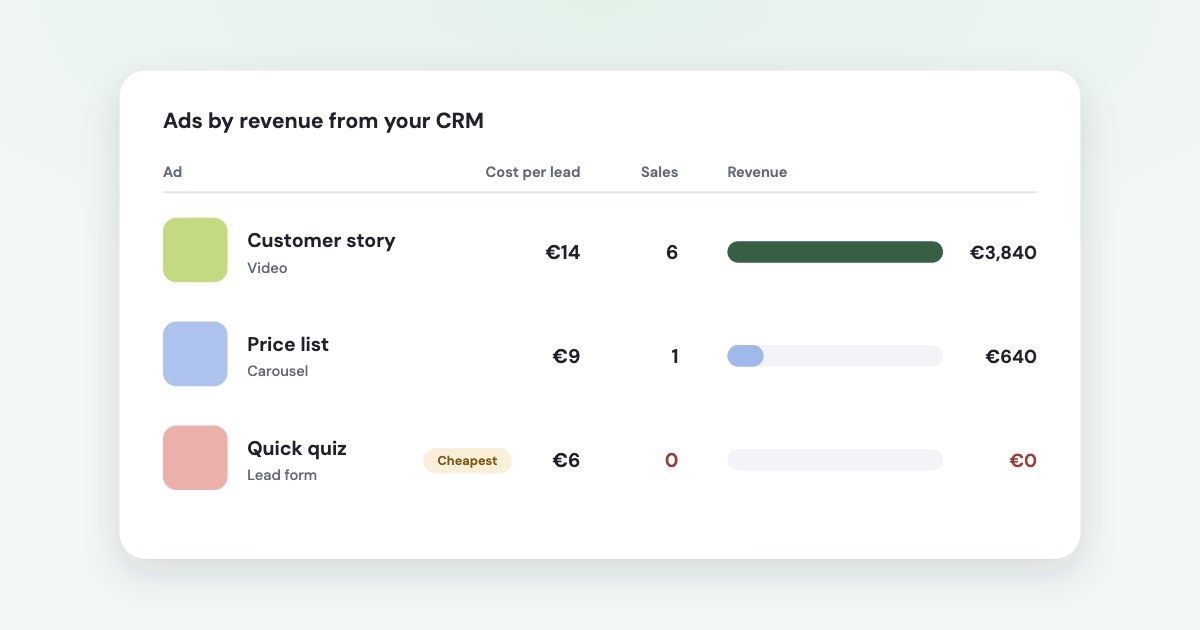
Ads Manager counts leads and website conversions; only your CRM knows who paid. To see which Facebook ads bring
paying customers, carry the ad’s ID from the click into the CRM deal — with {{ad.id}} in the link or the ad ID of a
lead form — and match each payment back to it. Then judge ads only after their leads have had time to pay.
On this page12 sections
Why Ads Manager can’t answer this
Ads Manager counts what Meta sees: lead form submissions, and website events from the pixel or Conversions API that happen within its attribution setting — 1 or 7 days after a click, or 1 day after a view.
A sale closed on the phone two weeks later, paid by bank transfer and recorded in Pipedrive, isn’t one of those. And even for events Meta does count, it warns that tools disagree:
there can be differences in how different tools detect, define and calculate conversions.
The link is what you carry
Meta doesn’t offer a report or an API call that says which ad a CRM deal came from. The only link between an ad and a payment is the information you carry from the click into the deal: an ad ID in the link, or the ad ID of a lead form.
Three ways a lead reaches your CRM
How the ad travels into the CRM depends on where the lead fills in their details:
| What carries the ad | What breaks it | |
|---|---|---|
| Form on your website | URL parameters in the ad link, saved into the form | Tags lost after the first page; the form doesn’t save them |
| Meta lead form (Instant Form) | The ad_id Meta attaches to every lead from an ad | A CRM integration that doesn’t keep the ID |
| Phone call or chat | Nothing, unless someone asks or the number is tracked | Always partly unknown — count it separately |
Most businesses have all three. Fix the first two; for the third, keep it as a known gap rather than guessing.
Tag every link with the ad ID
Meta fills dynamic parameters into the ad’s link for you. Its official list:
{{campaign.id}}, {{adset.id}}, {{ad.id}}, the matching .name versions,
{{placement}} and {{site_source_name}}. You add them under Tracking → URL parameters when you
create the ad (source).
Use IDs, not names. Meta’s own page explains why:
Campaign, ad set or ad names can still be changed, but the parameters will refer to the original names.
Names repeat, too
In one online education business we work with, the same ad name was used by 3.4 ads on average, in different ad sets. A payment tagged with that name can’t be put on one ad; a payment tagged with the ad ID can.
A string that works with any CRM:
utm_source={{site_source_name}}&utm_medium=paid&utm_campaign={{campaign.id}}&utm_term={{adset.id}}&utm_content={{ad.id}}
Two cautions from Meta. Changing URL parameters after publishing may cause your ad set to re-enter the learning phase
,
so set them on new ads. And A URL parameter is only applicable to the first product page
— your site has to keep the
tags until the form, usually in hidden form fields filled from the landing page address.
Meta lead forms already carry the ad
Every lead from a Meta lead form comes with the ad it came from. The download file has
ad_id, adset_id and campaign_id next to the lead’s answers (source),
and the lead webhook sends ad_id within minutes (source). Leads from organic reach
have no ad.
The weak spot is the integration in between. Meta’s own documentation notes:
Hubspot’s Lead Sync integration does not store the Meta Lead ID.
Open one lead in your CRM and check that the ad ID, or at least the lead ID, is saved on it. If not, map it in the integration or add tracking parameters to the form — Meta passes them to the CRM with the lead.
Leads expire in Meta after 90 days
Leads data will be available for download for up to 90 days from the time the Instant Forms is submitted by a user.
(source) If the ID never reached your CRM, it can’t be recovered later.
What your CRM keeps on its own
Don’t assume the CRM fills this in for you:
- Pipedrive records where a deal came from as a channel and origin, such as Web forms (source) — but not which ad. Its web form documentation mentions neither UTM tags nor hidden fields.
- HubSpot sets the original source automatically, down to Paid social → Facebook → the campaign name taken from
utm_campaign(source). That is campaign level; ads needutm_content.
So for either, store the tags from the link in deal fields of your own — one per tag.
Match payments to ads
Once deals carry tags, the match is mechanical:
- Export paid deals with the amount, the payment date, the lead date and the tags.
- Match from precise to rough: ad ID first, then ad set, then campaign.
- Don’t guess. If a name fits several ads, leave the payment unmatched and count it separately — spreading it over the ads invents half the report.
- Compare money with spend per ad for the same leads, not per day.
- Group by creative when the same creative runs in several ad sets, to see which message sells.
Give leads time to pay
The most common mistake is judging a campaign by payments before its leads could pay. A week-old campaign in a business with a three-week sales cycle always looks unprofitable.
How long payment takes
Across 1,598 payments in an online education business that sells through a CRM: the median time from lead to payment was about six days. 61% of the money arrived within 7 days of the lead, and 88% within 30.
Your curve will differ — a shop paid on the spot is near 100% on day one, a complex B2B sale may be 20% after a month. Measure it from your own payments: for each paid deal, the days between lead and payment.
Then count money two ways. By payment date shows what arrived this month. By lead date shows what the leads of a period have paid so far — the fair way to compare campaigns, as long as the period is old enough.
Send CRM stages back to Meta
The other direction is worth doing too. With the Conversions API for CRM, you send lead stages — qualified, opportunity, converted — back to Meta, so delivery can aim at leads that turn into customers (source). Meta’s guidance:
- it works with Meta lead forms (Instant Forms), and at least 200 leads a month;
- upload at least once a day, and send each stage change within 7 days (source);
- the stage you optimise for should happen within 28 days of the lead.
Since April 2026 the qualified leads goal needs this integration for new campaigns (source), and the old Offline Conversions API was discontinued in May 2025 (source).
It improves who Meta shows ads to. It doesn’t tell you which ads to keep: that still comes from your own match of payments to ads. Setup, fields and deadlines are in Meta Conversions API for CRM.
Mistakes that break the match
- Tagging with names. Renamed ads keep their old names in the link, and shared names can’t be told apart.
- Losing tags after the first page. The visitor browses, then fills in the form — and the tags are gone.
- An integration that drops the ad ID. Leads arrive in the CRM without the ad they came from.
- Judging too early. Payments for this week’s leads arrive next week or next month.
- Expecting Ads Manager and the CRM to match. They count different things in different windows.
How Variafy does it
Variafy connects your Meta ad accounts to an AI assistant and does this match for you:
- Payments in. From Pipedrive, a Google Sheet or an uploaded file — only the columns it needs: amounts, dates and tags.
- Matched by tags, precise first: ad, then ad set, then campaign, by ID or by name. When no tag names one ad alone, the tags together often do. A name several ads share is never guessed — that money is reported as unmatched, with its tags.
- Your own payment curve. It measures how long your leads take to pay, and doesn’t call a campaign a loss before its leads have had that time.
- By payment date or by lead date, and by creative across ad sets.
Ask in plain words
“Which ads brought paying customers in the last 30 days?” — answered with money against spend for each campaign, ad set or ad, and what is still too early to judge.
Add https://www.variafy.com/mcp to your assistant. Variafy is in private beta:
join the waitlist.
How we checked
Checked on 15 October 2026 against Meta’s Business Help Center (URL parameters, dynamic parameters, lead downloads and expiry, lead form tracking parameters, attribution, conversion count differences, lead ad performance goals), Meta’s developer documentation (retrieving leads, Conversions API for CRM, the Graph API v20.0 changelog), and the Pipedrive and HubSpot knowledge bases.
The payment timing and the shared ad names are our own measurements in one online education business that sells through a CRM; we don’t name it or show its amounts. Variafy is our product.
Questions
How do I know which Facebook ad brought a sale in my CRM?
Carry the ad ID from the click into the CRM deal — with {{ad.id}} in the ad’s URL parameters, saved in a hidden form field, or with the ad_id that Meta attaches to lead form leads — then match each paid deal back to the ad by that ID.
Should I use ad names or ad IDs in UTM parameters?
IDs. Meta says the parameters keep referring to the original names after you rename a campaign, ad set or ad, and the same name is often used by several ads, so a payment tagged with a name can’t always be put on one ad.
Why don’t my Ads Manager results match my CRM?
They count different things. Ads Manager counts lead form submissions and website events within its attribution setting, such as 1 or 7 days after a click; the CRM counts deals and payments whenever they happen, often weeks later and offline.
Do Facebook lead form leads include the ad ID?
Yes. The lead download includes ad_id, adset_id and campaign_id, and the lead webhook sends ad_id. Organic leads have none, and some CRM integrations don’t store the ID, so check one lead in your CRM.
How long should I wait before judging a Facebook campaign by sales?
As long as your leads usually take to pay. Measure it from your own deals: in one online education business we measured, 61% of the money arrived within 7 days of the lead and 88% within 30.