Can connecting AI get your Meta ad account banned?
Connecting an AI assistant to Meta Ads through a connector you sign in to with Facebook — Meta’s own ads MCP
server or a third-party one — does not by itself get an ad account banned. Meta says it is
unlikely that an account would be banned simply for using it
. Accounts are restricted for what happens in them:
ads that break Meta’s rules, signs of a hacked account, payment problems, automation outside the routes Meta allows, and new
accounts made to get around an earlier ban. AI changes the risk through how it gets in and what it may do there without you.
What Meta says
Meta’s help page on its ads AI connectors answers the question directly:
It’s safe to connect your ad account through Meta’s ads MCP server, and it’s unlikely that an account would be banned simply for using it.
It adds that Account bans are typically the result of violating Meta’s advertising standards
, such as non-compliant
ads or creating new accounts after a ban.
The same page says All ads are paused by default until you set them live
and that actions taken on your behalf
need your authorisation through the assistant. A third-party connector reaches your account the same way, through Meta’s
Marketing API, with the permissions you grant in Facebook’s own sign-in dialog. Meta’s rules for a change do not depend on
which tool makes it.
What actually gets ad accounts restricted
Meta’s help pages on advertising restrictions and policy violations list the reasons. AI touches some of them and not others:
| Where AI comes in | What to do | |
|---|---|---|
| Ads or behaviour that break Meta’s Advertising Standards or Community Standards | An assistant can write and publish many such ads quickly | Read new ads before they go live |
| A business portfolio or assets that look compromised or hacked | A leaked password or access token, or an unknown tool acting for you | Sign in only on Facebook; remove tools you no longer use |
| Not meeting two-factor authentication requirements | None | Turn on two-factor authentication for everyone with access |
| Unusual payment or account activity, or many failed or disputed payments | Many fast automated changes can look unusual; Meta does not say what counts | Keep a human pace for budget and payment changes |
| New ad accounts or business assets created to repeat violations | An agent told to “just make a new ad account” after a restriction | Request a review instead of starting over |
| Automation outside authorised routes (Account Integrity) | Scripts and bots that do not use the routes Meta provides | Use an API connector, not a bot in Ads Manager |
Meta’s Account Integrity standard is where automation is named: Meta may ask for more
information about an account used through automated means, such as scripting
, unless the scripting activity occurs through authorized routes
.
Advertisers who were restricted this year have quoted notices saying their account was created or used with an automation that doesn’t follow our rules
.
Four ways an AI reaches your ad account
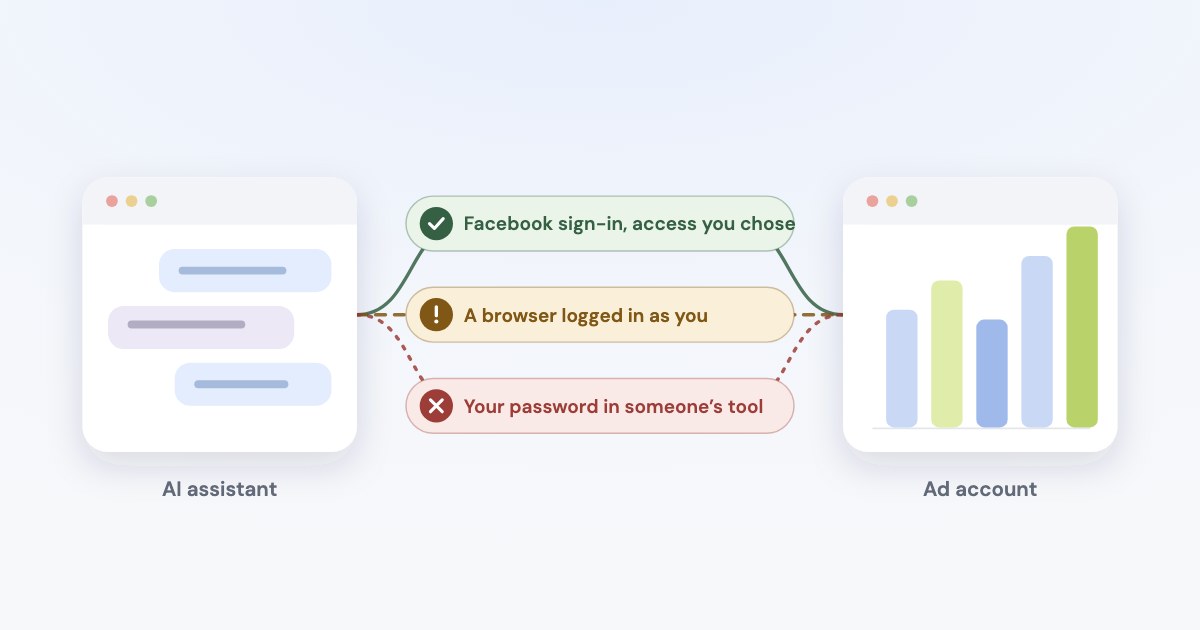
“Connecting AI” covers setups that look alike in a chat but are very different to Meta:
| What it is | Risk | Why | |
|---|---|---|---|
| A connector you sign in to with Facebook | Meta’s ads MCP server, or a third-party MCP connector with its own Meta app | Low | An authorised route: Meta’s API, the ad accounts you chose, access you can remove at any time. |
| A script or self-hosted server with your token | Code that calls Meta’s API with an access token you pasted in | Medium | Still the API, but nothing stops it running unattended or too fast, and a token in a file can leak. A self-hosted open-source Meta Ads MCP server had a flaw this year that could hand its access token to anyone who asked (CVE-2026-48039). |
| A browser logged in as you | An agent that opens Ads Manager and clicks through it for you | High | Meta’s terms forbid accessing or collecting data from its products by automated means without its prior permission, regardless of whether such automated access or collection is undertaken while logged-in. |
| Your password in a tool | A service that asks for your Facebook login | Highest | Meta’s platform terms say an app must not separately request or collect a Meta user’s login credentials, and its terms tell you not to share your password. |
Meta has not published anything specific about AI browser agents; the risk comes from its general terms. The assistants themselves put it on you: Anthropic’s Claude in Chrome safety page says you remain responsible for actions Claude takes in your browser, including respecting sites’ restrictions on automated access.
Rate limits: a pause, not a penalty
Meta limits how often an app may call an ad account. According to Meta’s
rate-limiting documentation, an app on development access that reaches the limit is blocked for
300 seconds, and one with full access for 60 seconds. The errors — 17 “User request limit reached”, 4 for
too many calls from an app, 613 and 80004 for too many calls to an ad account — tell you to wait and try
again.
It happened to us twice while testing Variafy against our own ad accounts on 14 October 2026: Meta answered with
17 and 4. Both cleared on their own, and neither ad account was restricted.
The catch is repetition. Meta says it will temporarily reduce the API Rate Limit quota of the abnormal accounts
,
and an app that keeps calling into the limit is what an abnormal account looks like. A connector should count its calls,
stop before Meta refuses them, and not retry in a loop.
Where AI can still get you in trouble
AI does not create new reasons for a ban. It can make the old ones happen faster:
- Many ads nobody read. An assistant can write and publish dozens of ads in a minute. If the copy makes claims Meta restricts — health results or quick money, for example — each can be rejected, and Meta restricts accounts for serious or repeated violations.
- Special ad categories. Ads about housing, employment, financial products or social issues must run under a special ad category. A model will not always know your ad is one of them.
- Getting around a restriction. If an account is restricted, creating another to keep advertising is exactly what Meta treats as evading enforcement.
- Money, not bans. Turning on old campaigns or raising budgets will not get you banned, but it can spend a week’s budget overnight. Keep spend increases behind a person’s approval.
How to connect AI safely
- Use a connector you sign in to with Facebook, not an agent that logs into Ads Manager for you and not a script with your personal token.
- Never type your Facebook password into another product. A real connector sends you to Facebook’s own dialog, where you see the app’s name and the permissions it asks for.
- Share only the ad accounts the assistant needs; you can add more later.
- Start read-only or with approval. Meta’s developer blog suggests starting an account
in a read-only or approval-required posture
. Let the assistant ask before every tool that changes ads, and read new ads before they go live — they start paused. - Set rules on Meta’s side. With full control of a business portfolio you can allow or block AI actions per ad account in Meta Business Suite under Settings → Integrations → Ads MCP server, where your business has it.
- Turn on two-factor authentication for everyone with access to the business portfolio.
- Remove what you no longer use under Settings & privacy → Settings → Business integrations in Facebook.
If your ad account is restricted anyway
- Stop the tool. Disconnect the assistant or connector and remove its app under Business integrations, so nothing keeps changing the account while Meta looks at it.
- Secure the account. If you shared a password or token anywhere, change the password and remove the app.
- Follow the steps Meta shows. Its help page on restricted accounts lists them: confirm your identity, complete verification, secure your account or request a review.
- Request one careful review. Meta’s help page on reviews says
Typically, our review is completed in 48 hours
, and that the number of review requests is limited. - Don’t open a new ad account to keep going. That is what Meta calls evading enforcement, and it can turn a restriction into a ban.
How Variafy handles this
Variafy is an MCP connector for Meta Ads built around the points above:
- Facebook sign-in, never your password. It works through Meta’s Marketing API with the ad accounts you share.
- Two calls per change. The first returns a preview with the ad account and the effect on spend; nothing changes until a second, confirming call. New ads and campaigns are created paused.
- Human approval on request. The owner can require that anything which increases spend waits for a signed-in person.
- It stays under Meta’s limits. Calls are counted per ad account, and when the limit is near the assistant is told to wait, not to retry.
- A watchdog. Every 15 minutes it checks for rejected ads, spend limits and delivery problems, so a rejection is noticed before it becomes a pattern.
The address to add to your assistant is https://www.variafy.com/mcp. More on choosing a connector:
official vs third-party servers and
Claude Code for Meta Ads.
How we checked
Checked on 15 October 2026 against Meta’s Business Help Center (AI connectors, advertising restrictions, policy violations, restricted accounts, reviews), Meta’s Terms of Service and Platform Terms, the Account Integrity standard in Meta’s Transparency Center, the Marketing API rate-limiting documentation, and the help pages of Claude in Chrome. The rate-limit errors come from our own testing on 14 October 2026. We could not open the Reddit thread; it is retold from articles that link to it, and restriction notices are quoted as advertisers reported them. Variafy is our product.
Questions
Can connecting ChatGPT or Claude get my Meta ad account banned?
Not by connecting through a connector you sign in to with Facebook. Meta says it is safe to connect through its ads MCP server and unlikely that an account would be banned simply for using it. Accounts are restricted for policy violations, signs of hacking, payment problems or automation outside Meta’s authorised routes.
Is it against Meta’s rules to use AI for Facebook ads?
No. Meta runs its own MCP server for AI assistants and allows automation through authorised routes such as its API. Its terms forbid accessing its products by automated means without permission, such as a bot clicking through Ads Manager logged in as you.
Can hitting Meta’s API rate limit get my ad account banned?
Hitting it once is a timed block: 5 minutes for apps on development access, 1 minute with full access. A tool that keeps calling into the limit looks abnormal, and Meta can cut its quota, so a connector should wait instead of retrying in a loop.
Should I give an AI tool my Facebook password?
No. Meta’s platform terms forbid apps from collecting Facebook login credentials. A legitimate connector sends you to Facebook’s own sign-in dialog and asks for permissions there.
What should I do if my ad account is restricted after connecting AI?
Disconnect the tool, secure your account, follow the steps Meta shows with the restriction and request one careful review; Meta says reviews typically take 48 hours. Do not create a new ad account to keep advertising.