Facebook ads attribution settings in 2026: what the windows mean and which to use for leads
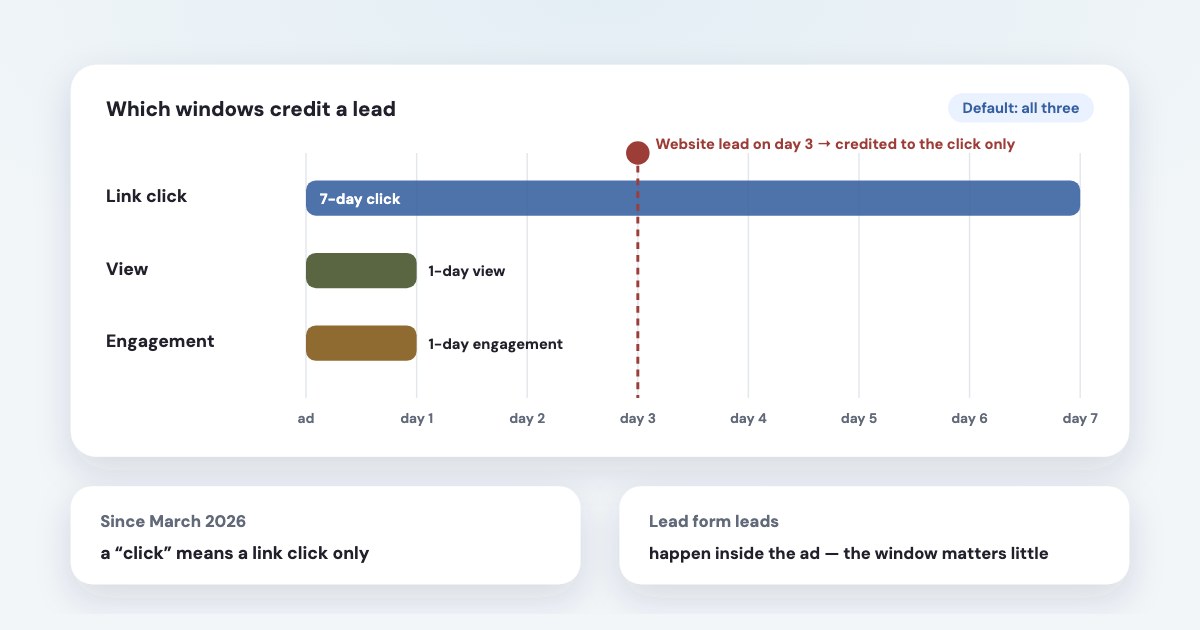
The attribution setting decides which results Meta credits to your ad, and it also steers delivery. In 2026 there are three windows: 1 or 7 days after a link click, 1 day after a view, and 1 day after an engagement such as a like or a 5-second video view. The default uses all three. Since March 2026 only link clicks count as clicks. For leads from Meta’s own lead forms the window matters little; for leads on your website it can change the count a lot. Whatever you pick, check it against the sales in your CRM — the window is an accounting rule, not proof that the ad caused the lead.
On this page10 sections
The three attribution windows
Meta’s help center describes them this way (source):
| What counts | Window | |
|---|---|---|
| Click-through | A result after someone clicked a link in your ad | 1 or 7 days |
| View-through | A result after someone saw the ad without clicking | 1 day |
| Engage-through | A result after a non-link action — a like, a share, a save, or a video played for 5 seconds | 1 day |
Meta uses a default attribution setting of 7-day click, 1-day view and 1-day engagement conversion.
The third window goes by several names: “engagement”, “engage-through”, earlier “engaged-view” — it is the same thing. Most guides still say the default is “7-day click, 1-day view”; that was true before it was added. Meta notes some accounts may still be on the earlier version while the change rolls out, so check the Attribution setting column in your own Ads Manager.
It changes delivery, not only the report
The setting lives on the ad set, and Meta’s API describes it as the Conversion attribution spec used for attributing conversions for optimization.
(source) In plain words: if you count only 1-day clicks, Meta learns from — and looks for — people who
convert within a day of clicking. With the default, it also learns from people who converted after only seeing or engaging with the ad.
So switching the window is a real change to the campaign, not a reporting filter. To look at the same results through other windows
without touching delivery, use Compare attribution settings in Ads Manager: Meta lets you
compare these attribution settings regardless of the ones you chose to optimize for in your campaign.
(source)
What changed, with dates
- January 2024 — Meta added an engaged-view window for video (source).
- June 2025 — the API started returning results the way Ads Manager shows them by default (source).
- 12 January 2026 —
7-day view (7d_view) and 28-day view (28d_view) attribution windows will no longer be returned
in the Ads Insights API (source). The 28-day click window stays available for comparison only. - 3 March 2026 — Meta started
changing the definition of click-through attribution for website and in-store conversions to exclusively include link clicks.
Likes, shares and saves now count as engage-through, and the video threshold dropped from 10 to 5 seconds.There will be no change to how advertisers are billed.
(source)
If your reported website leads dropped in March 2026 while your CRM didn’t, this is the likely reason (more on reading that drop).
Lead forms vs leads on your website
Meta applies the window to actions taken off your ad, such as a purchase on your website or shop
(source).
A lead form is filled in inside the ad itself, so it isn’t an action “off your ad” — and Meta’s reporting API keeps a separate window for
actions on the ad. Meta doesn’t spell out the consequence, but it follows: changing the window moves website leads much more than lead
form leads.
Watch out for the Leads column: it counts leads submitted on Meta technologies (including forms, Instagram, and Messenger) as well as off-Meta leads tracked by
your pixel or Conversions API (source). On a campaign that mixes both, a change of window shows only in
part of the number. Use Website leads to see the site side alone.
Which setting to use for leads
Meta doesn’t publish a recommendation for lead campaigns. A practical order:
- Keep the default while you learn the account. It gives Meta the most signals, which helps small budgets.
- Compare windows on last month with Compare attribution settings: how many website leads are 1-day click, how many come only from views or engagement.
- Check those groups against the CRM. If leads credited only to views rarely become customers, test a click-only setting on one ad set — a significant change, so give it a full week. If they buy as often as the rest, keep the default.
- Keep one setting per campaign. Results don’t add up across ad sets with different settings, and summary rows go blank.
Some experts, such as Jon Loomer, lean towards click-only for leads (source); Meta says it would
strongly encourage advertisers to leverage engaged-view attribution
(source). Your CRM is the tie-breaker.
Incremental attribution
Besides the standard model, Meta offers an incremental one. Meta describes it as counting
conversions we believe would not have occurred without an ad being shown
and reported an average 46% lift in incremental conversions compared to their business-as-usual approach
in its tests (Meta, Q1 2025 earnings call). It is a prediction model, not an experiment in your account,
and practitioners report it mainly for website sales campaigns. On most lead campaigns you’ll see only the standard model — check the
Attribution model field in the ad set.
Is Meta’s report too high or too low?
Independent tests don’t say “always too high”. Haus, across 640 experiments mostly with online stores, found Meta’s 7-day click reporting under-states the real effect by 15% on average (source). A Meta and Northwestern study of 663 experiments found that models without a control group can be far off (source). Only a test with a control group, such as Meta’s Conversion Lift, measures cause. None of these studies is about lead generation.
Which day a lead is counted on
Meta can report a conversion by time of conversion or time of exposure when the impression was served
(source). The same help page asks you to Check that your reporting tool conversion attribution windows match in both tools.
That is why Ads Manager, Google Analytics and your CRM rarely agree on “leads yesterday”: different windows, different days, and the CRM
counts every lead, not only those credited to ads. Compare whole weeks, not days
(how to read the report).
Compare windows against sales: Variafy
Variafy connects ChatGPT, Claude and other assistants to your Meta ad accounts and reads results with the attribution window you ask for. Try: “Last month by ad set: leads with the default setting and with 1-day click only — and how many of each became customers in the CRM.” With Pipedrive or a Google Sheet connected, you see whether the leads that only views brought are worth paying for.
How we checked
Checked on 17 October 2026 against Meta’s Business Help Center (attribution settings, Results, actions off the ad, comparing attribution settings, reporting time, Leads column), Meta for Business news on engaged-view (2024) and click attribution (March 2026), Meta’s Marketing API reference and its October 2025 developer post on attribution windows, the transcript of Meta’s Q1 2025 earnings call, Haus’s 640-experiment report and the Meta–Northwestern study. We also read the pages that rank for these searches.
That lead form leads are hardly affected by the window is our reading of Meta’s documentation, not a sentence Meta publishes. Variafy is our product.
Questions
What is the default attribution setting on Facebook ads in 2026?
Meta’s default is 7-day click, 1-day view and 1-day engagement: results within 7 days of a link click, 1 day of seeing the ad, or 1 day of a non-link engagement such as a like or a 5-second video view.
Does the attribution setting affect delivery or only reporting?
Both. Meta uses the ad set’s attribution setting for optimisation, so changing it changes which people the system looks for. To view results under other windows without changing delivery, use Compare attribution settings in Ads Manager.
Which attribution setting is best for lead generation?
Meta publishes no recommendation. Keep the default while learning, compare windows on past results, and check against your CRM whether leads credited only to views or engagement become customers. If they rarely do, test click-only on one ad set for a full week.
Why did my reported Facebook leads drop in March 2026?
From 3 March 2026 Meta counts only link clicks as click-through for website conversions; likes, shares and saves moved to the engage-through window. Billing didn’t change. If your CRM shows the same number of leads, only the counting changed.
What happened to the 28-day and 7-day view attribution windows?
Meta stopped returning 7-day view and 28-day view results in the Ads Insights API on 12 January 2026. Ads Manager still lets you compare 1-day view, 1-day click, 7-day click and 28-day click.
What is incremental attribution on Meta?
A model that credits only conversions Meta predicts would not have happened without the ad. Meta reported an average 46% lift in incremental conversions in its tests. It is a prediction, not an experiment, and is offered mainly for website sales campaigns.