Facebook ads not converting: clicks but no leads, or leads but no sales
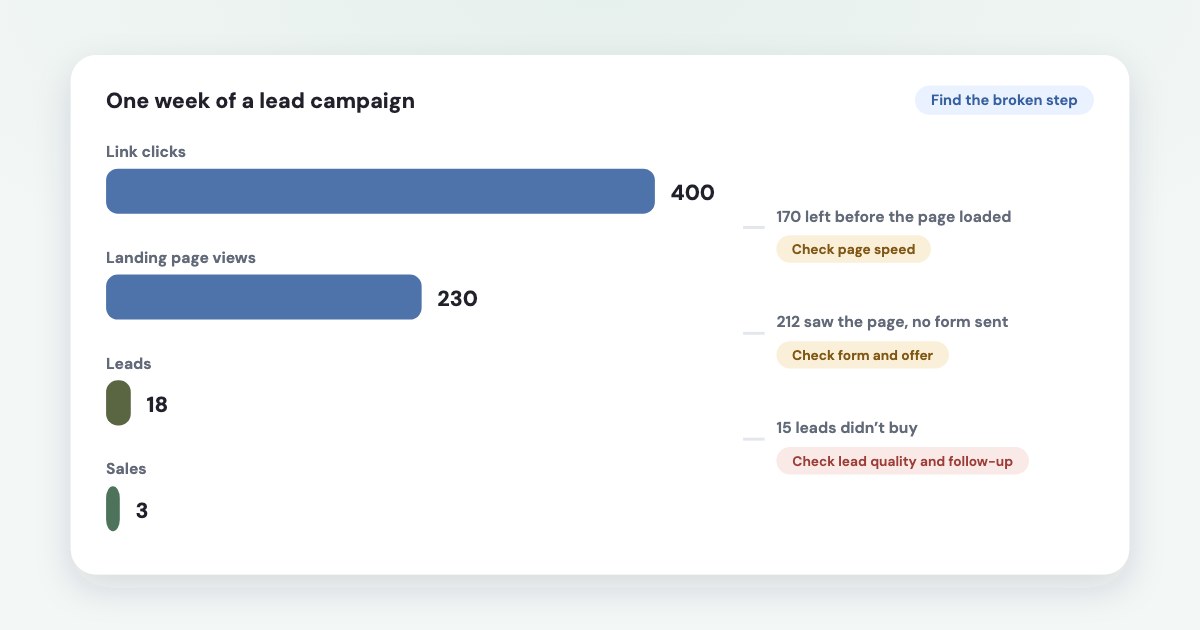
Find the step where people drop off before changing anything. Compare link clicks with landing page views (people who left before your site loaded), landing page views with leads (the page or form), and leads with sales in your CRM (lead quality or follow-up). Then check three things that look like “not converting” but aren’t the ad: the campaign optimises for clicks or landing page views instead of leads, the pixel doesn’t see the form, or the March 2026 change in how Meta counts clicks moved the numbers. Meta’s own advice runs against two popular fixes: don’t switch off placements just because they look expensive, and don’t judge an ad by its clicks.
On this page11 sections
Find the step where people drop off
“Not converting” means different things at different steps. Add these columns in Ads Manager and read them left to right:
| If this gap is large | Look at | |
|---|---|---|
| Link clicks → Landing page views | People clicked but left before the page loaded | Page speed, a broken link, an in-app browser problem |
| Landing page views → Leads | People saw the page and didn’t send the form | Offer, page, form, tracking |
| Leads → Qualified leads → Sales | Leads arrive but don’t buy | Lead quality, follow-up speed, the optimisation goal |
You can compare landing page views to link clicks to understand how many times people may have clicked on your ad but left before your website loaded.
On a lead form ad there is no landing page: Clicks on ad formats that take someone into a full-screen experience, such as lead forms, Canvas and collection
count as link clicks (source). So “200 clicks, 5 leads” on an Instant Form means 195 people opened the form
and closed it.
Meta also tells you when the ad itself is the weak point. If only the conversion rate ranking is low, The ad isn't producing conversions.
and Meta suggests improving the call to action or the post-click experience
, or targeting a higher-intent audience
(source). Rankings need at least 500 impressions.
Is the campaign actually looking for leads?
Meta finds the people most likely to do what you optimise for. Optimise for clicks and you get people who click. Meta warned
about this years ago: “clicky users” may not take your ultimate desired action
(Meta, 2018). Its
Traffic objective page still says: If your goal is to increase leads, messages or sales, consider the lead ads, messaging or conversion objectives.
(source)
Inside the Leads objective, the choice matters too (source):
- Maximize number of leads —
people most likely to share their contact information with you.
- Maximize number of qualified leads —
people most likely to convert after sharing their contact information with you.
- Landing page views or link clicks — cheap traffic, not leads.
A trap in Meta’s own advice
To get a small budget out of learning, Meta suggests optimizing for an event that’s higher up in the marketing funnel (for example, landing page views instead of conversions)
(source). That helps learning, but it is exactly how you end up with clicks and no leads. If you do it,
judge the campaign by leads per euro, not by cost per click (more on learning limited).
Leads come in, but Meta doesn’t see them
Before blaming the ad, check that Meta counts what really happened. Issues with your data source setup can lead to a lower volume of attributed events and an increased cost per action.
(source) Compare the leads in your inbox or CRM with Results in Ads Manager for the same week. If the CRM
has more, the ads may be fine and the pixel isn’t: see Meta pixel not firing. Meta’s list of
causes for a drop in events starts with base code issues, event code problems and website downtime (source).
The way Meta credits leads also changed. From March 2026 it is changing the definition of click-through attribution for website and in-store conversions to exclusively include link clicks.
— and says advertisers may begin to notice changes inside Ads Manager reporting.
(source) A lead
from someone who only liked or commented on the ad no longer counts as a click-through result. Fewer reported leads after March isn’t
necessarily fewer real leads.
Clicks but no page views: speed
Most quoted speed figures are old. Read them with their year:
- Google, 2017. The average mobile landing page from ads took 22 seconds to load fully on a simulated 3G connection, and
53% of mobile site visitors leave a page that takes longer than three seconds to load
— from Google Analytics data of March 2016 (source). Networks are faster now; the direction holds, the numbers don’t. - Renault, 2020–2021, lead forms. Across over 10 million visits, a 1-second faster Largest Contentful Paint went with a 14-point lower bounce rate and 13% more completed lead forms — a correlation, not a test (source).
- Vodafone, 2021, A/B test on paid traffic.
A 31% improvement in LCP increased sales by 8%
, with a 15% better lead-to-visit rate (source). - Deloitte for Google, 2019–2020. On lead-generation sites, 0.1 seconds faster went with 21.6% more people moving from the first form step to submission — that’s a step rate, not 21.6% more leads (source).
Google’s current target is a Largest Contentful Paint of 2.5 seconds or less for three visitors in four, on mobile and desktop separately (source). Test the page on a phone over mobile data, the way most people arrive from an ad. Meta doesn’t say it penalises slow pages in the auction; the cost is the people who leave.
Page views but no leads: the form and the offer
The evidence on form length is mixed, and it’s worth knowing why:
- HubSpot’s analysis of over 40,000 landing pages found that more fields lower conversion
slightly, but not as steeply as I expected
; large text boxes and drop-downs hurt more (source). - Zuko, which measures people who started a form, says
The number of form fields has no effect on conversion rate
— and that contact forms have the lowest completion of all form types (source). - Meta, for its own lead forms:
Fewer multiple choice questions results in more form submissions, whereas more multiple choice questions typically results in more quality leads.
It warns that typing several answersmay prevent them from submitting the form.
(source)
The common thread: fields people have to type cost more than fields they tap. Keep name and phone, turn other questions into choices, and add a question when you need to filter out weak leads, not by default.
If the form is short and people still leave, the problem is usually the offer: no price or range, no clear next step (“we’ll call you within an hour”), or a page that promises something different from the ad.
Lead form or website form?
Meta’s lead forms fill in name and contact details for the person. In a 2023 study Meta reported a
20% lower cost per qualified lead when compared to website forms
— 15 A/B tests with results reported by the advertisers
(source). A website form suits offers people need to read about first, like booking or a quote.
One detail explains many “clicks without leads” on lead forms: Submission of an instant form is only available for iOS and Android when people use the mobile Facebook app. It’s not available on mobile browsers, including Safari and Chrome.
(source)
Lead forms are easy to fill in by accident, so they also bring more weak leads; our guide to lead quality covers the Higher intent form and other filters.
Should you switch off placements?
Many guides say to turn off Advantage+ placements or Audience Network when leads don’t come. Meta says the opposite:
We don’t recommend removing a placement just because it has shown higher costs to date
(source).
Its system aims for the lowest cost across all placements, so the placement that looks dearer is often part of why the total is cheap.
Check instead: in Ads Manager, Breakdown → By delivery → Placement, with leads and — if your CRM is connected — sales next to spend. Act on a placement that spends a meaningful share and brings no leads over a couple of weeks, not on its cost per click. For configured versus effective placements and tracing each one to a customer outcome, see the separate guide to Facebook ad placements for leads.
Leads but no sales
If leads arrive and nobody buys, Meta’s numbers can’t tell you which ads work. Three steps:
- Connect the CRM and compare ads by sales, not by cost per lead (how).
- Send lead stages back to Meta and optimise for qualified leads. Since April 2026 that goal needs the Conversions API:
Beginning April 2026, the qualified leads performance goal is no longer available for new campaign creation without Conversions API integration.
(source, setup) - Check the follow-up. In one online education business we analysed, getting through to the lead at all mattered more than calling within 15 minutes (details).
Walk the funnel in one question: Variafy
Variafy connects ChatGPT, Claude and other assistants to your Meta ad accounts. Ask “Why aren’t my ads converting?” and its funnel check walks the steps in order — tracking, revenue, traffic, conversion, spend — and stops at the first broken one, so you fix the cause instead of the symptom.
- The placement report shows what each placement brings and where a result costs more than across the account.
- With payments sent in from a CRM or a sheet, ads are ranked by the money they brought, not by leads.
How we checked
Checked on 17 October 2026 against Meta’s Business Help Center (landing page views, link clicks, performance goals, learning limited, data source issues, event drops, ad relevance diagnostics, instant form tips and availability, qualified leads), Meta for Business news (optimisation tips 2018, instant forms 2024, click attribution 2026) and the Traffic objective page; Google’s 2017 mobile speed benchmarks, web.dev case studies (Renault, Vodafone, Deloitte) and Core Web Vitals; HubSpot’s and Zuko’s form research. We also read the pages that rank for these searches. The follow-up finding is from our own analysis of one advertiser.
Variafy is our product.
Questions
Why are my Facebook ads not converting?
Find the step first: compare link clicks with landing page views, landing page views with leads, and leads with sales. Then check that the campaign optimises for leads rather than clicks, that the pixel sees your form, and that nothing changed in how Meta counts results.
Why do my Facebook ads get clicks but no leads?
Common causes: the campaign optimises for clicks or landing page views, the page loads slowly so people leave before it appears, the form asks people to type too much, or the pixel doesn’t record the lead. On lead form ads, a click is just opening the form.
Should I turn off Audience Network if my ads aren’t converting?
Meta advises against removing a placement just because it looks more expensive, since its system balances cost across placements. Break results down by placement with leads (and sales if you can), and only cut a placement that spends a real share and brings nothing over a couple of weeks.
Is a lead form better than a landing page?
Meta reported a 20% lower cost per qualified lead for its instant forms than for website forms in a 2023 study of 15 tests. Lead forms are faster to fill in but bring more weak leads; a website form suits offers people need to read about first.
Why did my Facebook leads drop after March 2026?
Meta changed click-through attribution for website conversions to count only link clicks, and said advertisers may notice changes in reporting. Compare with your CRM: if real leads held steady, it’s the counting that changed.