How to read a Facebook ads report: what each column means and what to check first
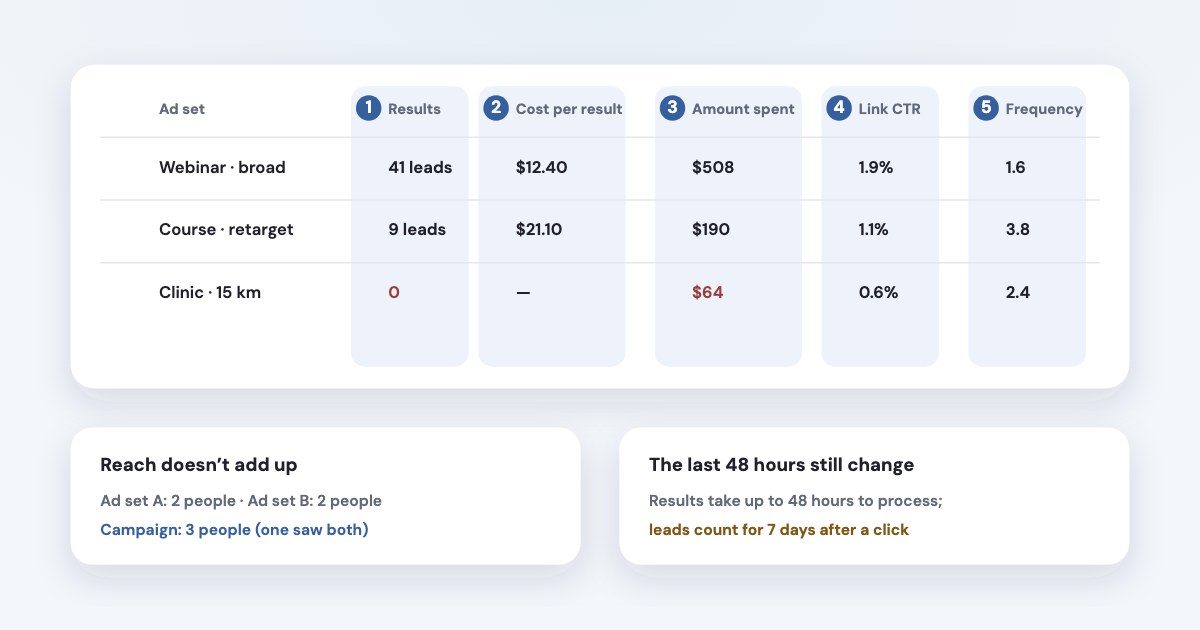
Start with Results and Cost per result — they count what your campaign optimises for, so for a lead campaign they are leads. Then check Amount spent, Link CTR and Cost per link click (not CTR (all), which also counts likes and photo taps), and Frequency. Three traps cause most misreadings: reach doesn’t add up across rows, numbers from the last 48 hours are still changing, and Meta counts a lead for 7 days after a click, 1 day after a view and 1 day after an engagement. Compare the leads with your CRM before deciding anything.
On this page9 sections
What to look at first
- Results and Cost per result.
The number of times your ad achieved an outcome, based on the objective and settings you selected.
(source) On a lead campaign that is leads; next to it, the Leads column shows all leads, wherever they came from. - Amount spent. Read it together with results: an ad set that spent the price of several leads and has none is the first thing to fix.
- Link CTR and Cost per link click. They show whether people act on the ad, not just react to it.
- Frequency and Reach. How many people you reach and how often they see the ads — rising frequency with rising cost is worth a look.
- Delivery and quality rankings. Whether ads are running, and how they compare with ads competing for the same audience.
- Your CRM. How many of those leads were real and how many paid — see ads and CRM sales.
What each column means
| What Meta counts | Watch out for | |
|---|---|---|
| Results | Outcomes based on your campaign’s objective and settings | Different meaning in different campaigns; may not reflect how you’re billed for your ad(source) |
| Cost per result | Amount spent divided by results | Only comparable between campaigns with the same objective |
| Amount spent | What you spent in the period | While ads run, it can take up to 48 hours for ad results to be processed(source). For the billing document, its fees and the period it covers, see Meta ads invoices and receipts |
| Reach | People who saw your ads at least once | Estimated from sampled data (source); doesn’t add up across rows |
| Impressions | Times your ads were shown | A full count, not sampled (source) |
| Frequency | Impressions divided by reach | An average: some people saw the ad once, some many times — see cost per lead |
| CTR (all) | Impressions with any click (source) | Includes reactions, comments and opening media |
| CTR (link click-through rate) | Link clicks divided by impressions (source) | For lead forms, opening the form counts as a link click (source) |
| CPC (all) / CPC (cost per link click) | Spend divided by all clicks / by link clicks (all, link) | Use the link version |
| Landing page views | Visits where your page loaded after a link click | The gap to link clicks is people who left before the page loaded (source) |
| Leads | Leads from forms, Instagram and Messenger plus website leads from the pixel or Conversions API (source) | Also counts contacts your business marks as a lead in chats |
| Website leads | Lead events on your website attributed to your ads (source) | Only website leads — compare with Leads |
| Quality, engagement and conversion rankings | How the ad compares with ads for the same audience; average represents the 35th to 55th percentile(source) | Empty under 500 impressions, last 35 days only, and aren't inputs into the ad auction(source) |
Five things that make reports look wrong
- Reach doesn’t add up.
If ad set 1 reached person A and B, and ad set 2 reached person B and C, each ad set would have a reach of 2 and the campaign would have a reach of 3.
(source) - The last two days aren’t final. Results can take up to 48 hours to process (source) — don’t judge yesterday’s ads this morning.
- Leads arrive late. Meta’s default attribution counts a lead within 7 days after a click, 1 day after a view and 1 day after an engagement (source); some accounts still use the previous version (source). Last week’s numbers keep growing for days.
- Some numbers are modelled. Results, leads and landing page views may use statistical modelling, and Meta says metrics marked “in
development” shouldn’t be used for
Historical comparison of advertising performance
(source). - Empty conversion columns.
Conversion metrics will not populate if the campaign or summary level has multiple attribution settings.
Other reasons: a new ad, dates without impressions, or ads that aren’t running (source).
Check the time zone
Days in the report follow the ad account’s time zone, and The default time zone for new ad accounts is Pacific Standard Time (PST)
.
Changing it creates a new ad account (source). If your days don’t match your CRM’s, this is often why.
Set up the table once
- Columns → Customize columns: add Leads, Website leads, Cost per lead, Link CTR, Cost per link click, Frequency and Reach, then save the set as a preset so every report opens the same way.
- Breakdown: split by day or week to see trends, and by placement, age or platform to see where leads come from.
- Compare: pick a date range and compare it with the previous period instead of reading one week on its own.
- Attribution setting column: add it, so mixed settings don’t silently empty your conversion columns.
Export and a template
This export will download as a .csv, includes summary totals, and does not include deleted campaign data.
Click Export at the top right of the table (in older layouts, Reports → Export table data) and choose .csv or .xlsx; the
longest period is 37 months. Some columns never reach the file: Tags, Age, Gender, Location, Body, Destination Type, Link (URL), Preview link, Related Page and Title.
(source)
A weekly template for a business that sells through leads, one row per ad set:
| From Ads Manager | From your CRM | |
|---|---|---|
| Who and when | Campaign, ad set, week | — |
| Money | Amount spent | Revenue from these leads |
| Volume | Leads, Website leads | Qualified leads, sales |
| Price | Cost per lead | Cost per qualified lead, cost per sale |
| Why | Link CTR, Cost per link click, Frequency | Main reason leads were rejected |
What to send clients each week is in the client report guide.
Where to find a dashboard
Inside Meta: Account Overview in Ads Manager shows alerts, opportunity score, campaign trends and how much budget is in
learning (source). Account insights in Ads Reporting adds charts with reach, frequency, CTR and cost per link
click, and cost per lead for lead campaigns — but it may not be available to you yet
(source). Ads Reporting
builds pivot tables and charts (source) and can share a link even with people outside your business, with an expiry
date (source).
Outside Meta: neither Google nor Microsoft has its own Meta connector. Google’s Data Studio (Looker Studio) and Power BI rely on third-party connectors — Microsoft’s list includes Supermetrics, Windsor and Funnel, but not Facebook (source). Windsor keeps one ad account free (source); Coupler.io has a free tier with manual refresh (source). For a small business, the free route is a weekly export into a shared sheet.
Or just ask: Variafy
Variafy connects ChatGPT, Claude and other assistants to your Meta ad accounts, so you can read the report in plain words:
- “Which ad sets got more expensive this week, and why?” — it splits a change in cost per lead into price, clicks and conversion.
- “Show last week by ad set with leads and sales from the CRM.” — with Pipedrive or a Google Sheet connected, Meta’s leads sit next to real sales.
How we checked
Checked on 17 October 2026 against Meta’s Business Help Center glossary and reporting pages (results, amount spent, reach and de-duplication, sampling, CTR and CPC variants, link clicks and lead forms, landing page views, leads, website leads, estimated and in-development metrics, missing data, ad relevance diagnostics, attribution, export, Account Overview, Account insights, Ads Reporting, time zones), Microsoft’s Power Query connector list and the pricing pages of Windsor.ai and Coupler.io. We also read the pages that currently rank for these searches.
Variafy is our product.
Questions
How do I read a Facebook ads report?
Start with Results and Cost per result (for a lead campaign, these are leads), then Amount spent, Link CTR, Cost per link click and Frequency. Remember that reach doesn’t add up across rows, the last 48 hours are still changing, and leads are counted for 7 days after a click. Compare the leads with your CRM.
What is the difference between CTR (all) and Link CTR?
CTR (all) counts every click, including reactions, comments and opening photos. Link CTR counts only clicks on links to your destination — and for lead form ads, opening the form counts as a link click.
Why doesn’t reach add up in Facebook Ads Manager?
Because Meta counts unique people. Someone reached by two ad sets counts once at campaign level, so campaign reach is usually lower than the sum of ad set reach. Reach is also estimated from sampled data.
How do I export a Facebook ads report?
Click Export at the top right of the Ads Manager table (or Reports → Export table data) and choose .csv or .xlsx. Up to 37 months can be exported, deleted campaigns aren’t included, and some columns such as Age, Gender and Link (URL) can’t be exported.
Where is the Facebook ads dashboard?
In Ads Manager, Account Overview shows alerts, opportunity score and campaign trends; Ads Reporting builds charts and pivot tables; Account insights adds trend charts where it has rolled out. Meta Business Suite also has Insights for Pages and ads.
Can I connect Facebook ads to Looker Studio or Power BI for free?
Neither Google nor Microsoft has its own Meta connector; you need a third-party one such as Windsor.ai, Supermetrics or Coupler.io, some with a free tier for one ad account. The free alternative is exporting from Ads Manager into a sheet.
Why are my Facebook ads numbers different today and tomorrow?
Meta says results can take up to 48 hours to process, and with the default attribution a lead is credited to an ad for up to 7 days after a click. Numbers for the last few days keep updating.