Facebook ads report for clients: what to send every week
Send a short summary every week and a fuller review once a month. Lead with what the client pays for — leads or sales and what each one cost — then say what changed and what you will do next; keep reach, CPM and CTR as supporting numbers. Before you send, check the main number against the client’s CRM: Ads Manager’s results are attributed and partly estimated, and last week’s figures are still settling.
On this page8 sections
Weekly or monthly?
Both, at different depths. In AgencyAnalytics’ 2026 survey of 494 agencies, 69% report to clients monthly, 11% weekly and 8% every two weeks; it adds that weekly reports work well for high-spend accounts (source). The respondents are mostly that vendor’s own customers, so treat it as a direction, not a law.
A workable rhythm for a small agency:
- Every Monday — five lines: the main result, its cost, what changed, what you did, what is next.
- Once a month — the full review with sales from the CRM, creatives, audiences and next month’s plan.
- When something breaks — a message the same day, not a line in Friday’s report.
The same survey found 35% of clients now prefer a call to a PDF, tied with static reports. A short weekly note plus a monthly call covers both.
What to put in the report
Clients care about outcomes. In the same survey, conversions were the metric clients care about most (44%), then leads (22%), ROI (12%) and revenue (11%); traffic got 6%. The question agencies hear most often: can you connect the ads to revenue?
Six to eight numbers are enough. Put them in this order:
| What it tells the client | Where it comes from | |
|---|---|---|
| Spend | How much went out this period | Ads Manager (Meta calls it estimated) |
| Results and cost per result | Leads or purchases the ads produced, and what each cost | Ads Manager |
| Leads that qualified, sales | Which of those leads turned into customers | The client’s CRM |
| Revenue or ROAS | Money back per euro spent | CRM for lead businesses; Ads Manager only for purchases Meta received |
| Link CTR and CPM | Whether the ads get attention and what attention costs | Ads Manager |
| Frequency | Whether the same people see the ads too often | Ads Manager (estimated) |
Then three short lines in words: what changed against last period, what you did about it, what comes next.
Say which number you show
Ads Manager’s labels hide definitions that clients rarely know (source):
- Results are
The number of times your ad achieved an outcome, based on the objective and settings you selected.
- CTR counts all clicks on the ad (Meta’s “click (all)”: reactions, profile clicks, opening media and so on), while link CTR counts only clicks to your site or form. Name the one you report.
- Reach, frequency and even spend are marked
This metric is estimated.
- Purchase ROAS counts only purchases Meta received from your tracking and attributed to the ads. A lead business that doesn’t send sale values back has no real ROAS in Ads Manager.
Why Ads Manager and the CRM disagree
Every client eventually asks why Facebook shows 42 leads and the CRM 38. The usual reasons:
- Attribution. Since 2026 the default credits a result to an ad within 7 days of a click, 1 day of an engaged view or 1 day of a view, and the default count can include several conversions by the same person (source). Your CRM counts people.
- The week isn’t closed. Meta’s data refreshes every 15 minutes and stops changing after 28 days. With a 7-day click window, leads from last weekend can still be credited to last week’s ads on Thursday — so Monday’s numbers are preliminary.
- Time zone and currency. Ads Manager reports in the ad account’s time zone and currency; a CRM in another time zone splits days differently.
- Tracking gaps. Some sales never reach Meta at all.
The three-number check
A quick way to see where the gap is, suggested on Shopify Community by someone who works for a tracking vendor (source): for a day that closed a week ago, compare orders or leads in the CRM, events received in Events Manager, and results attributed in Ads Manager. A gap between the first two is a tracking problem; between the last two it is attribution, and more events won’t fix it.
For a lead business, the CRM number is the one to lead with. A campaign with cheap leads that never buy loses to one with fewer, dearer leads that do — our guide to matching CRM sales to ads shows how to count it, and lead quality how to judge it before payments arrive.
A weekly report in five lines
A weekly note the client reads in thirty seconds:
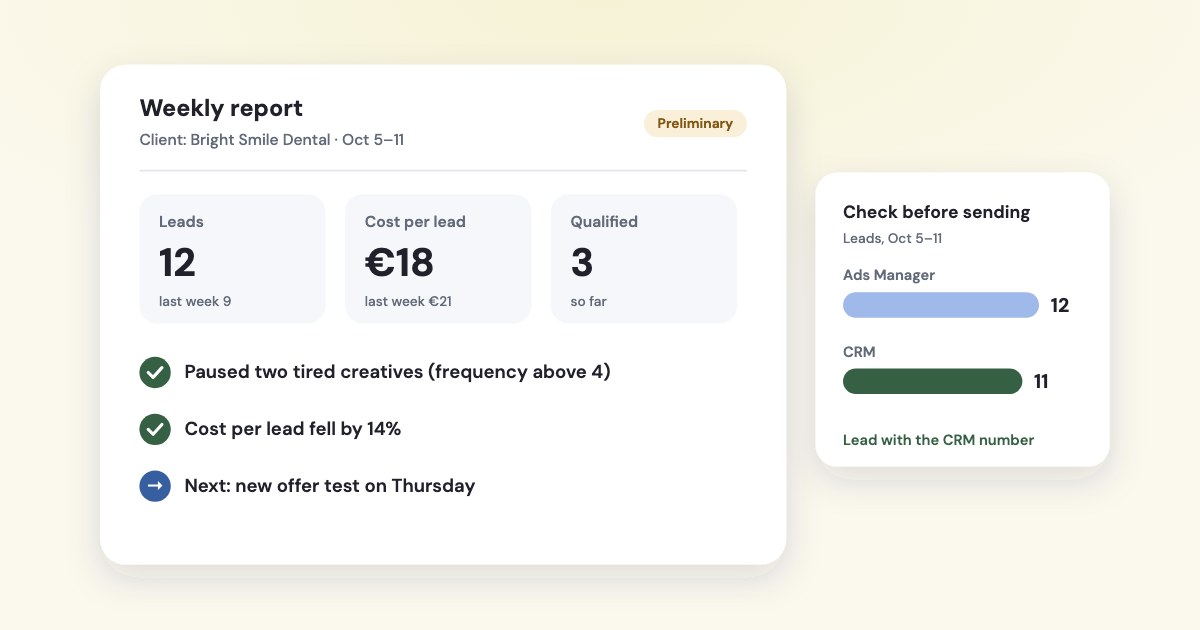
- Headline: “12 leads at €18 (last week 9 at €21). 3 qualified so far.”
- Spend: “€216 of the €250 weekly budget.”
- What changed: “Cost per lead fell after we paused two tired creatives; frequency was above 4 on the old ones.”
- What’s next: “Testing a new offer on Thursday; no budget change until it has a week of data.”
- Caveat: “Numbers for the last days may still move a little as Meta finishes counting.”
Keep the same order every week so the client learns where to look. Put the full table and charts in the monthly review.
How to send it without spending a morning
Scheduled email from Ads Manager
You can schedule a recurring report from ads reporting and have it emailed to yourself or someone else.
Two limits matter for agencies. It works for one ad account at a time — Cross-account reports can't be scheduled for email.
— and only people with access to that ad account can open it. Otherwise Meta suggests exporting the report and sending the file
(source).
If the client should see numbers but change nothing, give the narrowest role: Meta’s “Reporting only”, which Can see data on ad performance
(source).
Several clients in one place
- Meta Ads Manager for Excel — Meta’s free add-in builds one report across several ad accounts and can refresh as often as every 15 minutes. Its rating in Microsoft’s store is 2.2 from 105 reviews (source).
- Data Studio (called Looker Studio until April 2026) has no Meta connector of its own among Google’s connectors (source). Third-party connectors fill the gap: Porter Metrics has a free plan for 3 accounts and 30 days of history; Supermetrics starts at €39 a month.
Vendors’ own figures on time saved vary widely, from under an hour per report to several hours per client a week. Measure your own: time one weekly note and one monthly review, then decide what to automate.
How Variafy helps
Ask your assistant “Make last week’s report for this client” and Variafy:
- Builds a report file for one ad account and period, with your agency’s name, logo and commentary at the top. The download link works for 60 minutes and we keep no copy — you send the file to the client yourself.
- Adds money from the CRM when the client’s payments come in from Pipedrive or a Google Sheet: revenue per campaign and ad, not only Meta’s attributed results.
- Flags what broke — rejected ads, tracking problems, ad sets stuck in learning — from the weekly account check, so the note mentions it before the client asks.
- Emails you a brief of every connected ad account on a schedule, daily or weekly on Mondays.
Add https://www.variafy.com/mcp to your assistant. Variafy is in private beta:
join the waitlist.
How we checked
Checked on 16 October 2026 against Meta’s Business Help Center (scheduling reports by email), the Marketing API reference for ad account insights (metric definitions, updated 6 August 2026) and the Business Management API guide to ad account roles. Several Help Center pages about reporting required a login that day, so definitions come from Meta’s developer documentation. Also used: Jon Loomer’s guide to Meta attribution in 2026, AgencyAnalytics’ 2026 agency benchmarks (494 respondents, mostly its own customers), Google’s Data Studio connector list, the Meta Ads Manager for Excel listing and a Shopify Community thread.
Variafy is our product.
Questions
What should a Facebook ads report for clients include?
Six to eight numbers: spend, results and cost per result, leads that qualified or sales from the CRM, revenue or ROAS, link CTR and CPM, and frequency, followed by three short lines on what changed, what you did and what comes next.
How often should I send Facebook ads reports to clients?
Most agencies report monthly (69% in AgencyAnalytics’ 2026 survey). A short weekly note plus a monthly review works well for clients with larger budgets, with a same-day message when something breaks.
Can I schedule Facebook ads reports by email?
Yes, in Ads Manager’s reporting you can schedule a recurring report by email, but only for one ad account at a time, and only people with access to that ad account can open it. Otherwise export the report and send the file.
What access should a client have to see Facebook ads reports?
The narrowest role, which Meta calls “Reporting only”: it can see ad performance data but cannot change anything.
Why do Facebook leads not match my CRM?
Ads Manager credits results within its attribution windows (7-day click, 1-day engaged view and 1-day view by default in 2026) and can count several conversions by one person; recent days are still being counted; time zones can differ; and some conversions never reach Meta. The CRM counts people.
Is there a free Facebook ads connector for Looker Studio?
Google’s own connector list for Data Studio (Looker Studio until April 2026) has no Meta connector. Third-party connectors exist; Porter Metrics offers a free plan for 3 accounts and 30 days of history, and Meta has a free Excel add-in.
What is the difference between CTR and link CTR in Ads Manager?
CTR counts all clicks on the ad (Meta calls them click (all)), such as reactions, profile clicks and opening media; link CTR counts only clicks that lead to your website or form. Say which one you report.