Facebook lead quality: why lead forms bring junk leads and how to fix it
Most junk leads come from how the form and the campaign are set up: the form fills itself in from the profile and sends in two taps, and the default goal counts every submission as a success. Measure quality by what happens to leads in your CRM, filter at the form with SMS verification and a qualifying question, and tell Meta which leads turned into customers so it finds more like them.
On this page12 sections
What counts as a junk lead
“Junk” covers five different problems. Each has its own cause, so name yours before changing anything.
| Usual cause | First fix | |
|---|---|---|
| Nobody answers | The form took two taps, so many people were barely interested | Higher intent form, a qualifying question |
| Wrong or fake number | An outdated number in the profile, a typo or an automated submission | SMS verification |
| “I never filled this in” | A prefilled form sent by mistake, a friend who got the ad shared, or your own test lead | Higher intent review step; sharing left on Restricted |
| Not a fit | Broad targeting and an offer that appeals to everyone | Conditional logic that closes the form for non-fits |
| Spam and bots | Automated form fills | SMS verification |
Count them for two weeks: of every 20 leads, how many fall into each row. The biggest row tells you where to start.
Why lead forms bring them
An instant form is built to be easy. Meta fills in what it already knows:
Prefill questions take information from a Facebook or Instagram profile to complete the instant form.
People can still edit those answers, but they do not have to type anything. A form that costs nothing to send is also sent by people who are only mildly curious.
The default goal adds to it. A campaign set to get the most leads is rewarded for every submission, whether or not the person picks up the phone later.
Leads you did not pay for, and leads from elsewhere
Some “I never filled this in” leads are real submissions by someone else. If a form’s sharing is set to Open, a friend who was sent the ad can fill it in; Meta calls these organic leads (source). Restricted is the default. Test leads you send yourself also land in the download file, though not in the Results column.
Meta’s terms say plainly that Ads may be re-shared and accessed outside of the targeted audience
(source), and its help page warns you may get a lead from outside of your location settings
(source).
A form made in Business Suite has no filters
You can only use the additional features in instant forms when you create the form in Ads Manager.
A form made in Meta Business Suite is a simple contact form (source). Build forms in Ads Manager.
Measure quality before you change anything
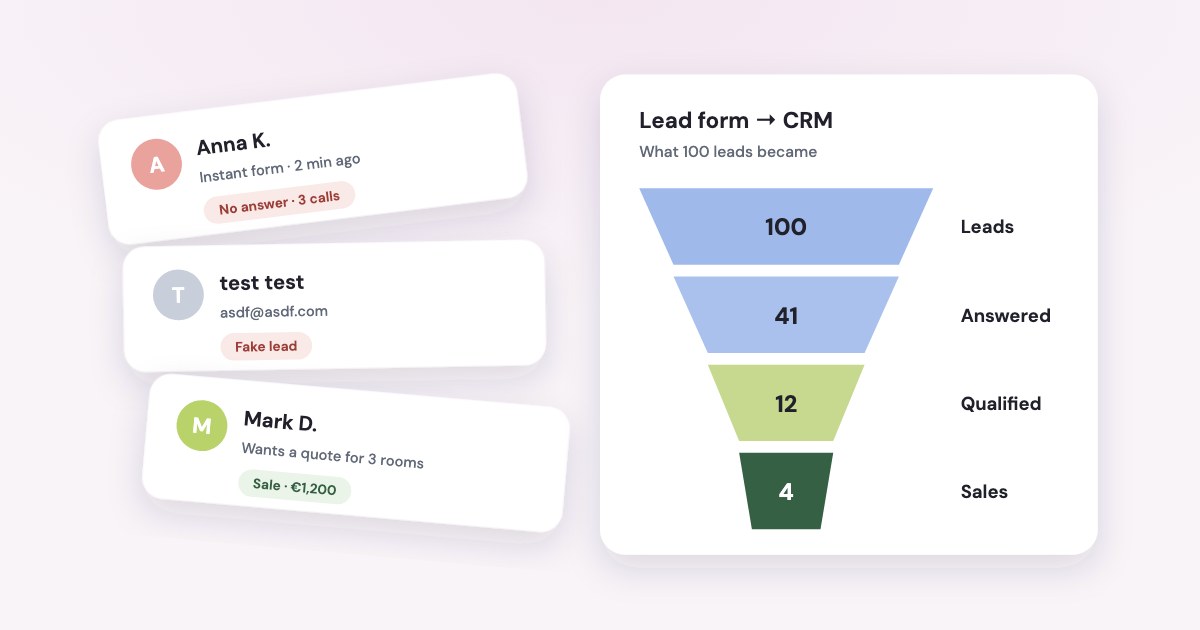
The form can’t tell you whether a lead was good. Only what happens next can: whether you reached the person, whether they qualified, whether they paid. So measure quality per ad and per ad set, from your CRM:
- Leads — how many each ad brought.
- Reached — how many you spoke to.
- Qualified — how many reached the first stage that means a real prospect, such as “offer sent” or “visit booked”.
- Sold — how many paid.
Give leads time before you judge. A lead that came in yesterday hasn’t had a chance to qualify yet.
Quality shows up weeks before payments
In one online education business we work with, 85% of the leads that reached qualified did so within 7 days of arriving, and half within two days. Payments take weeks.
When we tested a rule on seven months of its data — an ad with at least 10 week-old leads, whose leads qualified at under 40% of its campaign’s usual rate and none paid — the ads it flagged later brought back about a tenth as much revenue per euro of spend as the others.
Without a CRM
Meta’s free Leads Center tracks stages for you — Intake, Qualified, Converted, Lost and Not qualified — and needs no setup
for instant form leads (source). A connected Google Sheet gets a lead_status column,
and Each time you update the “lead_status” column, Meta will pull the new data
(source).
Download leads regularly either way: Lead information is only available on Meta for 90 days
(source).
Fix the form
Meta’s help center has a whole section called “Instant forms lead quality filtering” (source). The settings that matter most for a small business:
- Turn on SMS verification. People confirm their mobile number with a one-time code before the form will send.
- Choose the Higher intent form type. It adds a review step where people check their details before sending (source).
- Ask one qualifying question with set answers — the service, the area, the budget, when they want to start.
- Close the form for people who don’t fit with conditional logic.
- Say what happens next in the ad and the form intro — for example, that you will call within a day.
SMS verification
This feature also helps improve your lead quality by filtering out fake leads such as spam bots and bad actors.
What to know before you switch it on (source):
- Phone number must be a required contact field. A landline can’t receive the code, so that person can’t send the form.
- Such ads run only on Facebook and Instagram on mobile devices.
- It is not available in Iraq, Morocco, Nigeria, Pakistan, Sri Lanka and Uzbekistan.
- Your download gets a
phone_number_verifiedcolumn; a CRM integration may not pass it on. - Meta says it
may affect the number of generated leads and the cost per lead
— expect fewer, more reachable leads. - It
may be enabled by default for eligible advertisers
, so check the box before you blame the form.
Meta announced the feature in October 2025 and gave one example: a Dubai real estate company cut invalid phone numbers by 45% (source). That is one advertiser, not a study.
Conditional logic
Conditional logic can help you collect the information that is most important to you, filter out leads that don’t meet your criteria and direct different categories of leads to specific landing pages to encourage conversions.
An answer can close the form, and Meta then treats the person as a non-lead: you don’t get their details. The trade-off is in
Meta’s own words: The use of conditional logic may increase your cost per lead.
Questions you are not allowed to ask
Meta prohibits asking again for anything the prefill fields already cover, so you can’t make people retype their phone number. It also bans questions about health conditions and treatments, credit score and income, and a child’s date of birth (source). Clinics, finance and children’s courses should qualify with neutral questions: the service, the area, the timing.
For business-to-business offers there is also work email validation, which blocks free addresses such as Gmail. Up to 15 custom questions fit in one form (source); one or two good ones usually do more than ten.
Tell Meta which leads were good
Filters stop bad leads at the door. To get more good ones, Meta needs to know which leads turned out well, so it can find people like them. That is the qualified leads goal, called conversion leads in some of Meta’s pages.
You send each lead’s stage back from your CRM, Leads Center or a connected sheet. Since April 2026 the goal needs the Conversions API. How to set it up is in our guide to the Meta Conversions API for CRM.
Meta reports that advertisers using its CRM integration with this goal saw on average 19% lower cost per quality lead
than with the plain leads goal, in a budget-controlled A/B test with 567 advertisers in January 2025 (source).
The 200-leads rule
In October 2025 Meta announced it was removing the minimum monthly lead volume for this goal. Its developer documentation still lists 200 leads a month. If you are below that, the goal may still be offered — check in Ads Manager.
Once Meta reports quality, its metrics — qualified leads, cost per qualified lead, qualified lead rate — are estimated
:
they come from your CRM events and are partially derived through modeling
(source). Your
CRM stays the record.
The same logic applies to lookalike audiences: For lead ads, we recommend using an audience based on existing customers rather than those who have submitted a form
(source).
Placements and Audience Network
Many agencies tell you to switch off Audience Network, the apps and sites outside Facebook and Instagram, for lead
ads. That is their experience, not Meta’s position. Meta lists Leads among the objectives Audience Network supports and says
conversion rates were 8x higher
when people saw ads across Facebook, Instagram and Audience Network
(source). It doesn’t say how that was measured.
There is a quieter link. SMS verification, the Higher intent form and work email validation run only on Facebook and Instagram on mobile. Switch on those filters and your form leaves Audience Network anyway.
If you want to test it, compare placements by qualified leads from your CRM, not by cost per lead, and over at least two weeks.
Instant form or a form on your website
Meta suggests an instant form To increase performance and lower cost per quality lead
, and a form on your
website when people need to book an appointment, get a quote or see the full details of a bigger purchase
(source).
Meta’s own comparison found instant forms with the conversion leads goal brought a 20% lower cost per qualified lead than website forms. The method: 15 tests between November 2022 and February 2023, results reported by the advertisers themselves, at 86% confidence (source).
One catch: if you run both at once with the “website and instant forms” option, Maximize number of leads is the only performance goal
(source), so you lose the qualified leads goal.
Does calling faster fix it?
Meta recommends following up quickly. It says Minimizing the time it takes to follow up with your leads can improve your lead quality
and suggests running lead ads during business hours (source). Meta gives no numbers for it.
The figures you often see — “call within 5 minutes and you are 21 times more likely to qualify” — come from a 2007 study by a seller of sales software, not from Meta.
What we measured
In the same online education business, leads first called within 15 minutes bought about as often as leads first called after more than 4 hours: the difference was within the noise. What mattered was reaching the person at all. Leads the team spoke to at least once bought about 2.6 times as often as leads that were dialled but never answered.
That is one business that sells by phone. Your numbers may differ, so measure them: reach rate per ad says more about lead quality than minutes to first call.
Can you get money back for fake leads?
No. Meta’s help center says We don’t give refunds for poor ad performance or return on investment.
(source), and its advertising terms say Meta is not responsible for click fraud, technological issues, or other potentially invalid click activity
(source). There is no form for reporting fake leads.
What you can do is stop paying for them: verification and qualifying questions at the form, and the qualified leads goal so the budget moves to ads whose leads turn into customers.
How Variafy shows lead quality
Variafy reads your leads and their stages from Pipedrive or a Google Sheet. You choose once which stage means a lead is qualified. Then:
- Quality per ad and ad set. Daily advice points out ads whose leads rarely qualify — at least 10 leads that had 7 days to qualify, a qualified rate under 40% of the campaign’s usual one, and no payment. It shows up weeks before the payments do.
- Stages back to Meta. In the console you can switch on sending “New lead” and “Qualified lead” events to the dataset of the ad account each lead came from, so the qualified leads goal has data to learn from.
- Payments matched to ads. Which ads brought paying customers, not only leads — see matching CRM sales to ads.
Ask your assistant “Which ads bring leads that never qualify?” after adding https://www.variafy.com/mcp. Variafy is
in private beta: join the waitlist.
How we checked
Checked on 15 October 2026 against Meta’s Business Help Center (instant form types and creation, lead quality filtering, SMS verification, work email validation, conditional logic, prefill and prohibited questions, organic leads, downloading leads, lead metrics, Leads Center, Google Sheets stages, responding to leads, refunds, Audience Network, lookalike audiences), Meta for Business news from April 2024 and October 2025, Meta’s lead ads product page and its self-serve advertising terms.
Our own numbers come from one online education business we work with that sells by phone: lead-to-qualified timing and the quality rule tested on seven months of daily data, and first-call timing across its leads. We give them as ratios, not counts. Variafy is our product.
Questions
Why are my Facebook leads so bad?
Usually because the form takes two taps with prefilled details and the campaign is set to get the most leads, so it is rewarded for every submission. Add SMS verification, a Higher intent form and a qualifying question, and send your CRM stages back to Meta so it optimises for qualified leads.
How do I improve Facebook lead quality?
Measure quality per ad from your CRM first. Then filter at the form (SMS verification, Higher intent review step, a multiple-choice qualifying question, conditional logic for non-fits) and switch to the qualified leads goal by sending lead stages to Meta through the Conversions API.
Does Meta verify phone numbers in lead forms?
Yes, if you turn it on. SMS verification asks people to confirm their mobile number with a one-time code before the form sends. It runs only on Facebook and Instagram on mobile, landlines cannot pass, and it is not available in six countries. Meta says it may change the number of leads and the cost per lead.
Why do people say they never filled in my form?
Some forms are sent by mistake because details are prefilled; a review step (the Higher intent form type) helps. Others are organic leads from people the ad was shared with, which only happens when the form’s sharing is set to Open; and your own test leads also appear in the download.
Should I exclude Audience Network for lead ads?
Many agencies advise it; Meta does not and says Audience Network supports lead ads. SMS verification and the Higher intent form only run on Facebook and Instagram on mobile, so turning them on keeps the form off Audience Network anyway. Compare placements by qualified leads, not cost per lead.
Can I get a refund for fake leads from Facebook?
No. Meta says it does not give refunds for poor ad performance or return on investment, and its terms say it is not responsible for click fraud or invalid activity. There is no form to report fake leads.
How fast should I call a Facebook lead?
Meta advises following up quickly and running lead ads during business hours, but gives no numbers. In one online education business we measured, calling within 15 minutes or after 4 hours made no real difference to sales; reaching the person at all made leads about 2.6 times as likely to buy.
How long does Meta keep my leads?
Lead information is available on Meta for 90 days. Connect a CRM or download leads regularly so you don’t lose them.