Fake, spam and duplicate leads from Facebook lead ads
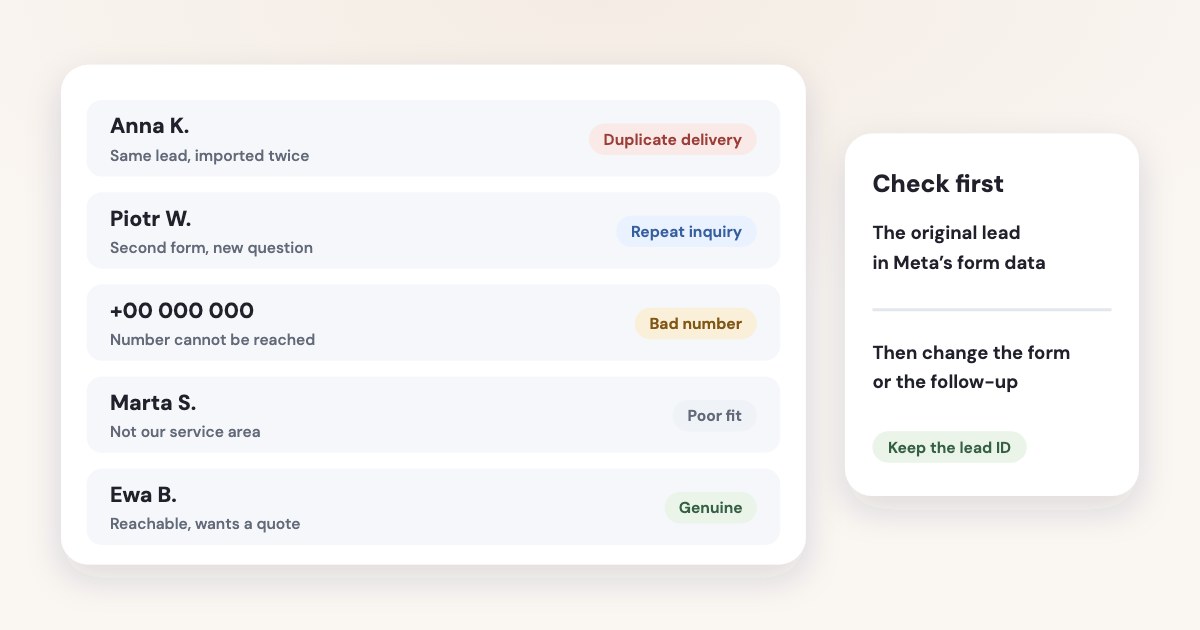
Compare a suspicious CRM record with the original Meta lead before changing your campaign. The same lead imported twice needs a delivery fix, while a second genuine submission needs a repeat-contact rule; neither proves that Meta sent a bot. For false contact details, Meta documents phone verification and form-quality controls, but no control guarantees a qualified customer. [1] [2] [3] [4]
On this page10 sections
Decide which problem you actually have
Start with the original submission, its creation time, form and ad identifiers where available, and the corresponding CRM record. Keep source evidence beside your classification, so a sales note such as “duplicate” does not erase the difference between two submissions and two imports.
| Pattern | First investigation |
|---|---|
| Same source lead identifier in two CRM records | Check repeated delivery or multiple import routes. |
| Different source identifiers with the same contact details | Check whether the person submitted more than once. |
| Wrong number or undeliverable email | Check the original field, formatting and contact verification. |
| Person says they never submitted | Compare form wording, source data and any test or shared-form context. |
| Real person outside your service criteria | Review qualification and the offer, rather than labeling the record a bot. |
Use these as investigation categories, not automatic verdicts. A shared family email, a receptionist’s number or a returning customer can make simple duplicate rules misleading; your business’s contact model should decide what counts as one person, household or company.
Variafy’s general Facebook lead-quality guide already covers form friction and campaign feedback. This article’s narrower job is to prevent a single source submission from becoming several sales tasks and to keep suspicious records traceable.
Compare Meta’s source with the CRM
Retrieve the relevant leads from Meta and compare a small sample with the destination records. Meta documents manual downloads and CRM retrieval as separate ways to obtain leads, so check whether more than one route is creating contacts. [4]
Our recommended audit starts with records from the same form and date range. Compare the source identifier, original contact fields, Meta creation time, CRM creation time and integration run history if your connector provides it; do not infer a second submission from the CRM timestamp alone.
If one source lead appears once in Meta but twice in the CRM, investigate delivery and record creation. If Meta contains distinct submissions, investigate the repeat-contact rule and the form experience; fixing a retry will not prevent someone from making another inquiry.
Check whether a manual spreadsheet import runs alongside an automated connector. Nominate one route that creates records and make any reconciliation import update by source identifier, so a recovery upload cannot silently recreate everything it contains.
For a low-cost transfer route, use the separate Facebook lead ads to Google Sheets guide. Whatever route you use, preserve source evidence rather than copying only the person’s name and phone number.
Example, not a finding
A connector retry and a simultaneous manual import are possible causes to investigate. We did not test your integration, and this article does not claim either happened in your account.
Add the documented contact-quality controls
Meta’s current phone-verification documentation describes a one-time code delivered by WhatsApp or SMS, with the channel selected automatically. It also says a previously verified number may not be challenged again for 180 days, so do not tell sales staff that every submission required a fresh SMS. [1]
The destination-level route below uses labels from Meta’s English documentation read November 4, 2026, as of November 2026. Review the saved form and delivery eligibility before publishing; the presence of a checkbox is not evidence that your existing leads passed it. [1]
STEPS: 1. In Ads Manager, select + Create. [1] 2. Select Leads and then Continue. [1] 3. At the ad set’s Conversion section, select Instant forms. [1] 4. At the ad’s Destination section, select Create form or an existing form. [1] 5. In the form’s Questions section, use + Add category → Contact fields → Phone number when adding that field. [1] 6. Make Phone number a required contact field. [1] 7. Select Require SMS verification to submit form in the destination settings when available. [1] 8. Review the completed ad and select Publish only when the setup is ready. [1]
For a Higher intent form, Meta documents the editor option Require leads to verify their phone number with a one-time passcode. Its page also lists country restrictions and limits delivery with phone verification to Facebook and Instagram mobile placements. [1]
Higher intent adds a review step, and Meta documents other quality options including work-email validation. Use those for the problem they address: excluding free email providers can be sensible for some business offers but is an editorial decision that can reject legitimate consumer inquiries. [2] [3]
Filter before creating a sales task
Our recommended delivery design keeps a restricted source log and a separate decision about whether to create or update a CRM record. Give every incoming submission a processing state such as accepted, repeated or needs review; these are suggested internal labels, not Meta menu names.
Use the source lead identifier as the key for handling delivery retries. When that identifier has already been processed, update its delivery record or the existing CRM link instead of creating another contact, and keep enough history to explain the decision later.
Then apply a separate repeat-contact check using normalized email or phone data. Normalization should remove formatting differences relevant to your business without inventing missing digits, changing the person’s answer or merging two people just because they share a number.
For distinct submissions from an existing contact, we suggest you attach a new inquiry or activity to the existing contact when your CRM supports that model. Preserve the new form, campaign and creation time so the sales team can see what the person asked for this time.
Route incomplete, contradictory or obviously nonsensical records to a review queue before assigning a salesperson. Keep a reason and a way to reverse the classification; a rule that silently deletes an unusual name or foreign number can hide a genuine inquiry.
Do not copy these proposed internal states into a platform’s conversion events without a separate mapping decision. The Conversions API for CRM guide explains the different task of sending actual lead stages back to Meta.
Verify what the quality field means
Meta says downloaded lead data can include phone_number_verified when phone verification is enabled. Its documentation warns that a CRM integration may not expose that column, and older submissions can remain FALSE after verification is enabled later. [1]
Ask your connector owner whether the field is available and mapped before building a rule around it. Distinguish FALSE from missing: “not supplied by this connector” should not become “failed verification” in a report.
Read the original form answers when a real person is a poor fit. Meta documents conditional logic and lead filtering among instant-form features, but those controls do not tell you whether the person later attends, qualifies or pays. [2]
Give sales staff a neutral script: “We received an inquiry about this service using these contact details; did you mean to ask us about it?” Avoid accusing the person of submitting spam, and record the answer separately from your integration diagnosis.
Send the form owner a useful change request
Describe the issue with a small, access-controlled sample and an explicit rule. A useful request says which form and date range are affected, whether Meta has one or several source submissions, and which records the CRM created.
Then ask for one correction you can evaluate: preserve the source identifier, prevent a second create operation, require phone verification where suitable, or clarify the qualifying question. Avoid changing audience, form, integration and sales process together, because you will struggle to explain what solved the observed issue.
Agree what happens to records already in the CRM before making bulk changes. Merge or close confirmed duplicates according to the CRM owner’s process while retaining the source history and any genuine conversations.
Review the next comparable group by the same classifications. Report genuine inquiries, delivery duplicates, repeat contacts and unresolved records separately; a lower raw lead count alone cannot tell you whether sales staff now receive more useful work.
What to do next
Take a small sample of suspicious CRM records and compare each with Meta’s source data. Assign the dominant issue to the integration owner, form owner or sales process owner, then make one specific correction.
Keep the source identifier and a review reason on future submissions. After the change, check both duplicate task creation and the share of genuine inquiries reaching a salesperson.
Where Variafy fits
Variafy can bring CRM deals and payments into ad reporting and send payments and lead stages back to Meta; that can help you judge outcomes after your intake rules work. It does not guarantee spam removal or repair your connector’s duplicate logic. It is in a free beta by invitation. Join the waitlist.
How we checked
Checked on 4 November 2026 against the pages below, read in English; Meta’s pages were read in a browser. We checked the documentation only: we did not run these steps in a live ad account.
- www.facebook.com/business/help/898260175547909 — Phone verification, exact settings, channel selection, 180-day reuse, eligibility, placement restrictions and download-field caveats
- www.facebook.com/business/help/761812391313386 — Documented instant-form quality features, conditional logic and work-email validation
- www.facebook.com/business/help/252352181957512 — Higher intent and other instant-form types
- www.facebook.com/business/help/734933888443065 — Source lead download and retrieval routes
- www.variafy.com/guides/facebook-lead-quality — Existing topic coverage checked to select the narrower duplicate-intake angle
What we could not confirm
- A measured spam rate
- A universal anti-bot switch
- A promise that every lead receives a new code
- Automatic deduplication in a named CRM
- A field available in every connector
- Guaranteed refunds
- Live form or connector testing. Proposed intake states and deduplication rules are editorial recommendations
Variafy is our product.
Questions
How do I tell a duplicate lead from a second real inquiry?
Compare the CRM record with the original Meta lead and keep the lead identifier. The same lead imported twice is a delivery problem to fix. A second genuine submission by the same person is a repeat inquiry that needs a repeat-contact rule. Neither proves that Meta sent a bot.
Does Meta have a control against fake contact details?
Meta documents phone verification and form-quality controls. Phone verification checks that the person controls a mobile number, not that they want to buy, so no control guarantees a qualified customer.
Should I delete suspicious leads automatically?
Route uncertain records to review instead. Deleting automatically can remove real people and hides the evidence you need to change the form or the follow-up.