Facebook lead ads to Google Sheets: free ways that work in 2026
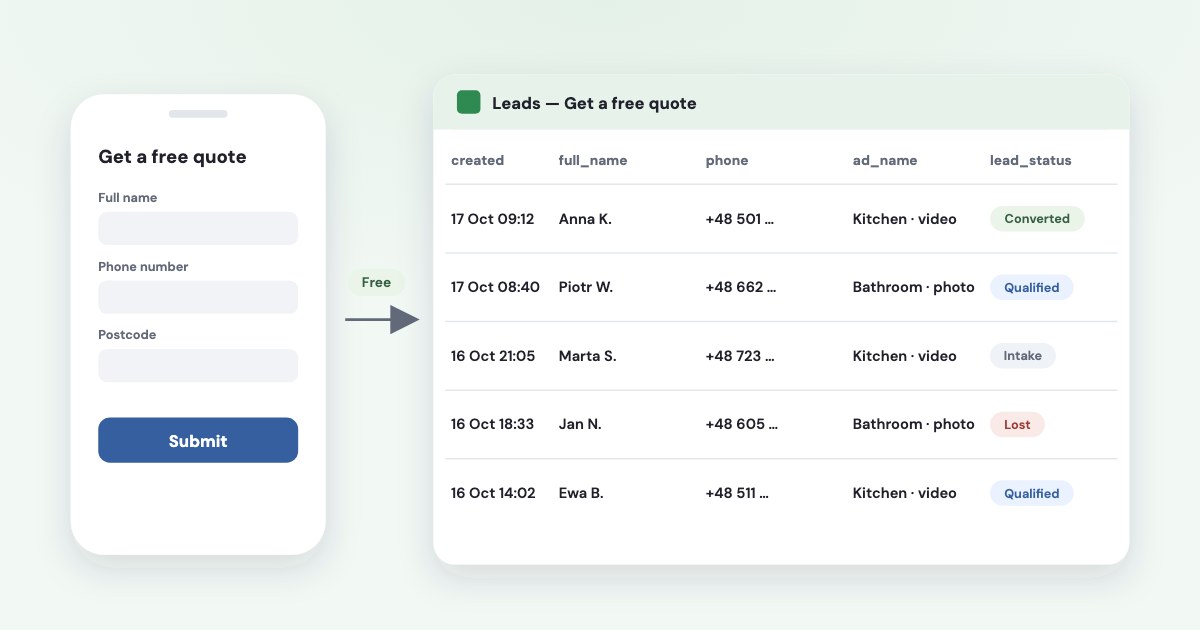
The free way most guides miss is Meta’s own: in Meta Business Suite, open Instant forms, choose Connect CRM, pick Google Sheets and sign in with Google. New leads then arrive in the sheet as they come in, and you can sync the form’s earlier leads too. If you’d rather not connect anything, download leads as CSV — but only for 90 days. Zapier doesn’t do this on its free plan (Facebook Lead Ads is a premium app there); Make and Pabbly have free tiers that cover a small business. Whatever you use, keep the sheet private: it holds names and phone numbers.
On this page8 sections
Free way 1: Meta’s own Google Sheets connection
This connection allows you to use Google Sheets to track and share leads data more efficiently, without relying on a third-party tool.
Meta’s steps, from Meta Business Suite (source):
- All tools → Instant forms → + Connect CRM.
- Choose Google Sheets and click Sign in with Google, then allow Facebook.com access to your spreadsheets.
- New integration → pick a spreadsheet or create a new one. You can tick Automatically create integrations for future forms: each new form then gets its own worksheet.
- Choose the worksheet and the form. Tick Sync existing lead to the sheet? if you want the leads you already have.
- Send test lead, check it arrived, then Complete.
You can also start from the ad itself: in Ads Manager, edit the lead ad and, under Automated lead delivery, click Set up
next to Google Sheets. Meta notes that The new or existing Google Sheets spreadsheet you choose to use has to be empty.
A bonus: lead quality goes back to Meta
Meta built this connection for its Conversions API for CRM, so the sheet
gets a lead_status column. If you mark leads as qualified, converted or lost there, Meta will pull the new data and create Conversions API events based on the updated status.
That is how a business without a CRM can teach Meta which leads are good (more on that).
Meta lists eligibility requirements for that part; if your account doesn’t meet them, use one of the ways below.
Free way 2: download leads as CSV
You can download leads as a CSV file
from Ads Manager, from the Instant forms page or from Leads Center in Meta Business
Suite (source), then import the file into Google Sheets with File → Import.
The catch is time: leads expire after 90 days, and Meta doesn’t make them available for download after that (source). A weekly download is fine for a few leads a day; for anything more, connect the sheet.
Free tiers of automation tools
If you need more than one sheet, filters, a message to your phone or a CRM later, an automation tool does it. Their free plans, checked on 17 October 2026:
| Free plan | Facebook Lead Ads on it | |
|---|---|---|
| Zapier | 100 tasks a month | No: it is a premium app — paid plan or 14-day trial |
| Make | 1,000 credits a month | Yes; roughly a few hundred leads a month |
| Pabbly Connect | 100 tasks, triggers not counted | Yes; about 100 leads a month |
| Integrately | 100 tasks, 15-minute updates | Not clearly stated |
| LeadsBridge | 50 leads a month, one connection | Yes; whether Sheets is included isn’t stated |
| n8n | Free if you host it yourself | Yes, but you need your own Meta app |
The lead estimates are ours, from each plan’s limits. Whatever tool you use, it only receives leads once you grant it access in your business settings under Leads access — the most common reason a working setup stops. Our guide to Zapier, Make and n8n covers that step and when each tool fits.
Developers can also pull leads with Google Apps Script and Meta’s API. That needs your own Meta app, a Page token and the
leads_retrieval permission — free in money, not in time.
When leads stop arriving in the sheet
- You edited the form. An edited form gets a new ID, and connections tied to the old one stop receiving leads without an error. Re-select the form after every edit.
- Leads access. Someone restricted leads access, or the tool was never added — check Business settings → Integrations → Leads access.
- Google sign-in expired or the person who connected the sheet lost access to it.
- Duplicates. Add a lead ID column and dedupe on it, not on e-mail.
- Phone numbers turned into formulas. Numbers starting with “+” can be read as a formula; format the phone column as plain text.
To test without waiting for a real lead, use Meta’s Lead Ads Testing Tool. Meta’s documentation notes test leads are organic leads not associated with any ad, so ad and campaign columns stay empty, and you can send one test lead per form at a time (source).
Keep the sheet private
A lead sheet holds names, phone numbers and e-mails. Google is clear about what link sharing means:
Anyone who has the link can use your file, without signing in.
(source) Share it with named people
only, and give edit rights only to those who call leads. In the EU, the GDPR requires appropriate security of the personal data
(source); delete old leads you no longer need.
From a sheet of leads to a sheet of sales: Variafy
A sheet tells you who left their details. The next question is which ads brought the people who paid. Variafy connects ChatGPT, Claude and other assistants to your Meta ad accounts and can read a Google Sheet of payments — date, amount and the ad or campaign — and match it to the ads that brought them (how that works).
Keep that payments sheet separate from the lead sheet, without names or phone numbers: Variafy reads it through a view-only link, so it should contain only what it needs.
How we checked
Checked on 17 October 2026 against Meta’s Business Help Center (connecting Google Sheets via Conversions API for CRM — read in a browser that day — downloading leads, expired leads), Meta’s developer documentation on lead ads testing, the pricing and help pages of Zapier, Make, Pabbly Connect, Integrately, LeadsBridge and n8n, Google Drive’s sharing help and the GDPR. We also read the pages that rank for these searches.
Variafy is our product.
Questions
How do I connect Facebook lead ads to Google Sheets for free?
Use Meta’s built-in connection: in Meta Business Suite go to All tools → Instant forms → + Connect CRM, choose Google Sheets, sign in with Google, pick an empty spreadsheet and the form, and send a test lead. You can also tick the option to sync the form’s existing leads.
Is Zapier free for Facebook lead ads?
No. Facebook Lead Ads is a premium app on Zapier, so it needs a paid plan or the 14-day trial. Meta’s own Google Sheets connection, Make’s free plan or Pabbly’s free plan are free alternatives.
Why are my Facebook leads not showing up in Google Sheets?
Most often the form was edited and got a new ID, leads access was not granted to the tool, or the Google sign-in expired. Re-select the form, check Leads access in business settings, and send a test lead with Meta’s Lead Ads Testing Tool.
How long can I download Facebook leads?
For 90 days. After that, leads expire and Meta doesn’t make them available for download, so connect a sheet or CRM, or download regularly.
Can I get old Facebook leads into Google Sheets?
Within 90 days, yes: Meta’s Google Sheets connection has an option to sync existing leads of a form, or you can download a CSV and import it. Older leads are no longer available.
Related guides
- Facebook lead ads with Zapier, Make or n8n — and when an AI connector is the better tool
- Facebook lead quality: why lead forms bring junk leads and how to fix it
- Meta Conversions API for CRM: send lead stages and sales back to Meta
- Lead response time: measure speed to lead without hiding unanswered enquiries