How to use the Meta Ad Library to research competitors’ ads
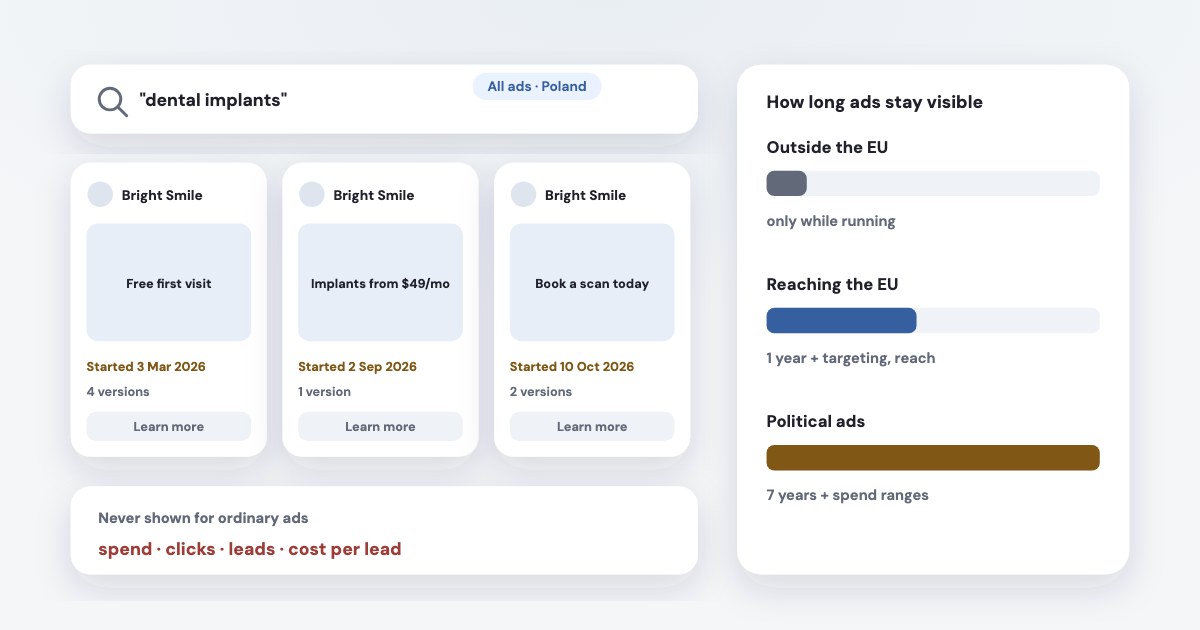
The Meta Ad Library is a free public search of ads running across Meta’s apps — Facebook, Instagram, Messenger and more; you don’t need an ad account. Pick a country, choose “All ads”, and search by keyword or a competitor’s Page. What you see depends on where you look: outside the EU, only ads running right now, with no spend or results; for ads reaching the EU, every ad for a year after it last ran, with targeting and reach. It shows what competitors say and how long an ad has run — useful for offers and angles, not proof of what works.
On this page8 sections
What the Ad Library is
Meta opened the library to all advertisers in 2019, showing all active ads any Page is running
, with a search by Page as well as
keywords (source). It’s a transparency tool: anyone can see what a business is advertising, at
facebook.com/ads/library.
| What you can see | How long it stays | |
|---|---|---|
| Ordinary ads, outside the EU | The ad, its start date, platforms, number of versions | Only while it’s running |
| Ads reaching the EU | Plus targeting parameters (age, gender, location), reach, who paid | A year after it last ran |
| Political and social issue ads | Plus spend and impressions in ranges, who paid | Seven years |
The EU rules come from the Digital Services Act: ads stay available until one year after the advertisement was presented for the last time
, with
the main parameters used for that purpose
(source). Meta announced in 2023 it would display and archive all ads that
target people in the EU, stored in our public Ad Library for a year
(source). Meta’s API
lists the targeting fields as covering the UK & EU
(source), so the API returns them for the UK as well.
The separate Ad Library Report covers only ads about social issues, elections or politics — no use for research in an ordinary niche.
How to search it
- Choose the country your competitor advertises in. The wrong country is the most common reason an advertiser seems missing.
- Choose “All ads”, not “Issues, elections or politics” — that category hides every commercial ad.
- Search by Page name for a known competitor, or by keyword (“dental implants”, “interior design course”) to see who advertises in your niche. Put a phrase in quotes for an exact match.
- Filter by platform, media type, language and active status, and open an ad to see its versions and start date.
Guides list these filters (example); Meta changes the panel from time to time, and some users now see sorting by impressions that Meta hasn’t documented.
Reading it for competitor research
- The offer and the first line. Free consultation or a price? A deadline? What do three competitors lead with? That’s where your ad has to stand out.
- Lead form or website. The button and link show whether they send people to an instant form or a landing page.
- How long an ad has run. An ad running for months is often working — but the date is when delivery started, not proof of continuous spend, and some ads simply run on a small budget nobody stopped. Treat it as a hint.
- Number of versions and active ads. Many versions of one message suggests a competitor testing creatives.
- In the EU, targeting and reach — the age and location a competitor chose and roughly how many people it reached.
What it never shows
Clicks, leads, cost per lead or sales — for any ad. The ArchivedAd fields in Meta’s API include spend and impressions only for political ads, and no results at all (source). Copy angles, not budgets: you can’t see what anything costs or brings.
Turning what you find into your own ad copy: AI Facebook ad copy.
The Ad Library API
Ads that did not reach any location in the EU will only return if they are about social issues, elections or politics.
So for a competitor advertising only in the US, the API returns almost nothing; the website is more useful. For ads reaching the EU it returns the same data as the library, including reach. Meta asks you to confirm your identity first, the same check as for political advertisers. More on Meta’s APIs: the Marketing API explained.
When the Ad Library isn’t working
- Wrong country or category — the usual cause. Ads Uploader:
The country filter is the single most common reason people "can't find" an advertiser.
(source) - Ad blockers can block the page because its address contains “ads” (Ads Uploader); try a private window.
- A VPN changes the country you’re seen from.
- The ad stopped — outside the EU it disappears from the library.
- Political ads in the EU: since 6 October 2025 Meta no longer runs them there (source), so new ones won’t appear.
From competitors’ ads to your own results: Variafy
Variafy connects ChatGPT, Claude and other assistants to your Meta ad accounts — your ads, with their real cost per lead and, with your CRM, sales. Searching competitors’ ads from the Ad Library through Variafy will come once Meta grants the access it needs; for now, use the library in your browser and bring the angles you find into a conversation about your own results.
How we checked
Checked on 17 October 2026 against Meta’s newsroom posts (2019 Ad Library launch, 2023 DSA measures, 2025 end of political ads in the EU), the Digital Services Act article 39, Meta’s Ad Library API and ArchivedAd references, and guides by Shopify and Ads Uploader for interface details Meta doesn’t document. We also read the pages that rank for these searches.
Variafy is our product.
Questions
What is the Meta Ad Library?
A free public search of ads running on Meta’s platforms. Anyone can open facebook.com/ads/library, choose a country and search by keyword or advertiser.
How do I see a competitor’s Facebook ads?
Open the Ad Library, choose the country they advertise in and “All ads”, then search for their Page name. Outside the EU you’ll see only ads running now; for ads reaching the EU, everything from the last year.
Does the Ad Library show how much competitors spend?
Only for political and social issue ads, in ranges. For ordinary ads it shows no spend, impressions or results; in the EU it shows reach and targeting parameters.
Why can’t I find an advertiser in the Ad Library?
Usually the country or category filter is wrong — use “All ads” and the country they target. An ad blocker or VPN can also interfere, and outside the EU ads disappear once they stop running.
Is there a Meta Ad Library API?
Yes, but it returns ordinary ads only if they reached the EU; outside the EU it covers political and social issue ads. Meta asks you to confirm your identity first.