What is the Meta Marketing API — and how to use it without writing code
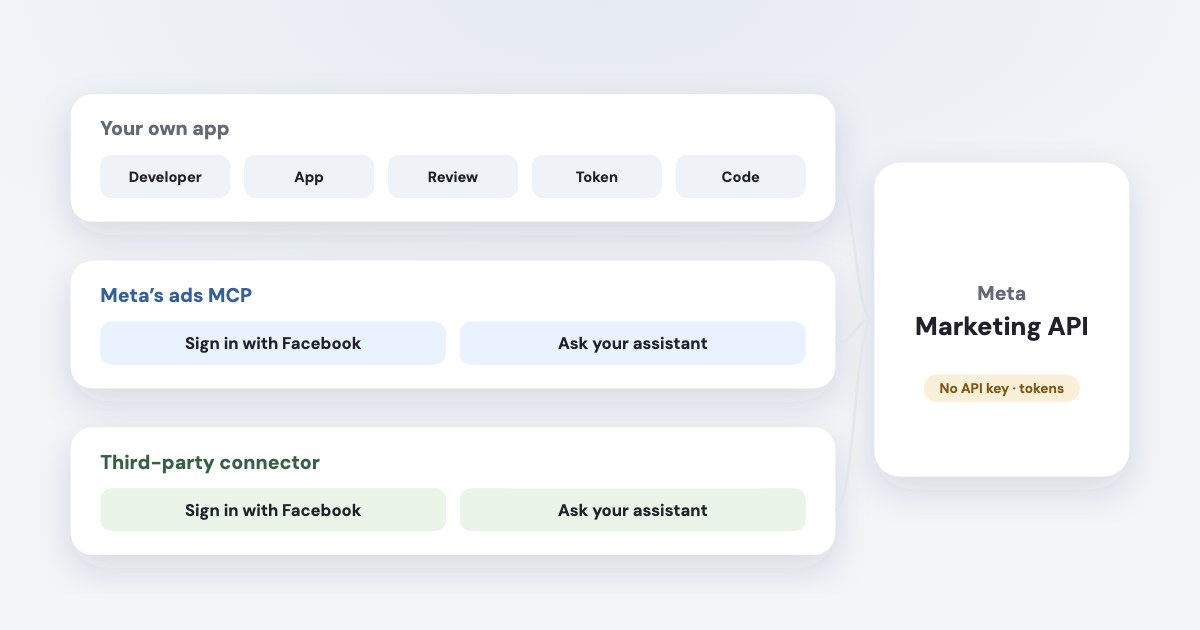
The Meta Marketing API is how software creates, changes and reports on Facebook and Instagram ads — the same things you do in Ads Manager, through code. There is no “API key”: you create an app at developers.facebook.com, get an app ID and secret, and make calls with an access token. Meta charges nothing for the calls; for your own ad account an app with basic access is enough, while managing other people’s accounts needs app review and business verification. If you don’t want to write code, you don’t need your own app at all: Meta’s official MCP connector or a third-party one lets ChatGPT or Claude use the API for you.
On this page10 sections
What the Marketing API is
Use the Marketing API to automate advertising across Meta technologies.
It covers the same structure as Ads Manager: the ad account, campaigns (the highest-level organizational structure within an ad account
),
ad sets (where The budget, billing, and duration are set
) and ads (source). Every tool that manages Meta ads
for you — Ads Manager scripts, reporting connectors, automation platforms, AI assistants — talks to this API.
Is there a Meta ads API key?
No. When you create an app, you Receive a unique App ID and App Secret, which are required for authentication.
(source) Calls then carry an access token (source):
| How long it lasts | Good for | |
|---|---|---|
| User token, short-lived | “an hour or two” | Trying calls in Graph API Explorer |
| User token, long-lived | About 60 days | Small scripts you renew by hand |
| System user token | does not expire | Automation that runs unattended |
Tools that give you an “API key” are giving you their own key, for their service, which then holds a Meta token on your behalf.
How to get Marketing API access in 2026
- Have an active ad account — Meta requires one (source).
- Register as a developer at developers.facebook.com and create an app (source).
- Pick the use case “Create & manage ads with Marketing API” (or the ones for measuring results or capturing leads). It adds the
ads_management,ads_readandbusiness_managementpermissions (source). - Connect a business portfolio. You can start unverified, but it
must be verified before you can run ads.
- Decide whether you need app review.
If your app will access data your don't own or manage, it requires App Review before your app users can grant access.
For your own ad account, people with a role on the app can use it without review.
New names for access tiers
Meta renamed them: "Standard Access" is now Limited Access, and "Advanced Access" is now Full Access.
Full access needs 500 successful calls in 15 days with errors under 15%, and Meta says that if your app only manages your own ad account,
standard access to the ads permissions is enough; managing other people’s accounts needs advanced access (source).
Confusingly, the permissions themselves still use the old Standard/Advanced names. Limited access is
heavily rate-limited (rate limits).
Meta publishes no review time; developers report anything from days to a few weeks.
Is the Meta ads API free?
Meta charges nothing per call and publishes no price list for the Marketing API — you pay for the ads you run. Its Platform Terms
keep the door open: We do not guarantee that Platform will always be free.
(source) The real cost is
time: building the app, verification, review and keeping up with version changes.
Versions: why old code stops working
Meta released Marketing API v26.0 on 29 July 2026 (source) — some of its pages still call v25.0 current.
The rule people quote, “two years per version”, is for the Graph API (source). For the Marketing API, Meta
promises less: it continues to support the previous version of the Marketing API for at least 90 days.
(source)
In practice v24.0 stopped working on 6 October 2026, about a year after release. Any script or tool you build needs updates a few times a
year — a guide with examples on v18 is already out of date.
API status and the Ad Library API
- Status. Meta shows outages of business products on metastatus.com, with Marketing API split into ad creation and editing, and insights.
- Ad Library API is a different API. It searches other advertisers’ ads, not yours:
Returns archived ads based on your search.
Outside the EU it only returns ads about social issues, elections or politics (source). It can’t manage your campaigns or read your results.
Using the API without writing code
Most small businesses and agencies don’t need their own app. Two routes give an AI assistant the API without it:
- Meta’s ads MCP server.
Owning a Meta app is not a prerequisite on using the ads MCP server.
You addhttps://mcp.facebook.com/adsto ChatGPT, Claude or another assistant and sign in with Facebook (source). It is in open beta and tools are rolling out gradually. - A third-party connector such as Variafy, which runs on its own reviewed Meta app. You sign in with Facebook and choose which ad accounts to share.
Both are compared in Meta Ads MCP servers; setup is in our guides for ChatGPT and Claude. Whether using the API this way is safe for your account is covered in can AI get your ad account banned.
The API without the app: Variafy
Variafy does the app, review, tokens, version updates and rate limits for you. Connect it to ChatGPT, Claude, Cursor or another MCP client, and ask in plain words — reports, audits, drafts of campaigns — with every change previewed and confirmed before it runs.
How we checked
Checked on 17 October 2026 against Meta for Developers documentation (Marketing API overview, get started, authentication, authorization and access tiers, creating an app and Marketing API use cases, versioning, rate limiting, the v26.0 announcement, Graph API versioning, the ads MCP server, the Ad Library API reference), Meta’s Platform Terms and metastatus.com. We also read the pages that rank for these searches.
Variafy is our product.
Questions
What is the Facebook ads API?
The Meta Marketing API: Meta’s interface for creating, managing and reporting on Facebook and Instagram ads through code. Ads Manager’s functions — campaigns, ad sets, ads, budgets, results — are all available through it.
How do I get a Meta ads API key?
There isn’t one. Register as a developer, create an app with the “Create & manage ads with Marketing API” use case, and use its app ID and secret to get an access token. A system user token doesn’t expire, which suits automation.
Is the Facebook ads API free?
Meta doesn’t charge for API calls and publishes no price for the Marketing API; you pay for the ads. Its Platform Terms say Meta doesn’t guarantee the platform will always be free.
Do I need app review to use the Marketing API?
Not for your own ad account used by people with a role on the app. Meta requires app review when your app accesses data you don’t own or manage, such as clients’ ad accounts, and Full access also needs business verification.
Can I use the Meta ads API without coding?
Yes. Meta’s ads MCP server and third-party connectors let ChatGPT, Claude and other assistants use the API for you; you sign in with Facebook and don’t need your own Meta app.
What is the difference between the Marketing API and the Ad Library API?
The Marketing API manages and reports on your own ads. The Ad Library API searches ads in Meta’s public library; outside the EU it only returns ads about social issues, elections or politics.