Meta Ads MCP: the official server, setup in Claude and ChatGPT, and every tool (2026)
Meta Ads MCP is Meta’s own Model Context Protocol server for ads, hosted at https://mcp.facebook.com/ads. You add it to Claude, ChatGPT, Claude Code or Perplexity, sign in with Facebook, and the assistant can read your ad accounts and create or edit campaigns, with new ads paused until you turn them on.
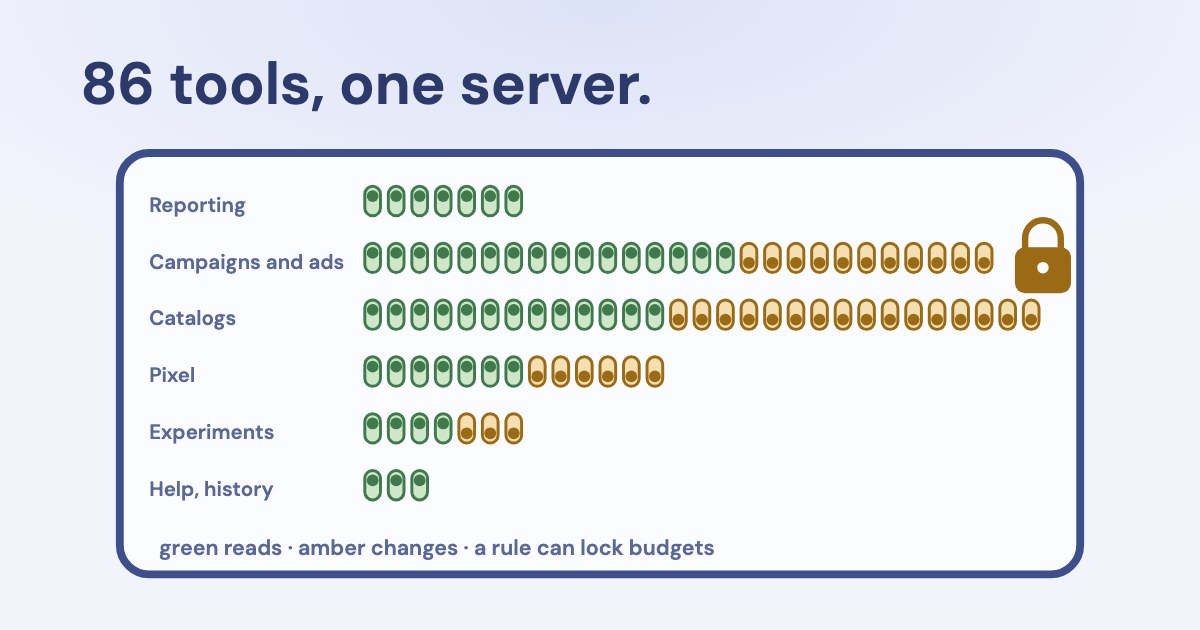
Meta’s documentation lists 86 tools as of 23 October 2026: 50 read and 36 change something, 7 of which delete.
Open the free meta Ads MCP tool finder ↓
On this page13 sections
What is Meta Ads MCP?
It is a remote MCP server that Meta runs for its ads platform. An AI assistant connects to it, you sign in with Facebook, and the assistant calls Meta’s tools on your behalf: report on campaigns, draft ads, change budgets, manage catalogs and pixels.
The ads MCP server is a Meta-hosted Model Context Protocol server that lets you manage Meta ads directly from an AI agent.
| What happened | |
|---|---|
| 29 Apr 2026 | Meta announces ads AI connectors — the MCP server and Ads CLI — in open beta (Meta). |
| 16 Jul 2026 | Meta opens the server to any developer with their own Meta app; agencies that work through their own app need App Review (Meta). |
| 22 Sep 2026 | Meta adds an API for ads MCP server rules to the same post. |
“Facebook Ads MCP” and “Meta MCP” in searches usually mean the same server. Third-party servers built on the Marketing API also exist; we compare them separately in official vs third-party Meta Ads MCP servers.
Which tools does Meta Ads MCP have?
Meta Ads MCP tool finder
86 documented tools
| Tool | Type | What it does | Rule that can block it |
|---|---|---|---|
ads_get_ad_entities | Reads | Campaigns, ad sets and ads with spend, impressions, CTR, CPC, CPM and conversions; filters, breakdowns, dates. | — |
ads_get_opportunity_score | Reads | The account’s opportunity score (0–100) and Meta’s recommendations. | — |
ads_insights_advertiser_context | Reads | Business context and funnel for the account. | — |
ads_insights_anomaly_signal | Reads | Unusual changes in performance. | — |
ads_insights_auction_ranking_benchmarks | Reads | Where your ads rank in the auction. | — |
ads_insights_industry_benchmark | Reads | Comparison with similar advertisers. | — |
ads_insights_performance_trend | Reads | Trends in CPC, CPM, cost per result, ROAS, CTR and conversion rate. | — |
ads_get_ad_accounts | Reads | Ad accounts you can reach. | — |
ads_get_ad_account_pages | Reads | Pages linked to an ad account. | — |
ads_get_pages_for_business | Reads | Pages owned by a business portfolio. | — |
ads_get_user_pages | Reads | Pages you manage. | — |
ads_get_field_context | Reads | Valid values for campaign, ad set and ad fields. | — |
ads_create_campaign | Changes | Creates a campaign, paused. | create_campaign |
ads_create_ad_set | Changes | Creates an ad set, paused. | create_ad_set |
ads_create_ad | Changes | Creates an ad, paused. | create_ad |
ads_update_entity | ChangesEdits live ads | Edits an existing campaign, ad set or ad — including live ones: budget, targeting, status. | edit_budget, edit_targeting, edit_status |
ads_activate_entity | ChangesStarts spend | Turns a paused campaign, ad set or ad on; spending starts. | edit_status |
ads_create_creative | Changes | Creates an ad creative. | edit_creative |
ads_get_creatives | Reads | Creatives in the account. | — |
ads_get_creative_ads | Reads | Ads that use a creative. | — |
ads_get_ad_images | Reads | Images in the ad library. | — |
ads_get_ad_videos | Reads | Videos in the ad library. | — |
ads_get_ad_preview | Reads | A preview of an ad. | — |
ads_library_search | Reads | Searches the public Meta Ad Library. | — |
ads_get_ig_accounts | Reads | Instagram accounts available for ads. | — |
ads_get_ig_media | Reads | Posts of an Instagram account. | — |
ads_boost_ig_post | ChangesStarts spend | Turns an organic Instagram post into a boosted ad. | only “all” |
ads_get_ad_account_custom_audiences | Reads | Custom audiences in the account. | — |
ads_get_custom_audience | Reads | One custom audience in detail. | — |
ads_get_custom_audience_adsets | Reads | Ad sets that use an audience. | — |
ads_create_custom_audience | Changes | Creates a custom audience. | only “all” |
ads_update_custom_audience | Changes | Edits a custom audience. | only “all” |
ads_update_custom_audience_users | Changes | Uploads hashed customer data to an audience. | only “all” |
ads_delete_custom_audience | Deletes | Deletes a custom audience. | only “all” |
ads_catalog_create | Changes | Creates a product catalog. | catalog: all |
ads_catalog_update_catalog | Changes | Edits a catalog. | catalog: all |
ads_catalog_list_catalogs | Reads | Catalogs you can reach. | — |
ads_catalog_get_diagnostics | Reads | Catalog problems Meta found. | — |
ads_catalog_get_dynamic_ads_health | Reads | Health of dynamic ads using the catalog. | — |
ads_catalog_get_data_sources | Reads | Feeds and other sources of the catalog. | — |
ads_catalog_list_products | Reads | Products in a catalog. | — |
ads_catalog_product_create | Changes | Adds a product. | edit_catalog_products |
ads_catalog_update_product | Changes | Edits a product. | edit_catalog_products |
ads_catalog_delete_product | Deletes | Deletes a product. | edit_catalog_products |
ads_catalog_create_product_set | Changes | Creates a product set. | edit_catalog_product_sets |
ads_catalog_update_product_set | Changes | Edits a product set. | edit_catalog_product_sets |
ads_catalog_list_product_sets | Reads | Product sets in a catalog. | — |
ads_catalog_product_set_delete | Deletes | Deletes a product set. | edit_catalog_product_sets |
ads_catalog_create_product_feed | Changes | Creates a product feed. | catalog: all |
ads_catalog_update_product_feed | Changes | Edits a product feed. | catalog: all |
ads_catalog_list_product_feeds | Reads | Feeds of a catalog. | — |
ads_catalog_create_product_feed_upload_session | Changes | Starts a feed upload. | catalog: all |
ads_catalog_get_product_feed_upload_sessions | Reads | Past feed uploads. | — |
ads_catalog_product_feed_delete | Deletes | Deletes a feed; its products are removed too. | catalog: all |
ads_catalog_create_feed_rule | Changes | Adds a feed rule. | catalog: all |
ads_catalog_get_feed_rules | Reads | Rules of a feed. | — |
ads_catalog_product_feed_delete_rule | Deletes | Deletes a feed rule. | catalog: all |
ads_catalog_event_source_get | Reads | Event sources linked to catalogs. | — |
ads_catalog_event_source_get_catalogs | Reads | Catalogs linked to an event source. | — |
ads_catalog_event_source_get_health | Reads | Health of the link between pixel and catalog. | — |
ads_catalog_event_source_get_recommendations | Reads | Meta’s recommendations for that link. | — |
ads_catalog_event_source_connect | Changes | Links an event source to a catalog. | catalog: all |
ads_catalog_event_source_disconnect | Changes | Unlinks an event source. | catalog: all |
ads_get_datasets | Reads | Pixels and datasets. | — |
ads_get_dataset_details | Reads | One dataset in detail. | — |
ads_get_dataset_stats | Reads | Event counts, up to 28 days. | — |
ads_get_dataset_quality | Reads | Event match quality. | — |
ads_pixel_event_read | Reads | Pixel event rules. | — |
ads_pixel_event_create | Changes | Creates a pixel event rule (inactive at first). | only “all” |
ads_pixel_event_update | Changes | Edits a pixel event rule. | only “all” |
ads_pixel_event_delete | Deletes | Deletes a pixel event rule. | only “all” |
ads_pixel_parameter_read | Reads | Pixel parameters. | — |
ads_pixel_parameter_create | Changes | Adds a pixel parameter. | only “all” |
ads_pixel_parameter_update | Changes | Edits a pixel parameter. | only “all” |
ads_pixel_parameter_delete | Deletes | Deletes a pixel parameter. | only “all” |
ads_get_customconversions | Reads | Custom conversions. | — |
ads_get_errors | Reads | Errors that block delivery. | — |
ads_get_help_article | Reads | Searches the Meta Business Help Center. | — |
ads_experiment_list_tests | Reads | A/B tests and lift studies. | — |
ads_experiment_check_eligibility | Reads | Whether a test can run. | — |
ads_experiment_abtest_create_test | Changes | Creates an A/B test. | only “all” |
ads_experiment_abtest_get_test | Reads | One A/B test and its results. | — |
ads_experiment_abtest_update_test | Changes | Edits or cancels an A/B test. | only “all” |
ads_experiment_lift_create_test | Changes | Creates a conversion lift study. | only “all” |
ads_experiment_lift_get_test | Reads | One lift study and its results. | — |
ads_account_get_activity_logs | Reads | What changed in the account and when, like Ads Manager history. | — |
Why pages quote 29, 86, 91 or 98 tools: 29 was the April set; Meta’s tool pages list 86 unique names today (one appears in two categories); live tools/list results vary by account and by the permissions you grant. Meta says so itself: “simply ask your agent what tools you have access to.”
Where “paused by default” does not protect you
ads_create_* tools create paused objects, but ads_update_entity edits campaigns, ad sets and ads that are already live, ads_activate_entity turns them on and starts spending, and ads_boost_ig_post turns an Instagram post into an ad. Seven tools delete: audiences, catalog products, product sets, feeds, feed rules, pixel events and parameters.
What access does Meta Ads MCP need?
For your own ad accounts, nothing beyond a Facebook login with access to them. Meta says owning a developer app is not a prerequisite. Behind the login, the token needs at least two permissions.
At a minimum, the token must be granted: ads_mcp_management; ads_read or ads_management
- More permissions, more tools:
ads_management,catalog_management,business_management,pages_show_listandinstagram_basiceach unlock further tools. At sign-in the server itself asks for nine, addingpages_manage_adsandinstagram_branded_content_ads_brand(its OAuth metadata, 23 Oct 2026). - Three ways to sign in: Facebook Login for Business through the AI client, a user access token, or a system user token. System users must have the Employee role; Meta says Admin-role system user tokens cannot access the server.
- Agencies: if you manage ads on behalf of other businesses through your own app, Meta asks you to submit it for App Review and request Advanced Access on
ads_mcp_management. - Rollout: Meta is enabling tools ad account by ad account. Third-party guides describe an
is_ads_mcp_enabledflag; Meta’s own pages do not name it. Our troubleshooting guide covers what to do when tools fail.
How do you connect Meta Ads MCP to Claude, ChatGPT and other clients?
Meta’s help page lists ChatGPT, Claude, Claude Code and Perplexity, all with the same server URL (Meta).
| How to add it | Notes | |
|---|---|---|
| Claude (web, Desktop, Cowork) | Customize → Connectors → + Add → Add custom connector → https://mcp.facebook.com/ads | Free plans get one custom connector (Anthropic). |
| ChatGPT | Plugins → + → Add custom MCP server → Server URL → OAuth | Which plans can add custom MCP servers, and with write tools, changes often; check Settings → Apps in your plan (OpenAI). |
| Claude Code | claude mcp add --transport http --client-id <META_APP_ID> meta-ads https://mcp.facebook.com/ads | Meta documents this with your own app ID; sign in with /mcp (Claude Code docs). |
| Perplexity | Add a custom remote connector with the server URL and OAuth | Menu names vary by plan; see Perplexity help. |
| Cursor, Codex, Gemini CLI | Remote server with your own Meta app ID as the OAuth client | Not on Meta’s supported list; set your app’s redirect URL to the client’s callback. |
First prompts Meta suggests, adapted:
List my ad accounts and say which ones you can read and change.
Summarize the top-spending campaigns in act_<AD_ACCOUNT_ID> over the last 30 days: spend, results and cost per result.
Draft, but do not activate, an ad set for campaign <CAMPAIGN_ID> that optimizes for leads. Show me every setting first.
How do you use Meta Ads with Claude?
- Add the connector. In Claude on the web or Desktop: Customize → Connectors → + Add → Add custom connector, name it “Meta Ads”, paste
https://mcp.facebook.com/ads. - Sign in with Facebook and pick the business portfolio and ad accounts Claude may use. Leave out accounts you do not want it to touch.
- Set tool permissions. In the connector’s settings, set tools that change things to “Needs approval”. Read tools can run without asking.
- Start with a read-only question, for example the account list below, and check one number against Ads Manager.
In Claude Code, add the same URL with claude mcp add --transport http and sign in with /mcp. The connector works in Claude’s mobile apps once it is added on the web.
How do you stop an AI agent from changing budgets?
Use ads MCP server rules. In Meta Business Suite settings, on the page Meta calls Ads MCP server (under integrations), a person with full control of the business portfolio can block actions per ad account — for example creating campaigns, editing budgets above a limit, or changing status. Partners can set rules that apply to their own staff.
A rule denies a specific agent action on a specific ad account or product catalog — for example, deny any budget increase above 20%, or deny delivery status changes.
- Rule actions for ad accounts:
create_campaign,create_ad_set,create_ad,edit_budget(by percentage, by amount or an absolute cap; daily, lifetime or both),edit_targeting,edit_creative,edit_statusandall. - For catalogs:
all,edit_catalog_products,edit_catalog_product_sets. - Not covered by a specific rule: custom audiences, pixel event rules and parameters, A/B tests and boosting Instagram posts. Only
allblocks them — use the “No specific rule can block” filter above. - The rules API is in limited availability and runs on
ads-api.facebook.com, not the Graph API host. Meta suggests starting “in a read-only or approval-required posture” and widening permissions as confidence grows.
What are the rate limits for Meta Ads MCP?
Meta publishes no separate limits for the MCP server. Its tools act on the Marketing API, whose limits are public (rate limiting):
| Limit | |
|---|---|
| Budget changes | At most 4 per ad set per hour |
| Edits to one object | One every 30 seconds by default |
| Account score | Reads cost 1 point and writes 3; the cap is 60 points on the development tier and 9,000 with full access. These tiers belong to a Meta app; Meta does not say which tier the hosted server runs on |
| Ads management per hour | 100,000 calls on full access, or 300 on the development tier, plus 40 per active ad |
Clients have their own limits: Claude Code warns when a tool returns more than 10,000 tokens and cuts output at 25,000 by default. Ask for one account, one period and the columns you need instead of “everything”.
Can Meta Ads MCP get your ad account banned?
Using the ads MCP server on its own does not put your account at risk.
What can put an account at risk is what the agent does: many edits in a short time, budget swings, or ads that break policy. Keep the first weeks read-only, approve each change, and see our guide to AI and Meta ad account bans.
Meta Ads MCP or Ads CLI?
| Ads MCP server | Ads CLI | |
|---|---|---|
| Who it is for | Anyone with an AI assistant | Developers and scripts |
| Runs | Hosted by Meta | On your computer, Python 3.12+ (Meta) |
| Sign-in | Facebook login, user or Employee system user token | System user access token |
| New objects | Paused | Paused by default |
| Deleting campaigns, ad sets, ads | No dedicated tool in the documentation | Yes |
Some guides give an npm command for the CLI; Meta’s announcement says it needs Python and pip or uv.
What do people actually use Meta Ads MCP for?
From public threads between May and October 2026, the uses that worked best were reading and checking, not autopilot:
- A morning check: spend, ROAS and cost per lead for yesterday, flagging campaigns more than 20% below their 7-day average.
- Creative fatigue: ads whose frequency rises while CTR falls for three days or more.
- Audits: structure, wasted spend, overlapping campaigns — read-only for weeks before any change.
- Competitor research through the Ad Library search tool.
The common complaints were account-by-account rollout, timeouts on large accounts, numbers that needed checking, and auto-pausing ads that were just leaving the learning phase. Ask the assistant to show the date range, attribution setting and account for every figure.
How is Variafy different from Meta’s server?
Variafy is an independent MCP server for ChatGPT and Claude, not affiliated with or endorsed by Meta. It reads Meta ad accounts alongside Google Ads, GA4 and payments from your CRM, so it can report revenue and cost per payment, not only Meta’s own results. Every change comes as a preview with its effect on spend and runs only after you confirm, and a signed-in person can be required to approve budget increases. You can use it next to Meta’s server.
| Meta’s ads MCP server | Variafy | |
|---|---|---|
| Results it reports | What Meta counts in Ads Manager | Meta results plus payments from your CRM: revenue, cost per payment |
| Other sources | Meta only | Google Ads, GA4 and Search Console in the same chat |
| Changes | Run when the tool is called; Business Suite rules can block them | A preview with the effect on spend first, then your confirmation |
| Hosted by | Meta | Variafy, with your own sign-in to Meta |
How we checked
Checked on 23 Oct 2026 against Meta’s ads MCP server documentation (overview, get started, the seven tool category pages, rules best practices), Meta Business Help on the ads MCP server, Meta’s April 2026 news post and July 2026 developer blog (updated in September), the Ads CLI announcement, Marketing API rate limiting, and the Claude, Claude Code, OpenAI and Perplexity help pages for custom connectors. We read 18 pages that rank for these searches.
The tool finder lists the names on Meta’s tool pages; the read, change and delete labels and the rule mapping are ours, from Meta’s descriptions and its list of rule actions. Live tool lists can differ by account. The usage examples come from public posts on Reddit and X, summarised.
Questions
What is the Meta Ads MCP server URL?
https://mcp.facebook.com/ads. Meta uses the same URL for every supported client.
Is there an official Meta Ads MCP?
Yes. Meta hosts its own ads MCP server, announced in April 2026 and opened to any developer with a Meta app in July 2026.
Is Meta Ads MCP free?
Meta does not charge for the server. You pay for your ads as usual, and your AI client may need a paid plan for custom connectors.
Does Meta Ads MCP work with ChatGPT and Claude?
Yes. Meta lists ChatGPT, Claude, Claude Code and Perplexity as supported clients. Which ChatGPT plans can add a custom MCP server with write tools changes often, so check the apps settings in your plan.
How many tools does Meta Ads MCP have?
Meta’s documentation lists 86 tools on 23 October 2026: 50 read and 36 change something, including 7 that delete. Your account may see a different set, depending on rollout and permissions.
Do I need a Meta developer app?
Not for your own ad accounts. Agencies that manage other businesses’ accounts through their own app need App Review with Advanced Access on ads_mcp_management.
Can the AI spend money without asking?
New objects are created paused, and clients ask before tool calls by default. But tools exist that edit live ads and turn ads on, so check approval settings in your client and set Business Suite rules.
Why can’t I see the Meta Ads MCP tools?
Meta is enabling tools ad account by ad account, so a newly connected account may not have them yet. Check the account you selected and see our troubleshooting guide.
Is Meta Ads MCP the same as Ads CLI?
No. The MCP server is hosted by Meta for AI assistants; Ads CLI is a Python command-line tool for developers that signs in with a system user token.