Can you schedule Facebook ads? Dates, hours and budget schedules
Yes — Facebook ads can be scheduled in three ways: start and end dates (any budget), hours and days of the week (in the ad set’s budget and schedule section) and budget schedules that raise a daily budget for a few days. Hours of delivery are where people get stuck: Meta’s help center now says they work with a lifetime or daily budget, while its developer docs still say lifetime only — if you don’t see the option, switch to a lifetime budget. For lead businesses Meta itself recommends running lead ads during business hours, so someone can call back fast. Don’t cut hours to save money: no data shows it lowers cost per lead.
On this page8 sections
Three kinds of scheduling
| What it does | Budget type | |
|---|---|---|
| Start and end dates | When the campaign or ad set begins and stops | Any; a lifetime budget needs an end date |
| Delivery hours and days | Ads run only in chosen hours on chosen days | Lifetime (help center: also daily) |
| Budget schedule | Raises the budget for a period, without limiting hours | Daily only |
Budget schedules allow up to 50 periods of at least 3 hours, up to 8 times the daily budget, one-off only (source). They suit a sale, an open day or a course start; more in how to increase a budget.
How to schedule hours and days
- In Ads Manager, open the ad set and find Budget & schedule.
- Set the start date and, for a lifetime budget, the end date.
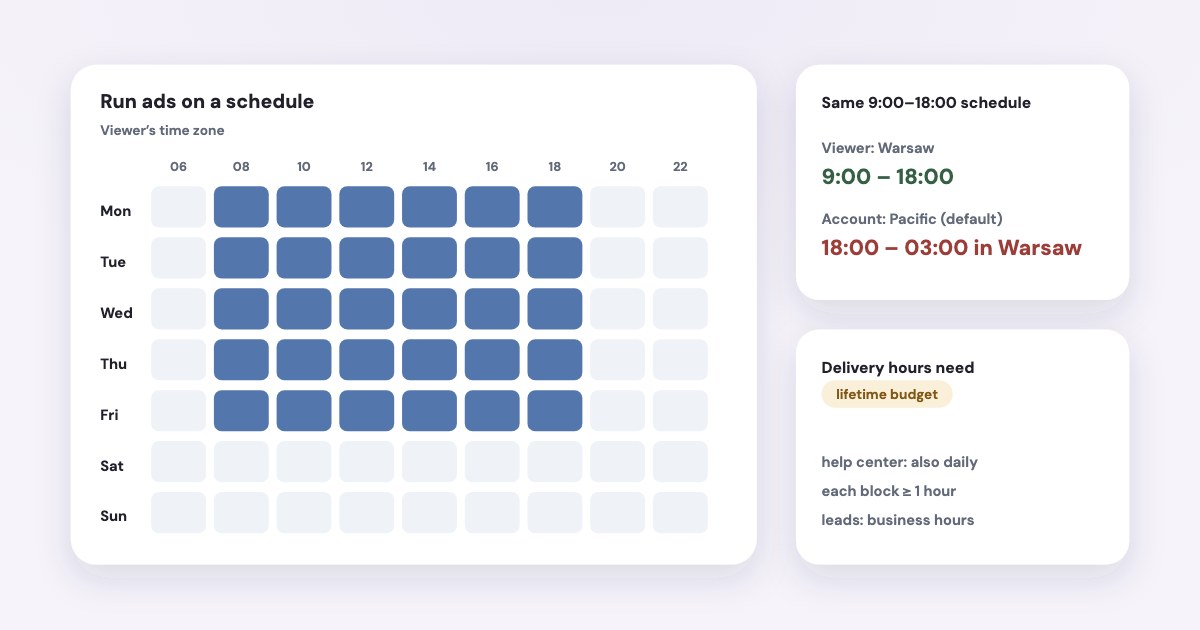
- Under delivery scheduling, choose Run ads on a schedule (Meta’s help calls it “Scheduled”) and select the hours and days.
- Choose the time zone: the viewer’s or your ad account’s.
- Review and publish. Schedule changes don’t send the ad back to review.
You can schedule your ad set to run on a specific day and time, if you have a lifetime or daily budget. When you schedule your ad set, it must run for at least one hour.
Meta’s developer reference says otherwise — Ad scheduling can only be used with lifetime budgets.
(source) —
and so does its call ads page. If the option is missing with a daily budget, your account doesn’t have the newer behaviour yet: use a lifetime
budget.
Time zones: the trap
The API lets you set hours based on the viewer’s or your ad account’s time zone.
(source)
Reports and billing always use the account’s zone. The catch: The default time zone for new ad accounts is Pacific Standard Time (PST)
(source). A clinic in Warsaw scheduling 9:00–18:00 “in the ad account’s time zone” on a PST account would run ads
overnight. Use the viewer’s time zone, or check the account’s.
Should a lead business run ads only in business hours?
We recommend that you run your lead ads during your business hours so you can quickly start a conversation with your prospective customers after they share their information.
Speed matters: in a 2025 test of 1,333 US law firms, the median reply to a web form took 13 minutes and 26% never replied (Hennessey Digital). A lead that arrives at 2 a.m. and gets a call at 11 is colder.
Meta’s call ads page reports 25.4% more call conversions by enabling call ads during business hours
, without showing the method, and
suggests pairing it with an instant form or messages that run outside of business hours, or 24/7
(source).
Hours are for your team, not for price
We found no controlled test showing that cutting hours lowers cost per lead.
AdEspresso’s 2021 data found cost per click remarkably stable throughout the week
, cheapest overnight — but with far fewer clicks
(source). And Meta warns: if you’ve set restrictive hours, consider relaxing your schedule to allow more time for ads to be delivered.
(source) Schedule hours when nobody can answer leads at night, not to save money.
“Scheduled” and “Completed”: what they mean
- Scheduled:
The ad set is scheduled to run at a future date.
(source) Check the start date and time zone. - Completed: the end date has passed;
Extend the date of a completed ad if you want to keep running it.
(source) - Active but not spending at certain times:
We don't deliver your ads outside of the schedule you set.
(source)
Other reasons an active ad doesn’t spend are in why Facebook ads aren’t spending.
Dates and hours in a conversation: Variafy
Variafy connects ChatGPT, Claude and other assistants to your Meta ad accounts. It can move a campaign’s or ad set’s start and end dates — extending a schedule waits for your confirmation — and bring an end date forward. It doesn’t set delivery hours or budget schedules; those stay in Ads Manager. Before cutting hours, ask it for an hourly breakdown: it shows when your leads actually arrive and what they cost.
How we checked
Checked on 17 October 2026 against Meta’s Business Help Center (scheduling an ad set — read in a browser that day — delivery statuses, schedules, lead ads, time zones, read on 15–16 October), Meta’s Marketing API reference for high demand periods and ad scheduling, Meta for Business’s call ads page, AdEspresso’s 2021 cost data and Hennessey Digital’s 2025 response-time study. We also read the pages that rank for these searches.
Variafy is our product.
Questions
Can you schedule Facebook ads?
Yes. You can set start and end dates, choose hours and days of delivery in the ad set, and schedule budget increases for specific periods.
Why is Facebook ad scheduling not available?
Usually because of the budget type. Meta’s help center says hours work with lifetime or daily budgets, but its developer docs still require a lifetime budget. If you don’t see the option, switch the ad set to a lifetime budget with an end date.
Why does my Facebook ad say Scheduled?
Its start date is in the future. Check the date and the time zone — new ad accounts default to US Pacific time, which can push the start by hours.
What is the best time to run Facebook ads for leads?
Meta recommends business hours for lead ads so you can call back quickly. No controlled test shows cutting hours lowers cost per lead; use hours when nobody can answer leads, not to save money.
Does Facebook ad scheduling use my time zone?
You choose the viewer’s time zone or your ad account’s. Reports and billing use the ad account’s time zone, which is US Pacific by default for new accounts.