Is Variafy approved by Meta? What App Review covers
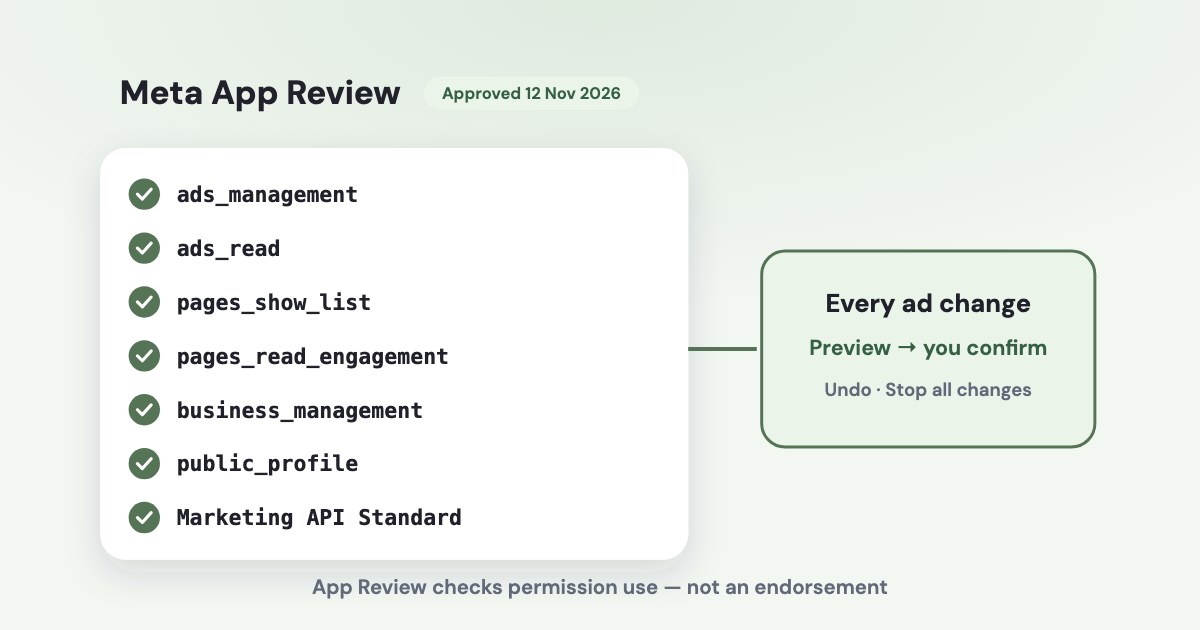
Yes. On 12 November 2026 Meta approved the Variafy app’s App Review submission, seven items including the
ads_management permission, so any business can connect its Meta ad accounts by signing in with Facebook. App Review checks how an
app uses the permissions it asks for; it is not an endorsement, and every ad change in Variafy still waits for your
confirmation.
On this page6 sections
What Meta approved
Apps that work with Meta’s business tools pass App Review before they can use sensitive permissions with people who have no role in the app. Meta reviews the use case for each permission, a screen recording of how the app uses it and the app’s privacy policy.
The submission Meta approved on 12 November 2026 has seven items: four permissions approved in this review and three that Meta had granted before and renewed:
| Item | 12 Nov 2026 | What Variafy uses it for |
|---|---|---|
ads_management | Approved | Read and change campaigns, ad sets and ads in the ad accounts you choose to share. |
ads_read | Approved | Read results and settings of those ad accounts for reports and alerts. |
pages_show_list | Approved | List the Facebook Pages you manage, so you can pick the Page an ad runs from. |
pages_read_engagement | Approved | Read basic Page details needed to show which Page an ad belongs to. |
business_management | Renewed | See the business portfolios behind your ad accounts, so ad accounts owned by a business can be shared. |
public_profile | Renewed | Your name from Facebook sign-in, to show who connected an ad account. |
Marketing API Standard Access | Renewed | The access level for apps in production, with Meta’s standard request limits. |
Meta’s permissions reference describes each one. An approved permission is what Meta calls Advanced Access: the app may request it from any business, not only from its own developers and testers.
What changed for you
Before 12 November, only people we added as testers could connect. Now anyone can connect their own ad accounts with Facebook sign-in. On 13 November Meta’s Marketing API reported the standard access tier for the production ad accounts we checked, the level Meta sets for apps outside development.
What App Review does not mean
- It is not an endorsement. Meta checks that the app uses each permission for the purpose it stated. It does not rate the product or recommend it.
- It is not a partner badge. The Meta Business Partner programme is separate; Variafy does not hold that badge.
- It does not change Meta’s ad rules. Ads still go through Meta’s own review, and your ad account still follows Meta’s advertising standards.
- It does not give the app more than you allow. The Facebook sign-in dialog shows the permissions and the ad accounts; the app can reach only what you selected there.
Does an approved app lower the risk to your ad account?
What puts ad accounts at risk is usually how a tool gets in, not the fact that AI is involved. A tool that drives a browser logged in as you, or asks for your Facebook password, looks to Meta like someone else using your account. An approved app works through Meta’s Marketing API with a token Meta issued for the permissions you granted, the same way as Meta’s own partners.
The guide to AI and ad account bans compares the access methods in detail.
What stays under your control
- Preview before every change. The assistant shows what will change and the effect on spend; nothing runs until you confirm.
- Stop all changes. One switch in the console blocks any further change from any assistant.
- Undo. The last change to a campaign, ad set or ad — budget, status, bid, name or creative — can be rolled back from the console for 14 days, again with a preview.
- Revoke. Remove Variafy in Facebook under Settings → Business integrations, or disconnect it in the console; its token stops working.
The security page covers how access tokens are stored and logged.
How we checked
Approval date and the seven items are from Meta’s App Review decision for the Variafy app (ID 1138578741369537) on 12 November 2026. Connection by a person without a role in the app was tested the same day; the Marketing API access tier was read from Meta’s API responses on 13 November 2026. Meta’s pages on App Review and access levels were checked on 22 November 2026.
Questions
Is Variafy approved by Meta?
Yes. Meta approved the Variafy app’s App Review submission on 12 November 2026: seven items, including the ads_management, ads_read, pages_show_list and pages_read_engagement permissions and Marketing API Standard Access. App Review checks how an app uses those permissions; it is not an endorsement.
Is Variafy a Meta Business Partner?
No. The Meta Business Partner badge is a separate programme, and Variafy does not hold it.
Can an approved app change my ads without asking?
Not in Variafy: every change is shown as a preview and runs only after you confirm it, and the console has a switch that stops all changes.
How do I remove the access?
In Facebook, open Settings → Business integrations and remove Variafy, or disconnect the ad account in the Variafy console. The token stops working at once.
Does App Review mean Meta checked my ads?
No. Your ads still go through Meta’s ad review and follow Meta’s advertising standards like any other ads.