ROAS calculator: break-even ROAS, CPA and cost per lead for businesses that sell after a lead
Break-even ROAS is 1 divided by the share of revenue a sale leaves after its costs: with a 50% margin and 5% refunds it is 1 ÷ (0.95 × 0.5) = 2.11×. For a business that gets leads and sells later, the most you can pay per lead is that margin per sale times the share of leads that buy — 10% of €570 is €57. The calculator below adds what shop calculators leave out: close rate, repeat sales, and how Google and Meta count sales that arrive weeks after the click.
Open the free break-even ROAS and cost per lead calculator ↓
On this page10 sections
ROAS and cost per lead calculator for lead businesses
Break-even ROAS and cost per lead calculator
Quick check: your numbers so far
Your break-even and targets
More: profit target, repeat sales, handling cost, timing
When do sales close after the lead? Share of sales, %
Everything stays in your browser. After you edit a number, the page address keeps your inputs (numbers only), so you can send a colleague the exact scenario.
Real ROAS comes from your CRM, not the ad platform
On the default example, Google Ads shows 1.23× on day 7 when the real target is 3.51×. Variafy reads your Meta and Google Ads accounts in ChatGPT or Claude and reports ROAS and cost per payment from the payments in your CRM, so the number you judge a campaign by is the one that reaches your bank.
How do you calculate break-even ROAS?
Divide 1 by the share of each sale you keep after the costs that exist only because the sale happened.
break-even ROAS = 1 ÷ ((1 − refund rate) × margin)
target ROAS     = 1 ÷ ((1 − refund rate) × (margin − profit target))
Example: a €1,200 contract, 5% refunded, 50% margin. Each sale keeps €1,140 × 50% = €570. Break-even ROAS is €1,200 ÷ €570 = 2.11×. To keep 20% of revenue as profit you need 3.51×. Google writes the same idea in percent: a target ROAS of 500% means €5 of conversion value for each €1 of spend (Google’s example).
Which margin? Use revenue minus variable costs of the sale: the doctor’s or teacher’s time, materials, a sales commission, card or instalment fees. Rent, salaries and software are fixed and do not belong here. Accountants call the result contribution margin (the difference from gross margin); several shop calculators call it gross margin, which is why their results disagree.
Check the formula before you trust a calculator
A ROAS of 100% is break-even only if every euro of revenue were profit; with a 50% margin you need 200%. And a target cost per lead must come from what a sale leaves you and how many leads buy — not from your current cost per lead.
How much can you pay per lead?
Multiply what a sale leaves you by the share of leads that buy. Subtract what it costs to handle a lead, if that is significant.
max cost per lead    = close rate × deal value × (1 − refunds) × margin − handling cost per lead
target cost per lead = close rate × deal value × (1 − refunds) × (margin − profit target) − handling cost per lead
With the example above and a 10% close rate: max cost per lead €57, target €34.20. The table shows the break-even cost per lead at a 50% margin and no refunds — the answer to “what is a reasonable cost per lead” for your numbers, not an industry average.
| Deal €300 | Deal €1,000 | Deal €3,000 | |
|---|---|---|---|
| 5% of leads buy | €7.50 | €25 | €75 |
| 10% of leads buy | €15 | €50 | €150 |
| 20% of leads buy | €30 | €100 | €300 |
| 35% of leads buy | €52.50 | €175 | €525 |
There is no reliable public benchmark for lead-to-sale rates: the widely shared figures measure clicks to leads, not leads to customers. Take yours from your CRM, counting only leads at least 90 days old, and per channel if you can.
What is the most you can pay per sale (CPA)?
The break-even cost per sale is simply the margin one sale leaves: €570 in the example. The target cost per sale keeps your profit: deal value × (1 − refunds) × (margin − profit target), €342 here. Cost per sale = cost per lead ÷ close rate, so a €34.20 lead that closes 10% of the time is a €342 sale.
If customers buy more than once, the calculator also shows the lifetime ceiling. Pay up to it only if you can wait for the repeat sales: David Skok’s SaaS rule of thumb is a lifetime value at least three times acquisition cost and payback within about a year, and he calls these guidelines, not laws (SaaS Metrics 2.0).
Why does ROAS look worse in Google Ads and Meta than in your CRM?
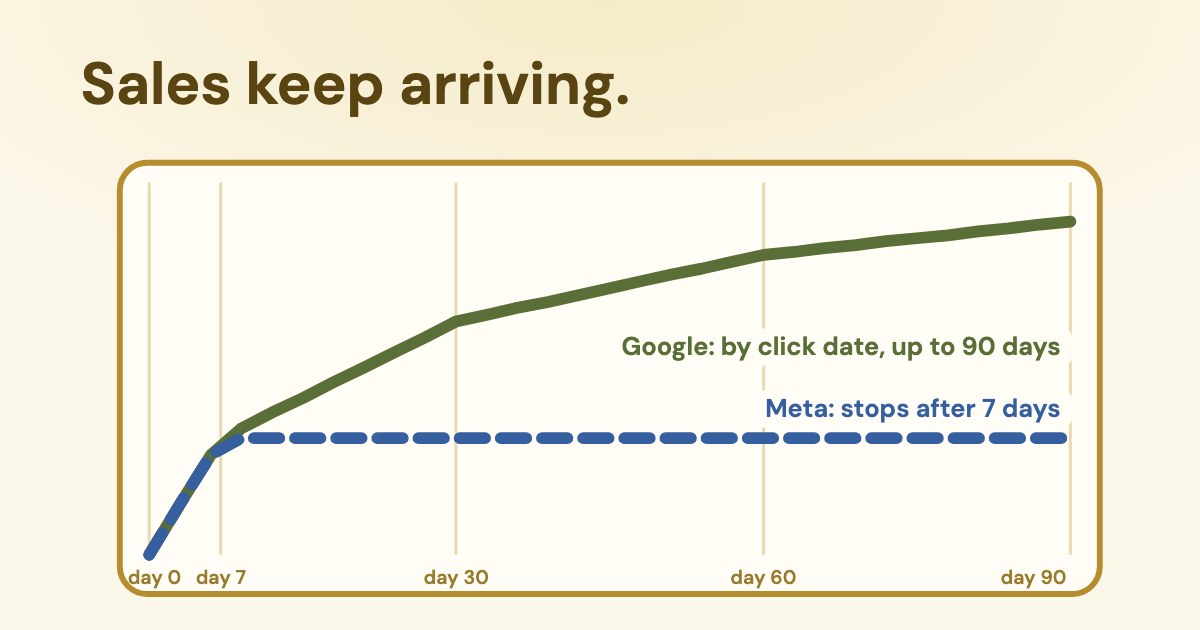
Because sales arrive after the click, and the two platforms handle that differently. Google keeps adding them to the click date; Meta stops counting a week after the click.
The primary conversion columns mentioned above are calculated based on the time of the click, not the time of the conversion.
In Google Ads the conversion window can be 1 to 90 days and is 30 days by default for most conversion actions (Google), so sales after the window are never counted unless you lengthen it. Offline sales imported from a CRM count if they happen within 90 days of the click (offline conversion import). Every sale is booked on its click date, so last week’s ROAS is low today and rises as sales come in. Google’s own target ROAS recommendation leaves out the most recent days for this reason (target ROAS), and the “by conv. time” columns show the other view (Google).
Click-through: Counts events that occurred within 1-day or 7-day after a link click on your ad.
Meta’s purchase ROAS is purchase value divided by amount spent (Meta), counted within the attribution setting. With the default setting — 7-day click, plus 1-day view — a website sale three weeks after the lead does not reach Ads Manager. So the ROAS you aim for in Meta has to be the real target multiplied by the share of sales that close within 7 days: with 35% of sales in the first week, a 3.51× real target shows as about 1.23× in Ads Manager.
What maturing ROAS looked like in a real account
In one lead-based business we work with, anonymised with the owner’s permission, revenue per ad euro on day 7 after the lead was about a third of its 90-day value, and sales after day 90 added another 9–27% depending on the product. A campaign judged on day 7 would have looked three times worse than it was.
How do you make Google and Meta optimise for sales, not leads?
Send the sale back. Google recommends target CPA bidding on qualified or converted leads, and value-based bidding when leads are worth different amounts (best practices for leads).
- Google Ads: import offline conversions or use enhanced conversions for leads, with the deal value. Sales count up to 90 days after the click (63 days for enhanced conversions for leads).
- Meta: the Conversion Leads goal works with Instant Form leads; Meta’s guidelines ask for a stage that happens within 28 days of the lead and converts 1–40% of leads, at least 200 leads a month, and daily uploads (Meta).
- Either way: pick one stage that most leads reach within the window, and send values without VAT, the same way you enter them in the calculator.
How is CAC different from CPA and cost per lead?
| Counts | Divides by | |
|---|---|---|
| Cost per lead (CPL) | Ad spend | Leads |
| Cost per sale (CPA) | Ad spend | Sales from those leads |
| Customer acquisition cost (CAC) | Ads plus sales team, tools and other acquisition costs | New paying customers |
Use CPL and CPA to set bids, and CAC to check whether the whole business makes money. A campaign can beat its target cost per sale while CAC is too high because the sales team’s time was not counted; that is what the handling-cost field in the calculator is for.
Where do you get the close rate and timing?
- Export leads from your CRM with the date created, source and the date of the first payment.
- Keep leads at least 90 days old, so most of those who will buy have bought.
- Close rate = leads with a payment ÷ all leads, per channel if you can.
- Timing = days from lead to payment, grouped into 0–7, 8–30, 31–60 and 61–90.
Variafy does this join for Meta and Google Ads when you send it payments from your CRM: it reports revenue, ROAS and cost per payment by campaign from your own payments, not the pixel, so you can compare the platform’s ROAS with the real one.
How we checked
Checked on 23 Oct 2026 against Google Ads Help (target ROAS, target CPA, conversion columns, conversions by conversion time, conversion windows, offline conversion import, best practices for leads), Meta Business Help (purchase ROAS, attribution settings) and Meta’s Conversion Leads documentation, AccountingTools on margins and David Skok’s SaaS Metrics. We read about 35 pages that rank for these searches; none of the ROAS calculators asked for a close rate or the delay between lead and sale.
The formulas and the worked example are ours and are shown in full. The “real account” figures are ratios from a business we work with, anonymised with the owner’s permission.
Questions
What is a good ROAS?
One above your break-even ROAS, which depends on margin: 1 ÷ ((1 − refunds) × margin). At a 50% margin break-even is 2.0×; at 25% it is 4.0×. A 2.5× ROAS is profitable at a 50% margin and a loss at 30%.
How do you calculate break-even ROAS?
Break-even ROAS = 1 ÷ the share of revenue left after the variable costs of the sale and refunds. With a 50% margin and 5% refunds: 1 ÷ (0.95 × 0.5) = 2.11×.
How much should I pay per lead?
At most your close rate times what a sale leaves after its costs. With a €1,200 deal, a 50% margin, 5% refunds and 10% of leads buying, that is €57; keeping a 20% profit lowers it to €34.20.
What ROAS is 25% ACoS?
ACoS is spend divided by revenue, the inverse of ROAS. 25% ACoS is a ROAS of 4.0× (400%).
Why is my Meta ROAS lower than my CRM shows?
Meta counts website sales only within the attribution setting, by default 7 days after a click or 1 day after a view. Sales that close later do not appear in Ads Manager, so Meta’s ROAS stays below the real one for businesses with longer sales cycles.
Why does last week’s ROAS keep going up in Google Ads?
Google books each conversion on the date of the click, within the conversion window (30 days by default, up to 90). Sales that close later are added to past days, so recent days always look worse at first.
Should I use target CPA or target ROAS for lead generation?
Google recommends target CPA on qualified or converted leads, and value-based bidding such as target ROAS when you can send different values for different leads or sales.
What is the difference between CPA and CAC?
CPA divides ad spend by sales. CAC divides all acquisition costs, including the sales team and tools, by new customers. CAC is always higher or equal.