Click-to-WhatsApp ads for a lead business: setup, costs and measuring leads
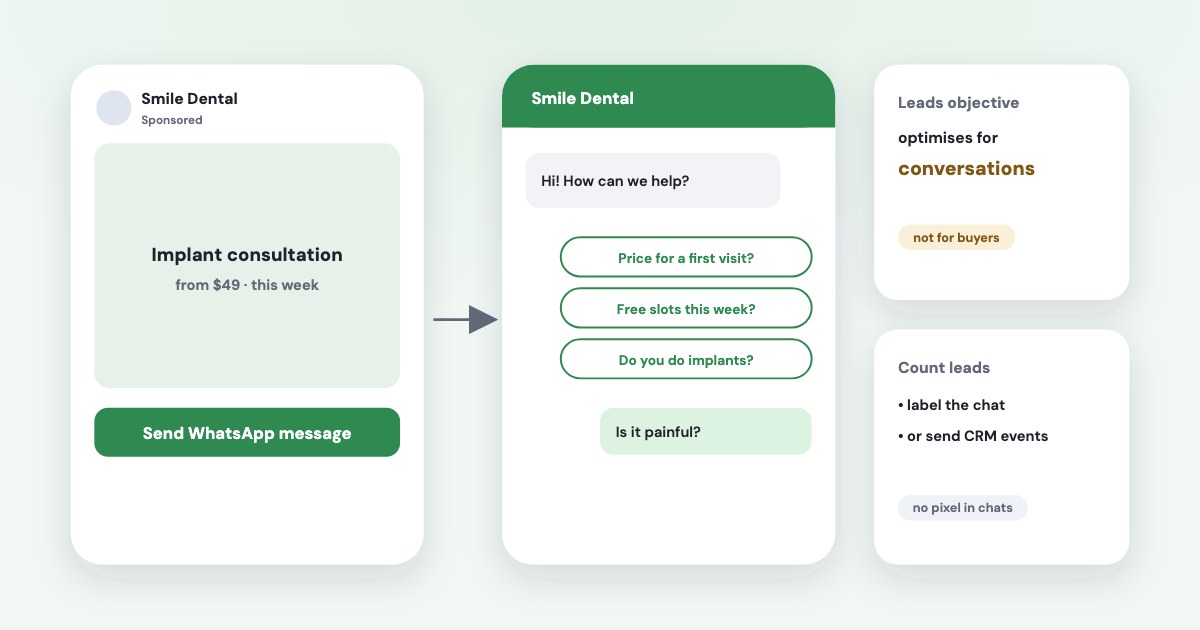
Click-to-WhatsApp ads run on Facebook and Instagram and open a WhatsApp chat with your business when tapped — they aren’t ads inside WhatsApp. For a clinic, school or service business they replace a form with a conversation, which suits customers who won’t fill in forms but will message. Two things to know before you start: with the Leads objective, Meta optimises for conversations, not for qualified leads; and there’s no pixel in a chat, so you count leads by labelling chats or sending events from your CRM. On the WhatsApp Business app, the chat itself is free — you pay only for the ads.
On this page9 sections
What click-to-WhatsApp ads are
Ads that click to WhatsApp send people who click on your ads directly into conversations with your business in WhatsApp.
The ad runs in Facebook and Instagram feeds, stories and reels; the person taps “Send WhatsApp message” and a chat opens with an
optional greeting and ready-made questions. Ads inside WhatsApp are a different thing: Meta announced ads in Status, in the Updates tab
away from your personal chats
, in June 2025 (source); WhatsApp’s own page still says “Coming soon”
(source), so check your account before planning on them.
Which objective to use
| What Meta optimises for | Good for | |
|---|---|---|
| Leads → WhatsApp | Conversations only | Lead businesses that qualify in chat |
| Engagement → WhatsApp | Conversations, link clicks | Same result, more flexible |
| Sales → WhatsApp | Conversations or conversions you send back | When you send sales events from your CRM |
| Traffic → WhatsApp | Conversations, clicks, landing page views | Rarely the right choice for leads |
From Meta’s Marketing API table of objectives and destinations (source); interface labels change from time to time. In Ads Manager you pick the objective, then Messaging apps → WhatsApp as the conversion location. The key line: with Leads, the only optimisation is conversations. Meta finds people likely to start a chat, not people likely to buy — so quality depends on how you qualify in the chat.
What you need
- A Facebook Page with a WhatsApp number linked — Meta lists
A Facebook page with WhatsApp number linked.
as the requirement (source). Link it in the Page settings; if the number is in another business portfolio, its owner approves the request. - WhatsApp Business app or platform. The free app is enough for a business where one or two people answer. The platform (API, through a provider) is for teams, chatbots and sending “lead” and “sale” events back to Meta.
- A greeting and 2–3 starter questions (“Price for a first visit?”, “Next course start?”) so the chat begins with intent.
- Someone who answers fast. The ad starts conversations; the person replying turns them into leads.
What it costs
You pay for the ads like any other campaign — billed on impressions. Messaging costs depend on how you run WhatsApp:
- WhatsApp Business app: chats are free.
- WhatsApp Business platform (API): when someone messages you from a click-to-WhatsApp ad on a phone and you reply within 24 hours,
All messages are free for 72 hours, including template messages
(source). - New in October 2026: on the platform,
Effective October 1, 2026, Meta will charge on a per-message basis for service messages
outside free windows; replies from Meta’s AI business agent are charged by tokens from 1 August 2026 (source). Claims of a “7-day window” or “1,000 free messages a month” aren’t on Meta’s pricing pages.
Counting leads from chats
There’s no pixel in a chat. Ads Manager counts conversations started; leads need one of these:
- Label chats as leads. Meta’s Leads column includes
the number of times your business marks a contact as a lead in Messenger, Instagram and WhatsApp
(source). Simple, manual, works on the app. - Send events from your CRM. The Conversions API has an action source for chats:
Conversion was made from ads that click to Messenger, Instagram or WhatsApp.
(source) That needs the platform or a provider. - Automatic events — Meta can detect leads and purchases in chats on the platform, but
Automatic Event Identification is not available to business customers in the European Union, United Kingdom, or Japan.
(source)
Whatever you choose, judge campaigns by leads and sales per euro, not by cost per conversation (matching sales to ads).
WhatsApp, Messenger or a lead form?
Meta’s one tested number
Letting people choose Messenger, Instagram or WhatsApp instead of WhatsApp only gave a
9.5% lower median cost per message and an 11.3% higher median conversion rate
, based on experiments with 734,000 businesses in the second
half of 2024 (source). If your team can answer in all three, don’t limit the ad to one.
Against an instant form, there’s no published comparison for lead businesses. Run both as an A/B test and compare by sales
(how to A/B test). Meta’s AI business agent can answer and qualify chats — Meta says it
Books appointments and qualifies incoming leads
(source) — but on the platform its replies are paid.
Check what your chats cost: Variafy
Variafy connects ChatGPT, Claude and other assistants to your Meta ad accounts. For click-to-WhatsApp campaigns already running, it reads conversations started and their cost alongside your other campaigns and, with sales from your CRM, shows which ones bring customers. Creating click-to-WhatsApp ads through Variafy will come once Meta grants the permission it needs; today you set them up in Ads Manager.
How we checked
Checked on 17 October 2026 against Meta’s developer documentation (ads that click to WhatsApp, WhatsApp pricing and non-template message pricing, Conversions API server event parameters, automatic events), Meta for Business pages on click-to-message ads, Meta’s help page on the Leads column, Meta’s June 2025 announcement of ads in Status, WhatsApp Business pages and the Meta Business Agent announcement. We also read the pages that rank for these searches.
Variafy is our product.
Questions
What are click-to-WhatsApp ads?
Ads on Facebook and Instagram that open a WhatsApp chat with your business when someone taps them. They are not ads inside WhatsApp; those exist only in the Status tab and are still rolling out.
How much do click-to-WhatsApp ads cost?
You pay for the ads like any Meta campaign. On the WhatsApp Business app, chats are free. On the WhatsApp Business platform, messages are free for 72 hours after someone writes from the ad, if you reply within 24 hours; since October 2026 other service replies are charged per message.
Can I run click-to-WhatsApp ads with the Leads objective?
Yes, but with WhatsApp as the destination the only optimisation is conversations: Meta looks for people likely to start a chat, not for leads that buy. Qualify in the chat and count leads by labelling chats or sending CRM events.
How do I track leads from WhatsApp ads?
There’s no pixel in a chat. Mark contacts as leads in WhatsApp so they appear in the Leads column, or send lead and sale events from your CRM through the Conversions API. Automatic event detection isn’t available in the EU, UK or Japan.
Does WhatsApp show ads?
Only in the Status (Updates) tab, which Meta announced in June 2025 and is rolling out gradually; not in personal chats. Click-to-WhatsApp ads run on Facebook and Instagram.