Facebook ad stuck in review: prepare a support request
If your Facebook ad is stuck In review, check the ad’s own status and the last relevant edit before changing it again. Meta describes 24 hours as typical for most ads, while allowing longer waits; it is not a guaranteed deadline. If the wait exceeds that typical period, a practical next step is to collect the ad ID, timeline and current status for support. [1] [2]
On this page10 sections
Is the ad actually still in review?
Start with the specific ad you intended to launch. Meta documents separate delivery statuses at campaign, ad set and ad level, so an active campaign does not settle the status of each ad inside it. [2]
- Open Meta Ads Manager.
- Select Ads.
- Locate the affected ad.
- Read its Delivery column.
- Check the related Ad sets and Campaigns views as well.
These English labels are from Meta’s documentation read November 4, 2026. Use the exact displayed status in your notes rather than describing every absence of impressions as a review problem. [2]
| Status | What it tells you |
|---|---|
| In review | Meta is checking the ad against its Advertising Standards. |
| Processing | Meta is applying changes; some updates may take up to eight hours. |
| Preparing | The ad passed review and delivery preparation is underway. |
| Scheduled | The ad set has a future start date. |
| Rejected | A decision has been made; use the rejection workflow. |
The table summarizes Meta’s current delivery-status definitions, read November 4, 2026. If your ad is already Preparing or Active, continue with Facebook ads not spending rather than treating the old review state as the current fault. [2]
When did this particular wait begin?
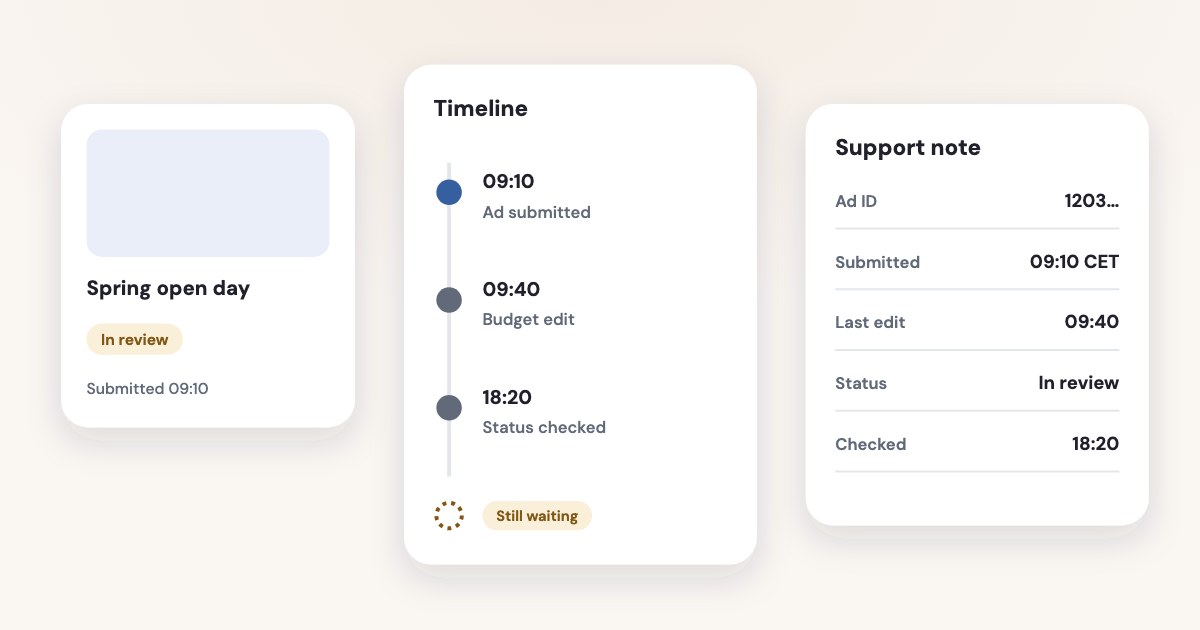
Write down when the ad was submitted, when the most recent relevant change was published and when you observed the current status. Keep the account time zone with the timestamps so a teammate or support agent can read the timeline correctly.
Meta’s Activity history shows who changed an ad, what changed and when. As of November 2026, its documented route is the following. [3]
- Open Ads Manager.
- Select Ads.
- Select the affected ad.
- Click Activity history on the right.
- Inspect Activity types for the relevant changes.
- Inspect Changed by to identify the person or system shown.
Check the associated ad set if the change concerned targeting or another ad-set setting. Record the sequence before drawing a conclusion about whether the original submission has waited continuously.
Meta says Changed by can show Meta for several reasons, including review-system changes and some changes associated with removed users. That label alone does not identify a particular reviewer or explain a delay. [3]
Keep your handover small: account and ad IDs, submission time, latest relevant edit, current status and the time you checked it. For a broader investigation, see Facebook ads change history.
How long should you wait?
Most ads are reviewed within 24 hours, although in some cases it may take longer.
That statement was read November 4, 2026. Plan around the possibility of a longer wait, and do not treat the typical period as a service guarantee or an automatic rejection. [1]
Meta uses automated and human review and may consider past advertiser compliance. Elapsed time alone does not identify the cause of your pending review. [1]
If the ad is still within the typical period and you have no separate error or restriction to address, leaving the submitted version alone is a reasonable operational choice. Set a reminder to inspect its status again instead of repeatedly refreshing and making speculative edits.
If it has exceeded that period, begin preparing a support request while checking for other issues. This is our recommended checkpoint, not a claim that Meta accepts escalation at an exact hour or promises a decision afterward.
For a future launch, build approval time into the plan before its start. Meta says a submitted scheduled ad goes through review but will not begin delivering before its scheduled start date. [1]
What can you change while you wait?
Fix a real error when you find one, but distinguish that correction from a supposed way to move through review faster. Changing the offer, audience or destination simply to provoke a different outcome makes your original timeline harder to interpret.
Creative and targeting edits can trigger another review; budget, bid and ad-set schedule changes do not. Neither is a documented way to accelerate approval. [1]
If the offer will no longer be valid when the ad is approved, you can choose to turn the ad off. Meta documents the following procedure, read November 4, 2026. [5]
- Open Meta Ads Manager.
- Select Ads.
- Find the affected ad.
- Click its toggle to turn it off.
Turning an ad off does not delete it, according to Meta. Use that control to manage delivery eligibility, without assuming it withdraws the review request or changes how quickly the review is handled. [5]
Before a deadline passes, decide whether to postpone the launch, revise the offer’s dates or use another existing communication channel. Make that business decision explicitly instead of leaving a time-sensitive promotion waiting indefinitely.
When should you contact Meta?
Contact support when the unresolved wait is beyond the usual period or when another account issue needs action. First check whether you are reporting an isolated pending ad, a wider publishing problem or a restriction; those observations make different support requests.
Meta’s public status page has categories for Ads Creation and Editing, Ads Delivery and Ads Reporting. Check the relevant incident details and timing rather than assuming a service-status page proves an individual ad is healthy or faulty. [4]
To inspect account issues, Meta currently documents this route. [6]
- Open Meta Business Support Home.
- Set the date range using the calendar icon.
- In Recent account issues, select Outstanding.
- Open the relevant account issue for its details and available actions.
Meta’s overview lists contacting support among Business Support Home’s functions. Use the support option presented to your account; this article does not promise a universal chat button or a guaranteed response time. Labels and functions were checked November 4, 2026. [6]
Support request contents
Provide the ad account ID, campaign/ad set/ad IDs, submission timestamp and time zone, latest relevant edit, exact current status, a status screenshot and any incident or error you found. Ask Meta to investigate the pending review; keep your existing case reference with the record.
Should you request another review or duplicate the ad?
Meta’s request for another review addresses an allegedly incorrect rejection. It is not a documented shortcut for a pending ad. [1]
If your status changes to Rejected, use our rejected-ad guide for the policy reason, correction and appeal procedure. If the account is restricted, follow the account-restriction guide and the action shown for that asset.
Keep the pending ad and case IDs identifiable while support investigates. Copies offer no verified shortcut; document a genuinely different creative or offer as a separate business change.
What to do next
Confirm the exact ad-level status, then capture a timeline from Activity history. If the ad remains In review beyond Meta’s typical period, check Meta Status and Business Support Home and submit your evidence through the support option available to you.
Choose a fallback for the launch date and give one person responsibility for the next status check. When the state changes, follow the corresponding path—delivery troubleshooting, the scheduled start, or the separate rejection guide—using the same ad ID.
Where Variafy fits
Variafy cannot approve an ad or speed up Meta’s review; use Meta’s support process for that. For examining ad-account data with ChatGPT or Claude, Variafy connects the account to your assistant and makes data reading free. It is in a free beta by invitation, with sign-up closed. Join the waitlist.
How we checked
Checked on 4 November 2026 against the pages below, read in English; Meta’s pages were read in a browser. We checked the documentation only: we did not run these steps in a live ad account.
- www.facebook.com/business/help/204798856225114 — Typical review time, process, scheduled ads, edit triggers and rejected-decision review requests
- www.facebook.com/business/help/650774041651557 — Delivery column, object-level differences and status definitions, including the Processing time
- www.facebook.com/business/help/289211751238030 — Activity history, filters, timestamps and interpretation of Changed by
- metastatus.com/ads-manager — Public Ads Manager incident categories
- www.facebook.com/business/help/172764286113080 — Turning an ad off, toggle labels and distinction from deletion
- www.facebook.com/business/help/254088759757736 — Business Support Home, Outstanding issues and support functions
What we could not confirm
- A maximum review time, a guaranteed escalation threshold or a support response SLA.
- That a new account, holiday demand, a particular format or a budget change caused an individual delay.
- That a budget, schedule, pause/resume action or duplicate makes approval faster.
- That every account has the same support buttons or a live-chat entitlement.
- That turning an ad off cancels the review itself.
- Rejection causes, appeal limits or appeal timing; the published rejection guide already covers that subject.
- Any functional test or access to a private review queue.
Variafy is our product.
Questions
How long does Facebook ad review take?
Meta says most ads are reviewed within 24 hours, although in some cases it may take longer. That is a typical period, not a guaranteed deadline or an automatic rejection.
Does editing or duplicating an ad make review faster?
Meta documents no way to speed review up. Creative and targeting edits can trigger another review; budget, bid and ad-set schedule changes do not. Duplicating the ad has no verified shortcut either, and it makes your timeline harder to read.
Should I request another review for an ad that is still In review?
No. Meta’s request for another review addresses a rejection you believe is wrong, not a pending ad. If the status changes to Rejected, use our rejected-ad guide.