Why was my Facebook ad rejected — and why is it stuck in review?
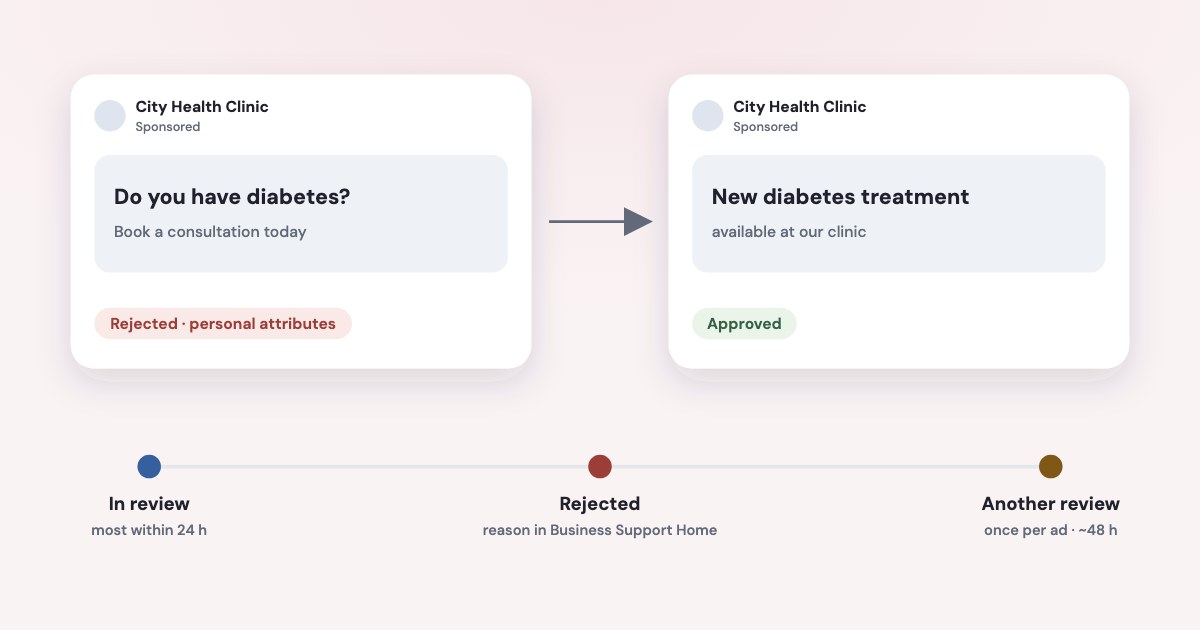
Meta rejects an ad when its mostly automated review finds that the ad, its targeting or its landing page breaks the Advertising Standards. For businesses that sell through leads, the usual causes are text that implies something personal about the reader (“Do you have diabetes?”), a housing, job or credit ad run without its Special Ad Category, and an unconfirmed non-discrimination policy. The reason is in Meta Business Support Home. Fix the ad, or request another review — once per ad — and don’t delete it first. Most ads are reviewed within 24 hours; changing a budget, bid or schedule doesn’t send an ad back to review.
On this page10 sections
How long Facebook ad review takes
Most ads are reviewed within 24 hours, although in some cases it may take longer. Remember, ads may be reviewed again, including after they are live.
Meta gives no upper limit. Review relies primarily on automated technology
, with people training the system and checking some
ads by hand, and Meta may consider an advertiser’s historical compliance
when deciding whether an ad needs a closer look
(source). The review covers the images, video and text, the targeting, the landing page and the Special Ad Category.
Which edits send an ad back to review
| Starts a new review? | |
|---|---|
| Targeting | Yes |
| Creative: images, text, links or video | Yes |
| Optimization or billing event | Yes |
| Budget, bid amount or ad set schedule | No — Changes to your ad's bid amount, budget or ad set schedule will not trigger review. |
Source: About ads in review. Many guides say a budget change resets the review; Meta says the opposite.
If an ad seems stuck
- Check every level. A campaign can look active while an ad shows In review after a recent edit (source).
- “Preparing” is not review. It means
The ad successfully passed review
and Meta is matching it to bids and audiences; “Processing” can takeup to 8 hours
(source). - Check Meta’s status page. Ad creation and editing outages show up at metastatus.com; there is no separate line for ad review.
- Submit before the start date. A scheduled ad goes through review when submitted and
won’t begin delivering until your start date
(source), so publish launches a day early. - To cancel an ad in review, turn it off: it isn’t deleted and can be turned back on (source). Deleting can’t be undone (source).
Where to see why your ad was rejected
When an ad is rejected, you'll receive an email notification and a link to Meta Business Support Home where you can find the reason for the rejection.
(source). Business Support Home is the tool older guides call Account Quality; it lists rejected ads for the last
14, 30 or 90 days and is where you request reviews (source). In Ads Manager you can also hover over the status in
the Delivery column.
The reason is often short and general — Meta says we may not share some details about how our review systems work
(source). Business Support Home is also where to check that a “your ad was rejected” email or call really came from
Meta: fake rejection notices are a common phishing trick.
The most common reasons, and what to change
| What Meta says | What to change | |
|---|---|---|
| Personal attributes | Ads must not assert or imply personal attributes— health, age, financial status, religion and more. Do you have diabetes?is rejected; New diabetes treatment availableis allowed (source) | Describe the service, not the reader. “You” is fine without an attribute next to it (examples) |
| Special Ad Category missing | Housing, employment and financial ads aimed at the US, Canada or much of Europe, including the EU and the UK, must use their category; without it your ad may be rejected(source) | Choose the category when creating the campaign; it limits targeting but doesn’t slow review |
| Discriminatory practices | If Meta asks you to certify its non-discrimination policy, If you don't certify compliance, they may be rejected.(source) | Certify the policy; check age, gender or location exclusions in housing, job and credit ads |
| Prohibited commercial practices | Since 9 September 2026 this replaces the old “Unacceptable business practices” policy (source); it covers deceptive pricing, guaranteed jobs and unrealistic income (source) | Remove guarantees: “a job after the course”, “earn X a month”, prices that don’t match the landing page |
| Health and wellness | No promises of specific outcomes within a set timeframe without disclaimers or qualifiersand no statements of inferiority about appearance; weight loss and cosmetic procedures must target people 18+ (source) | Drop “in 2 weeks” promises, set the age to 18+. For dental ads and lead forms, see the separate guide to Facebook ads for dentists |
| Social issues | Ads about social issues, elections or politics need authorisation, and Meta does not allow social issue, electoral, or political ads in the European Union.(source) | Selling a product or service usually doesn’t count (source); remove political or legislative references |
| Landing page | The review includes the ad’s destination, and The products and services promoted in an ad must match those promoted on the landing page.(source) | Make the page sell what the ad promises, with the same price and offer |
For schools and course providers
Meta lists Professional certification programs
and
Guaranteed interviews or career placement
among examples of employment ads (source). A course
promising a certificate or a job may be treated as an employment ad — with the Special Ad Category and its targeting limits — and a job
guarantee also runs into the prohibited commercial practices policy.
In a Special Ad Category, age is generally fixed at 18–65+, audiences must include all genders, and lookalike audiences aren’t available
(source); Meta adds that choosing a Special Ad Category doesn’t impact how long it takes for us to review your ads.
(source).
Fix it or request another review
Meta offers three ways forward (source):
- Edit the ad.
Your ad will automatically be submitted for another review once it’s edited.
- Create a new ad that follows the policy.
- Request another review if you think the rejection was wrong: Business Support Home → select the ad account → select the rejected ads → Request review → Submit.
What the review request page says:
We aim to review and provide a decision within 48 hours.
People do more of this work than in the first review.- One attempt per ad: if it is rejected again,
it will stay rejected and you won’t be able to submit another review request for the same ad.
Requesting another review of an ad will not hurt your standing with Meta in any way.
If the rejection is overturned, itwill not count as an ad violation.
- Don’t delete first:
If you delete the ad, you may lose your ability to request another review
.
Why re-uploading the same ad makes it worse
Editing or deleting an ad that was rejected for violating Advertising Standards will not remove the violation from your account
,
and You can be restricted from advertising for severe or repeated ad violations.
(source). Restrictions
range from a daily spending limit to losing the ability to advertise (source), and Any attempt to evade our review process or other enforcement actions is not allowed
(source).
So each fresh copy of a rejected ad that gets rejected again is one more violation on the account, and the account’s history is something Meta weighs when it decides how closely to review your next ads. If the account is already restricted, see Facebook ad account restricted.
Why an approved ad gets rejected later
Running ads can be reviewed again: if people hide, block, report or otherwise provide negative feedback about an ad
,
at random, or If an ad receives unexpectedly high levels of engagement
. You won’t hear about it unless the ad breaks a policy — then
it is rejected and stops delivering (source). Since September 2026 Meta also treats persistent negative
feedback about a business — non-delivery, misleading prices, refund problems — as a reason to restrict its accounts
(source). To handle an ad’s comment thread by hand, see the separate guide to finding, hiding or turning off Facebook ad comments.
When the rejected ad was the only one in its ad set, the ad set stops spending: see Facebook ads not spending.
Ads created by tools and AI assistants
Ads created through the Marketing API — by scheduling tools, connectors or an AI assistant — are made by a “system user”, and Meta’s non-discrimination check applies to them separately:
People with full control of a business portfolio who create and manage system users need to review and certify compliance with our Discriminatory Practices policy on behalf of their business. System users will not be able to create ads until they do so.
If ads made by a tool are rejected while the same ads made by hand pass, a full-control admin of the business portfolio should certify the policy in Settings for system users, or at facebook.com/certification/nondiscrimination (source).
How Variafy helps
Variafy connects ChatGPT, Claude and other assistants to your Meta ad accounts:
- Every morning it checks each ad account and flags ad sets that have nothing left to deliver because their ads were rejected, before a day’s leads are lost.
- Ask “which of my ads were rejected?” and it lists them across all your ad accounts at once, so you know exactly which ones to open in Business Support Home.
- Ask it to fix the text and you get a corrected version to review; nothing is published until you confirm.
How we checked
Checked on 16 October 2026 against Meta’s Business Help Center (ads in review, ad statuses, approved-then-rejected ads, troubleshooting a rejected ad, Business Support Home, turning off and deleting ads, Special Ad Categories, non-discrimination certification, social issue ads, advertising restrictions) and Meta’s Transparency Center (Advertising Standards; personal attributes; health and wellness; the Prohibited Commercial Practices policy and its 9 September 2026 announcement). Help Center pages carry no update date; quotes are as read on that day. We also read the guides that currently rank for these searches; review times and “stuck” thresholds that appear only in blogs are not repeated here.
Variafy is our product.
Questions
Why was my Facebook ad rejected?
Meta found that the ad, its targeting or its landing page breaks its Advertising Standards. For lead businesses the usual causes are text that implies a personal attribute, a housing, job or credit ad without its Special Ad Category, an unconfirmed non-discrimination policy, or promises like guaranteed jobs or results by a date. The exact reason is in Meta Business Support Home.
How long does Facebook ad review take?
Meta says most ads are reviewed within 24 hours, although some take longer, and gives no upper limit. A request for another review after a rejection aims for a decision within 48 hours.
Does changing the budget send my ad back to review?
No. Meta says changes to the bid amount, budget or ad set schedule don’t trigger review. Changes to targeting, creative (images, text, links, video), optimization or billing event do.
How do I cancel a Facebook ad that is in review?
Turn it off in Ads Manager. A turned-off ad isn’t deleted and can be turned back on; deleting can’t be undone. Don’t delete an ad that has already been rejected if you might want to request another review.
How many times can I request a review of a rejected ad?
Once per ad. If the ad is rejected again, it stays rejected and you can’t request another review for it. Edit it or create a new ad that follows the policy instead.
What does “discriminatory practices” mean on a rejected ad?
Meta’s policy bans ads that target, exclude or describe people by personal attributes, and it can require your business to certify the non-discrimination policy. Ads are rejected until that is done — for ads created through an API or connector, a full-control admin must certify for system users.
What happened to the “unacceptable business practices” policy?
On 9 September 2026 Meta retired it as a standalone ad policy and folded it into the Prohibited Commercial Practices standard, which covers scams, deceptive pricing, guaranteed jobs and unrealistic income for both ads and organic content.