Meta ads billing: country, currency and payment methods
Meta’s accepted payment methods depend on the ad account’s country and currency, and some local methods require a particular setup from the start. Check Meta’s country-specific list before choosing the account currency or adding a payment method. A listed method does not explain every declined payment, so use the actual Billing & payments error to choose the next step.
On this page8 sections
Separate account country, currency and delivery market
The payment methods available depend on your account's country and currency settings.
| Setting | What it describes | What to check |
|---|---|---|
| Ad account business country | The business-country setting used in Meta’s billing conditions | Use the country-specific section of the accepted-methods page |
| Ad account currency | The currency used for ad-account billing and reporting | Check method eligibility before choosing it |
| Audience locations | The places selected for ad delivery | Do not use an export destination as a shortcut for billing eligibility |
| Card issuing country | Where the card was issued | Check any explicit issuer restriction for your account setup |
Read the accepted payment options for the actual combination you plan to use. This guide reports Meta’s requirements; it does not establish a way to choose a different business country to obtain a payment method.
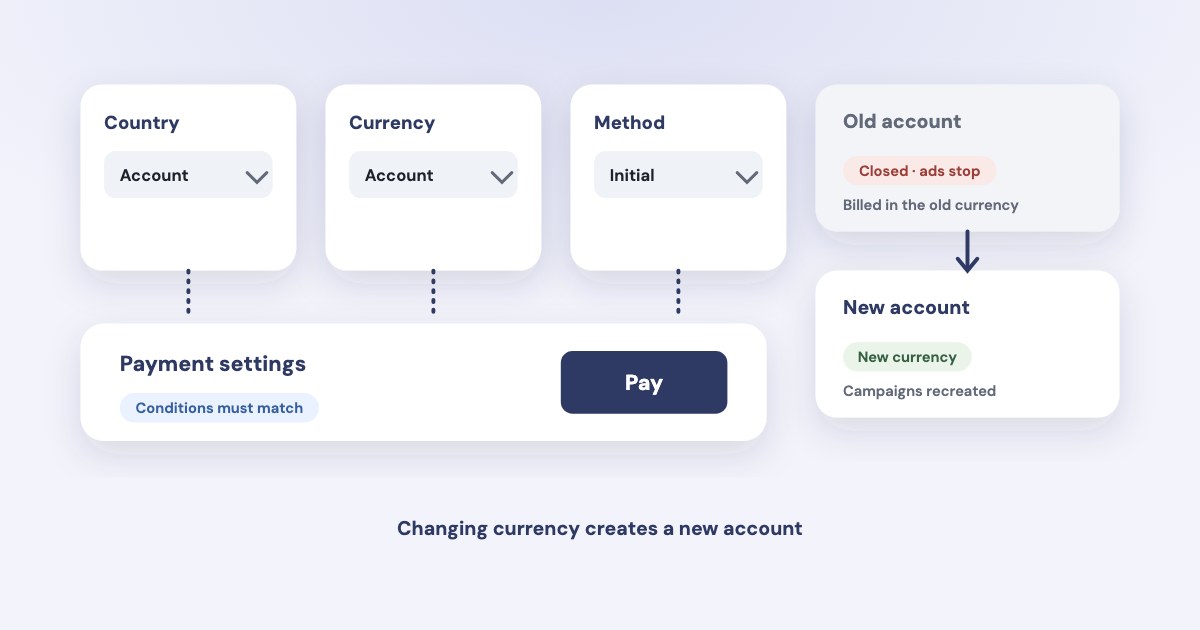
Check the payment setting as well as the method
Meta’s payment-options page distinguishes automatic billing from available funds. The initial payment method can determine the setting, while some advertisers may have access to both.
Do not assume an account using automatic billing can add every local manual method later. Check the country’s conditions and the options actually offered in Billing & payments.
Method availability is conditional
A general list of cards, PayPal or local payment services is not a promise that all of them work for every account. Read the country, currency and initial-setup conditions together.
Keep the account’s payment setting in the billing handover record. It helps distinguish an unpaid automatic-billing balance from insufficient available funds.
Argentina and China: preserve Meta’s exact conditions
The examples below come from the country sections of Meta’s accepted payment options, checked on 30 October 2026. They concern ad billing eligibility, rather than a general assessment of advertising or payment access in either country.
| Country and method | What Meta lists | Condition that matters |
|---|---|---|
| Argentina: Visa | Visa is listed among accepted cards | For an account in Argentine pesos (ARS), Meta says that since 10 February 2023 Visa must be issued by an Argentinian bank or financial institution |
| Argentina: local manual methods | Mercado Pago, Rapipago, Pago Facil and Tarjetas locales | Account country Argentina, currency ARS, and a manual method chosen at initial account setup |
| China: local manual method | Alipay | Account country China, currency Chinese yuan (CNY), and a manual method chosen at initial account setup |
These notes do not establish that every other card is accepted regardless of issuer, or that switching an existing account to dollars will solve a decline. Meta’s listed currency-specific conditions are narrower than those conclusions.
The country pages do not tell you your bank’s decision, your local tax treatment or what your card issuer charges. Meta has a separate help page on how it determines foreign exchange rates; we do not quote rates from it. We give no tax percentage, bank-fee estimate or workaround for either country.
Changing currency is a disruptive account change
Meta’s currency-change instructions say the workflow creates a new ad account. The old account remains visible but is closed, its ads stop and its existing charges stay in the old currency.
The page also gives eligibility conditions: account-admin access, no current balance and a 60-day interval. It says currency cannot be changed for an account using monthly invoicing and notes country/currency matching rules in some countries.
Do not change currency as an experiment
Review which account will stop, which campaigns must be recreated and which currency will apply before saving. The documented process is not a simple display-currency switch.
A volatile local currency does not by itself prove that another account currency will reduce total costs or improve authorization. That would need information beyond the Meta Help Center sources used here.
Diagnose the declined charge from the actual error
Meta’s failed-payment guide lists several possible causes: unsupported or inactive methods, invalid or unverifiable card details, insufficient funds, connection errors and a decline by the financial institution. A failed payment is not proof of a country-wide restriction.
- Confirm the ad account. Read its country, currency and payment setting, then compare the method with Meta’s country-specific list.
- Read Billing & payments. Record the error and whether an automatic-billing balance is due or available funds are insufficient.
- Check the method. Meta advises checking online or recurring payment capability, expiry, verification details, funds and access to the phone receiving any verification code.
- Use the relevant payment action. Follow Meta’s Pay now or Add funds instructions for that account; do not assume topping up resolves every automatic-billing issue.
- Escalate an unresolved failure. Meta’s guide directs advertisers to Business Support Home after the listed troubleshooting steps.
Keep full card details and verification codes out of a troubleshooting message. A useful record identifies the account, error, time and checks performed without copying payment credentials.
The payment-failed guide covers adjacent spending-limit problems, and invoices and receipts explains payment records.
Prepare before the first campaign starts
Record the business country, account currency, payment setting, eligible method and person responsible for billing. Check these before launch using the first-30-days checklist.
Variafy’s Meta integration is in testing and under Meta app review; access requires a manual tester invitation. The waitlist is not a guarantee that an external or client account can connect, and payment-method changes belong in Meta’s billing interface.
How we checked
Only Meta Help Center sources were used for billing claims, read in Chrome on 30 October 2026: accepted payment options, including expanded Argentina and China sections; change the account currency; and fix a failed payment.
Not confirmed: a specific bank’s approval, current local taxes, foreign-exchange costs, card-provider workarounds or universal payment access for advertisers in any country. No live payment was attempted. Variafy is our product.
Questions
Can I pay for Meta ads in dollars from any country?
The sources here do not establish universal access. Check the ad account’s country, currency, payment setting and Meta’s method-specific conditions before choosing a currency.
Why does Meta reject a foreign Visa card for Argentine peso accounts?
Meta states that, as of 10 February 2023, an ad account with its currency set to the Argentine peso (ARS) cannot pay with a Visa card issued outside Argentina. The rule depends on the ARS currency; it does not explain every declined payment or every other account setup.
Can a China ad account use Alipay?
Meta lists Alipay as a local manual method with account country China, currency CNY and a manual payment method selected when the account is first set up. Check that your setup meets all those conditions.
Will changing my ad account currency preserve the running campaigns?
Meta’s documented currency-change workflow creates a new account, closes the old one and stops its ads. Review the consequences and eligibility conditions before using it.