Facebook lead ads to a CRM: the built-in options
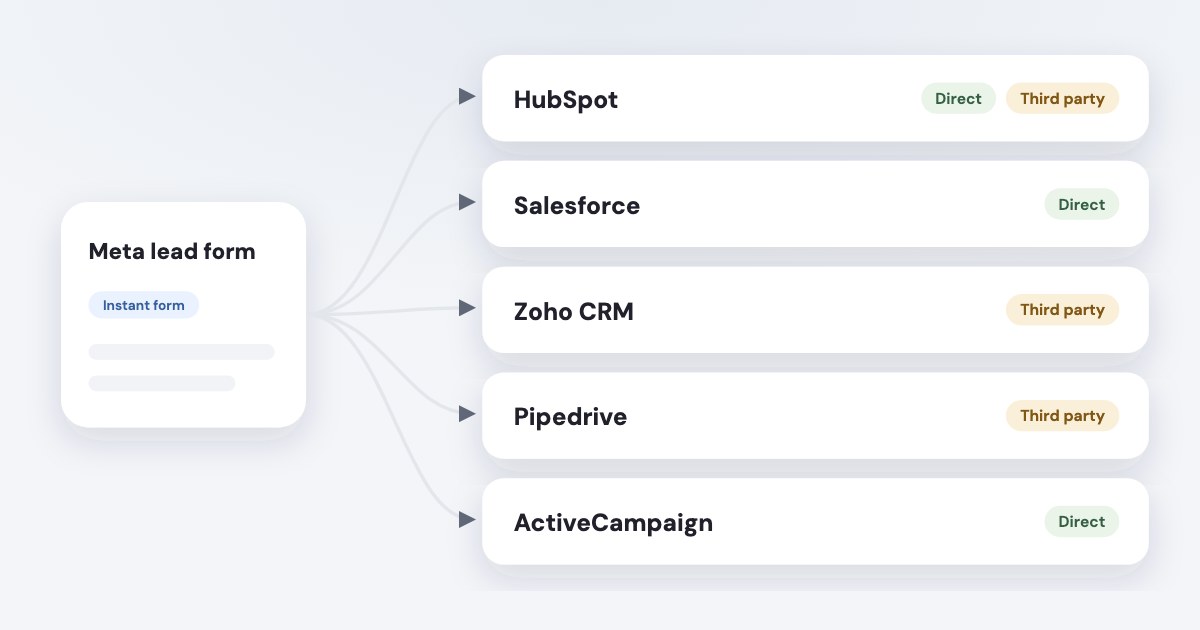
To send Facebook lead ads to a CRM, start with the connection your CRM documents and check how Meta lists it. Meta’s current catalog includes direct and third-party routes: Salesforce and ActiveCampaign are labeled direct, while Pipedrive and Zoho CRM are labeled third party. A listing does not establish the subscription cost or prove that no intermediary is involved. [1]
On this page10 sections
What does Meta currently list?
We opened Meta’s searchable Available CRM system integrations for lead ads catalog on November 4, 2026 and checked the named entries below. This is a checked shortlist, not an exhaustive inventory of every provider. [1]
| CRM entry | Labels shown in Meta’s catalog |
|---|---|
| HubSpot | Third party integration; Direct integration |
| Salesforce | Direct integration |
| Zoho CRM | Third party integration |
| Pipedrive | Third party integration |
| ActiveCampaign | Direct integration |
| ActiveCampaign by Zapier | Separate catalog entry |
Meta’s own connection instructions distinguish Connect from website from a route marked through Zapier. Treat those as different implementation and billing decisions even when both start inside Meta Business Suite. [2]
Incoming lead delivery and conversion feedback are separate requirements. Specify both if you need them.
For that return journey, see Meta Conversions API for CRM. Do not buy a conversion-feedback connection and assume it also solves incoming lead delivery.
How do you start the connection in Meta?
As of November 2026, Meta’s dedicated setup article gives the following route. It says the person connecting needs Page administration and leads access, and customized permissions may require assigning the CRM separately. [2]
- Open the relevant Facebook Page.
- Open More tools.
- Click Meta Business Suite.
- Click All tools.
- Under Advertise, click Instant forms.
- Select CRM setup.
- Search for your CRM.
- Select the correct provider entry.
- For a website route, click Connect from website.
- For a route labeled through Zapier, click Connect.
Complete the remaining setup using that provider’s instructions. Meta says an integration established through an external website must be edited or disconnected through the provider’s website, rather than through Meta Business Suite. [2]
The catalog contains older wording
Some catalog entries still describe Publishing tools and Leads setup. The dedicated current setup page describes Instant forms > CRM setup; use the linked provider documentation for the rest of the procedure. Both pages were read November 4, 2026. [1] [2]
Define the destination object, required fields and owner before authorizing. Test the saved record, not just the login.
What do HubSpot and Salesforce cost?
HubSpot’s lead-sync documentation is marked available for all products and plans, except where noted. It offers New Leads or New & recent leads, with the latter including the previous 90 days; allow up to two hours for new leads to sync according to that documentation. These plan and timing statements were read November 4, 2026. [3]
Check HubSpot’s own route before adding a connector bill. Verify any other marketing features against your plan.
To inspect an absent Page in HubSpot, its current troubleshooting instructions use Settings > Marketing > Ads > Lead syncing, followed by Connect, Facebook, the Page checkbox and Save. They also require the connecting user to have the relevant Facebook permissions. [4]
Salesforce documents Lead Capture for Marketing Cloud as a free feature for customers who already license Marketing Cloud. Its broader Lead Capture documentation covers Marketing Cloud data extensions and Sales Cloud lead objects, with the relevant AppExchange application installed. [5] [6]
Ask your Salesforce administrator to verify entitlement and destination. A universal new-customer Salesforce subscription price was not verified.
What about Zoho, Pipedrive and ActiveCampaign?
Zoho’s LeadChain is separately subscribed and is not included automatically with Zoho CRM, Bigin or Zoho One. Its documentation requires a supported paid Zoho CRM edition to use it through Zoho CRM, even though LeadChain itself has a free tier. [7]
On November 4, 2026, the localized official pricing page displayed 50 lead data syncs per month free. For 500 monthly syncs, Standard displayed €5 with monthly billing or €4.17 per month billed annually, before local taxes; the page served EUR, so these are not converted US-dollar prices. [9]
Pipedrive’s documented Facebook route uses Zapier and explicitly requires a paid Zapier plan. Pipedrive’s own Lite price displayed US$14 per seat per month billed annually, while Zapier Professional displayed a starting price of US$19.99 per month with Pay yearly selected, both read November 4, 2026. [8] [10] [11]
These are separate subscriptions, not a combined quote. Check existing licenses and required task volume before budgeting.
ActiveCampaign’s integration page says it is built by ActiveCampaign and included with Plus, Professional and Enterprise. Its pricing page did not display usable dollar amounts in our check, so confirm the current eligible plan and contact allowance directly rather than budgeting from an old price. [12] [13]
When is an automation tool worth adding?
Prefer the CRM’s route when it saves the required record and you can diagnose failures. Add automation for routing, transformations or multiple destinations.
Specify destinations, mandatory fields, ownership and failure handling before comparing prices. These define your workflow’s cost and acceptance criteria.
Zapier’s Facebook Lead Ads integration is a premium app requiring a paid plan; its free plan is not a permanent free route for that app. Make offers a free plan with 1,000 monthly credits, but the actual workflow must fit the allowance. These terms were checked November 4, 2026. [14] [15]
For a full comparison, continue with Facebook lead ads with Zapier, Make or n8n. If your only destination is a spreadsheet, use the Google Sheets guide instead of buying a CRM just to receive a notification.
What breaks after a successful setup?
Make permission checks part of your acceptance criteria. Meta’s setup documentation explicitly warns that customized leads access can prevent submissions appearing in the CRM until the CRM is assigned permission. [2]
Keep a record of the connecting user, source Page, selected forms and destination fields. When a form changes, compare that record against the new setup; when the connection owner changes, check access before assuming a provider outage.
Zoho’s current instructions include Test Connection, followed by run test, before saving and publishing the chain. They also document a case where creating the test lead succeeds but receiving its event fails because the CRM lacks Meta access. [16]
Inspect the saved email, phone, answers and assignment. Record the test result and exclude it from customer follow-up.
Finally, ask how you will recover the switch-over period. Pipedrive’s documented Zapier route does not transfer previously collected leads, so historical submissions need a separate export and import plan. [8]
What to do next
Check your CRM’s current Meta catalog entry and its own documentation, then confirm the complete subscription cost for your volume and destination. Configure one route and verify a test record before switching the rest of your forms.
Reconcile the transition period and assign an owner to connection failures. Once delivery works, use matching CRM sales to Facebook ads to check whether the collected enquiries become paying customers.
Where Variafy fits
Variafy can bring CRM deals and payments into reports and send payments and lead stages back to Meta. Choose and test your incoming lead-delivery route separately. Variafy is in a free beta by invitation; sign-up is closed. Join the waitlist.
How we checked
Checked on 4 November 2026 against the pages below, read in English; Meta’s pages were read in a browser. We checked the documentation only: we did not run these steps in a live ad account.
- www.facebook.com/business/help/908902042493104 — Live searchable catalog; HubSpot, Salesforce, Zoho CRM, Pipedrive and ActiveCampaign entries inspected, plus the separate ActiveCampaign by Zapier entry
- www.facebook.com/business/help/1588743581429919 — Current setup route, website versus Zapier paths, permissions and provider-side management
- knowledge.hubspot.com/ads/sync-leads-from-your-facebook-page-or-linkedin-ads-account-to-hubspot — Plan availability, historical-sync choice and provider-specific sync time
- knowledge.hubspot.com/ads/manage-facebook-pages-syncing-leads-to-hubspot — HubSpot’s Page selection and permission requirements
- help.salesforce.com/s/articleView?id=000380185&language=en_US&type=1 — Lead Capture feature included for licensed Marketing Cloud customers
- help.salesforce.com/s/articleView?id=sf.mc_ads_lead_capture.htm&language=en_US&type=5 — Lead Capture destinations and AppExchange installation
- help.zoho.com/portal/en/kb/zoho-lead-chain/getting-started/articles/lead-chain-an-overview — Separate LeadChain subscription and supported paid Zoho CRM editions
- support.pipedrive.com/en/article/zapier-add-new-facebook-ad-leads-as-people-in-pipedrive — Documented Zapier route, paid requirement and historical limitations
- www.zoho.com/leadchain/pricing.html — Free allowance and EUR prices; inspected with 500 syncs selected and both monthly and yearly billing on 2026-11-04.
- www.pipedrive.com/en/pricing — US$14 Lite seat price with annual billing
- zapier.com/pricing — US$19.99 Professional starting price with USD and Pay yearly selected
- www.activecampaign.com/apps/facebook-lead-ads-integration — Provider-built integration and listed eligible plans
- www.activecampaign.com/pricing — Current pricing selector; numeric plan prices did not render in the checked view; inspected 2026-11-04.
- help.zapier.com/hc/en-us/articles/8496061306253-How-to-get-started-with-Facebook-Lead-Ads-on-Zapier — Premium app and paid-plan requirement
- www.make.com/pricing — Free plan’s 1,000 monthly credits
- help.zoho.com/portal/en/kb/zoho-lead-chain/creating-chains/facebook/articles/integrating-facebook-lead-ads-with-zoho-crm — Test Connection, run test and missing CRM access
What we could not confirm
- That the shortlist is the complete Meta catalog or that every route is available in every account.
- That Meta’s catalog label guarantees the provider’s current architecture, price or plan entitlement.
- A verified current dollar quote for ActiveCampaign or a universal Salesforce subscription price for this workflow.
- That all listed connections deliver instantly, recover the same historical period or include conversion feedback.
- That any live CRM or ad-account connection was created or functionally tested for this article.
Variafy is our product.
Questions
Does Meta connect lead ads to every CRM for free?
No. Meta’s catalog labels each entry as a direct or a third-party integration, and a label does not show the subscription cost. HubSpot documents lead syncing across all products and plans, Salesforce Lead Capture needs a licensed product, Pipedrive’s documented route uses paid Zapier, and Zoho LeadChain has a free tier but needs a supported paid Zoho CRM edition.
Is Zapier free for Facebook lead ads?
No. Facebook Lead Ads is a premium app on Zapier, so it needs a paid plan. Make has a free plan with 1,000 credits a month, as read on 4 November 2026; your workflow has to fit that allowance.
Does the CRM connection also send conversions back to Meta?
Not necessarily. Incoming lead delivery and conversion feedback are separate requirements, so specify both. Our guide to Meta’s Conversions API for CRM covers the return journey.