Facebook lead ads with Zapier, Make or n8n — and when an AI connector is the better tool
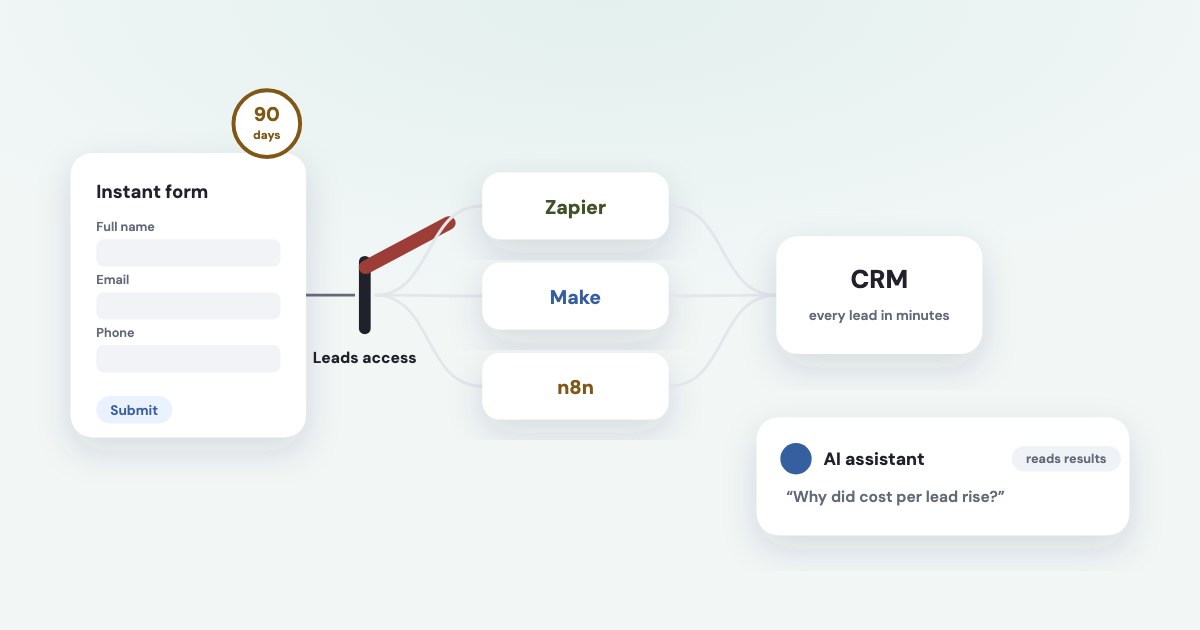
Use Zapier, Make, n8n or Meta’s own CRM integrations to move every lead from Facebook lead ads to your CRM or sheet within minutes — Meta keeps leads downloadable for only 90 days. Use an AI assistant connected to the ad account for the other job: questions about results and decisions about budgets and ads. The two don’t replace each other: Meta’s official ads MCP server has no tool for reading leads, and Zapier can’t read ad results. Most broken lead flows come from one setting, Leads access.
On this page9 sections
Two different jobs
| What it needs | Use | |
|---|---|---|
| Deliver each new lead | The same steps every time, within minutes, never skipped | Meta’s CRM integrations, Zapier, Make or n8n |
| Simple rules | “If this number crosses that line, do X” — on a schedule | Automated rules in Ads Manager or a workflow |
| Questions and decisions | Reading many numbers, comparing, explaining, proposing a change | An AI assistant connected to the ad account |
n8n’s own blog puts it well: Use AI only where you need AI.
Its plain Switch and IF steps execute in milliseconds and never hallucinate a routing decision
(source). Sending a lead to a CRM is a rule. Working out why cost per lead rose in one ad account is not.
Why lead delivery has to be automatic
Leads data will be available for download for up to 90 days from the time the Instant Forms is submitted by a user.
Even with a campaign’s lifetime results open, you will only be able to download leads from the last 90 days
, and Meta recommends
downloading your leads data often or using a CRM system
(source). Speed matters too: a lead called the
same day is worth more than one found in a CSV next week.
Meta offers three ways: a direct integration with your CRM, a third-party integration such as Zapier, or a custom integration through webhooks and the Graph API (source). Its catalogue lists hundreds of CRMs, some of them “by Zapier” (source). If you don’t need automation yet, Leads Center keeps leads with stages, owners and reminders, and exports a CSV (source).
Zapier, Make and n8n for lead ads
| Zapier | Make | n8n | |
|---|---|---|---|
| How leads arrive | Instant “New Lead” trigger | Instant “New Lead”, or “Watch Leads” on a schedule | Webhook trigger through your own Meta app |
| What you need | A paid plan: Facebook Lead Ads is a premium app (pricing) | A Make account; the form must have had at least one submission (source) | A Meta app in Live mode with lead permissions (source) |
| Reads ad results | No — no Meta ads reporting actions | Yes, with the Facebook Insights app (source) | Through the generic Graph API node (source) |
| Price | From $19.99 a month billed yearly (source) | Free plan with 1,000 credits a month | Cloud from €20 a month billed yearly (price snapshot: 16 October 2026), or self-hosted for free (source) |
| Best for | Fastest setup, one-way lead delivery | Delivery plus simple reporting | Teams that can run their own Meta app |
Old leads
Instant triggers react to new submissions. To bring in leads that came before the flow existed, use Meta’s bulk read of a form’s leads or Make’s List Leads module — within the same 90 days (source).
The setting that breaks lead flows: Leads access
Once someone with full control of the portfolio starts customization, new people, CRM systems or partners need to be added manually.
Until someone customises it, every Page admin can download leads. After the first change, each new tool must be added by hand under Business portfolio → Settings → Integrations → Leads access, on the People, Partners or CRMs tab (source).
- Zapier. Look for
Zapier (not "Zapier Inc.")
in the list —These appear as two separate apps in Facebook.
If test leads work but the live Zap stays silent, the likely cause is that Zapier has no CRM access to the Page (source). - Your own app (n8n, custom code). The app fetches each lead with a person’s or Page’s token, and that
fails if the people backing the UAT or PAT don't have leads access permission.
(source) - Agencies.
Only the business that owns the Page can assign leads access permissions to partner businesses or agencies.
(source) — the client has to do it; see agency access.
What running n8n with your own Meta app involves
- One webhook per app.
Facebook Lead Ads only allows you to register a single webhook per app.
Switching between n8n’s test and production URLs overwrites it (source). - Tokens expire.
A long-lived token generally lasts about 60 days.
A Page token made from it has no expiry date (source); a flow built on a personal token stops after about two months. - Your accounts vs clients’.
If your app is only managing your ad account, standard access to the ads_read and ads_management permissions are sufficient. If your app is managing other people's ad accounts, you need advanced access
(source), andAdvanced Access now requires Business Verification
(source). - Rate limits. Meta’s entry-level Marketing API access is
Heavily rate-limited per ad account. For development only.
(source) - Downtime. Meta retries failed webhook deliveries for up to 36 hours and then drops them; after a longer outage, fetch the missing leads with a bulk read.
Using the official API with your own app is an authorised route; nothing in Meta’s rules singles out n8n or Zapier as a risk to the ad account.
Where an AI connector fits
A connector lets ChatGPT, Claude or another assistant read the ad account and, with your approval, change it. Meta’s own ads MCP
server reports spend, results and anomalies, and its write tools create entities in a paused state; your AI client asks for confirmation before activation.
(source). It has no tool for reading leads — so keep your lead flow as it is and add the assistant for questions
like “which ad sets got dearer this week and why?”.
Zapier, n8n and Make now offer MCP too: they let an assistant run their actions. Zapier counts two tasks per tool call (source), and n8n can ask a person to approve a tool call in Slack, Telegram or chat first (source). They give the assistant what their modules can do — which, for Meta ads, is lead delivery and, in Make and n8n, raw reporting.
Don’t mix lead text and write access
Meta warns that an agent can follow malicious instructions hidden in tool outputs (prompt injection)
,
including webhook payloads
, and advises: Don't grant write/manage scopes to AI agents that process untrusted input.
(source). Lead form answers are untrusted input: an agent that reads them shouldn’t also be able to change budgets.
Where Variafy fits
Variafy is an AI connector for Meta ads, not a lead-delivery tool — keep your Zap, scenario or CRM integration. It adds what those tools don’t do:
- Ad results joined with sales. Connect Pipedrive or a Google Sheet, and the assistant judges ads by qualified leads and payments, not only by Meta’s cost per lead — see ads and CRM sales.
- Morning checks across all your ad accounts: ads spending without results, ad sets with nothing left to deliver, payment problems.
- Changes with a preview of their effect on spend, run only after you confirm.
How we checked
Checked on 16 October 2026 against Meta’s Business Help Center (CRM integrations and their catalogue, expired leads, Leads Center, leads access), Meta’s developer documentation (retrieving leads, webhooks, app modes, access levels, Marketing API authorization, access tokens, the ads MCP server and its tools), the documentation of n8n (Facebook Lead Ads trigger and credentials, Graph API node, human approval for tools), Zapier (Facebook Lead Ads troubleshooting, pricing, MCP) and Make (Facebook Lead Ads, Facebook Insights), and the pricing pages of Zapier and n8n. Make’s prices are rendered by script and were taken from its plan description; check the current plan before buying.
Variafy is our product.
Questions
How do I send Facebook lead ads to Google Sheets automatically?
Use Zapier’s Facebook Lead Ads “New Lead” trigger with a Google Sheets action, Make’s New Lead module, or n8n’s Facebook Lead Ads trigger. Zapier needs a paid plan for this premium app. Then check Leads access so the tool is allowed to receive the leads.
How long does Facebook keep lead ads data?
90 days from the moment a person submits the form. Older leads can’t be downloaded even from lifetime results, so send them to a CRM or sheet as they arrive.
Why did my Facebook Lead Ads Zap stop working?
Most often Leads access: once someone customises it, new tools must be added by hand, and Zapier must be listed as “Zapier”, not “Zapier Inc.”. An expired connection is the next most common cause — reconnect the Facebook account in Zapier.
Can n8n receive Facebook lead ads?
Yes, with the Facebook Lead Ads trigger and your own Meta app with lead permissions in Live mode. One app can register only one webhook, so n8n’s test and production URLs overwrite each other.
Is Zapier or n8n better for Facebook lead ads?
Zapier is the quickest to set up for one-way delivery on a paid plan. n8n is cheaper at volume and can also read ad results through the Graph API, but you run your own Meta app, tokens and webhook.
Can ChatGPT or Claude read my Facebook leads?
Not through Meta’s official ads MCP server, which has no lead-reading tool. Keep leads flowing to a CRM with an integration or automation tool, and use the assistant for ad results, questions and proposed changes.
Does using Zapier or n8n put my ad account at risk?
Not by itself: they use Meta’s official API with permissions you grant. Meta restricts accounts for automation outside authorised routes, such as scripts logging in as you.