Google Ads disapproved ad: how to fix it, appeal it and avoid strikes
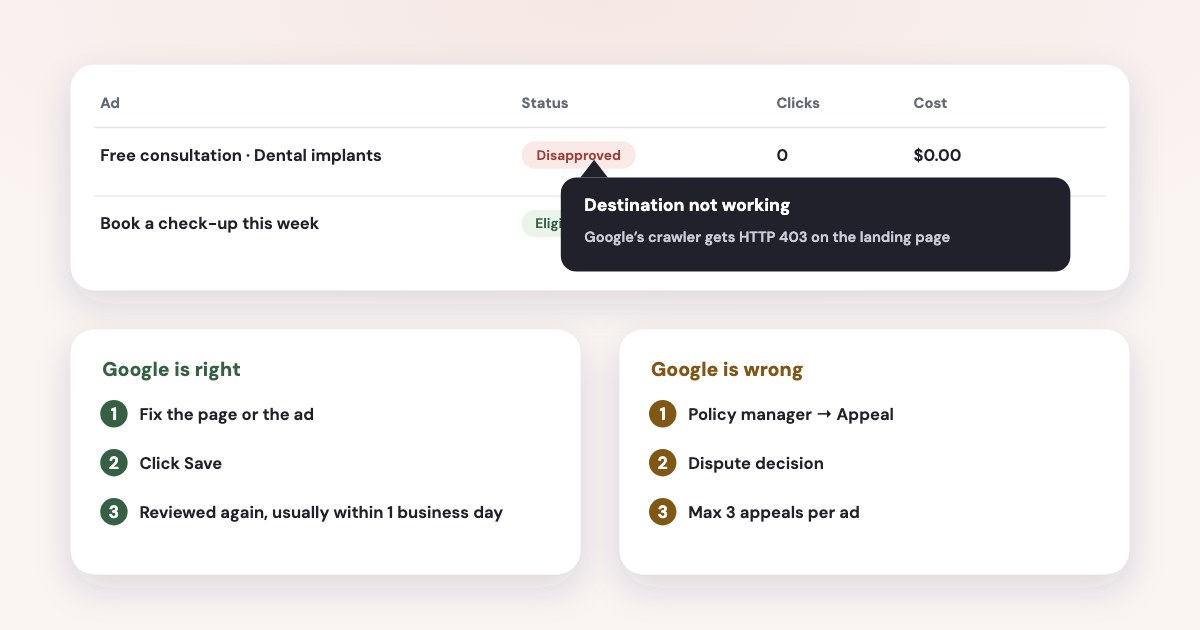
Hover over “Disapproved” in the Status column of the Ads page — Google names the policy there. Fix what it names and click Save: the ad is reviewed again automatically, most within one business day. If you think Google got it wrong, appeal from Policy manager with “Dispute decision” — but each ad gets only 3 appeals, and since July 2026 decisions older than six months can only be appealed through support. For lead businesses the usual causes are a landing page Google’s crawler can’t open, a hacked site, unclear business details, health or finance rules, and editorial style. Most of these bring a warning, not a strike.
On this page8 sections
What the ad statuses mean
| What Google says | What to do | |
|---|---|---|
| Under review | still being reviewed and will be eligible to serve if we determine that it complies with our policies. | Wait; most reviews finish within one business day |
| Eligible | can be shown to all audiences. | Nothing |
| Eligible (limited) | can run, but not in all situations | Check the policy detail — often trademarks or a restricted industry |
| Disapproved | can't run because its content or its destination violates Google Ads policy. | Fix and save, or appeal |
Source: Google Ads Help. Google says Most ads are reviewed within one business day.
(source) and that it uses a combination of Google AI and human evaluation
(source). For an eligible ad with no impressions, see diagnosing zero and low impressions.
Fix it or appeal it
- Find the reason.
In the "Status" column, hover over the "Disapproved" status for more information.
(source) - If Google is right, fix and save. Edit the ad or the page, then
Select Save to resubmit for review.
The ad is reviewed again automatically. - If Google is wrong, appeal. Tools → Troubleshooting → Policy manager → Appeal, and choose Dispute decision. After fixing, choose Made changes to comply with policy instead.
- Mind the limits.
Each ad is limited to 3 appeals.
Wait 24 hours before appealing the same ads again.
The usual reasons for a lead business
Destination not working, not crawlable, mismatch
Google wants a page that will return an HTTP 200 response code globally
(source). A page that
opens for you can still fail for Google: a firewall, bot protection or a country block can show its crawler a 403. Google’s tip:
Verify the URL is working for Google by the Google AdsBot web crawlers by using Chrome DevTools
with the AdsBot user agent.
“Not crawlable” is usually robots.txt or too many crawls at once (source); “mismatch” means the ad doesn’t
accurately reflect which app or website the user is being directed to
(source) — for example
a redirect to another domain.
Compromised site
Someone added code that makes the site act in ways that benefit a third party
, often through an outdated CMS or plugin. Google asks
you to Review your site and remove any code that refers to the identified domains.
, check Security Issues in Search Console and the
Safe Browsing status, then update the CMS. Once the flag is cleared, ads should run again on their own (source).
You don’t need a paid “unblocking” service.
Misrepresentation
Ads can’t be obscuring, or omitting material information about your identity
, use an unclear business name, hide the payment model
or promise an improbable result (even if this result is possible)
(source). Put the business name,
address, prices or price ranges and contacts on the landing page.
Health and finance
- Healthcare has restricted content and certification for things like prescription drug services and addiction services (source).
- Health targeting. Remarketing and Customer Match can’t be used for health topics, which include
Invasive medical procedures, including cosmetic surgery, surgical procedures, or injections
(source). Unlike Meta, Google’s rule here is about targeting, not about phrases like “Do you have…” in the ad. - Financial services verification can apply to businesses that aren’t financial: Google’s examples include a school advertising financial aid for tuition (source).
Editorial and trademarks
Editorial rules cover spelling, capitalisation, punctuation, gimmicky repetition and phone numbers in ad text — calls belong in call assets (source). Trademarks restrict a brand name in the ad text after the owner complains, not in your keywords (source).
Strikes, warnings and suspensions
Most disapprovals don’t count against your account. Google’s strike system covers 15 policies — for lead businesses mainly personal loans, credit repair, clickbait and misleading ad design. The steps (source):
- a one-time warning by e-mail;
- first strike:
temporary hold state for 3 days
; second within 90 days: 7 days; - third strike: suspension for repeat violations.
Destination, editorial, healthcare and trademark issues work differently: Google issues a warning at least 7 days before any suspension. Suspension without warning is reserved for serious cases such as circumventing systems and unacceptable business practices (source) — for those see Google’s account suspension pages, not this guide.
Verification deadlines
If Google asks you to verify as an advertiser, the deadline comes in the notice and
the deadline can't be extended.
Missing it pauses the account until you verify (source).
Ads running but barely showing: limited ad serving
Not every restriction shows as “Disapproved”. Under limited ad serving, Google limits impressions of ads that are more likely to result in negative ads experiences.
— Individual ads will not be disapproved.
Google looks at user complaints, the account’s history, the industry and whether the
advertiser is verified (source). New accounts and unverified advertisers feel it first; verifying helps.
over 99% of policy-violating ads before they ever served
Google says it blocked or removed over 8.3 billion ads in 2025 and cut wrongful advertiser suspensions by 80% with Gemini (source). Automated review is fast, and sometimes wrong — which is why the appeal limits matter.
Find every disapproved ad at once: Variafy
Variafy offers read-only Google Ads access after your beta invitation. It lists every disapproved or limited Google ad with the policy topics and the evidence Google gives — for example, which landing page fails — so you can fix them in one pass instead of opening ads one by one. It doesn’t edit ads or appeal for you.
For the Meta side, see why was my Facebook ad rejected. Variafy is in the free beta: join the free beta.
How we checked
Checked on 17 October 2026 against Google Ads Help and the Google Ads policies (review statuses, the ad review process, fixing and appealing, destination requirements, destination not working and not crawlable, compromised sites, misrepresentation, healthcare and medicines, personalised advertising for health, editorial, trademarks, financial services verification, advertiser verification timelines, repeat violations, limited ad serving) and Google’s 2025 Ads Safety Report. Google’s help pages show no update dates; the wording is as it read that day. We also read the pages that rank for these searches.
Variafy is our product. Google and Google Ads are trademarks of Google LLC; we are not a Google product, partner or representative.
Questions
How do I fix a disapproved ad in Google Ads?
Hover over “Disapproved” in the Status column to see the policy, fix the ad or the landing page, and click Save — the ad is reviewed again automatically, most within one business day. If you believe the decision is wrong, appeal from Policy manager with “Dispute decision”.
How long does a Google Ads review take?
Google says most ads are reviewed within one business day, and complex reviews take longer. For an appeal in progress, Google suggests checking back in 24 hours.
How many times can I appeal a Google Ads disapproval?
Each ad is limited to 3 appeals, with at least 24 hours between appeals for the same ads. Since 21 July 2026, decisions older than six months can only be appealed through Google Ads support.
Why does Google say “destination not working” when my site works?
Google’s crawler may be getting an error your browser doesn’t — often from bot protection, a firewall or a country block. Test the page in Chrome DevTools with the Google AdsBot user agent and make sure it returns HTTP 200 everywhere you advertise.
Can disapproved ads get my Google Ads account suspended?
Only some. Strikes apply to 15 policies, such as personal loans, credit repair and clickbait: a warning, then holds of 3 and 7 days, then suspension. Destination, editorial, healthcare and trademark issues bring a warning at least 7 days before any suspension.