Google Ads limited by budget or not spending: what it means and what to do
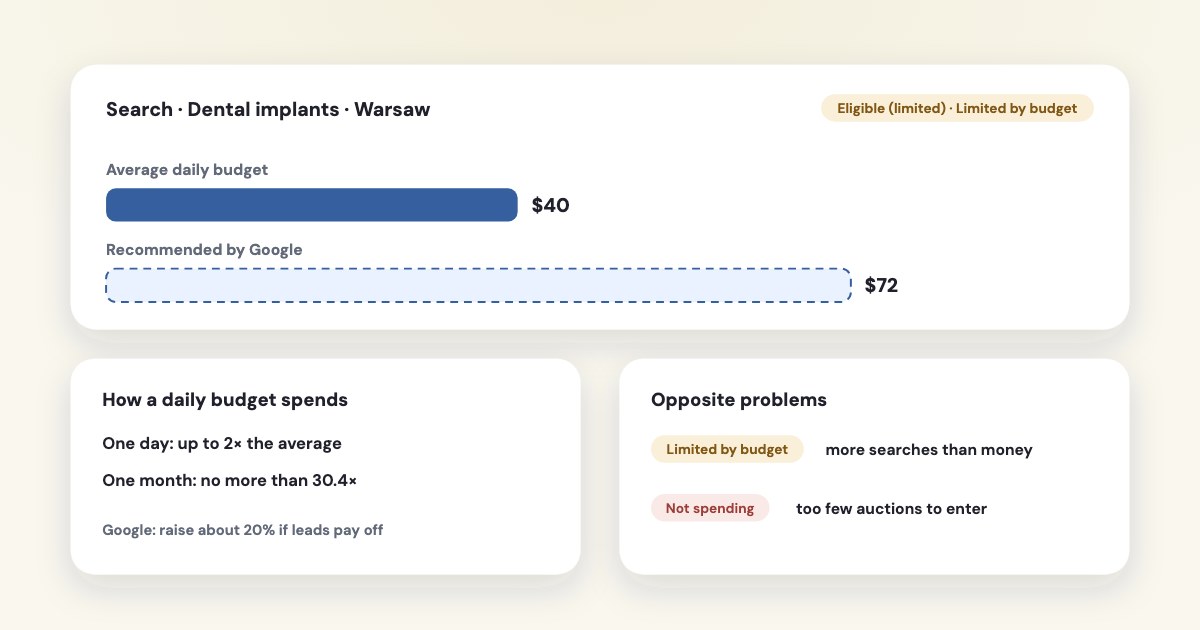
“Limited by budget” means your average daily budget is lower than the amount Google recommends — there are more searches than your budget can pay for. It isn’t an error, and it’s the opposite of “not spending”, where Google finds too few auctions to enter. Before raising the budget, check cost per lead: if it’s good, a modest increase (Google suggests about 20%) buys more of the same. Since 17 August 2026, campaigns with a target CPA that hit their budget are steered closer to the target, so leads may get dearer if you were beating it. If the campaign isn’t spending at all, look at ads, billing, bids and targeting instead.
On this page8 sections
What “Limited by budget” means
a campaign status indicating that your average daily budget is lower than the recommended amount.
The recommendation comes from the campaign’s recent performance, its budget, keywords and targeting (source). In
the campaign list it shows as Eligible (limited): Your campaign is active, but showing ads only occasionally due to budget constraints or a limited bid strategy.
(source)
So the status says “there is more demand than money”. Whether that’s a problem depends on the price of each lead. A campaign limited by budget with a good cost per lead is a reason to spend more; with a bad one, a reason to fix the campaign first.
How Google spends a daily budget
On a given day, your campaign might spend up to twice your average daily budget
— and over a month it spendsno more than 30.4 times your average daily budget.
(source) A day at double the budget is normal.- The 2× and 30.4× limits apply
for most campaigns
(source). - A shared budget is
a single average daily budget that's shared by multiple campaigns in an account.
Google recommends pairing it with portfolio bidding (source). - Bid adjustments raise the effective cost per click, so the same budget buys fewer clicks — another way a campaign becomes limited (source).
What to do when a campaign is limited by budget
This section is about a campaign that is already running; for choosing a starting budget, see how much a small business should spend on Google Ads.
- Check cost per lead first. Compare the campaign’s cost per conversion with your other campaigns and with what a lead is worth to you (how to judge it).
- If leads are good value, raise the budget in steps. Google’s guidance:
If your campaign status is "Limited by budget", a modest increase (for example, 20%) can help improve impression volume.
(source) The status pop-up shows budget ideas, based on the last 7 days (source). - If you can’t spend more, spend better. Cut search terms that never convert, narrow to the hours and places that bring leads, and move budget from weaker campaigns.
- Mind the bid strategy. Maximize conversions
will try to fully spend your average daily budget.
(source) With Target CPA, a target that’s too lowmay cause you to forgo clicks that could result in conversions
(source).
New since 17 August 2026
Starting on 17 August 2026, Google updated its bidding systems to deliver more consistent and predictable performance.
For campaigns with a target CPA or ROAS that are limited by budget, Google now bids closer to the target you set. Its example: a target of
$10 while you’re getting $5 — the system will move towards $10. Google won't automatically adjust your bidding targets or budgets.
If you were beating your target, lower the target to your real cost per lead (source).
Not spending at all: a different problem
Google’s advice: If your ad doesn't receive any impressions after 3 business days
, go through the causes
(source):
For a step-by-step diagnosis of zero impressions, account reviews and Search delivery, see diagnosing zero and low impressions in Google Ads.
| What you see | Where to look | |
|---|---|---|
| Account or billing | All campaigns stopped; payment declined or account budget used up | Billing summary and Transactions (source) |
| Ads | All ads disapproved or still under review | Fix disapproved ads |
| Dates and schedule | Campaign hasn’t started or has ended | Campaign settings (source) |
| Bids and targets | Target CPA far below your historical cost per lead | Raise the target by 10–20%, Google suggests |
| Keywords | “Low search volume”, low Quality Score, or paused after 13 months without impressions | Keyword status (source) |
| Targeting | Small area, few hours, many negative keywords | Broaden; audit negative keyword lists |
| Conversion tracking | “Misconfigured” — no conversions for bidding | Fix tracking before using smart bidding |
Check with the Ad preview and diagnosis tool rather than searching for your own ad: using the tool avoids accumulating ad impressions
(source). Bid strategy statuses add detail — Limited (inventory) means Your bid strategies are limited by available search volume.
(source)
Learning: count conversions, not days
After a new bid strategy or a big change, the strategy shows Learning. Google measures it in conversions and conversion cycles, and its pages give different figures.
For Demand Gen campaigns, Google’s campaign setup page says As a good general rule, wait 50 conversions before making changes to your campaign.
The English (US) page on
learning duration says a few conversion cycles (1-2 typically)
, while the same page in English for the UK says
up to around 50 conversion events or 3 conversion cycles
. There is no “one week” rule. On a small lead budget that can mean a month — so change one thing at a
time and judge after the learning ends. For the full observation plan, see whether to wait, check or repair a Learning bid strategy.
Know why a campaign is limited: Variafy
Variafy offers read-only Google Ads access after your beta invitation. It reads each campaign’s status with Google’s reasons — budget, bid strategy, search volume, disapproved ads — and its budget recommendations, alongside cost per lead, so an assistant can tell you which campaigns deserve more budget. It doesn’t change budgets or bids.
For Meta, see Facebook ads not spending. Variafy is in the free beta: join the free beta.
How we checked
Checked on 17 October 2026 against Google Ads Help (limited by budget, campaign and bid strategy statuses, average daily budgets and overdelivery, shared budgets, simulators, Target CPA, Maximize conversions, the August 2026 change to target-based strategies, learning periods, campaigns not running, account issues, keyword status, Ad preview and diagnosis). Google’s help pages show no update dates; one page differs between regional versions, which we note. We also read the pages that rank for these searches.
Variafy is our product. Google and Google Ads are trademarks of Google LLC; we are not a Google product, partner or representative.
Questions
What does “limited by budget” mean in Google Ads?
Your average daily budget is lower than the amount Google recommends for the campaign, so it shows ads only part of the time. It isn’t an error: if cost per lead is good, a modest budget increase buys more leads.
How much should I increase a budget that is limited?
Google suggests a modest increase, for example 20%, and a daily budget of at least 10 times your expected cost per click or 2–3 times your target CPA. Raise in steps and check cost per lead after each.
Why is my Google Ads campaign not spending?
Usually billing or account issues, disapproved ads, a campaign that hasn’t started, a target CPA far below your historical cost, keywords with low search volume, or targeting that is too narrow. If there are no impressions after 3 business days, go through these in order.
Can Google Ads spend more than my daily budget?
Yes, up to twice the average daily budget on a single day, but over a month no more than 30.4 times the daily budget for most campaigns.
Why did my cost per lead rise after August 2026?
Since 17 August 2026, campaigns with a target CPA that are limited by budget are steered closer to the target. If your target was well above your real cost per lead, lower it to keep recent performance.