Google Ads not spending? Diagnose zero and low impressions
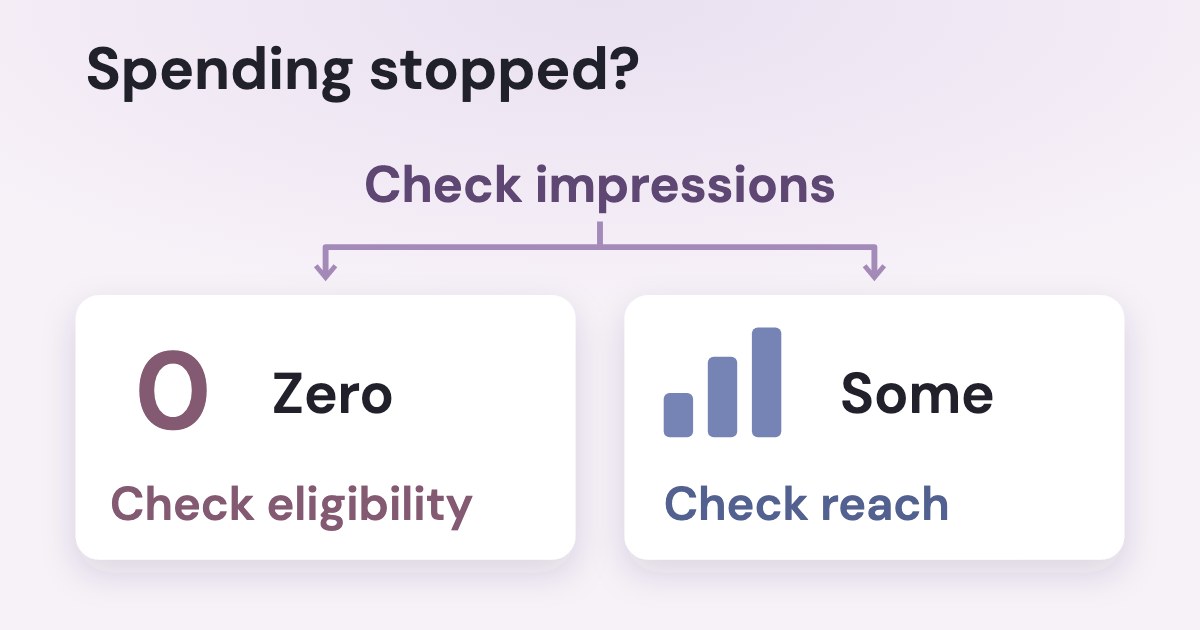
If Google Ads is not spending, first separate zero impressions from impressions with little spend in the selected date range. With zero impressions, check account holds, campaign and ad statuses, dates and the bid strategy; for Search campaigns with impressions, inspect targeting and lost impression share before raising the budget. Eligible means able to serve, not a promise of impressions.
On this page9 sections
Where should you start when there are no impressions?
Start with actual campaign impressions for the intended period, then read the status at the level where delivery is blocked. Our suggested sequence starts with account and status checks, followed by Search bidding, targeting and impression share.
- Confirm the period and scope. Match reporting dates to campaign start/end dates; an inactive period can show no impressions (Help).
- Separate an account-wide stop from one campaign. Inspect alerts and billing for an account-wide stop; if other campaigns run, focus on the affected campaign (account troubleshooting).
- Read the reason, not just the label. As of 19 Oct 2026, Help gives campaigns a Status column; ads have their own Status and Policy details columns. Read each at its own level.
| Meaning | Next check | |
|---|---|---|
| Campaign · Eligible | Active and able to show ads. | Check its ads and auction constraints; the label does not establish impressions. |
| Campaign · Eligible (limited) | Occasional delivery because of budget constraints or a limited bid strategy. | Read which constraint Google identifies before adding money. |
| Campaign · Not eligible | Inactive: there are no ad groups, or all ad groups, all ads or all keywords are paused or deleted. | Look at the whole campaign tree: a single paused ad group or ad does not make a campaign Not eligible. |
| Campaign · Paused / Removed | Paused by you, or removed. | Confirm the intended state; a removed campaign cannot simply be resumed. |
| Campaign · Pending / Ended | A future start date, or a scheduled end date already passed. | Check whether those dates match the intended run. |
| Campaign · Eligible (Misconfigured) | Read the full message, including any Google-tag warning. | Check the tag and conversion configuration rather than assuming ordinary learning. |
The campaign-status reference supplies those meanings. The bid-adjustment FAQ describes Eligible (Limited) more broadly; we use the level-specific references, not its learning-day figures. For ads, use the separate ad-status reference:
| Meaning | Next check | |
|---|---|---|
| Ad · Eligible | Complies with policy and can run. | Check the parent campaign, ad group and other delivery constraints. |
| Ad · Under review | The ad is awaiting its policy review. | Read review status; do not treat eligibility elsewhere as approval of this ad. |
| Ad · Disapproved | Cannot run because of content or destination policy issues. | Read Policy details and fix the cited issue or follow the appeal process. |
| Ad · Eligible (limited) | Can run only in some situations because of policy restrictions. | Inspect Policy details; this is not a diagnosis of insufficient campaign budget. |
| Ad · Eligible (limited all locations) | Policy and targeting prevent delivery in the targeted locations; interested users may still be eligible. | Read the exact policy and location explanation. |
| Ad · Not eligible | Its campaign or ad group may be paused, removed, pending, ended or incomplete. | Check the parent object. Paused, Pending, Ended and Removed can also appear on ads. |
For a disapproval, use the guide to fixing and appealing disapproved Google ads. Do not apply every status to every format: Google’s Serving ad status, for example, refers to a video ad eligible on YouTube.
An empty preview is not a campaign report
Google says the Ad preview and diagnosis tool simulates a particular auction; no ad in that preview does not establish no delivery anywhere. Use actual impressions and clicks, then use the preview tool for a specific search. Help places it under Tools → Troubleshooting; it avoids adding your own search impressions.
Campaign diagnostics is available from Campaigns, in a selected campaign’s Overview or Insights view. Use its identified issue as evidence, not a reason to apply every recommendation automatically.
Google’s general troubleshooting page says that if an ad has no impressions after 3 business days, the campaign may still be in the bid strategy learning phase
; if the issue persists, it tells you to review the common reasons.
This is a checkpoint, not a promise that learning ends then.
Is Google holding the account, payment or ad?
A suspended account or billing issue can stop ads until it is resolved. If other campaigns are running, focus on the affected campaign rather than account status (account troubleshooting). For a suspension, Help links to Google’s suspended account tool.
A background security review is another account-level issue. Google’s Search troubleshooting page says it can produce zero impressions or a temporary daily spending limit.
These automated reviews cannot be expedited.
The same page says there is no specific dashboard notification for that background check, and spending limits are typically removed automatically after it completes. An empty dashboard is therefore not proof that there is no review: that is our reading of Google’s warning.
Check authorized administrators and outstanding account tasks without assuming that every quiet campaign has a security hold. For an actual declined payment, inspect Billing Summary; Google says ads may stop until payment succeeds, although some qualifying accounts have a short grace period (declined-payment Help).
| What Google says | What to do | |
|---|---|---|
| Monthly invoicing · account budget reached | If total campaign costs reach the account budget’s designated amount before its end date, all ads in the account stop (Help). | Check the account budget, separately from the daily budget of an individual campaign. |
| Payment-information verification | An account may be temporarily paused. Document verification can take up to 5 business days after documents are submitted (Help). | Complete the requested task; this is not a guaranteed time for every payment issue. |
| Advertiser verification | Some ads may be restricted and some accounts paused. It can take up to 5 business days for the status to update (Help). | Follow the deadline and tasks in your notification; status-update timing is not a universal completion deadline. |
For payment verification, Google’s instructions place Account under Admin → Policy, with a task such as Confirm your payment method → Start task. Follow the task actually requested; a bank transfer can keep an account paused until the payment arrives (payment instructions).
Ad review has different timing across Google’s Help pages. The standard English Find your ad status page says:
Most reviews are completed within one business day
It also says complex reviews can take longer. The Search troubleshooting page gives most ads a review range of 24–48 hours, then adds that for new accounts or specific formats like image or video, it can take up to 5 business days
for review.
The general troubleshooting page also describes newly created or edited ads as undergoing a one to 2 day review
for policy compliance.
Google’s pages give different review timing and qualifications, not a universal deadline. None is a security- or payment-review deadline. If an ad remains under review, confirm that its campaign and ad group are enabled and read the current instructions before editing it.
What is the bid strategy preventing?
For a Search campaign using automated bidding, inspect the bid strategy’s own status and reason instead of treating every limit as a budget shortage. Google’s bid-strategy status reference, checked 19 Oct 2026, distinguishes these conditions:
- Inactive: check paused campaigns, ads or keywords, missing attached campaigns, or an exhausted prepaid budget.
- Learning: a new/reactivated strategy or a settings/composition change may be involved. Let the status and performance evidence guide assessment; there is no fixed learning-day rule in this guide. For a separate triage of the status and the conversion cycle, see whether to wait, check or repair a Learning bid strategy.
- Limited: read the reason: Inventory means limited available search volume; Bid limits means bid caps/floors obstruct optimization; Budget constrained concerns insufficient associated budgets; Bidding strategy is a campaign-specific limitation of the chosen strategy.
- Misconfigured: check conversion settings, or whether campaigns sharing a budget use incompatible bidding arrangements. Google describes separate shared-budget and conversion-setting cases.
For conversion-based bidding, verify that the intended lead action is set up and usable by the strategy. Our proposed check: compare the business’s definition of a lead with the action used for bidding before changing the budget. For the full tracking workflow, see what to check first when conversion tracking is not working.
Google’s Search troubleshooting guidance also says very low bids may win or enter too few auctions, and insufficient or incorrect conversion data can limit conversion-based automated bidding. Review a restrictive Target CPA or Target ROAS against the campaign’s evidence. Do not treat a change in strategy as the universal first fix.
Have Search settings left too little relevant traffic?
For Search, check whether keywords, audiences, locations and operating hours leave enough relevant opportunities to show an ad. These checks concern the actual Search setup, not a rule for Performance Max audience signals.
| What to inspect | How to interpret it | |
|---|---|---|
| Keywords and negatives | Check Low search volume, paused keywords and negatives that block relevant searches (keyword statuses; Search Help). | Find relevant demand before broadening. Removing every negative is not a diagnosis. |
| Audience · Targeting / Observation | Targeting narrows reach to selected criteria; Observation reports their performance within existing targeting without restricting reach (definitions). | For new Search campaigns, Google suggests Observation instead of Targeting to avoid an unintended audience restriction. |
| Location · Presence / Presence or Interest | Presence covers people likely in or regularly in the area; Presence or Interest also includes people interested in it (location options). | Decide whether people outside the service area can be useful customers before broadening. |
| Days, hours and devices | Review the actual campaign settings and ad schedule; Smart Bidding still respects scheduled days and hours (Help). | Check whether the campaign is permitted to serve when relevant people search. |
These labels were checked in Help as of 19 Oct 2026. Google’s location guidance recognizes cases for Presence, including wanting only people in specific places.
Our service-area advice: choose reach the business can serve. An emergency service and a remote course may need different location options; extra spend alone is not a useful outcome. For a filled service-area card, see checking your Google Ads service area.
The Search troubleshooting overview also lists overlapping targeting, ad quality and competing advertisers. It describes possible pauses involving certain features and poor policy-compliance/engagement history, but does not name those features; do not invent a specific feature diagnosis.
A keyword with Low search volume is also different from one paused due to low activity. Google’s keyword-status page says the latter had zero impressions over the past 13 months and was automatically paused; inspect the reason before assuming a new policy rejection.
Do Search reports point to budget or Ad Rank?
For a Search campaign with enough traffic to report impression share, compare losses due to budget with losses due to Ad Rank. Google’s impression-share reference, checked 19 Oct 2026, defines the columns separately:
| Meaning on the Search Network | Our next check | |
|---|---|---|
| Search lost IS (budget) | Missed impressions because of insufficient budget; this metric is available at campaign level only. | Use the budget diagnosis and lead economics before deciding to spend more. |
| Search lost IS (rank) | Missed impressions because of poor Ad Rank in the auction. | Inspect bids and ad/landing-page quality instead of assuming the budget alone is responsible. |
Google reports impression share separately by campaign type and updates these metrics within 1–2 days. The Search lost-impression-share guidance also warns that data may not populate without enough traffic. Missing data is not a measured zero. For how competing advertisers appear in Google’s Auction Insights report, see Google Ads Auction Insights.
Rank loss is a direction to investigate
Our reading: rank loss does not prove that one Target ROAS setting caused all of the underspend. Bids, ad quality and landing-page experience need inspection; the Search guide identifies these as possible improvements. Use the same campaign and period for a comparison, and keep a missing metric marked as missing.
If the constraint is budget, follow the guide to Google Ads limited by budget for spending limits and budget changes. For reading impressions, clicks and conversion costs together, use the Google Ads reporting guide; do not judge a campaign only by whether it consumed the allowance.
How could Variafy help with the read-only check?
Variafy offers read-only Google Ads access after your beta invitation. The implementation checked on 19 Oct 2026 includes readers for campaign status, type, strategy, budget and dates, plus spend and impressions over a selected period.
Those readers compare reported facts; they cannot establish a background security review from zero spend or complete Google’s verification for you.
A prompt for reviewing reported facts
“For the same Google Ads account and period, list campaign status, type, strategy, dates, budget, spend and impressions. Separate zero-impression campaigns from campaigns with impressions and little spend. State what the returned data supports and what still needs checking in Google Ads. Do not change anything.”
This is a reading workflow; account changes require human approval. Variafy is in the free beta: join the free beta.
What should you record before changing the campaign?
Keep a diagnosis record tying each change to evidence. This is our working note, not a Google requirement:
- Observation: account, campaign type, period, impressions and spend; whether other campaigns still serve.
- Reason: the full status and affected level, an outstanding verification task, or a supported bidding/targeting constraint.
- Evidence: the diagnostic message and relevant report; distinguish an absent metric from a zero. For what to look at in the account history before new edits, see what changed before the drop.
- Action and review: the single intended correction, who approves it, and what evidence will show whether delivery recovered.
Wait for an identified review when you cannot expedite it; complete a requested task when action is needed. If a campaign is eligible but opportunity is restricted, change the specific setting supported by the evidence. For a broader account handover, use the Google Ads audit checklist for a lead business.
How we checked
Checked on 19 Oct 2026 against the original public Google Help pages, fetched as raw HTML: general and Search low-traffic troubleshooting, campaign/ad/keyword/bid-strategy statuses, payment and advertiser verification, Ad preview, campaign diagnostics, location and audience settings, scheduling and impression share. The standard English ad-status and Search troubleshooting pages give different review timing and format qualifications, which are stated together; none is treated as a universal deadline. Google’s broader troubleshooting pages also differ on learning timing, so this guide gives no learning duration in days. Interface labels are Help’s wording as of that date; no ad account was opened.
The editorial comparison used the supplied review of five guides and Google AI Mode. Our check order and diagnosis note are proposals; no client account data was used. Product statements were checked against the implementation on the same date. Variafy is our product, and Google Ads access is read-only and available after your beta invitation.
Questions
Why is my Google Ads campaign not spending money?
First check actual impressions for the selected date range. With zero impressions, inspect account holds, campaign and ad statuses, dates and the bid strategy; with some Search impressions, inspect reach and lost impression share before raising the budget.
Why does Google Ads say Eligible but show no impressions?
Eligible means the campaign is active and can show ads, not that every ad or auction will serve. Check ad-level status and policy details, account tasks, bidding and Search targeting; an enabled campaign can still contain inactive or disapproved items.
How long should I wait for a new Google ad to be reviewed?
Google’s standard English ad-status page says most reviews finish within one business day, with longer complex reviews. Its Search troubleshooting page says 24–48 hours for most ads and up to 5 business days for new accounts or image/video formats. These are different qualifications, not one guaranteed serving deadline or a security/payment-review deadline.
Can I speed up a Google Ads account security review?
Google’s Search troubleshooting page says these automated security reviews cannot be expedited. Complete outstanding account tasks, but do not expect a budget or bid change to remove the background review.
Why is Google Ads not spending my full daily budget?
A campaign can have too little relevant traffic, restrictive bids or targets, or delivery constraints even when budget remains. For Search, compare campaign-level Search lost IS (budget) with Search lost IS (rank); budget loss and poor Ad Rank call for different checks.
Does an empty Ad preview mean my Google ads are not running?
No. Google says the tool simulates a particular auction and may not reflect every real-time condition. Check actual campaign impressions and clicks, then use the preview diagnostics for the specific search.