Advantage+ leads campaigns: should you use them?
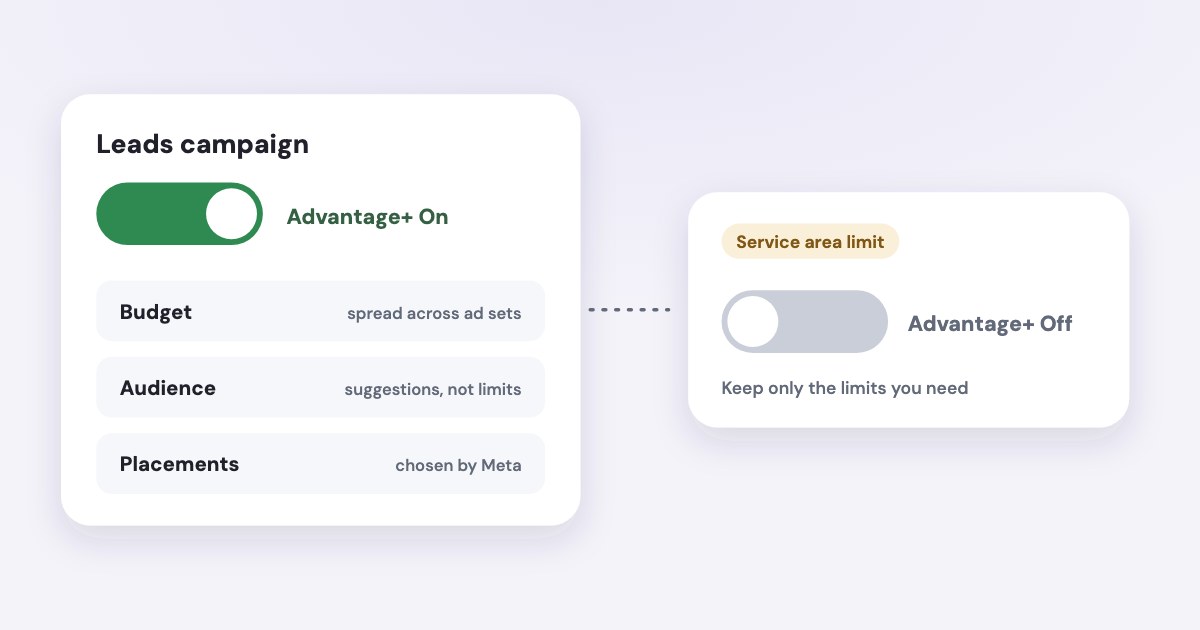
Meta’s current Advantage+ leads setup combines campaign budget allocation, audience automation and placements, with Advantage+ On by default for leads campaigns. Use it when that flexibility fits your business and you can judge actual lead outcomes; keep necessary manual constraints when service area, allocation or another requirement demands them. The On label does not establish that the campaign is finding qualified customers. [1] [2] [3] [4]
On this page10 sections
Understand the current leads setup
Older guides may show a separate choice between a manual campaign and an Advantage+ campaign. Meta’s current leads documentation describes a streamlined setup that starts with Advantage+ enabled, while its training materials cover maintaining or changing that status through controls and manual settings. [1] [5]
Meta’s current training groups Advantage+ sales, app and leads campaigns in that streamlined setup. It calls sales the successor name to Advantage+ shopping; for a service business collecting inquiries, this article concentrates on the Leads objective rather than importing shopping-campaign advice. [5]
That matters when you follow a tutorial and cannot find its opening choice. Start from the actual Leads objective and review the resulting configuration, rather than searching for an old setup screen that the current documentation says is no longer necessary. [4]
Advantage+ audience, Advantage+ placements and Advantage+ campaign budget are related components, but the campaign’s overall label is a separate status check. Creative enhancements are another set of options; we suggest you review the actual creative treatment rather than assuming the campaign label approves every alteration. [1]
This article uses English documentation read November 4, 2026, as of November 2026. Meta’s product page describes availability for eligible accounts, so the documented setup is not proof that every account has identical controls or the same rollout state. [1]
For the detailed targeting mechanics, use the Advantage+ audience guide. Here, the decision is whether the combined campaign setup suits your business’s operating limits.
Identify the control you would give up
Campaign budget allocation lets Meta distribute the shared budget among ad sets. If a client requires a fixed allocation for separate branches or services, that flexibility may conflict with the agreement even when the total campaign budget is acceptable. [6]
Audience automation can use your inputs as suggestions and expand beyond them, subject to the controls the setup supports. Do not put a service requirement into a suggestion and then assume the campaign must honor it as a boundary. [2] [3]
| Business decision | What to review |
|---|---|
| Total spending authorization | Budget level, duration and the account’s spending backstop. [6] |
| Allocation between services | Whether a shared campaign budget can move money acceptably. [6] |
| Where you can serve customers | The supported location controls and the actual service-area requirement. [2] |
| Who must be excluded | Customer-audience exclusions rather than inclusion suggestions. [3] |
| Where ads may appear | Placement automation and any necessary account-level controls. [1] |
| What counts as success | The selected performance goal and your real lead outcomes. [4] |
Write down only requirements you can explain in business terms. “We cannot service that location” is a reason for a boundary; “someone online says this placement is bad” needs evidence from your own results before it becomes a permanent restriction.
Check what Advantage+ On actually requires
Meta’s leads product page says On involves Advantage+ campaign budget, at least one ad set using Advantage+ audience and Advantage+ placements across the ad sets. Its FAQ also describes audience and placement controls at account level as compatible with the On state. [1]
Some campaign-level restrictions or removal of automated features can trigger Advantage+ Off. Meta says manual features remain available, so Off should be read as a setup state, not as a declaration that the business made an error. [1]
The product page tells you to check the campaign opportunities section for the On or Off status and offers Apply now to restore Advantage+ when appropriate. Review what that action changes before using it; preserving the label is not a reason to remove a necessary constraint. [1]
Use the campaign-budget versus ad-set-budget guide when allocation is the deciding issue. A small account does not need a complicated structure merely to create an automation comparison; choose a setup that you can explain and measure.
Do not infer the complete setup from one component being enabled. An audience can use automation while other campaign choices differ, so record the actual budget, audience and placement decisions beside the status label.
Start with Advantage+ when flexibility fits
Consider the default setup when you have one clear offer, a service area the available controls can represent and no requirement for fixed spend between ad sets. You should also have a usable way to distinguish a submitted form from a genuine, qualified inquiry.
That is a decision framework, not a performance forecast. Meta publishes aggregate performance claims for Advantage+ leads, but those do not establish what your local business will pay per appointment or whether its lead quality will improve. [1]
Prepare a clear offer and a form that asks questions relevant to the service. Meta documents different conversion locations and form options; we suggest you choose the location that fits the customer’s next action instead of treating automation as a replacement for that design. [1] [4]
Give the person reviewing results access to the actual lead outcomes. If the only available signal is “form sent,” your evaluation can still compare cost per submission, but you cannot honestly report it as a measured change in customer acquisition.
Use the lead-quality guide to define the follow-up and qualification record. A cheap inquiry that cannot be served is not made useful by the campaign remaining Advantage+ On.
Keep manual constraints when the business needs them
Keep a requirement when removing it would produce an unacceptable customer experience or violate the agreed allocation. Write the reason beside the setting and accept the resulting campaign status if that is what the requirement entails.
A strict existing-audience campaign needs special care because including a custom audience can be a suggestion rather than a boundary. Read Meta’s objective-specific audience instructions and confirm whether the chosen control truly limits reach before calling the campaign “customers only.” [3]
Separate offers may also need separate allocations when their capacity, value or approval owner differs. Meta’s budget guidance describes ad set budgets as an option for more control within individual ad sets; that is a setup tradeoff, not evidence that manual allocation wins every test. [6]
Avoid adding every restriction at once to compensate for missing outcome data. If your diagnosis is that genuine inquiries are poor fits, first establish which requirement fails and whether the form, offer or delivery control is the appropriate place to fix it.
A score is not a business result
Meta’s lead-ad setup guidance says opportunity score does not guarantee actual or future performance. Treat recommendations as changes to assess, with the same attention to service limits and lead outcomes as any other edit. [4]
Run a comparison you can interpret
Write a decision before launching: which setup fits the business constraints and produces acceptable qualified inquiries at the approved spend? Keep the offer, follow-up rules and qualification definition consistent so the comparison has a useful meaning.
STEPS: 1. In Ads Manager, select + Create. [4] 2. Select Leads and then Continue. [4] 3. Review the campaign setup and the Advantage+ status. [1] [4] 4. At the ad set, review Conversion location and Performance goal. [4] 5. Check the required audience controls, budget arrangement and placements. [1] [2] [3] [6] 6. Review the ad and destination, then select Publish when the approved setup is complete. [4]
Record actual spend, genuine inquiries, qualified inquiries and later sales using the same business definitions. Choose a review point appropriate to your own sales cycle; this article does not invent a universal campaign duration or a minimum number of leads for a valid decision.
If you need a controlled experiment rather than a descriptive before-and-after comparison, use the Facebook A/B testing guide. Two campaigns running side by side are not, by themselves, proof that differences came from the one setting you wanted to test.
What to do next
List the business constraints your next leads campaign must honor and identify which are hard requirements. Check that the selected controls enforce them, then keep Advantage+ On where the remaining flexibility is acceptable.
Choose a real qualification outcome and review it alongside spend. Keep or change the setup based on that evidence and the business requirements, rather than trying to maximize an automation label.
Where Variafy fits
Variafy can bring CRM deals and payments into ad reporting and send payments and lead stages back to Meta, helping you evaluate outcomes beyond form submissions. It does not guarantee that Advantage+ will outperform another setup. It is in a free beta by invitation. Join the waitlist.
How we checked
Checked on 4 November 2026 against the pages below, read in English; Meta’s pages were read in a browser. We checked the documentation only: we did not run these steps in a live ad account.
- www.facebook.com/business/ads/meta-advantage-plus/leads — Streamlined setup, default status, On criteria, manual and account-level controls, eligibility and performance-claim scope
- www.facebook.com/business/ads/meta-advantage-plus/audience — Audience suggestions and controls
- www.facebook.com/business/help/572787736078838 — Objective-specific audience inclusions, suggestions and exclusion controls
- www.facebook.com/business/help/375478503258484 — Leads creation labels, conversion location, performance goal and opportunity-score caveat
- certifications.facebookblueprint.com/student/path/291113/activity/247023 — Meta training on the streamlined sales, app and leads setup and manual controls
- www.facebook.com/business/help/214319341922580 — Campaign allocation versus individual ad set budgets
What we could not confirm
- A universal advantage for small businesses
- Any predicted cost reduction
- A minimum budget or test duration
- That every account shows the same rollout
- That Advantage+ Off is an error
- That an included custom audience automatically creates strict retargeting
- Live campaign creation or testing
Variafy is our product.
Questions
What are Advantage+ leads campaigns?
In Meta’s current setup, a leads campaign combines budget allocation, audience automation and placements, with Advantage+ On by default. Advantage+ is a family of automation features, not one universal campaign type.
Can I keep manual controls?
Yes. Some manual constraints, such as a service area or specific allocation, can turn the campaign’s Advantage+ status off. Keep the constraints your business actually needs.
Does Advantage+ On mean the campaign finds qualified customers?
No. The label describes automation, not outcomes. Judge the setup by qualified inquiries and sales.