How to connect Meta Ads to Grok
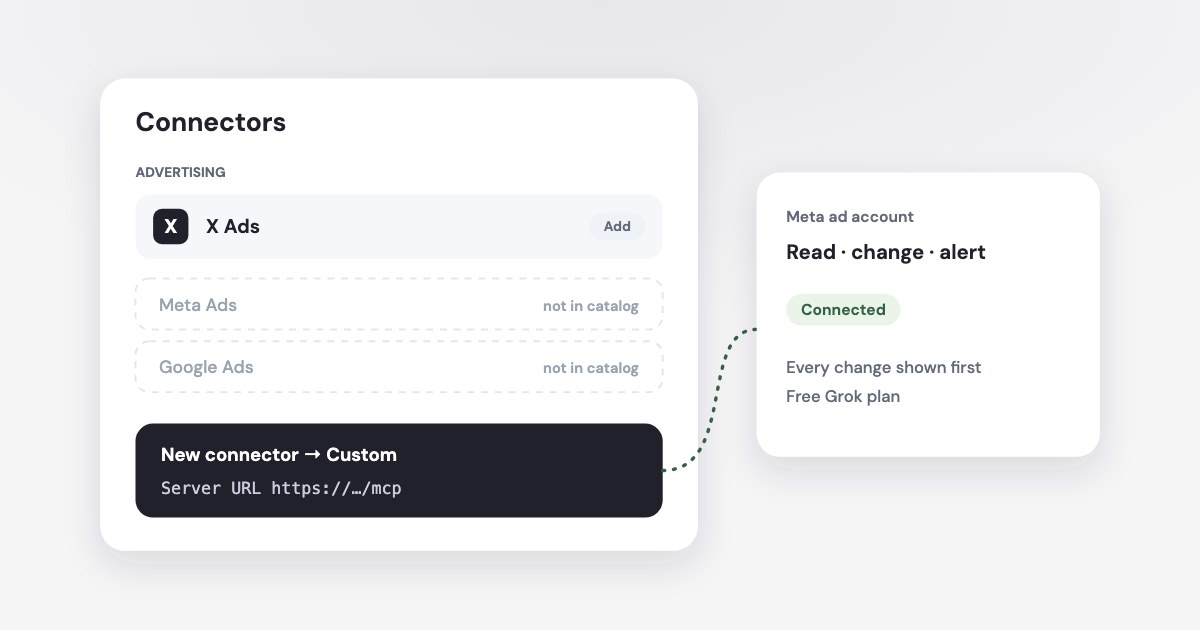
Grok can read and manage your Meta ad account once you add a connector to it. Its own connector catalog has no Meta Ads entry — the Advertising section lists only X Ads — so you add one yourself under Connectors → New connector → Custom. It took us two minutes on a free Grok account.
On this page7 sections
Can Grok manage your Facebook ads?
Yes, through a connector. Grok can’t open Ads Manager by itself, but with a Meta Ads connector it reads live results, explains what changed and prepares changes — pausing ads, moving budget, drafting campaigns.
Three things decide how far it goes:
- The connector. Grok has none for Meta Ads built in, so the connector you add sets what Grok can see and do.
- Who approves a change. In our test Grok did not ask before calling a tool. Pick a connector that shows each change first and waits for you — see is it safe to let AI change your Facebook ads.
- Sales data. Meta only knows leads. To see which ads brought paying customers, the connector also has to read your CRM — see ads and CRM sales.
How to add a Meta Ads connector to Grok
On grok.com in a browser:
- Open Connectors. Go to
grok.com/connectors, or open it from the left menu. - Choose New connector → Custom.
- Fill in two fields. A name, for example Variafy, and the server URL
https://www.variafy.com/mcp. Then add the connector. - Sign in. A Variafy window opens. Sign in with an email code, pick the Variafy account Grok should use and choose Allow connection. Untick Prepare and run changes first if Grok should only read.
- Check it. Back in Grok the connector shows as added. In a new chat ask: “Use the Variafy connector: which Meta ad accounts are connected, and what campaigns do they have?”
We checked it on a free account
On 18 October 2026 we added Variafy to a free Grok account and asked it to read our test ad account, create an alert after a preview, and delete it again. All three worked. Before the first chat Grok asked us to confirm our age.
xAI keeps the current steps in its connectors documentation, which also settles the plan question:
Connectors are available to all Grok users
On Grok Business and Enterprise, a team admin first sets the connector up for the team.
What Grok’s own catalog has for ads
We searched Grok’s connector catalog for “ads” on 18 October 2026. The Advertising section had one entry, X Ads, for campaigns on X. There was no connector for Meta Ads, Google Ads or TikTok Ads.
So for Facebook and Instagram ads in Grok, a custom connector is the way in today.
How changes are checked
In our test Grok called the connector’s tools straight away, without a prompt of its own. Variafy adds the check on its side:
- Reading is free and changes nothing.
- A change — a paused ad, a new budget, an alert — first comes back as a preview with the ad account and the effect on spend. Nothing happens until you say OK and Grok confirms it in a second call.
- Spend increases can wait for a person. The account owner can require that anything raising spend is approved in the console, whatever the chat says.
Illustrative example — USD
For an account in USD, you could ask: “Alert me when a campaign’s cost per action passes $50.” The preview should show the rule and the ad account before you confirm it. This is an illustration, not a report of a test at this dollar threshold.
What to ask first
- “Which campaigns spent money yesterday without a single result?”
- “Compare cost per lead this week with the previous four weeks, by campaign.”
- “Are any ads rejected, and what does the rejection say?”
- “Email me when any campaign’s cost per lead goes above 40 — show me the preview first.”
To take access back, revoke Grok under Connected apps in the Variafy console, or remove the connector in Grok. What is stored and for how long is in the privacy policy.
How we checked
Checked on 18 October 2026 on a free Grok account in a browser, connected to a Variafy test account with a test Meta ad account: we read the account, created an alert after a preview, and deleted it. Menu names follow xAI’s connectors documentation. We did not test Meta’s official ads server in Grok. Variafy is our product.
Questions
Can I connect Meta Ads to Grok for free?
Yes. We added a custom connector on a free Grok account on 18 October 2026: Connectors → New connector → Custom, with a name and the server URL.
Does Grok have an official Meta Ads connector?
Not in its catalog. On 18 October 2026 the Advertising section of Grok’s connector catalog listed only X Ads, so Meta Ads is added as a custom connector.
Can Grok change my ads without asking?
In our test Grok did not ask before calling a tool. With Variafy, every change first comes back as a preview and is applied only after you confirm it; you can also connect Grok for reading only.
How do I disconnect Grok from my ad account?
Revoke Grok under Connected apps in the Variafy console, or remove the connector in Grok. Revoking takes effect at once.